


- Posts: 190
- Thank you received: 0
3 Post Moderation Rule for New Boarders (25 Jan 2021)
New boarders will have their posts moderated - Don't worry if you cannot see your post immediately.
Make words move?
- ronny courtens
-

- Offline
- Moderator
-

Less
More
- Posts: 4455
- Thank you received: 962
04 Aug 2015 17:48 #67139
by ronny courtens
Replied by ronny courtens on topic Make words move?
Hi Sean,
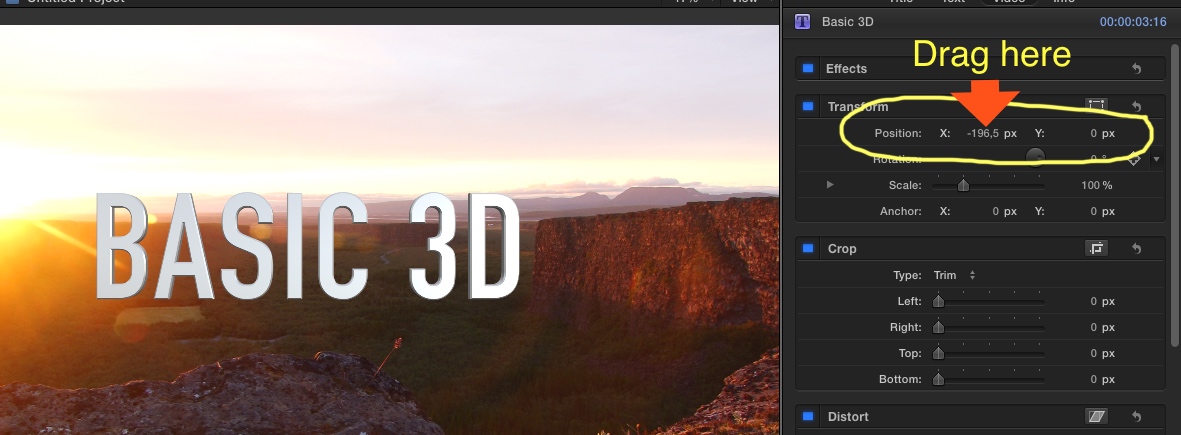
Select the title clip on the timeline and move your playhead to the place where the word needs to appear. Then in the Inspector > Video tab drag on the Transform > Position X parameter to move the title out of the frame.
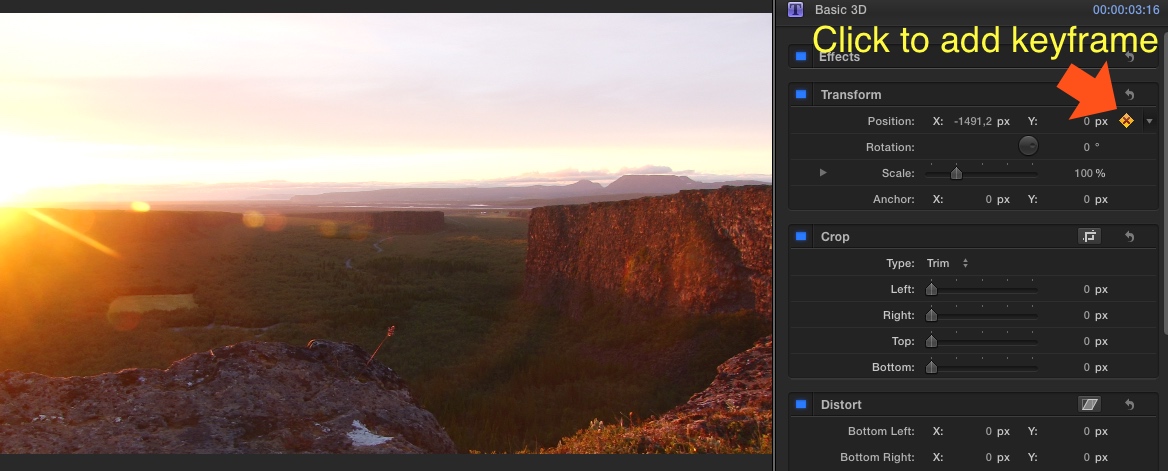
Then set a keyframe in the Inspector.
Now move your playhead on the timeline to where the word needs to be on screen. Then in the Inspector, drag the Position X parameter again to move the text to where you want it. This will automatically add a second keyframe for your word animation.
Finally play the timeline to see the animation happening.
- Ronny
Select the title clip on the timeline and move your playhead to the place where the word needs to appear. Then in the Inspector > Video tab drag on the Transform > Position X parameter to move the title out of the frame.
Then set a keyframe in the Inspector.
Now move your playhead on the timeline to where the word needs to be on screen. Then in the Inspector, drag the Position X parameter again to move the text to where you want it. This will automatically add a second keyframe for your word animation.
Finally play the timeline to see the animation happening.
- Ronny
Please Log in to join the conversation.
04 Aug 2015 19:25 #67142
by Seany
Replied by Seany on topic Make words move?
Thank you! How would I now delete previous keyframes? Cant quite work it out.
Please Log in to join the conversation.
- ronny courtens
-
- Offline
- Moderator
-
Less
More
- Posts: 4455
- Thank you received: 962
04 Aug 2015 19:38 #67144
by ronny courtens
Replied by ronny courtens on topic Make words move?
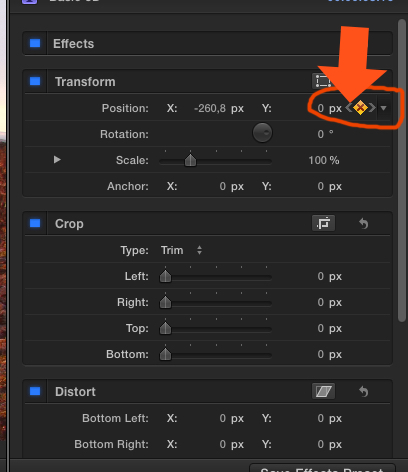
Use the little arrows to navigate through your keyframes.
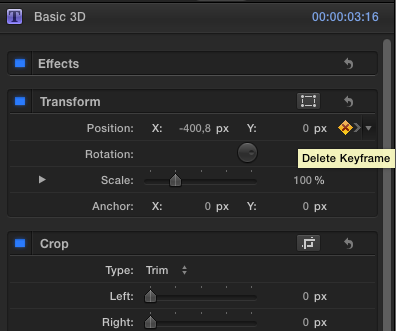
Then press the keyframe button to delete the specific keyframe.
- Ronny
Then press the keyframe button to delete the specific keyframe.
- Ronny
Please Log in to join the conversation.
