


- Posts: 4
- Thank you received: 0
3 Post Moderation Rule for New Boarders (25 Jan 2021)
New boarders will have their posts moderated - Don't worry if you cannot see your post immediately.
Transition of severals backgrounds with a fixe person in all of them
02 Aug 2015 07:10 #67083
by paul653
Hi everybody,
I'm really starting on Final cut and the video creation. But I love it... I've a idea for my next video but I really don't know how I can do.
Explanation :
- I have several videos of myself (selfie). So I'm in the center of each video. And behind me (in background), there are street. So all the time I'm walking in the street recording myself.
- My face is always the same but my clothes and the street (in background) change in every video.
Goal :
- I'm looking for a solution to play all of these videos in a row with a beautiful and natural transition.
1) I guess to have this result my face should be always in the same position (perfectly) => How can I do that ?
2) Make an effect/transition when the background and my clothes change => How can I do that ?
I hope my explanation was clear. Else just ask me...
If you know a example video with this kind of effect. I'll be really happy to watch it. Or if you know some tutorials to do that or something sensibly similar...
Thank in advance for your response.
I'm really starting on Final cut and the video creation. But I love it... I've a idea for my next video but I really don't know how I can do.
Explanation :
- I have several videos of myself (selfie). So I'm in the center of each video. And behind me (in background), there are street. So all the time I'm walking in the street recording myself.
- My face is always the same but my clothes and the street (in background) change in every video.
Goal :
- I'm looking for a solution to play all of these videos in a row with a beautiful and natural transition.
1) I guess to have this result my face should be always in the same position (perfectly) => How can I do that ?
2) Make an effect/transition when the background and my clothes change => How can I do that ?
I hope my explanation was clear. Else just ask me...
If you know a example video with this kind of effect. I'll be really happy to watch it. Or if you know some tutorials to do that or something sensibly similar...
Thank in advance for your response.
Please Log in to join the conversation.
- ronny courtens
-

- Offline
- Moderator
-

Less
More
- Posts: 4455
- Thank you received: 962
05 Aug 2015 15:11 - 05 Aug 2015 15:11 #67150
by ronny courtens
Replied by ronny courtens on topic Transition of severals backgrounds with a fixe person in all of them
Hi Paul, welcome to the forum.
I guess you mean something like this: vimeo.com/4636202
Actually, this is very easy. When you take a selfie, always make sure that your face is in the same place in the frame. Then import the different shots in FCP X and just drop all the shots onto a timeline.
Of course you won't be able to record every selfie exactly as the others, so you will have to do some reframing while editing to make it look like your head or body are always in the same position. In the video you regularly see black borders where he has needed to reframe shots to make them match.
If you want to do this better than in the video:
- record all your clips in 1080p or higher
- import the clips in FCP X
- create a 720p project and drop the clips onto the timeline
- reframe the shots so every shot matches well with the preceding and the following one.
- you will obviously get black borders on many shots due to the reframing.
- to get rid of the borders: compound all the reframed clips, select the compound clip and use the Transform > Scale tool to scale the image up until you see no more black borders when you play the sequence.
- as you have recorded the clips in a higher resolution than the project resolution, you will lose no quality due to the scaling.
In the video he has mostly used cuts to go from one shot to the other. But you could also add a short cross-fade between every clip to make the transitions smoother.
- Ronny
I guess you mean something like this: vimeo.com/4636202
Actually, this is very easy. When you take a selfie, always make sure that your face is in the same place in the frame. Then import the different shots in FCP X and just drop all the shots onto a timeline.
Of course you won't be able to record every selfie exactly as the others, so you will have to do some reframing while editing to make it look like your head or body are always in the same position. In the video you regularly see black borders where he has needed to reframe shots to make them match.
If you want to do this better than in the video:
- record all your clips in 1080p or higher
- import the clips in FCP X
- create a 720p project and drop the clips onto the timeline
- reframe the shots so every shot matches well with the preceding and the following one.
- you will obviously get black borders on many shots due to the reframing.
- to get rid of the borders: compound all the reframed clips, select the compound clip and use the Transform > Scale tool to scale the image up until you see no more black borders when you play the sequence.
- as you have recorded the clips in a higher resolution than the project resolution, you will lose no quality due to the scaling.
In the video he has mostly used cuts to go from one shot to the other. But you could also add a short cross-fade between every clip to make the transitions smoother.
- Ronny
Last edit: 05 Aug 2015 15:11 by ronny courtens.
Please Log in to join the conversation.
06 Aug 2015 16:13 #67178
by paul653
Replied by paul653 on topic Transition of severals backgrounds with a fixe person in all of them
Thank you very much Ronny for your complete answer.
I've more learn with your message than with lots video find on youtube.
I'll show the result when I finish.
Thanks
I've more learn with your message than with lots video find on youtube.
I'll show the result when I finish.
Thanks
Please Log in to join the conversation.


09 Aug 2015 19:48 #67223
by joema
Replied by joema on topic Transition of severals backgrounds with a fixe person in all of them
Here is a practical example of CNN using this technique. See from about 00:20 to 00:27. They did a good job of matching the shots, esp. considering she was talking and in motion toward the camera:
www.cnn.com/2014/06/13/tech/virgin-galac...pace-tourism-update/
Please Log in to join the conversation.

10 Aug 2015 04:24 #67227
by canelson
--
Matias Canelson
www.canelson.us
Replied by canelson on topic Transition of severals backgrounds with a fixe person in all of them
Just an idea for the framing...
If your camera has a viewfinder that rotates 180 degrees so you can see yourself while recording, you can stick some transparent tape over it and draw your body and head position over the tape with a sharpie, that way it would be much easier for you to be around the same frame position every time.
If your camera has a viewfinder that rotates 180 degrees so you can see yourself while recording, you can stick some transparent tape over it and draw your body and head position over the tape with a sharpie, that way it would be much easier for you to be around the same frame position every time.
--
Matias Canelson
www.canelson.us
Please Log in to join the conversation.
- Karsten Schlüter
-

- Offline
- Moderator
-
Less
More
- Posts: 3790
- Thank you received: 718
10 Aug 2015 09:18 - 10 Aug 2015 09:37 #67235
by Karsten Schlüter
Replied by Karsten Schlüter on topic Transition of severals backgrounds with a fixe person in all of them
stop the press: there is already a 'ruler tool' plugin, by Peter:
www.fcp.co/forum/utility/10252-free-fcpx...t-align-ruler-guides
sorry for 'double post' ...
I'm doing that in post:
Had to align two dozens of headshots, for some 'The Team Intro'
Shot with lots of 'beef' around the players.
In Pixelmator, on a new layer, I draw 3 lines, fixing the eyes position.
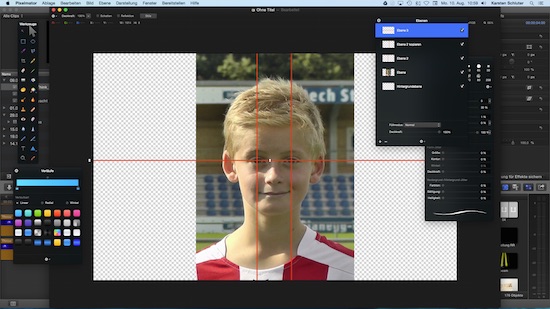
Switched off the pic plane, exported it as png (to keep transparency)
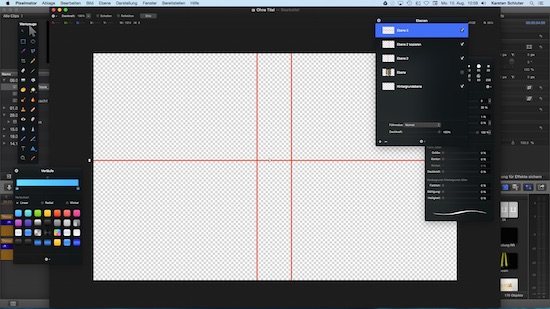
Put in FCPX as a top-layer, adjusted the player underneath with transform tools, cropped the rest - done!
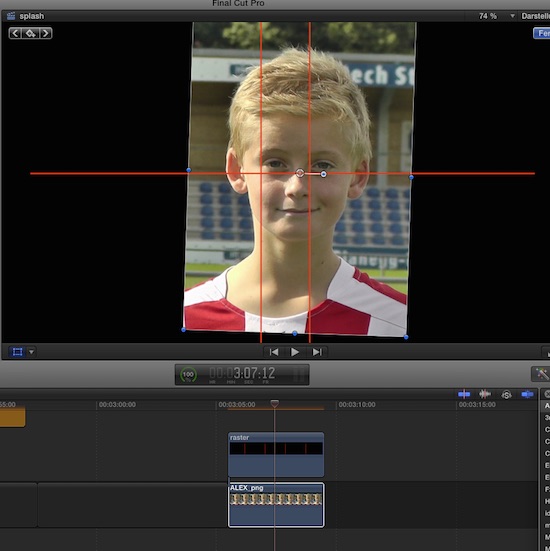
(for this demo I used an allready cropped pic, but to explain the workflow...)
Works with moving images too, IF the subject doesn't move to much. Therefor the CNN expample asks für several runs (btw: never saw such 'eye-candy' in a news show :huh: ... the vague border btw. journalism and entertainment! LOL
www.fcp.co/forum/utility/10252-free-fcpx...t-align-ruler-guides
sorry for 'double post' ...
canelson wrote: .... stick some transparent tape over it and draw ...
I'm doing that in post:
Had to align two dozens of headshots, for some 'The Team Intro'
Shot with lots of 'beef' around the players.
In Pixelmator, on a new layer, I draw 3 lines, fixing the eyes position.
Switched off the pic plane, exported it as png (to keep transparency)
Put in FCPX as a top-layer, adjusted the player underneath with transform tools, cropped the rest - done!
(for this demo I used an allready cropped pic, but to explain the workflow...)
Works with moving images too, IF the subject doesn't move to much. Therefor the CNN expample asks für several runs (btw: never saw such 'eye-candy' in a news show :huh: ... the vague border btw. journalism and entertainment! LOL
Last edit: 10 Aug 2015 09:37 by Karsten Schlüter.
Please Log in to join the conversation.
14 Aug 2015 07:36 #67421
by paul653
Replied by paul653 on topic Transition of severals backgrounds with a fixe person in all of them
Ok thanks for your answer.
So I've finished my video.
So there were 2 difficulties :
- Like i record with my iphone 4s. The front camera is really cheat (640-480). So for a video in 720p with native videos of 1080p. We see particulary the difference.
- Even if my head is exactely in the same place. There are the angle of the camera And the mouvement of my body walking (speed and direction)
- With the plugin BPM. I wanted do something to rythm the video with the musik. But that doesn't work very well
So to sum up step-by-step how to do :
1) Install the Alignement plugin ( www.fcp.co/forum/utility/10252-free-fcpx...t-align-ruler-guides )
2) Project inferior to the resolution of the video
3) Set up few alignement rules : 4 for the face (left-right / bottom-top) AND 1 for the eyes
4) Transform your clips for the faces are always perfectly in the middle of the rules. (particulary for the first and last picture of a clip)
So I've finished my video.
So there were 2 difficulties :
- Like i record with my iphone 4s. The front camera is really cheat (640-480). So for a video in 720p with native videos of 1080p. We see particulary the difference.
- Even if my head is exactely in the same place. There are the angle of the camera And the mouvement of my body walking (speed and direction)
- With the plugin BPM. I wanted do something to rythm the video with the musik. But that doesn't work very well
So to sum up step-by-step how to do :
1) Install the Alignement plugin ( www.fcp.co/forum/utility/10252-free-fcpx...t-align-ruler-guides )
2) Project inferior to the resolution of the video
3) Set up few alignement rules : 4 for the face (left-right / bottom-top) AND 1 for the eyes
4) Transform your clips for the faces are always perfectly in the middle of the rules. (particulary for the first and last picture of a clip)
Please Log in to join the conversation.
- Karsten Schlüter
-
- Offline
- Moderator
-
Less
More
- Posts: 3790
- Thank you received: 718
14 Aug 2015 11:47 #67436
by Karsten Schlüter
oops, missed that in your first discription: you want to align faces AND the movement of a free-hand camera?
now it comes tricky... <scratching head> Are you familiar with Motion Tracking?
Motion has it, and there's the famous TrackX from coremelt...
'cause, when the camera moves and the subject moves too - what is the reference? As far as I understand you now, the eyes should be 'fix', and movement of subject AND movement of cam should be aligend with them. Esp. rotation and change of perspectives (z-axis/distance to subject) must result in very special viewing experience ...
When you find out, how to accomplish that, post this sequence here! ... Must have some very ... befuddled effect :silly:
concerning iPhone cam:
in very bright light conditions, pics come out nice - low res, but fine, imho......
Replied by Karsten Schlüter on topic Transition of severals backgrounds with a fixe person in all of them
And the mouvement of my body walking (speed and direction)
oops, missed that in your first discription: you want to align faces AND the movement of a free-hand camera?
now it comes tricky... <scratching head> Are you familiar with Motion Tracking?
Motion has it, and there's the famous TrackX from coremelt...
'cause, when the camera moves and the subject moves too - what is the reference? As far as I understand you now, the eyes should be 'fix', and movement of subject AND movement of cam should be aligend with them. Esp. rotation and change of perspectives (z-axis/distance to subject) must result in very special viewing experience ...
When you find out, how to accomplish that, post this sequence here! ... Must have some very ... befuddled effect :silly:
concerning iPhone cam:
in very bright light conditions, pics come out nice - low res, but fine, imho......
Please Log in to join the conversation.

15 Aug 2015 17:41 #67469
by BenB
Replied by BenB on topic Transition of severals backgrounds with a fixe person in all of them
Stabilize the footage first.
Please Log in to join the conversation.
26 Aug 2015 06:23 #67712
by paul653
Replied by paul653 on topic Transition of severals backgrounds with a fixe person in all of them
BenB : How can i do that ?
Please Log in to join the conversation.
26 Aug 2015 12:02 #67719
by BenB
Replied by BenB on topic Transition of severals backgrounds with a fixe person in all of them
FCPX has a stabilizer built-in.
help.apple.com/finalcutpro/mac/10.2/#/verbacf92b
Motion has a stabilizing tracker.
help.apple.com/motion/mac/5.2/#/motn18190529
Online user manuals are fantastic things...
help.apple.com/finalcutpro/mac/10.2/#/verbacf92b
Motion has a stabilizing tracker.
help.apple.com/motion/mac/5.2/#/motn18190529
Online user manuals are fantastic things...
Please Log in to join the conversation.
