


- Posts: 14
- Thank you received: 0
3 Post Moderation Rule for New Boarders (25 Jan 2021)
New boarders will have their posts moderated - Don't worry if you cannot see your post immediately.
How to create this effect... Newbie!!!
28 Jul 2015 23:36 #66939
by tedblight
How to create this effect... Newbie!!! was created by tedblight
Hi,
Great forum guys, I will take a good look around.
I'm new to FCP but a long time user of iMovies on iMac.
I decided to use FCP to create this effect.
But I'm not sure where to start or even what the effect is call.... I would love it if someone could point me in the right direction.
I've shot the footage from a static camera.
In iMovies I could go onto cutaway but the best I can get is to set the opacity to 50% and I look like a ghost in each shot. I want the effect to look like the video above.
I hope you guys can help... Thanks in advance.
Great forum guys, I will take a good look around.
I'm new to FCP but a long time user of iMovies on iMac.
I decided to use FCP to create this effect.
But I'm not sure where to start or even what the effect is call.... I would love it if someone could point me in the right direction.
I've shot the footage from a static camera.
In iMovies I could go onto cutaway but the best I can get is to set the opacity to 50% and I look like a ghost in each shot. I want the effect to look like the video above.
I hope you guys can help... Thanks in advance.
Please Log in to join the conversation.
- Karsten Schlüter
-

- Offline
- Moderator
-

Less
More
- Posts: 3790
- Thank you received: 718
29 Jul 2015 08:44 #66945
by Karsten Schlüter
Replied by Karsten Schlüter on topic How to create this effect... Newbie!!!
two options, both demand a rock-solid tripod :
a) masking - you split the frame into parts, record the talent 4 times and stitch it together - tricky, if the talent moves out of his mask
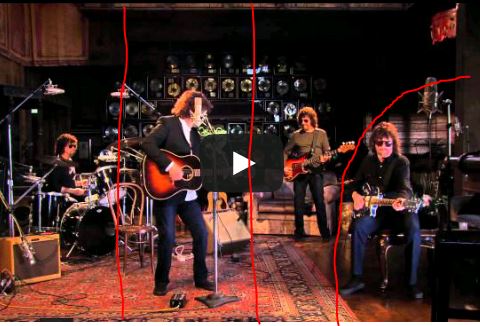
b) Color Keying: the talent is recorded before a green-screen, 4 times, and you welder it into your background... tricky to adopt the lighting of the background.
It gets by both techniques tricky, when you move the camera and/or use diff. perspectives ...
Tracking-Tools like TrackX do help for those situations ...
I'm actually in the making of some scenes, handheld camera in a gren-screen ... when done, I can post here my hobbyists results....
a) masking - you split the frame into parts, record the talent 4 times and stitch it together - tricky, if the talent moves out of his mask
b) Color Keying: the talent is recorded before a green-screen, 4 times, and you welder it into your background... tricky to adopt the lighting of the background.
It gets by both techniques tricky, when you move the camera and/or use diff. perspectives ...
Tracking-Tools like TrackX do help for those situations ...
I'm actually in the making of some scenes, handheld camera in a gren-screen ... when done, I can post here my hobbyists results....
Please Log in to join the conversation.
29 Jul 2015 08:53 #66946
by tedblight
Replied by tedblight on topic How to create this effect... Newbie!!!
Thanks for the reply, that's a great help, I wasn't sure what the techniques where call so i was at a loss...
I'm going to attempt Masking as I've already shot the footage. So it's like doing a picture in picture but instead of a square, you can crop each clip accordingly?
I'm doing a cover version of song and whiles recording the musics I filmed it. I kept the camera static during the whole process. I know it won't be perfect but I'm having fun doing it!!
Thanks again!
I'm going to attempt Masking as I've already shot the footage. So it's like doing a picture in picture but instead of a square, you can crop each clip accordingly?
I'm doing a cover version of song and whiles recording the musics I filmed it. I kept the camera static during the whole process. I know it won't be perfect but I'm having fun doing it!!
Thanks again!
Please Log in to join the conversation.
29 Jul 2015 12:45 #66954
by tedblight
Replied by tedblight on topic How to create this effect... Newbie!!!
Thanks for you help... I'm pleased with my first attempt - I would have never found the masking without your input.
Please Log in to join the conversation.

29 Jul 2015 14:27 - 29 Jul 2015 14:27 #66964
by BenB
Replied by BenB on topic How to create this effect... Newbie!!!
I've done this a lot, no green screen, that just complicates it.
Camera on a tripod, use sand bags at the base to make sure it doesn't move at all. Shoot the song fully with the actor on each instrument (4x). Then stack the takes on top of each other, mask each one as necessary. Yes, don't let the talent move too much to make it easier. If the talent walks in front of himself, you'll have to animate a mask to cover that. Actually pretty simple and easy with the Draw Mask effect and keyframing.
Camera on a tripod, use sand bags at the base to make sure it doesn't move at all. Shoot the song fully with the actor on each instrument (4x). Then stack the takes on top of each other, mask each one as necessary. Yes, don't let the talent move too much to make it easier. If the talent walks in front of himself, you'll have to animate a mask to cover that. Actually pretty simple and easy with the Draw Mask effect and keyframing.
Last edit: 29 Jul 2015 14:27 by BenB.
Please Log in to join the conversation.
- Karsten Schlüter
-
- Offline
- Moderator
-
Less
More
- Posts: 3790
- Thank you received: 718
29 Jul 2015 16:25 - 29 Jul 2015 16:27 #66978
by Karsten Schlüter
in most cases but not in general.
For one of our school projects, we needed a 'choir', a 'spooky' choir.
So we recorded ONE actor 40 times in a green screen, and then in FCPX 'stacked' them together. ... wonderful! 40 persons, acting indivdually, but <shiver> looked all the same (Haloween project..) ...
So, masking by using color key could make things even easier ...
Especially, when the subjects should 'overlap'
Replied by Karsten Schlüter on topic How to create this effect... Newbie!!!
BenB wrote: ... no green screen, that just complicates it.....
in most cases but not in general.
For one of our school projects, we needed a 'choir', a 'spooky' choir.
So we recorded ONE actor 40 times in a green screen, and then in FCPX 'stacked' them together. ... wonderful! 40 persons, acting indivdually, but <shiver> looked all the same (Haloween project..) ...
So, masking by using color key could make things even easier ...
Especially, when the subjects should 'overlap'
Last edit: 29 Jul 2015 16:27 by Karsten Schlüter.
Please Log in to join the conversation.
30 Jul 2015 01:57 #66995
by BenB
Replied by BenB on topic How to create this effect... Newbie!!!
Yeah, if you have 40 of someone, yes, green screen. But for only 4, too much work for only 4 of someone.
Please Log in to join the conversation.
