


- Posts: 88
- Thank you received: 7
3 Post Moderation Rule for New Boarders (25 Jan 2021)
New boarders will have their posts moderated - Don't worry if you cannot see your post immediately.
Selecting multiple clips in timeline, duration seems wrong
27 Jul 2015 19:05 #66890
by thefcpguy
I'm trying to determine if this is a bug or if I'm misunderstanding the way this information is intended to be used.
If I select two non-continuous clips in my timeline, the amount of time selected at the bottom of the screen includes all the clips in between. For example, I have a 60 piece comprised of multiple clips. If I Command click on the first and last clip it shows "01:00;02 selected." That seems like a mistake to me. Isn't the normal behavior to show the duration of only the selected clips?
Bill
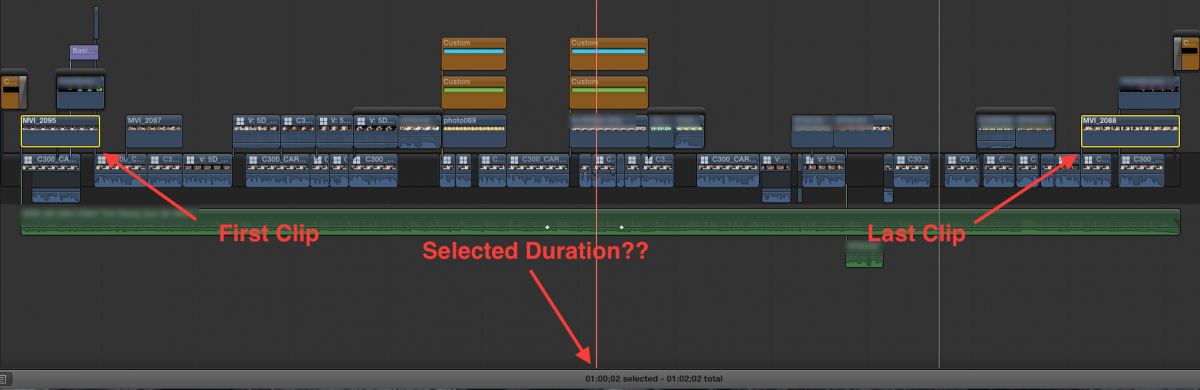
If I select two non-continuous clips in my timeline, the amount of time selected at the bottom of the screen includes all the clips in between. For example, I have a 60 piece comprised of multiple clips. If I Command click on the first and last clip it shows "01:00;02 selected." That seems like a mistake to me. Isn't the normal behavior to show the duration of only the selected clips?
Bill
Please Log in to join the conversation.

27 Jul 2015 19:23 - 27 Jul 2015 19:24 #66891
by BenB
Replied by BenB on topic Selecting multiple clips in timeline, duration seems wrong
It shows what you've selected from In Point to Out Point, always been this way. Thus, non-continuous clips include all the time in-between. That's how it works, not a bug.
Last edit: 27 Jul 2015 19:24 by BenB.
Please Log in to join the conversation.
27 Jul 2015 19:24 #66892
by thefcpguy
Replied by thefcpguy on topic Selecting multiple clips in timeline, duration seems wrong
Interesting. Thanks. I guess I never realized that.
Bill
Bill
Please Log in to join the conversation.
