


- Posts: 1080
- Thank you received: 106
3 Post Moderation Rule for New Boarders (25 Jan 2021)
New boarders will have their posts moderated - Don't worry if you cannot see your post immediately.
Exporting with Roles
25 Jul 2015 20:56 - 25 Jul 2015 21:00 #66838
by Redifer
Exporting with Roles was created by Redifer
Is there any way to export with certain roles set? Say I want to export certain version of the same video with different versions of music or VO. If I shut certain stuff off with Roles, it sounds fine in the Timeline but when I export they are ALL there and audible which is not what I want at all. Do I have to go in and "V" each thing I don't want to export?
EDIT: Also, how do I get rid of a role? I don't want a client's name showing up as a selectable role in ALL of my other projects. I only want that role to live in the event I created it in.
EDIT: Also, how do I get rid of a role? I don't want a client's name showing up as a selectable role in ALL of my other projects. I only want that role to live in the event I created it in.
Last edit: 25 Jul 2015 21:00 by Redifer.
Please Log in to join the conversation.
- Tom Wolsky
-

- Offline
- Moderator
-

25 Jul 2015 21:02 #66839
by Tom Wolsky
Replied by Tom Wolsky on topic Exporting with Roles
Export Master file with roles as tracks or files and you get options to select which roles to export.
Please Log in to join the conversation.

- JPM Editor
-

- Offline
- Premium Member
-

26 Jul 2015 09:06 - 26 Jul 2015 09:06 #66853
by JPM Editor
Jesús Pérez-Miranda
Cut People CEO & Founder
www.cutpeople.es
Replied by JPM Editor on topic Exporting with Roles
Hi Joe,
Let me know if this helps:
www.fcp.co/forum/4-final-cut-pro-x-fcpx/...udio-roles-yet#66730
Also, every clip needs to have at least one Role assigned, two if it's a video+audio clip. It can be the default "Video/Dialogue" or custom ones, like you are using.
If you re-use those clips later and you don't want them to show the custom Role info you added, the only thing you can do is select them in the new event, and assign them the default roles again. The role info will stay independent (as long as it is a duplicate of the original clip). You just need to make sure that you copy the clips to the new event (instead of moving them).
Cheers,
Jesús
@jesus_edits
Let me know if this helps:
www.fcp.co/forum/4-final-cut-pro-x-fcpx/...udio-roles-yet#66730
BenB wrote: Roles are a universal preset, can make them Event specific.
Also, every clip needs to have at least one Role assigned, two if it's a video+audio clip. It can be the default "Video/Dialogue" or custom ones, like you are using.
If you re-use those clips later and you don't want them to show the custom Role info you added, the only thing you can do is select them in the new event, and assign them the default roles again. The role info will stay independent (as long as it is a duplicate of the original clip). You just need to make sure that you copy the clips to the new event (instead of moving them).
Cheers,
Jesús
@jesus_edits
Jesús Pérez-Miranda
Cut People CEO & Founder
www.cutpeople.es
Last edit: 26 Jul 2015 09:06 by JPM Editor.
Please Log in to join the conversation.
26 Jul 2015 19:25 #66860
by Redifer
Replied by Redifer on topic Exporting with Roles
Seems like Roles are still useless for me then. Kind of a lot of work to get around something that should be common sense. Pressing V is less effort than assigning a custom role.
How would I do that, exactly? Also how do I delete existing roles? Like I said I don't want these two dude's names living in my FCPX forever.
Roles are a universal preset, can make them Event specific.
How would I do that, exactly? Also how do I delete existing roles? Like I said I don't want these two dude's names living in my FCPX forever.
Please Log in to join the conversation.
27 Jul 2015 04:10 #66864
by BenB
Replied by BenB on topic Exporting with Roles
"Can't" make them Event specific.
To delete a custom Role, you have to remove it from all clips using it. Then it'll vanish.
Sounds like maybe use Keywords or put their names in the Notes somewhere. If you're not tagging, or only using one or the other type of tag, Fav and Rej could be used (renaming them as you assign them).
So, why use proper or client names in a Role? I'd be interested to see what workflow goal that achieves.
To delete a custom Role, you have to remove it from all clips using it. Then it'll vanish.
Sounds like maybe use Keywords or put their names in the Notes somewhere. If you're not tagging, or only using one or the other type of tag, Fav and Rej could be used (renaming them as you assign them).
So, why use proper or client names in a Role? I'd be interested to see what workflow goal that achieves.
Please Log in to join the conversation.
27 Jul 2015 04:46 #66868
by Redifer
Replied by Redifer on topic Exporting with Roles
I used them as roles mainly because I don't really understand Roles. I wanted to export each speaker's VO for tweaking in iZotope RX (yes I know that works directly in FCPX, but not nearly as well as the standalone app). Both peeps needed slightly different adjustments to their deliveries. After that's done I could just import and audio file for each dude, turn the originals off and leave them in place in case any future changes needed to be made.
Thank you!To delete a custom Role, you have to remove it from all clips using it. Then it'll vanish.
Please Log in to join the conversation.
27 Jul 2015 07:45 - 27 Jul 2015 07:53 #66869
by plysat
It would be easy to do this by moving or making copies of the projects you'll be exporting into a new Event, exporting Event XML, replace the Roles, and reimport. Use any text editing program with a find and replace function. You could probably do it over the entire Library as well...
Can't sleep? Try this: fcpxpert.net ;-)
Replied by plysat on topic Exporting with Roles
Redifer wrote: Seems like Roles are still useless for me then. Kind of a lot of work to get around something that should be common sense. Pressing V is less effort than assigning a custom role.
Roles are a universal preset, can make them Event specific.
How would I do that, exactly? Also how do I delete existing roles? Like I said I don't want these two dude's names living in my FCPX forever.
It would be easy to do this by moving or making copies of the projects you'll be exporting into a new Event, exporting Event XML, replace the Roles, and reimport. Use any text editing program with a find and replace function. You could probably do it over the entire Library as well...
Can't sleep? Try this: fcpxpert.net ;-)
Last edit: 27 Jul 2015 07:53 by plysat.
Please Log in to join the conversation.
27 Jul 2015 13:45 #66875
by lichinho
Replied by lichinho on topic Exporting with Roles
An easy way to delete all custom roles at once: delete your preferences.
Any roles in use in any of your libraries will reappear once they are opened.
So if you finish a production for a client, close the library, delete preferences, and any role you used specifically for that library is gone.
Any roles in use in any of your libraries will reappear once they are opened.
So if you finish a production for a client, close the library, delete preferences, and any role you used specifically for that library is gone.
Please Log in to join the conversation.
27 Jul 2015 22:56 #66895
by Redifer
Replied by Redifer on topic Exporting with Roles
OH MY GOD! I think it's much easier to just select the files I don't want to play and press V.It would be easy to do this by moving or making copies of the projects you'll be exporting into a new Event, exporting Event XML, replace the Roles, and reimport.
Please Log in to join the conversation.
27 Jul 2015 23:05 - 27 Jul 2015 23:06 #66896
by plysat
I was suggesting a way to completely remove a Role from an Event, or even an entire library without changing it on every clip it's applied to, which would be pretty much impossible. If ya just don't want to have it export, sure, disable it or don't include it in the export.
Can't sleep? Try this: fcpxpert.net ;-)
Replied by plysat on topic Exporting with Roles
Redifer wrote:
OH MY GOD! I think it's much easier to just select the files I don't want to play and press V.It would be easy to do this by moving or making copies of the projects you'll be exporting into a new Event, exporting Event XML, replace the Roles, and reimport.
I was suggesting a way to completely remove a Role from an Event, or even an entire library without changing it on every clip it's applied to, which would be pretty much impossible. If ya just don't want to have it export, sure, disable it or don't include it in the export.
Can't sleep? Try this: fcpxpert.net ;-)
Last edit: 27 Jul 2015 23:06 by plysat.
Please Log in to join the conversation.
- ronny courtens
-

- Offline
- Moderator
-
Less
More
- Posts: 4455
- Thank you received: 962
28 Jul 2015 08:45 #66902
by ronny courtens
Replied by ronny courtens on topic Exporting with Roles
Let's be honest about this: Roles can become a very powerful feature, but they don't work as they should at this time.
1. We should be able to turn off (disable) a group of clips based on their Role. Now we can mute the clips on the timeline by muting their Role, but they still are audible in the exported file. There is a workaround by which you can do a Clip search in the Timeline Index based on the Role name and then disable all the clips at once by pressing V but honestly, this is totally against the FCP X spirit of keeping things intuitive and easy.
2. It is unacceptable that there is no way to delete Roles from the Role Editor, and that Roles persist over different Libraries if you don't shut down FCP X before opening a new Library.
Here I have a Library with a complex multicam with polywave audio and lots of Roles and Subroles:
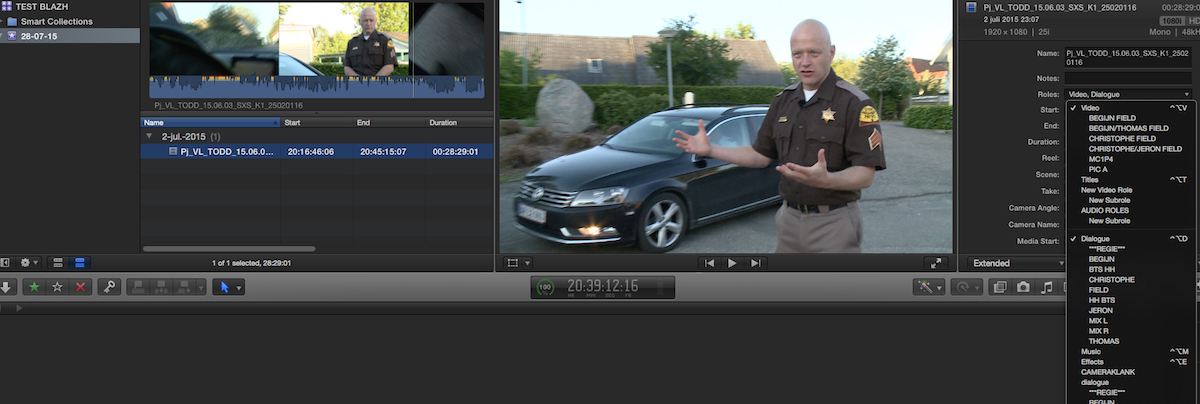
I close the Library, open a second one and behold: all the Roles and Subroles from the closed Library still show in the newly opened Library, and there is no way you can delete them:
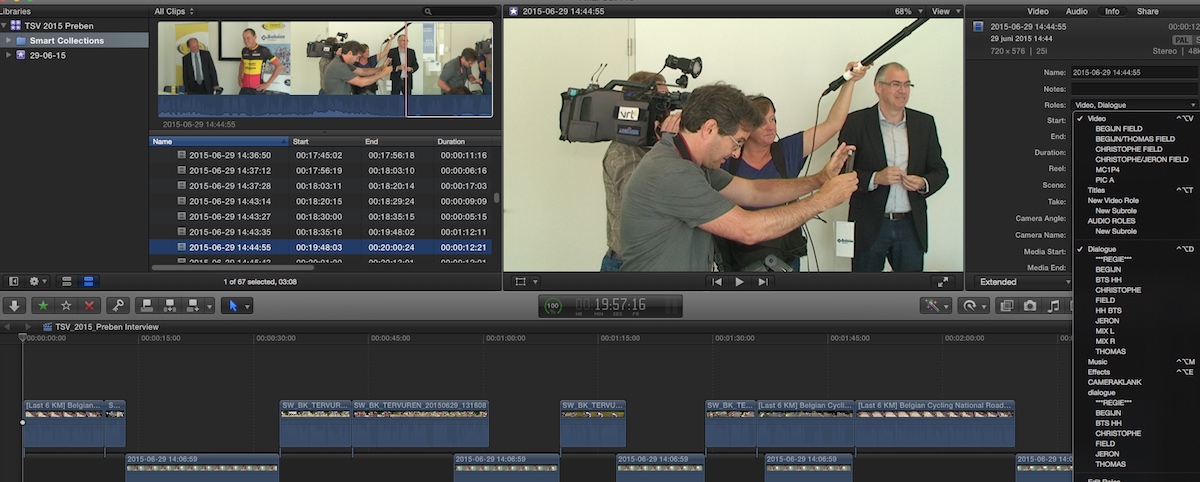
When I shut FCP X down and then I re-open the second Library, the Roles and Subroles from the multicam Library are gone:

I'm sure Roles will be very powerful once they are fully implemented, more powerful that audio tracks, but at this time they have lots of limitations.
- Ronny
1. We should be able to turn off (disable) a group of clips based on their Role. Now we can mute the clips on the timeline by muting their Role, but they still are audible in the exported file. There is a workaround by which you can do a Clip search in the Timeline Index based on the Role name and then disable all the clips at once by pressing V but honestly, this is totally against the FCP X spirit of keeping things intuitive and easy.
2. It is unacceptable that there is no way to delete Roles from the Role Editor, and that Roles persist over different Libraries if you don't shut down FCP X before opening a new Library.
Here I have a Library with a complex multicam with polywave audio and lots of Roles and Subroles:
I close the Library, open a second one and behold: all the Roles and Subroles from the closed Library still show in the newly opened Library, and there is no way you can delete them:
When I shut FCP X down and then I re-open the second Library, the Roles and Subroles from the multicam Library are gone:
I'm sure Roles will be very powerful once they are fully implemented, more powerful that audio tracks, but at this time they have lots of limitations.
- Ronny
Please Log in to join the conversation.
- JPM Editor
-
- Offline
- Premium Member
-
28 Jul 2015 09:27 #66903
by JPM Editor
I totally agree, Ronny. And I can't wait to see how far Apple can take this concept in the next updates!
I love what that we can accomplish in the "Share" menu by using the "Roles as - multitrack quicktime movie" option. Almost any configuration is possible with both video and audio, and it's great that we can save those presets for later use.
But with that said, it wouldn't hurt to have an option to "Exclude disabled roles" either, like in this simple mockup I did:
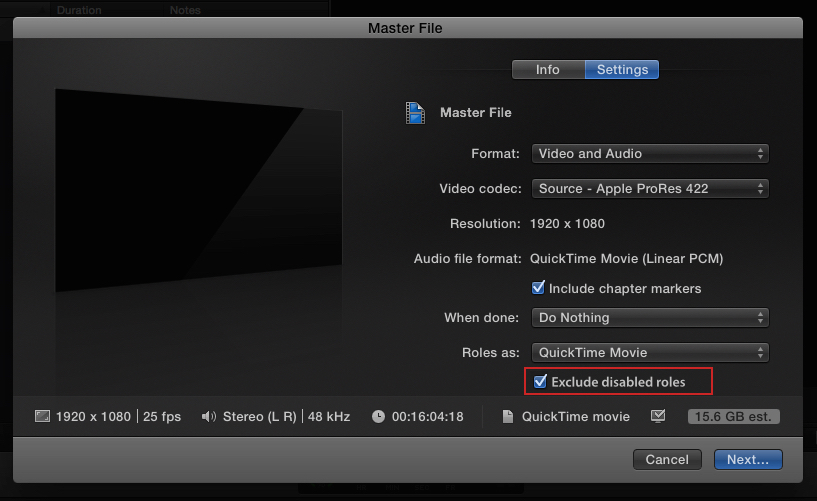
Wouldn't it be nice? Should I send this over to Apple or Richard Taylor ?
Jesús Pérez-Miranda
Cut People CEO & Founder
www.cutpeople.es
Replied by JPM Editor on topic Exporting with Roles
ronny courtens wrote: Let's be honest about this: Roles can become a very powerful feature, but they don't work as they should at this time.
I totally agree, Ronny. And I can't wait to see how far Apple can take this concept in the next updates!
I love what that we can accomplish in the "Share" menu by using the "Roles as - multitrack quicktime movie" option. Almost any configuration is possible with both video and audio, and it's great that we can save those presets for later use.
But with that said, it wouldn't hurt to have an option to "Exclude disabled roles" either, like in this simple mockup I did:
Wouldn't it be nice? Should I send this over to Apple or Richard Taylor ?
Jesús Pérez-Miranda
Cut People CEO & Founder
www.cutpeople.es
Please Log in to join the conversation.
- ronny courtens
-
- Offline
- Moderator
-
Less
More
- Posts: 4455
- Thank you received: 962
28 Jul 2015 09:32 - 28 Jul 2015 09:32 #66904
by ronny courtens
Replied by ronny courtens on topic Exporting with Roles
Hey Jesús,
That's a great suggestion, you should send this to Apple.
I am quite confident we will be able to disable Roles and to manage groups of clips based on their Roles in a next major update.
- Ronny
That's a great suggestion, you should send this to Apple.
I am quite confident we will be able to disable Roles and to manage groups of clips based on their Roles in a next major update.
- Ronny
Last edit: 28 Jul 2015 09:32 by ronny courtens.
Please Log in to join the conversation.
- JPM Editor
-
- Offline
- Premium Member
-
28 Jul 2015 09:51 - 28 Jul 2015 09:59 #66905
by JPM Editor
Jesús Pérez-Miranda
Cut People CEO & Founder
www.cutpeople.es
Replied by JPM Editor on topic Exporting with Roles
Thanks Ronny!
There is a similar option in the Avid export menu:
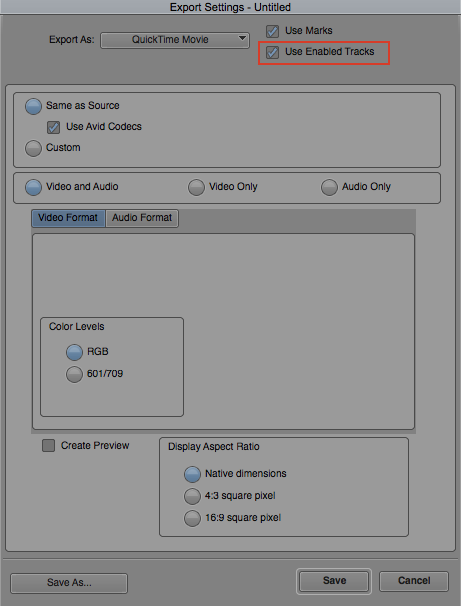
You can export only the Enabled tracks, or in other words, exclude disabled tracks on export. I guess that's where that I idea came from.
I will definitely send feedback to Apple about this and will also share it with Richard Taylor, so he can add it to his list of Top Requests for FCPX.
Cheers,
Jesús
@jesus_edits
There is a similar option in the Avid export menu:
You can export only the Enabled tracks, or in other words, exclude disabled tracks on export. I guess that's where that I idea came from.
I will definitely send feedback to Apple about this and will also share it with Richard Taylor, so he can add it to his list of Top Requests for FCPX.
I sure hope so! That would be so cool!ronny courtens wrote: I am quite confident we will be able to disable Roles and to manage groups of clips based on their Roles in a next major update.
Cheers,
Jesús
@jesus_edits
Jesús Pérez-Miranda
Cut People CEO & Founder
www.cutpeople.es
Last edit: 28 Jul 2015 09:59 by JPM Editor.
Please Log in to join the conversation.
