


- Posts: 190
- Thank you received: 0
3 Post Moderation Rule for New Boarders (25 Jan 2021)
New boarders will have their posts moderated - Don't worry if you cannot see your post immediately.
Title section problems, unwanted movement of letters!!
25 Jul 2015 14:27 #66832
by Seany
Title section problems, unwanted movement of letters!! was created by Seany
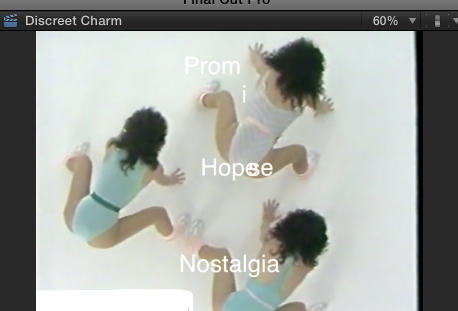
Is there way of globally resetting parameters in the title section of the inspector, I'm having problems setting permanent x and y values for text on the video image, when letters move what command is being activated? Letters keep moving on me when I just want the word to move, what am I doing wrong?
Here is a screen shot to show you what is happening.
Here is a screen shot to show you what is happening.
Please Log in to join the conversation.

25 Jul 2015 16:15 #66835
by BenB
Replied by BenB on topic Title section problems, unwanted movement of letters!!
There is no global position for multiple title boxes at once. What title template are you using?
Please Log in to join the conversation.
27 Jul 2015 18:09 #66887
by Seany
Replied by Seany on topic Title section problems, unwanted movement of letters!!
Custom.
Please Log in to join the conversation.
27 Jul 2015 18:31 #66888
by BenB
Replied by BenB on topic Title section problems, unwanted movement of letters!!
Actually, if you go to the Video section of the Inspector, and use the position controls there, it'll move them all together at once. Yeah, that would work.
Please Log in to join the conversation.
27 Jul 2015 21:41 - 27 Jul 2015 21:42 #66893
by Seany
Replied by Seany on topic Title section problems, unwanted movement of letters!!
One more question, does one set a keyframe before one changes the position of lets say a word for example and then set another keyframe at the next position that one moves the word to. Do I have to move the playhead in the timeline each time I want to set a keyframe?
Last edit: 27 Jul 2015 21:42 by Seany.
Please Log in to join the conversation.
28 Jul 2015 03:33 #66899
by BenB
Replied by BenB on topic Title section problems, unwanted movement of letters!!
1 Put your playhead at a spot.
2 Make a keyframe.
3 Adjust parameters for that specific keyframe.
4 Move playhead to new spot.
5 Change parameters.
6 If necessary, repeat from step 4.
First keyframe must be manually created, all others are automatically created when the playhead is in a new position and those same parameters are changed.
When manually setting a keyframe, you can set parameters first, or keyframe first. If you set parameters first, they change for all frames before and after that frame. If you set the keyframe first, changing parameters changes them to only that frame, all frames before and after automatically ramp accordingly.
2 Make a keyframe.
3 Adjust parameters for that specific keyframe.
4 Move playhead to new spot.
5 Change parameters.
6 If necessary, repeat from step 4.
First keyframe must be manually created, all others are automatically created when the playhead is in a new position and those same parameters are changed.
When manually setting a keyframe, you can set parameters first, or keyframe first. If you set parameters first, they change for all frames before and after that frame. If you set the keyframe first, changing parameters changes them to only that frame, all frames before and after automatically ramp accordingly.
Please Log in to join the conversation.
