


- Posts: 70
- Thank you received: 0
3 Post Moderation Rule for New Boarders (25 Jan 2021)
New boarders will have their posts moderated - Don't worry if you cannot see your post immediately.
Import Vs. Drag and Drop
21 Jul 2015 15:31 #66696
by jcmcnamee
Import Vs. Drag and Drop was created by jcmcnamee
I'm working on a documentary where our footage is primarily being shot on a Sony F55 using the XAVC codec. I just noticed that the clips come in differently through the import dialogue vs dragging the folders into FCPX.
Dragged files:
AVC-Intra 100M 1080/29.97p, Linear PCM shot at 23.98 framerate
Imported files:
Linear PCM, XAVC HD 1080p24(100 Mb/s) at 23.98 framerate
Basically we brought half our footage in through dragging and half in through importing. More metadata (such as Camera Model) came in via the Import method. However the import method would not let us leave the files in place rather it had to copy the media to the library (which we would have preferred not to do). So one way better metadata but takes more storage since copying into the library. The other way worse metadata but allows us to use links to original footage outside the library. The clips appear different in FCPX, too. Imported do not have the .mxf extension. Dragged clips do.
We had already started editing with the footage before I noticed the change. I am wondering if this may present a problem down the road. I'm also curious why the codec for the dragged clips is showing as 29.97 when this was all shot 24.
Dragged files:
AVC-Intra 100M 1080/29.97p, Linear PCM shot at 23.98 framerate
Imported files:
Linear PCM, XAVC HD 1080p24(100 Mb/s) at 23.98 framerate
Basically we brought half our footage in through dragging and half in through importing. More metadata (such as Camera Model) came in via the Import method. However the import method would not let us leave the files in place rather it had to copy the media to the library (which we would have preferred not to do). So one way better metadata but takes more storage since copying into the library. The other way worse metadata but allows us to use links to original footage outside the library. The clips appear different in FCPX, too. Imported do not have the .mxf extension. Dragged clips do.
We had already started editing with the footage before I noticed the change. I am wondering if this may present a problem down the road. I'm also curious why the codec for the dragged clips is showing as 29.97 when this was all shot 24.
Please Log in to join the conversation.
- DmitriZigany
-

- Offline
- Platinum Member
-

Less
More
- Posts: 730
- Thank you received: 26
22 Jul 2015 12:07 #66714
by DmitriZigany
Replied by DmitriZigany on topic Import Vs. Drag and Drop
You can choose where the library stores it's files so I don't see the problem?
Importing directly in FCPX has always been the best solution for me.
Importing directly in FCPX has always been the best solution for me.
Please Log in to join the conversation.

22 Jul 2015 12:37 #66717
by BenB
Replied by BenB on topic Import Vs. Drag and Drop
Interesting, never seen this behavior. If you're importing from a camera card, or a replica of a camera card, FCPX won't let you keep it in place (the card, which is a bad idea anyway). Otherwise you should be able to leave in place.
Drag and drop from a Finder window uses the import settings you set in Preferences > Import.
What is the source location you're importing from? Are they all camera cards? What settings do you have in Import Preferences vs Import window? What OS X and FCPX versions are you running?
Drag and drop from a Finder window uses the import settings you set in Preferences > Import.
What is the source location you're importing from? Are they all camera cards? What settings do you have in Import Preferences vs Import window? What OS X and FCPX versions are you running?
Please Log in to join the conversation.

22 Jul 2015 16:14 #66725
by joema
Except for AVCHD which cannot be left in place, even if previously copied to your hard drive.
I read somewhere that within the XAVC structure are both lower-res proxy files and full-res files. By contrast XAVC-S has only one file set. I wonder if he's using XAVC and accidentally dragged/dropped the proxy files vs the full res files. Import would probably use the full res files.
However he reports they are both 1080p, just differing frame rates, so maybe the XAVC proxy thing is not related. Normally the F55 would generate HD or SD proxy files if recording in 4k. I wonder if it somehow did HD proxies for HD material and created those proxies at 29.97 vs 23.98 fps? Just a guess.
The reported inability to leave files in place on import is an AVCHD-like behavior.
Replied by joema on topic Import Vs. Drag and Drop
BenB wrote: ...If you're importing from a camera card, or a replica of a camera card, FCPX won't let you keep it in place (the card, which is a bad idea anyway). Otherwise you should be able to leave in place...
Except for AVCHD which cannot be left in place, even if previously copied to your hard drive.
I read somewhere that within the XAVC structure are both lower-res proxy files and full-res files. By contrast XAVC-S has only one file set. I wonder if he's using XAVC and accidentally dragged/dropped the proxy files vs the full res files. Import would probably use the full res files.
However he reports they are both 1080p, just differing frame rates, so maybe the XAVC proxy thing is not related. Normally the F55 would generate HD or SD proxy files if recording in 4k. I wonder if it somehow did HD proxies for HD material and created those proxies at 29.97 vs 23.98 fps? Just a guess.
The reported inability to leave files in place on import is an AVCHD-like behavior.
Please Log in to join the conversation.
22 Jul 2015 16:36 #66726
by jcmcnamee
I have FCPX set to keep everything external, however when doing imports of this footage that option is greyed-out in the import settings.
BenB, I don't believe that the footage that was dragged into the project was proxy footage. When doing a test of one clip both ways (drag and drop and import) one doesn't look and different than the other. The codec is just showing up slightly differently and there is less metadata. Examining the card folders there only seems to be one media file per clip.
The media folders on the drive are copies of the camera cards. I am used to working this way from the avid world and would much rather have all media reside outside of the library (except for optimized and proxy media) then bring footage into the library. Here is my main reason...I frequently work with an AE or a remote producer and we have copies of all footage and libraries in both places. When sending projects back and forth it seems the best method is to use a temporary library (let's call it Transfer library), copy the project to that library, email/dropbox it, then drag it into the AE/Producers Original library where all the used clips automatically relink. When the footage is linked externally this Transfer library is very small (since we are not passing the optimized/proxy media back and forth, leaving those unchecked). When the main footage is stored inside the library rather than external links, the FCPX wants to send the footage along with the project into the Transfer library...making it too big to email and creating redundant clips when getting added back to the Original library.
I would be happing bringing footage into my libraries if someone knew a simple way to send projects back and forth between two editors without sending any attached media (assuming copies of the media reside in both locations).
Replied by jcmcnamee on topic Import Vs. Drag and Drop
DmitriZigany wrote: You can choose where the library stores it's files so I don't see the problem?
I have FCPX set to keep everything external, however when doing imports of this footage that option is greyed-out in the import settings.
BenB, I don't believe that the footage that was dragged into the project was proxy footage. When doing a test of one clip both ways (drag and drop and import) one doesn't look and different than the other. The codec is just showing up slightly differently and there is less metadata. Examining the card folders there only seems to be one media file per clip.
The media folders on the drive are copies of the camera cards. I am used to working this way from the avid world and would much rather have all media reside outside of the library (except for optimized and proxy media) then bring footage into the library. Here is my main reason...I frequently work with an AE or a remote producer and we have copies of all footage and libraries in both places. When sending projects back and forth it seems the best method is to use a temporary library (let's call it Transfer library), copy the project to that library, email/dropbox it, then drag it into the AE/Producers Original library where all the used clips automatically relink. When the footage is linked externally this Transfer library is very small (since we are not passing the optimized/proxy media back and forth, leaving those unchecked). When the main footage is stored inside the library rather than external links, the FCPX wants to send the footage along with the project into the Transfer library...making it too big to email and creating redundant clips when getting added back to the Original library.
I would be happing bringing footage into my libraries if someone knew a simple way to send projects back and forth between two editors without sending any attached media (assuming copies of the media reside in both locations).
Please Log in to join the conversation.
22 Jul 2015 21:27 #66744
by joema
These are all good points. I suspect that FCP X treats both AVCHD and XAVC (both Sony technologies) similarly and disallows external media -- even if on your hard drive. However I don't have any XAVC cameras to test this with.
This is a significant issue, and one reason why I dislike AVCHD. At least with AVCHD ClipWrap can rewrap without transcoding to Quicktime format, which can be left in place during import. It adds an additional processing step but it's possible. EditReady can transcode XAVC but I'm not sure it can re-wrap.
I'd be interested in how others who process a lot of AVCHD or XAVC material handle this.
Replied by joema on topic Import Vs. Drag and Drop
jcmcnamee wrote: ...The media folders on the drive are copies of the camera cards. I am used to working this way from the avid world and would much rather have all media reside outside of the library...I would be happing bringing footage into my libraries if someone knew a simple way to send projects back and forth between two editors without sending any attached media (assuming copies of the media reside in both locations).
These are all good points. I suspect that FCP X treats both AVCHD and XAVC (both Sony technologies) similarly and disallows external media -- even if on your hard drive. However I don't have any XAVC cameras to test this with.
This is a significant issue, and one reason why I dislike AVCHD. At least with AVCHD ClipWrap can rewrap without transcoding to Quicktime format, which can be left in place during import. It adds an additional processing step but it's possible. EditReady can transcode XAVC but I'm not sure it can re-wrap.
I'd be interested in how others who process a lot of AVCHD or XAVC material handle this.
Please Log in to join the conversation.
- Tom Wolsky
-

- Offline
- Moderator
-

22 Jul 2015 21:34 #66745
by Tom Wolsky
Replied by Tom Wolsky on topic Import Vs. Drag and Drop
"I suspect that FCP X treats both AVCHD and XAVC (both Sony technologies) similarly and disallows external media"
This is just incorrect. FCP certainly allows external media for AVCHD or XAVC; it just doesn't allow it inside a camera card or camera archive, but it absolutely does not have to be inside the FCP library bundle.
This is just incorrect. FCP certainly allows external media for AVCHD or XAVC; it just doesn't allow it inside a camera card or camera archive, but it absolutely does not have to be inside the FCP library bundle.
Please Log in to join the conversation.
22 Jul 2015 21:46 #66746
by jcmcnamee
Replied by jcmcnamee on topic Import Vs. Drag and Drop
Tom, with the camera card folder on my hard drive I think FCPX should let us leave it in place. If the only workaround is to pull the MXF files out of the original card folder structure to trick the program into leaving in place (is that what you are implying?) then I think that's not a good way to do it. I know that at least in the Avid world the program gets angry the minute you disturb that folder structure (at least in AMA workflow) so I want to leave those folders intact as shot for any future uses. I would prefer not to do a rewrap as well. There should just be an option to link to camera archives without importing to the library and trust us that we've done proper backups, etc.
We haven't figured out why dragging behaves differently than importing, though. Since both use the same settings in preferences you would think they would behave the same way.
And if anyone has any workflow suggestions for passing projects between the same library in different locations without passing any linked media (so file size is in MB not GB) I would love to hear them!
We haven't figured out why dragging behaves differently than importing, though. Since both use the same settings in preferences you would think they would behave the same way.
And if anyone has any workflow suggestions for passing projects between the same library in different locations without passing any linked media (so file size is in MB not GB) I would love to hear them!
Please Log in to join the conversation.
22 Jul 2015 21:52 #66747
by joema
Tom, when we last discussed this I understood you to say AVCHD could not be left in place as external media -- even on a hard drive: www.fcp.co/forum/4-final-cut-pro-x-fcpx/...rage-locations#59982
That matches my experience -- FCP X will not let me import AVCHD files from my hard drive and leave them in place as external media. I think jcmcnamee is reporting similar behavior for XAVC.
Replied by joema on topic Import Vs. Drag and Drop
Tom Wolsky wrote: ....FCP certainly allows external media for AVCHD or XAVC; it just doesn't allow it inside a camera card or camera archive, but it absolutely does not have to be inside the FCP library bundle.
Tom, when we last discussed this I understood you to say AVCHD could not be left in place as external media -- even on a hard drive: www.fcp.co/forum/4-final-cut-pro-x-fcpx/...rage-locations#59982
That matches my experience -- FCP X will not let me import AVCHD files from my hard drive and leave them in place as external media. I think jcmcnamee is reporting similar behavior for XAVC.
Please Log in to join the conversation.
- Tom Wolsky
-
- Offline
- Moderator
-
22 Jul 2015 22:43 #66748
by Tom Wolsky
Replied by Tom Wolsky on topic Import Vs. Drag and Drop
Two different things. The AVCHD media cannot be left in place when imported from a camera structure. There is no leave in place for camera imports. However, the imported media does not have to be inside the library. You can assign any external location to store the media.
Please Log in to join the conversation.
23 Jul 2015 01:19 #66752
by BenB
Replied by BenB on topic Import Vs. Drag and Drop
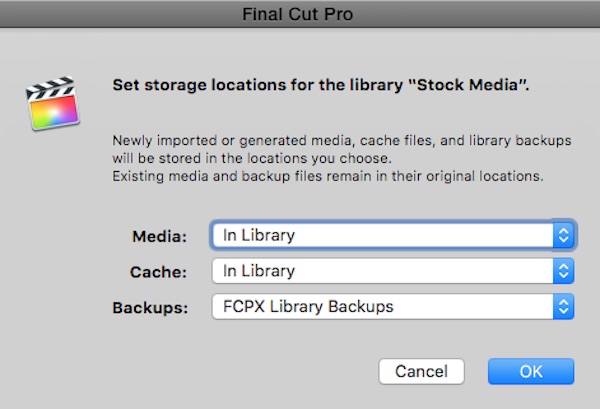
To add to Tom's post, putting media in an external folder, but still as FCPX managed media, is what we call hybrid media. It is not "leave in place" but "Copy To Library", and is the proper method for a collaborative environment.
Please Log in to join the conversation.
23 Jul 2015 13:35 #66757
by jcmcnamee
Replied by jcmcnamee on topic Import Vs. Drag and Drop
I want to thank everyone for their replies. I think that the original question has been answered (although still not sure why FCPX treated the media differently dragging it in vs importing from a camera card structured folder). However it has led to a bigger question that I will post in another topic since it doesn't pertain to this thread.
Please Log in to join the conversation.


23 Jul 2015 19:00 #66775
by FernKraft
Replied by FernKraft on topic Import Vs. Drag and Drop
not too late to the party I hope, but I just noticed the same behavior with XAVC-I footage from a FS7. That being said, I did not notice any metadata missing... but I did not do an extensive search through all metadata fields.
Very odd behavior indeed!
Very odd behavior indeed!
Please Log in to join the conversation.
23 Jul 2015 19:34 #66779
by jcmcnamee
Replied by jcmcnamee on topic Import Vs. Drag and Drop
One thing I'm not sure of is whether we will be ok down the road cutting with the footage we dragged in (3 months worth that is already keyworded, organized, and used in our cut) of if there may be some issue with it and we should use the import method for it. I don't think these clips will be able to link to imported versions.
Please Log in to join the conversation.
- ronny courtens
-

- Offline
- Moderator
-
Less
More
- Posts: 4455
- Thank you received: 962
23 Jul 2015 20:00 #66782
by ronny courtens
Replied by ronny courtens on topic Import Vs. Drag and Drop
Hey Jim,
This is odd behavior indeed. If you are concerned about the footage that has been dragged into the Library, maybe you could try to re-import it using File > Import > Reimport from Camera/Archive. This will leave the existing organization untouched. You could just try it with 1 clip first and see if the reimported footage shows the correct codec.
- Ronny
This is odd behavior indeed. If you are concerned about the footage that has been dragged into the Library, maybe you could try to re-import it using File > Import > Reimport from Camera/Archive. This will leave the existing organization untouched. You could just try it with 1 clip first and see if the reimported footage shows the correct codec.
- Ronny
Please Log in to join the conversation.
23 Jul 2015 20:22 #66786
by jcmcnamee
Replied by jcmcnamee on topic Import Vs. Drag and Drop
The Reimport option is greyed-out for these clips. When I have a moment I'm going to do a test in a new library with the same clip imported and dragged, then move the originals folder I dragged from and try to relink to the FCP managed folder for the imported version of these same clip. my guess is that camera metadata doesn't update once a clip has first been imported, though.
OTOH...this is about 2TB of footage that I don't really want to duplicate on our drive by making it managed so may stick with the dragged versions that didn't need to be managed just hope for the best. They seem to behave properly in FCPX except for having less metadata.
OTOH...this is about 2TB of footage that I don't really want to duplicate on our drive by making it managed so may stick with the dragged versions that didn't need to be managed just hope for the best. They seem to behave properly in FCPX except for having less metadata.
Please Log in to join the conversation.
- ronny courtens
-
- Offline
- Moderator
-
Less
More
- Posts: 4455
- Thank you received: 962
23 Jul 2015 20:25 #66787
by ronny courtens
Replied by ronny courtens on topic Import Vs. Drag and Drop
Okay, keep us updated. And if you have any further questions down the road, don't hesitate to post them here.
- Ronny
- Ronny
Please Log in to join the conversation.
23 Jul 2015 21:47 #66788
by jcmcnamee
Replied by jcmcnamee on topic Import Vs. Drag and Drop
Ok here is an update. I made a new library, setting it to store media on the desktop. I copied one of our camera card folders to the desktop (XAVC card folder shot on F55). From there I dragged it into this test library and it behaved as before...allowing me to leave the media in place but metadata is lacking and strange codec name (as before). In the same event I imported the same card. As expected, even though it allowed me to tick the "leave in place" option it brought the footage into the managed folder on the desktop as soon as it realized it was XAVC footage. I then quit FCPX and deleted the camera card on the desktop.
Now, the dragged-in footage in this library is offline since i deleted what they were linking too. Next to try and relink to the imported footage. I was not able to select all and use the "locate all" relink command to the footage in the managed media folder. However, I was able to do it file by file (not sure why one works and not the other). The originally-dragged-in files that were relinked updated metadata to match the imported clips. They also kept their own keywords and went back online in a test project I had made.
Since there are over 1,200 clips that were originally brought in this way I probably won't relink each one by hand this way but may do it with the clips used in the final show before we go to color and mix.
Now, the dragged-in footage in this library is offline since i deleted what they were linking too. Next to try and relink to the imported footage. I was not able to select all and use the "locate all" relink command to the footage in the managed media folder. However, I was able to do it file by file (not sure why one works and not the other). The originally-dragged-in files that were relinked updated metadata to match the imported clips. They also kept their own keywords and went back online in a test project I had made.
Since there are over 1,200 clips that were originally brought in this way I probably won't relink each one by hand this way but may do it with the clips used in the final show before we go to color and mix.
Please Log in to join the conversation.
