


- Posts: 178
- Thank you received: 9
3 Post Moderation Rule for New Boarders (25 Jan 2021)
New boarders will have their posts moderated - Don't worry if you cannot see your post immediately.
Change Multicam audio to a new one
20 Jul 2015 16:35 #66679
by rickytin
Change Multicam audio to a new one was created by rickytin
I have a project that is edited with 2 Multicam, now I have the audio that was clean and level in another programa and now I what to create a new audio angle for the 2 Multicam I have and then change all my clips to this new audio. I know a can multiple select my clips and change the audio angel but because the edit is from 2 Multicam it docent let me change.
I would like to know if there is a easy why to change all the clips from 2 Multicam to the new audio angle.
Thanks for the help.
I would like to know if there is a easy why to change all the clips from 2 Multicam to the new audio angle.
Thanks for the help.
Please Log in to join the conversation.

20 Jul 2015 18:34 #66682
by BenB
Replied by BenB on topic Change Multicam audio to a new one
OK, tricky. Here's what I'd do. Select All (Cmd-A), detach audio, delete all audio. Then drop the new audio track as a connected clip to the edit.
Please Log in to join the conversation.
- sperezrleon
-

- Offline
- Junior Member
-

- No hay mucho que decir... ni siquiera tengo cita favorita :)
Less
More
- Posts: 35
- Thank you received: 1
20 Jul 2015 18:40 #66684
by sperezrleon
Replied by sperezrleon on topic Change Multicam audio to a new one
You can use Timeline Index to search for the fist camera an select all clips there, change de audio angle (it will let you now that you only selected the clips from one multi clip) and then do the sms with the second multi clip.
Hope it helps!
Hope it helps!
Please Log in to join the conversation.
- ronny courtens
-

- Offline
- Moderator
-

Less
More
- Posts: 4455
- Thank you received: 962
21 Jul 2015 06:18 - 21 Jul 2015 10:21 #66687
by ronny courtens
Replied by ronny courtens on topic Change Multicam audio to a new one
Hi Ricky,
I know a can multiple select my clips and change the audio angel but because the edit is from 2 Multicam it docent let me change.
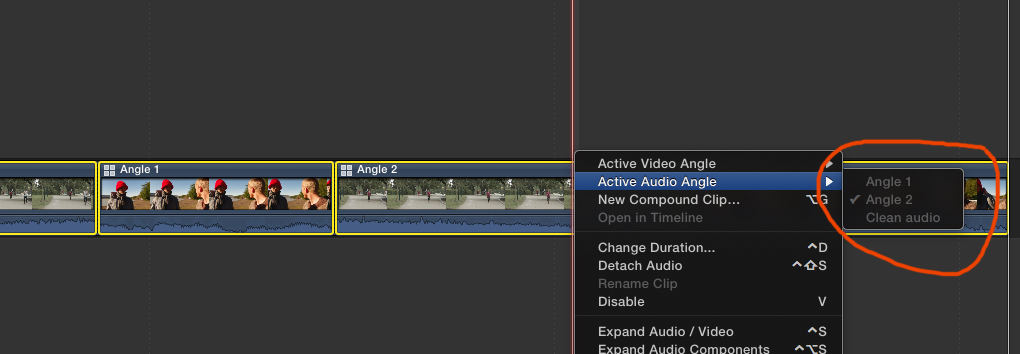
That is correct. When you have multiple active audio angles on the timeline, you add the clean audio to your Angle Editor and then you R-click the clips on the timeline to change the active audio angle, the option will be greyed out.
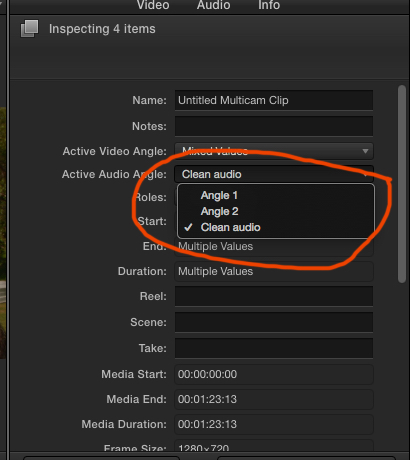
But in the Inspector > Info tab you will be able to set the Active audio angle to the clean audio.
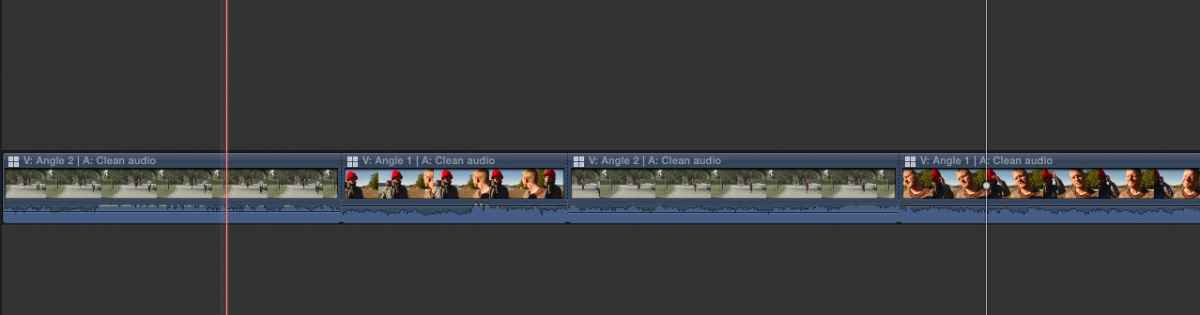
And instantly the audio on all your multicam clips in the timeline will be replaced by the clean audio.
The advantage of using this method, instead of adding the clean audio as an attached clip under your multicam clips in the timeline, is that your clean audio is always perfectly in synch with the existing angles (add the clean audio as a new Angle in the Angle Editor and use the "Synch to Active Angle command). Even if you already have cleaned up the multicam edit on your timeline, getting rid of unwanted portions, your new clean audio will remain perfectly in synch with the edits you have performed.
- Ronny
I know a can multiple select my clips and change the audio angel but because the edit is from 2 Multicam it docent let me change.
That is correct. When you have multiple active audio angles on the timeline, you add the clean audio to your Angle Editor and then you R-click the clips on the timeline to change the active audio angle, the option will be greyed out.
But in the Inspector > Info tab you will be able to set the Active audio angle to the clean audio.
And instantly the audio on all your multicam clips in the timeline will be replaced by the clean audio.
The advantage of using this method, instead of adding the clean audio as an attached clip under your multicam clips in the timeline, is that your clean audio is always perfectly in synch with the existing angles (add the clean audio as a new Angle in the Angle Editor and use the "Synch to Active Angle command). Even if you already have cleaned up the multicam edit on your timeline, getting rid of unwanted portions, your new clean audio will remain perfectly in synch with the edits you have performed.
- Ronny
Last edit: 21 Jul 2015 10:21 by ronny courtens.
Please Log in to join the conversation.
21 Jul 2015 16:01 #66699
by rickytin
Replied by rickytin on topic Change Multicam audio to a new one
Thanks to all for the help.
Ronny I try you method before you mention but the problem is I am using two Multicam in my project and when I select all my clips in the inspector the option is greyed out.
What I end up doing is in my Multicam I created a new angle call "not final audio" and then move my original audio to this new angle and then I put my clean new audio in the original audio angle, I did make sure that everything was in sync and I also made this same process in my other Multicam and everything went perfect.
I hope this is helpful for someone and thanks again for all the help.
Ronny I try you method before you mention but the problem is I am using two Multicam in my project and when I select all my clips in the inspector the option is greyed out.
What I end up doing is in my Multicam I created a new angle call "not final audio" and then move my original audio to this new angle and then I put my clean new audio in the original audio angle, I did make sure that everything was in sync and I also made this same process in my other Multicam and everything went perfect.
I hope this is helpful for someone and thanks again for all the help.
Please Log in to join the conversation.
