


- Posts: 786
- Thank you received: 21
3 Post Moderation Rule for New Boarders (25 Jan 2021)
New boarders will have their posts moderated - Don't worry if you cannot see your post immediately.
Title has mind of it's own....
- Jonathan Levin
-
 Topic Author
- Offline
- Platinum Member
-

Less
More
20 Jul 2015 14:57 #66675
by Jonathan Levin
Title has mind of it's own.... was created by Jonathan Levin
Hi all.
I have an issue that I'm pretty sure it is something that I am doing or not doing.
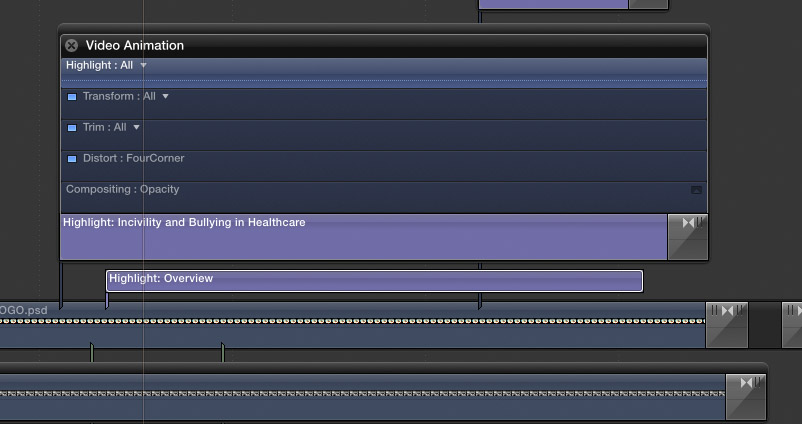
I created a title in FCP X using the "Four Corners" title generator. The problem I am having is the title seems to "snap" in focus at a certain point in the the build-in that I can't seem to find and correct. I've attached a short clip and the screen capture of the expanded animation. It seems to happen just when it gets to the keyframe of Highlight "All" in the animation.
If I click on that key frame I get some options: All, Size, In Duration, Feather, Out Duration and Highlight color.
Your halp as ussual is greatly appreciated.
Jonatan
and
I have an issue that I'm pretty sure it is something that I am doing or not doing.
I created a title in FCP X using the "Four Corners" title generator. The problem I am having is the title seems to "snap" in focus at a certain point in the the build-in that I can't seem to find and correct. I've attached a short clip and the screen capture of the expanded animation. It seems to happen just when it gets to the keyframe of Highlight "All" in the animation.
If I click on that key frame I get some options: All, Size, In Duration, Feather, Out Duration and Highlight color.
Your halp as ussual is greatly appreciated.
Jonatan
and
Please Log in to join the conversation.
- Jonathan Levin
-
Topic Author
- Offline
- Platinum Member
-
Less
More
- Posts: 786
- Thank you received: 21
20 Jul 2015 15:04 - 20 Jul 2015 15:05 #66676
by Jonathan Levin
Replied by Jonathan Levin on topic Title has mind of it's own....
Sorry, could not post video, but here are some grabs. The two are one frame appart. And yes everything has been totally rendered. When I export this clip to master file, it also shows there.

and then goes to this:

and then goes to this:
Last edit: 20 Jul 2015 15:05 by Jonathan Levin.
Please Log in to join the conversation.


20 Jul 2015 15:52 - 20 Jul 2015 15:55 #66678
by BenB
Replied by BenB on topic Title has mind of it's own....
The Video Animation pane you show doesn't have any keyframes in it. Just disclosure triangles to open and close sections. Your playhead is on the disclosure triangle, not a keyframe. Nope, don't see any keyframes there.
Sharpness will only be effected by either a change in Scale, or a Blur filter added. None of which is in the Four Corners title template.
I'm testing it and not seeing any sharpness issues. Are you only seeing this during playback, or are you seeing this with the playhead on a specific frame? Go frame by frame (using arrow keys) and see if it is still there.
Also try rendering first, and see if it is still there.
I'm not really seeing it.
That said, when I open a copy in Motion, I get an warning that I'm missing the "Coolvetica" font. What? Where'd that come from? And the fonts are different default colors in Motion and in FCPX. I think there's something up with that template. Filling out the feedback form now...
Sharpness will only be effected by either a change in Scale, or a Blur filter added. None of which is in the Four Corners title template.
I'm testing it and not seeing any sharpness issues. Are you only seeing this during playback, or are you seeing this with the playhead on a specific frame? Go frame by frame (using arrow keys) and see if it is still there.
Also try rendering first, and see if it is still there.
I'm not really seeing it.
That said, when I open a copy in Motion, I get an warning that I'm missing the "Coolvetica" font. What? Where'd that come from? And the fonts are different default colors in Motion and in FCPX. I think there's something up with that template. Filling out the feedback form now...
Last edit: 20 Jul 2015 15:55 by BenB.
Please Log in to join the conversation.
- Jonathan Levin
-
Topic Author
- Offline
- Platinum Member
-
Less
More
- Posts: 786
- Thank you received: 21
20 Jul 2015 16:44 #66680
by Jonathan Levin
Replied by Jonathan Levin on topic Title has mind of it's own....
Thanks BenB.
You are correct that is not a keyframe. My bad. What I noticed is this: If I go into the Published Paramters in the inspector under Title tab and switch the Style pull down to none, my type works fine all the way through, though I don't get any of the glow effects. So I think it has something to do with that.
I wouldn't even know where to begin describing this issue to Apple.
Jonathan
You are correct that is not a keyframe. My bad. What I noticed is this: If I go into the Published Paramters in the inspector under Title tab and switch the Style pull down to none, my type works fine all the way through, though I don't get any of the glow effects. So I think it has something to do with that.
I wouldn't even know where to begin describing this issue to Apple.
Jonathan
Please Log in to join the conversation.
20 Jul 2015 18:36 #66683
by BenB
Replied by BenB on topic Title has mind of it's own....
Exactly as you did here, even give them a link to this thread. And, right-click it in the browser, Open A Copy In Motion, and see if you get the missing font message like I did. I think that has something to do with this.
Please Log in to join the conversation.

21 Jul 2015 05:18 #66686
by Gregorio
Replied by Gregorio on topic Title has mind of it's own....
For any of the FCPX titles, generators and effects you can open a copy in motion (right click the generator in the effects browser and you get the option.
I took a look at the 4 corners title in motion and there is indeed a direction blur during the build-in portion of the title, so this was intentional by whoever designed the title.
It's actually a quick job to open a copy, disable the directional blur and save as a modified copy.
I took a look at the 4 corners title in motion and there is indeed a direction blur during the build-in portion of the title, so this was intentional by whoever designed the title.
It's actually a quick job to open a copy, disable the directional blur and save as a modified copy.
Please Log in to join the conversation.
- Jonathan Levin
-
Topic Author
- Offline
- Platinum Member
-
Less
More
- Posts: 786
- Thank you received: 21
22 Jul 2015 13:04 #66719
by Jonathan Levin
Replied by Jonathan Levin on topic Title has mind of it's own....
Thanks Gregorio and Ben.
How would I do this: Is it just a matter of setting up the title in the project, export that title after selecting the "Range" or in and out? I have not used Motion much at all, but I do have a current copy of it.
If you could walk me through that, I'd love you for ever!
I wonder why there is that small part where it jumps that you can't stop that in FCP?
Thanks.
JL
How would I do this: Is it just a matter of setting up the title in the project, export that title after selecting the "Range" or in and out? I have not used Motion much at all, but I do have a current copy of it.
If you could walk me through that, I'd love you for ever!
I wonder why there is that small part where it jumps that you can't stop that in FCP?
Thanks.
JL
Please Log in to join the conversation.
22 Jul 2015 17:50 #66736
by Gregorio
You're basically modifying the stock motion title and saving it as a custom motion title. When you save it, be sure to save make a custom category, and be aware that the custom title has to be manually moved if you want to use it on another computer.
I have the modified generator at home, I'll be glad to send it if you like. If you want to get more involved with customizing or creating effect I highly recommend the Ripple training series on Motion5.
Replied by Gregorio on topic Title has mind of it's own....
You're basically modifying the stock motion title and saving it as a custom motion title. When you save it, be sure to save make a custom category, and be aware that the custom title has to be manually moved if you want to use it on another computer.
I have the modified generator at home, I'll be glad to send it if you like. If you want to get more involved with customizing or creating effect I highly recommend the Ripple training series on Motion5.
Please Log in to join the conversation.
22 Jul 2015 18:28 #66737
by BenB
Replied by BenB on topic Title has mind of it's own....
Right-click the Four Corners title template in the Titles Browser, in FCPX. Select "Open Copy In Motion".
In Motion, open the disclosure triangles for all layers.
Select each Motion Blur effect, hit your delete key to remove them (there's 2).
Save, quit, done.
Now you have two copies in FCPX, one is Four Corners and one is Four Corners Copy. One with and one without the motion blur we hate so much.
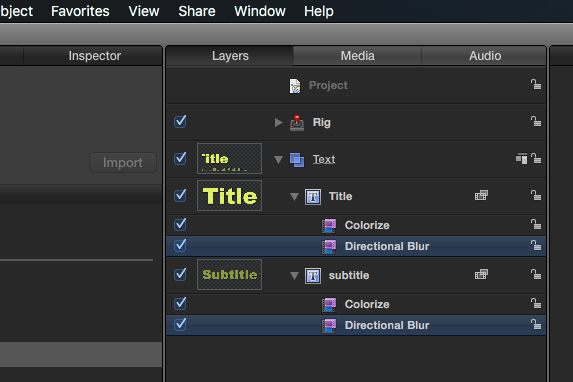
In Motion, open the disclosure triangles for all layers.
Select each Motion Blur effect, hit your delete key to remove them (there's 2).
Save, quit, done.
Now you have two copies in FCPX, one is Four Corners and one is Four Corners Copy. One with and one without the motion blur we hate so much.
Please Log in to join the conversation.
- Jonathan Levin
-
Topic Author
- Offline
- Platinum Member
-
Less
More
- Posts: 786
- Thank you received: 21
22 Jul 2015 18:49 #66739
by Jonathan Levin
Replied by Jonathan Levin on topic Title has mind of it's own....
Ben, thanks so much for that. I just made the change to the title, and I'll be working with it some later on.
Jonathan
Jonathan
Please Log in to join the conversation.
