


- Posts: 786
- Thank you received: 21
3 Post Moderation Rule for New Boarders (25 Jan 2021)
New boarders will have their posts moderated - Don't worry if you cannot see your post immediately.
Deleteing all keyframes in a single audio clip.
- Jonathan Levin
-
 Topic Author
- Offline
- Platinum Member
-

Less
More
19 Jul 2015 12:23 #66646
by Jonathan Levin
Deleteing all keyframes in a single audio clip. was created by Jonathan Levin
I see a menu option for deleting all key frames but how do you delete lots of keyframes from a single audio clip? One at a time is kinda a drag.
Thanks.
Jonathan
Thanks.
Jonathan
Please Log in to join the conversation.
- ronny courtens
-

- Offline
- Moderator
-

Less
More
- Posts: 4455
- Thank you received: 962
19 Jul 2015 12:41 - 19 Jul 2015 14:16 #66647
by ronny courtens
Replied by ronny courtens on topic Deleteing all keyframes in a single audio clip.
Hi Jonathan,
To delete a group of keyframes in an audio clip:
SHIFT+click every keyframe you want to delete, then delete all of them at once.
To delete ALL audio keyframes in an audio clip at once:
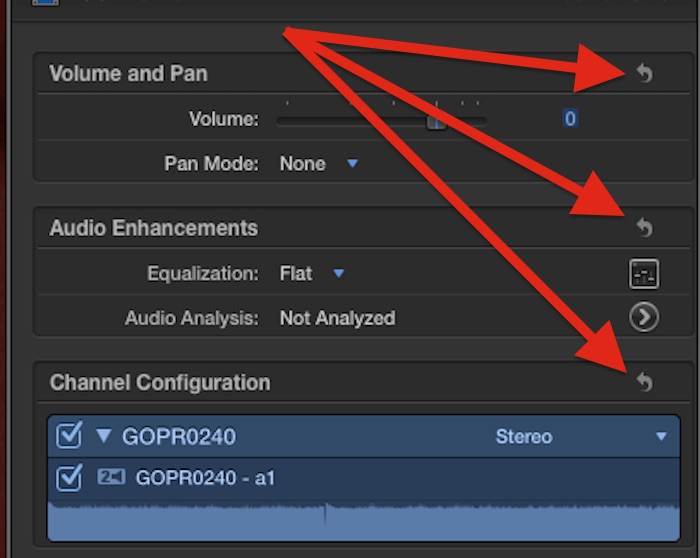
Select the audio clip and in the Inspector, reset the Volume and Pan parameter.
- Ronny
To delete a group of keyframes in an audio clip:
SHIFT+click every keyframe you want to delete, then delete all of them at once.
To delete ALL audio keyframes in an audio clip at once:
Select the audio clip and in the Inspector, reset the Volume and Pan parameter.
- Ronny
Last edit: 19 Jul 2015 14:16 by ronny courtens.
Please Log in to join the conversation.


- Jonathan Levin
-
Topic Author
- Offline
- Platinum Member
-
Less
More
- Posts: 786
- Thank you received: 21
19 Jul 2015 15:14 #66650
by Jonathan Levin
Replied by Jonathan Levin on topic Deleteing all keyframes in a single audio clip.
Gentleman,
Thank you. That bit of information makes me want to regain all the time in my life doing these one at a time!!!
Best to you.
Jonathan
Thank you. That bit of information makes me want to regain all the time in my life doing these one at a time!!!
Best to you.
Jonathan
Please Log in to join the conversation.

19 Jul 2015 17:07 - 19 Jul 2015 17:48 #66653
by Soundwise
Replied by Soundwise on topic Deleteing all keyframes in a single audio clip.
Use Range tool (or Press R or select the range by I/O) to select the keyframes. Then you can delete them by right clicking on one of the keyframes.

Last edit: 19 Jul 2015 17:48 by Soundwise.
Please Log in to join the conversation.
- Jonathan Levin
-
Topic Author
- Offline
- Platinum Member
-
Less
More
- Posts: 786
- Thank you received: 21
19 Jul 2015 17:38 #66655
by Jonathan Levin
Replied by Jonathan Levin on topic Deleteing all keyframes in a single audio clip.
Thanks Soundwise.
That's pretty neat!
That's pretty neat!
Please Log in to join the conversation.
- ronny courtens
-
- Offline
- Moderator
-
Less
More
- Posts: 4455
- Thank you received: 962
19 Jul 2015 18:02 #66657
by ronny courtens
Replied by ronny courtens on topic Deleteing all keyframes in a single audio clip.
The Oscar goes to Soundwise 
- Ronny
- Ronny
Please Log in to join the conversation.
