


- Posts: 61
- Thank you received: 0
3 Post Moderation Rule for New Boarders (25 Jan 2021)
New boarders will have their posts moderated - Don't worry if you cannot see your post immediately.
Help -A clip on my timeline is jumping!!!
15 Jul 2015 14:41 #66499
by iKitty2
Help -A clip on my timeline is jumping!!! was created by iKitty2
This morning I added a shot to my timeline and everything was normal. Then later when I played this clip back it was jumping madly on my timeline - no other shot was behaving this way...
I played the clip back in the viewer and it behaved the same - this did not happen earlier and so I am puzzled as why it has started jumping.
During the interval of no jumping and jumping I did delete my rendered files - could this be the problem. But then why is no other clip jumping...
I played the clip back in the viewer and it behaved the same - this did not happen earlier and so I am puzzled as why it has started jumping.
During the interval of no jumping and jumping I did delete my rendered files - could this be the problem. But then why is no other clip jumping...
Please Log in to join the conversation.
- ronny courtens
-

- Offline
- Moderator
-

Less
More
- Posts: 4455
- Thank you received: 962
15 Jul 2015 16:00 #66501
by ronny courtens
Replied by ronny courtens on topic Help -A clip on my timeline is jumping!!!
Hi Kitty,
Never heard of anything like this. Is the clip still jumping when you play the timeline? If so, could you make a video screen recording of it and post it here? I'm very curious as to why this could be happening. I think deleting the FCP X preferences should solve an unexpected issue like this.
- Ronny
Never heard of anything like this. Is the clip still jumping when you play the timeline? If so, could you make a video screen recording of it and post it here? I'm very curious as to why this could be happening. I think deleting the FCP X preferences should solve an unexpected issue like this.
- Ronny
Please Log in to join the conversation.
16 Jul 2015 11:00 #66535
by iKitty2
Replied by iKitty2 on topic Help -A clip on my timeline is jumping!!!
Hi Here is the link for jumping clip - I tried using QT Video screen grab but it just will not upload to forum so I've uploaded it to UT.
Here is the Link:
The first half is the clip playing in the TL the 2nd part I am playing the clip in Viewer.
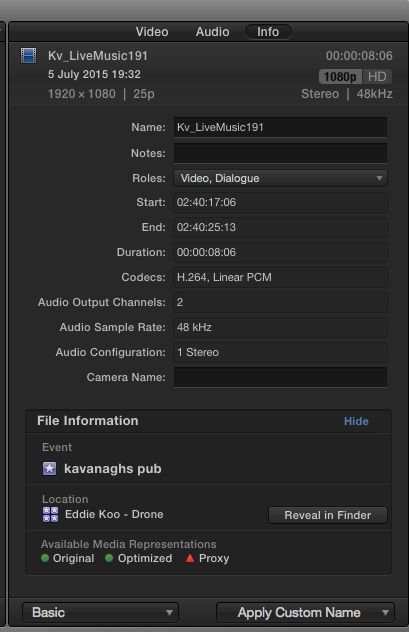
Attached is screen grab of inspector for more info.
A baffled Kitty
Here is the Link:
The first half is the clip playing in the TL the 2nd part I am playing the clip in Viewer.
Attached is screen grab of inspector for more info.
A baffled Kitty
Please Log in to join the conversation.
- ronny courtens
-
- Offline
- Moderator
-
Less
More
- Posts: 4455
- Thank you received: 962
16 Jul 2015 11:03 #66536
by ronny courtens
Replied by ronny courtens on topic Help -A clip on my timeline is jumping!!!
Hi Kitty,
The video is set to "Private" in Youtube, we cannot watch it. You need to set the video to "Public".
- Ronny
The video is set to "Private" in Youtube, we cannot watch it. You need to set the video to "Public".
- Ronny
Please Log in to join the conversation.
16 Jul 2015 12:06 #66538
by iKitty2
Replied by iKitty2 on topic Help -A clip on my timeline is jumping!!!
Oh here it is:
Please Log in to join the conversation.
- ronny courtens
-
- Offline
- Moderator
-
Less
More
- Posts: 4455
- Thank you received: 962
16 Jul 2015 12:18 #66539
by ronny courtens
Replied by ronny courtens on topic Help -A clip on my timeline is jumping!!!
Thank you, this make everything much clearer.
Select the problematic clip in the browser and press SHIFT+CMD+R to reveal the clip in Finder.
Then double-click the clip in the Finder window to open it in QT player. Does the clip play normally in QT player or does it jitter as well?
- Ronny
Select the problematic clip in the browser and press SHIFT+CMD+R to reveal the clip in Finder.
Then double-click the clip in the Finder window to open it in QT player. Does the clip play normally in QT player or does it jitter as well?
- Ronny
Please Log in to join the conversation.
16 Jul 2015 12:42 #66540
by iKitty2
Replied by iKitty2 on topic Help -A clip on my timeline is jumping!!!
Ok tried that - my source media plays perfectly - in the meantime I will delete clip and re-import.
But I was puzzled why this happened...
But I was puzzled why this happened...
Please Log in to join the conversation.
16 Jul 2015 12:44 #66541
by iKitty2
Replied by iKitty2 on topic Help -A clip on my timeline is jumping!!!
Ok just tried to re-import but when in browser it jumps - just remembered that I had already tried re-importing this yesterday... and it didn't work.
Weird!
Weird!
Please Log in to join the conversation.
- ronny courtens
-
- Offline
- Moderator
-
Less
More
- Posts: 4455
- Thank you received: 962
16 Jul 2015 12:46 #66542
by ronny courtens
Replied by ronny courtens on topic Help -A clip on my timeline is jumping!!!
Select the clip in the browser, R-click it and select Transcode Media > Create optimized media. Let FCP X optimize the clip, then try playing it again.
- Ronny
- Ronny
Please Log in to join the conversation.
16 Jul 2015 12:48 #66543
by iKitty2
Replied by iKitty2 on topic Help -A clip on my timeline is jumping!!!
Ha! just changed the name of clip and re-imported it - IT NOW WORKS - YIPPY But hopefully that jumping nightmare does not occur again...
Please Log in to join the conversation.
- ronny courtens
-
- Offline
- Moderator
-
Less
More
- Posts: 4455
- Thank you received: 962
16 Jul 2015 13:17 #66545
by ronny courtens
Replied by ronny courtens on topic Help -A clip on my timeline is jumping!!!
No kidding! I think we can classify this as "totally weird and unexpected behavior". Let's indeed hope it doesn't happen again.
- Ronny
- Ronny
Please Log in to join the conversation.
- Jonathan Levin
-

- Offline
- Platinum Member
-

Less
More
- Posts: 786
- Thank you received: 21
16 Jul 2015 14:45 #66551
by Jonathan Levin
Replied by Jonathan Levin on topic Help -A clip on my timeline is jumping!!!
You guys beat me to it.
I was going to suggest two things:
Switch off the scrubbing option and the other is when you play your clip, where exactly is your mouse pointer located, couldn't quite tell. Wonder if that's is any clue.
Can you try and reproduce it, not that you'd actually want too....
Jonathan
I was going to suggest two things:
Switch off the scrubbing option and the other is when you play your clip, where exactly is your mouse pointer located, couldn't quite tell. Wonder if that's is any clue.
Can you try and reproduce it, not that you'd actually want too....
Jonathan
Please Log in to join the conversation.
