


3 Post Moderation Rule for New Boarders (25 Jan 2021)
New boarders will have their posts moderated - Don't worry if you cannot see your post immediately.
Event Disappearance
- sonictimbo
-
 Topic Author
- Offline
- Senior Member
-

Less
More
15 Jul 2015 08:30 #66495
by sonictimbo
Event Disappearance was created by sonictimbo
I worked on two music videos recently (I have 6 to do in all). I have a Library for the band, in that Library I have events. On opening FCPX 10 .1.4 (Mavericks OS) this morning one of the projects is blank. I have looked on the hard drive and all the Media and versions are there, but FCP doesn't want to open it
The event appears in the list of events, but when I click on it the window is blank. It worked perfectly well last time FCP was open - now it doesn't seem to recognise it.
The event does have a small triangle with an exclamation mark next to it, but it had this when it worked
Any suggestions?
The event appears in the list of events, but when I click on it the window is blank. It worked perfectly well last time FCP was open - now it doesn't seem to recognise it.
The event does have a small triangle with an exclamation mark next to it, but it had this when it worked
Any suggestions?
Please Log in to join the conversation.
- ronny courtens
-

- Offline
- Moderator
-

Less
More
- Posts: 4455
- Thank you received: 962
15 Jul 2015 16:13 #66502
by ronny courtens
Replied by ronny courtens on topic Event Disappearance
Hey Tim,
When you select the problematic Event:
- Do you see any message at all in the blank window? Such as "Import Media" or "No items match the selection..."?
- Do you see a number if items listed under the window?
- Ronny
When you select the problematic Event:
- Do you see any message at all in the blank window? Such as "Import Media" or "No items match the selection..."?
- Do you see a number if items listed under the window?
- Ronny
Please Log in to join the conversation.
- sonictimbo
-
Topic Author
- Offline
- Senior Member
-
15 Jul 2015 16:22 #66503
by sonictimbo
Replied by sonictimbo on topic Event Disappearance
Hi Ronny,
Thanks for getting back to me
Nothing appears at all - no dialogue asking where files are - nothing
I'll try and include a screenshot - but haven't had much luck uploading stuff before now!
The blank project is called 'Dust'
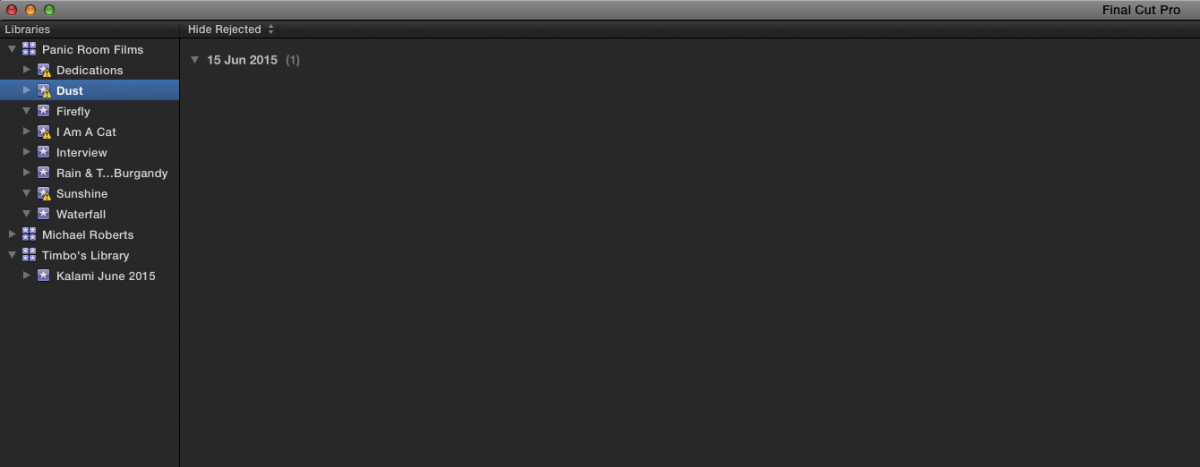
Thanks for getting back to me
Nothing appears at all - no dialogue asking where files are - nothing
I'll try and include a screenshot - but haven't had much luck uploading stuff before now!
The blank project is called 'Dust'
Please Log in to join the conversation.
- ronny courtens
-
- Offline
- Moderator
-
Less
More
- Posts: 4455
- Thank you received: 962
15 Jul 2015 16:33 #66505
by ronny courtens
Replied by ronny courtens on topic Event Disappearance
Thank you for the information and the screenshot. I just wanted to rule out a couple of possible causes.
It looks like you had one clip inside that Event. The metadata is still there, but the Event seems to have lost its relation to the actual media.
Try this: select the Event, then choose File > Relink Files. The Relink window will open.
In the Relink window, do you see the clip under "Missing" or under "All"?
- Ronny
It looks like you had one clip inside that Event. The metadata is still there, but the Event seems to have lost its relation to the actual media.
Try this: select the Event, then choose File > Relink Files. The Relink window will open.
In the Relink window, do you see the clip under "Missing" or under "All"?
- Ronny
Please Log in to join the conversation.
- sonictimbo
-
Topic Author
- Offline
- Senior Member
-
15 Jul 2015 16:38 #66506
by sonictimbo
Replied by sonictimbo on topic Event Disappearance
There are a lot of clips under 'missing' and even more under 'all' I have tried to relink but the dialogue -
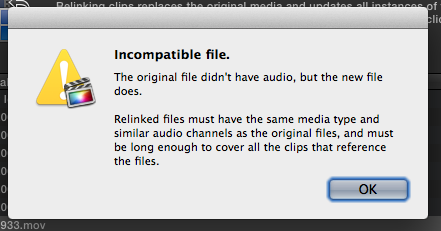
Comes up!
Comes up!
Please Log in to join the conversation.
- ronny courtens
-
- Offline
- Moderator
-
Less
More
- Posts: 4455
- Thank you received: 962
15 Jul 2015 16:44 #66507
by ronny courtens
Replied by ronny courtens on topic Event Disappearance
You have a corrupt Event.
Select the Library, then choose File > Open Library > From Backup.
Select a backup close to the last time you shut down FCP X when everything was still okay with the Event, then press OK.
- Ronny
Select the Library, then choose File > Open Library > From Backup.
Select a backup close to the last time you shut down FCP X when everything was still okay with the Event, then press OK.
- Ronny
Please Log in to join the conversation.
- sonictimbo
-
Topic Author
- Offline
- Senior Member
-
15 Jul 2015 17:16 #66510
by sonictimbo
Replied by sonictimbo on topic Event Disappearance
Brilliant Ronny!!
It is now in my timeline (but not in my event)
All I need to do now it save it back to the event (or a new event)
How do I do that?
It is now in my timeline (but not in my event)
All I need to do now it save it back to the event (or a new event)
How do I do that?
Please Log in to join the conversation.
- ronny courtens
-
- Offline
- Moderator
-
Less
More
- Posts: 4455
- Thank you received: 962
15 Jul 2015 17:28 #66511
by ronny courtens
Replied by ronny courtens on topic Event Disappearance
So now you see the missing clip(s) in your timeline, but you still don't see any clips in the problematic Event. Is that correct?
If so: select a clip in the timeline and press SHIFT+F. This should reveal the clip in the Event it belongs to.
- Ronny
If so: select a clip in the timeline and press SHIFT+F. This should reveal the clip in the Event it belongs to.
- Ronny
Please Log in to join the conversation.
- sonictimbo
-
Topic Author
- Offline
- Senior Member
-
15 Jul 2015 17:36 #66512
by sonictimbo
Replied by sonictimbo on topic Event Disappearance
I see the clips now, but none in the problematic event.
...and Shift F points me to the blank 'Dust' event In the backup library (just like you said!)
Is it save-able?
...and Shift F points me to the blank 'Dust' event In the backup library (just like you said!)
Is it save-able?
Please Log in to join the conversation.
- ronny courtens
-
- Offline
- Moderator
-
Less
More
- Posts: 4455
- Thank you received: 962
15 Jul 2015 17:43 #66513
by ronny courtens
Replied by ronny courtens on topic Event Disappearance
Create a new Event, name it "Dusk2".
Then select the Dusk Event and drag it onto the Dusk2 Event. Both Events will merge. Do the clips reappear in the Dusk2 Event now?
If not:
Close FCP X and open it again while holding the ALT+CMD keys pressed down. You will get a message asking you if you want to delete your FCP X preferences. Confirm and let FCP X launch. Then check if the problem is solved.
- Ronny
Then select the Dusk Event and drag it onto the Dusk2 Event. Both Events will merge. Do the clips reappear in the Dusk2 Event now?
If not:
Close FCP X and open it again while holding the ALT+CMD keys pressed down. You will get a message asking you if you want to delete your FCP X preferences. Confirm and let FCP X launch. Then check if the problem is solved.
- Ronny
Please Log in to join the conversation.
- sonictimbo
-
Topic Author
- Offline
- Senior Member
-
15 Jul 2015 18:12 #66514
by sonictimbo
Replied by sonictimbo on topic Event Disappearance
Amazing Ronny
You're the man!!
Thank you so much!!
You're the man!!
Thank you so much!!
Please Log in to join the conversation.
- ronny courtens
-
- Offline
- Moderator
-
Less
More
- Posts: 4455
- Thank you received: 962
15 Jul 2015 18:14 #66515
by ronny courtens
Replied by ronny courtens on topic Event Disappearance
My pleasure, Tim.
Happy editing!
- Ronny
Happy editing!
- Ronny
Please Log in to join the conversation.
- Jonathan Levin
-

- Offline
- Platinum Member
-

Less
More
- Posts: 786
- Thank you received: 21
16 Jul 2015 04:55 #66525
by Jonathan Levin
Replied by Jonathan Levin on topic Event Disappearance
So Ronny and the others here that seem to solve a lot of problems: Who helps you guys out when you have an issue????? I mean reading this, you must have run across this issue. Is it trial and error and a lot of tearing out of hair?
Jonathan
Jonathan
Please Log in to join the conversation.
- ronny courtens
-
- Offline
- Moderator
-
Less
More
- Posts: 4455
- Thank you received: 962
16 Jul 2015 09:02 - 16 Jul 2015 09:07 #66528
by ronny courtens
Replied by ronny courtens on topic Event Disappearance
Hey Jonathan,
Actually I have never heard of this particular issue. But you can solve many problems with a simple troubleshooting process. This is basically a series of logical steps, first to narrow down the probable causes of the issue, and next to resolve the problem or work around it. Which steps to take is a matter of experience on the side of the troubleshooter and, before anything else, a matter of getting correct information and feedback from the person who has the problem.
In this case all credits go to Chris. He has carefully followed the suggestions step by step and he has given immediate and clear feedback about the results of every action. This makes it very easy to quickly find a solution, even for a very uncommon issue. I truly wish everyone who posts a problem would follow up our suggestions and provide feedback as precisely as Chris did, it would make our lives so much easier.
FYI: in this case, if the last suggestion would have been unsuccessful, the final solution would have been to select every clip in the timeline, Reveal in Finder in the Inspector > Info tab, and manually drag the original clips back into the problematic Event. But fortunately just merging the Event into a new one has solved the problem.
- Ronny
Actually I have never heard of this particular issue. But you can solve many problems with a simple troubleshooting process. This is basically a series of logical steps, first to narrow down the probable causes of the issue, and next to resolve the problem or work around it. Which steps to take is a matter of experience on the side of the troubleshooter and, before anything else, a matter of getting correct information and feedback from the person who has the problem.
In this case all credits go to Chris. He has carefully followed the suggestions step by step and he has given immediate and clear feedback about the results of every action. This makes it very easy to quickly find a solution, even for a very uncommon issue. I truly wish everyone who posts a problem would follow up our suggestions and provide feedback as precisely as Chris did, it would make our lives so much easier.
FYI: in this case, if the last suggestion would have been unsuccessful, the final solution would have been to select every clip in the timeline, Reveal in Finder in the Inspector > Info tab, and manually drag the original clips back into the problematic Event. But fortunately just merging the Event into a new one has solved the problem.
- Ronny
Last edit: 16 Jul 2015 09:07 by ronny courtens.
Please Log in to join the conversation.
