


3 Post Moderation Rule for New Boarders (25 Jan 2021)
New boarders will have their posts moderated - Don't worry if you cannot see your post immediately.
Separate Roles for multiple clips (audio tracks) in browser
- finalbug.net
-
 Topic Author
- Offline
- Platinum Member
-

- Absence of Quality is the essence of squareness.
This is driving me nuts.
Am I missing something here or is this not possible…
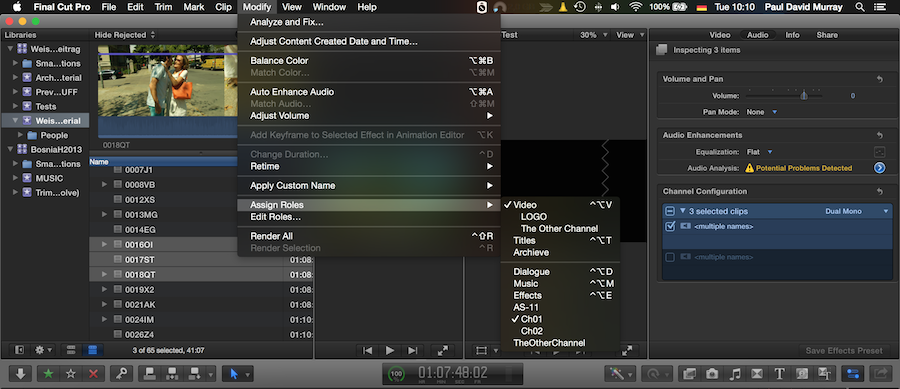
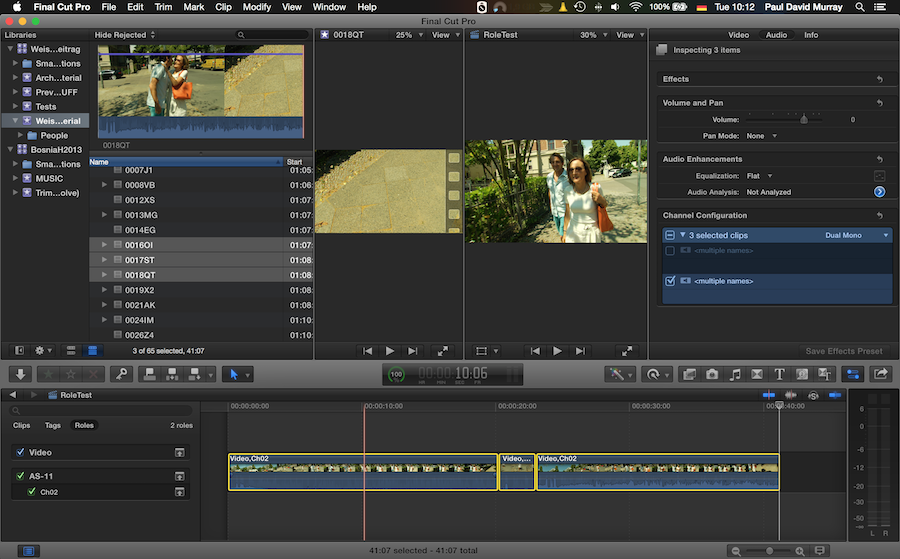
Step 01
I select 3 clips in the browser.
In the inspector I select the first of 2 mono tracks
I deselect the the second of 2 mono tracks
(Use the little boxes with ticks for this)
Go to Modify/assign roles (audio)AS-11/Ch01
And assign Ch01
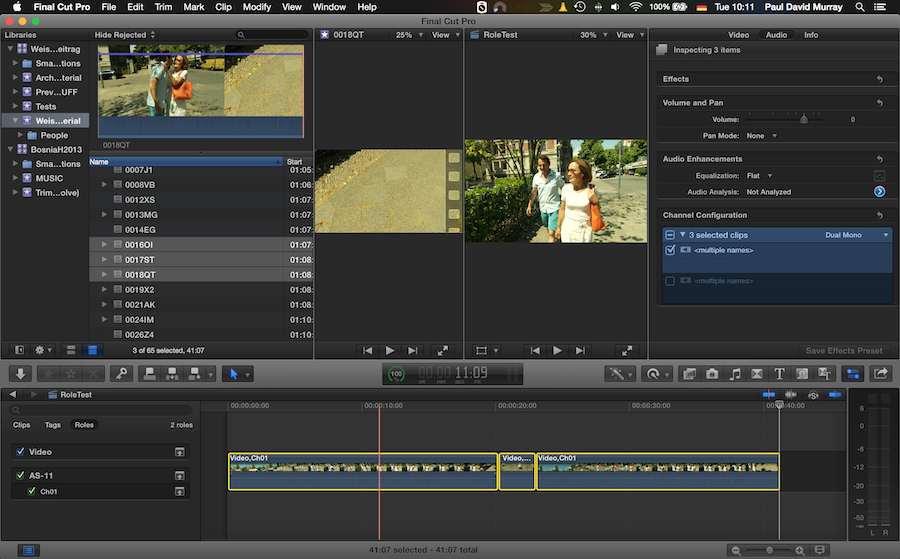
Step 02
I edit the clips into the timeline and see that they have Ch01 assigned.
Step 03
I press command Z to undo the edit
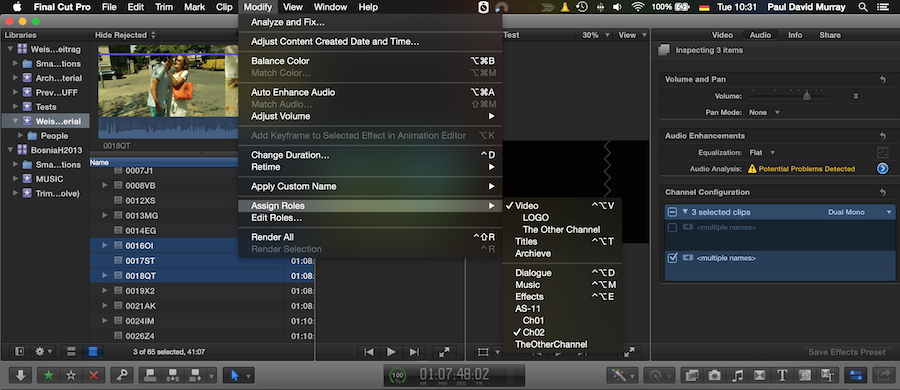
Step 04
I select (same) 3 clips in the browser.
In the inspector I select the second of 2 mono tracks
I deselect the the first of 2 mono tracks
(Use the little boxes with ticks for this)
Go to Modify/assign roles (audio)AS-11/Ch02
And assign Ch02
Step 05
I edit the clips into the timeline and see that they have Ch02 assigned.
Is this a Homer Simpson Doh moment?
Am I being stupid or am I missing something.
Obviously I am trying to assign different roles to different tracks for multiple clips in the browser for export as separate roles later...
Any tips would be greatly appreciated
thanks
Paul
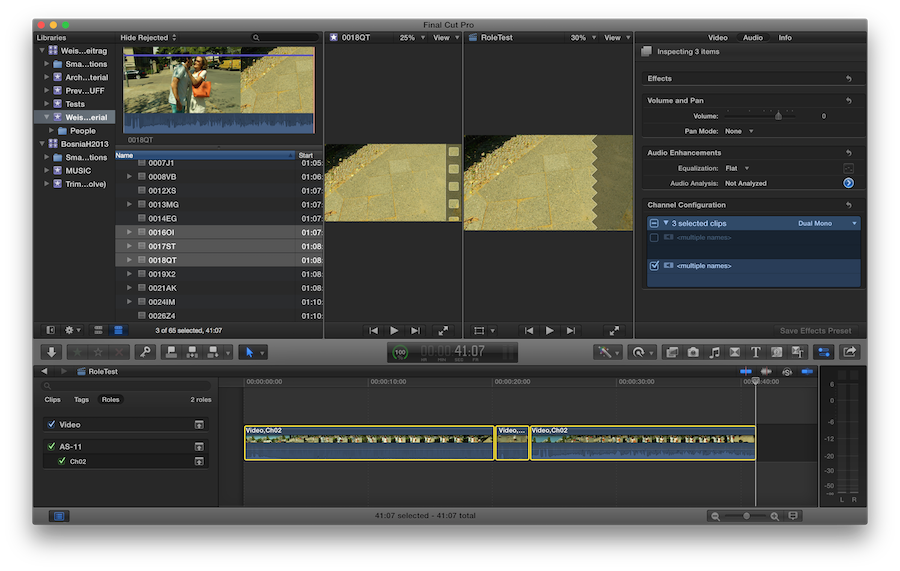
ps please ignore the last screen shot
Please Log in to join the conversation.

- Posts: 971
- Thank you received: 46
I have no idea, my understanding of the function of roles was to manage highlighting in the timeline and on export/sharing, where you can select different roles to be included in a file on the export/share.
Thanks for the question...Looking forward to the response.. Maybe drop the guys at Ripple a tweet @RippleTraining maybe Mark/Steve has an answer, if yes, maybe they could Macbreak Studio episode 319 for us!

Please Log in to join the conversation.
- finalbug.net
-
Topic Author
- Offline
- Platinum Member
-
- Absence of Quality is the essence of squareness.
Sure your logic is correct.
I have the same experience if doing this in the project/timeline.
I am attempting to get this to work for multiple clips
Preferably in the browser. (less scope for human error :woohoo: )
i.e. Ch 01 AND Ch 02 for respective mono tracks.
seems like it should be doable to me :dry:
best
Paul
Please Log in to join the conversation.
- Posts: 971
- Thank you received: 46
Logical workflow and Apple, not always

ps comment is tongue in cheek!!! :oops:
Please Log in to join the conversation.
- finalbug.net
-
Topic Author
- Offline
- Platinum Member
-
- Absence of Quality is the essence of squareness.
Guess that it is only a matter of time...
But does not help me as I want Ch01 AND Ch02
As of now I can only get one or the other on multiple clips.
Paste attributes (including roles) would seem more constrictive to me
And in the Browser for that matter, that would be cool :whistle:
Please Log in to join the conversation.
- JPM Editor
-

- Offline
- Premium Member
-

I see what the problem is. It seems that you are trying to assign a role to a Channel selected in the inspector... But that's not the way FCPX works.
- You can either select one or more clips in the Browser and assign one video role and one audio role to it/them from the "Modify > Assign Roles" menu or from the Info panel of the Inspector (not from the Audio panel like you are trying to do). When you edit those clips into a timeline, the role info will carry trough.
- You can assign roles to edited clips once they are in the timeline, but this info will not be assigned to the original master clips they were edited from
Either way, you will only be able to assign one video role and a global audio role to each clip with this method. What you want to do, if I understood it correctly, is assign different subroles to each audio channel. This is doable, although not as easy as it should be. Basically, you have two ways of achieving this:
- Select a single clip in the Browser, right-click, and choose "Open in Timeline". Then, expand its audio components, select an individual component in the timeline, and assign a role to it. Repeat this steps with the other audio component. You can do this only one clip at a time, one component at a time, so it is really a slow process and far from ideal.
- Edit your clips into a Project timeline and assign the Subroles after the fact. Once you expand the audio components for all your edited clips, you can shift-click to select the same audio component through all of them and assign the same subrole from the Modify menu or the Info panel in the Inspector.
None of these methods are ideal, and there is certainly some room for improvement here. So send your feedback to Apple if you'd like to be able to assign subroles from the Inspector to one or more Browser clips at once. Right now, we are forced to select the individual components in a timeline in order to be able to do that.
Anyway, I hope this helps. Good luck!
Jesús
@jesus_edits
Jesús Pérez-Miranda
Cut People CEO & Founder
www.cutpeople.es
Please Log in to join the conversation.
- finalbug.net
-
Topic Author
- Offline
- Platinum Member
-
- Absence of Quality is the essence of squareness.
That is pretty much what I feared.
I even looked at QT Edit from digital Rebellion as it has a Meta Data Editor but no luck :ohmy: With said, application there is no way to add roles in the original files which kind of makes sense as I guess they are Meta Data after the event so to speak.
I am going to post a series of articles here:
finalbug.net/
And when I have them up I will write to Apple with links.
For me this is as of now definitely the achilles heel in FCPX.
If Apple fix this FCPX will be IMHO untoppable
With respect to your first suggestion. Sure it is fine for smaller projects but 100s or even 1000s of clips that would be painful for sure.
With respect to your second suggestion. Definitely the better way to go. Darn if I could just drag those clips back into an Event in the Browser....
thank you very much for your detailed response
Greatly appreciated
Paul
Please Log in to join the conversation.
- JPM Editor
-
- Offline
- Premium Member
-

Yes, Apple should be aware of this issue for quite some time now. Prominent FCPX users like Sam Mestman (FCPWORKS) and Mike Matzdorff (Assistant Editor in "Focus") have been very vocal about this issue in more than one occasion.
But the more people send them feedback about it, the sooner we might get it fixed.
Looking forward to reading your articles!

Cheers,
Jesús
@jesus_edits
Jesús Pérez-Miranda
Cut People CEO & Founder
www.cutpeople.es
Please Log in to join the conversation.
- JPM Editor
-
- Offline
- Premium Member
-
paurray wrote: That is pretty much what I feared.
I even looked at QT Edit from digital Rebellion as it has a Meta Data Editor but no luck :ohmy: With said, application there is no way to add roles in the original files which kind of makes sense as I guess they are Meta Data after the event so to speak.
Hi Paul, after giving it some more thought, maybe there is another third party app that you can use to assign subroles very quickly to 100s or 1000s of clips: Sync N' Link X , by Intelligent Assistance.
- First, you need to custom rename all your components inside FCPX. You can do this in the Channel Configuration section of the Audio Inspector, even with multiple clips at once, as long as you want the same name for a particular component across all the selected clips.
- Then, you have to export an event XML from FCPX.
- Finally, open the XML in Sync N' Link X, and from there, create Roles and subroles based on the audio component names you added inside FCPX.
I haven't tried this method myself, but in theory it could work and save you a lot of time!
I know this app is normally used for batch syncing video and audio clips based on timecode, but the role functionality is there too.
I remember Philip Hodgetts commented on Twitter that he was seriously considering selling a cheaper "lite" version of Sync N' Link X, without the syncing functionality, only as a tool to batch assign roles to clips... He even thought of marketing it as a separate app but he wasn't sure how to name it. I suggested "Comps N' Roles" or "Comps 2 Roles", but I guess it didn't sound so good to him :whistle:
Anyway, just another idea. Let me know if this method works for you.
Cheers,
Jesús
@jesus_edits
Jesús Pérez-Miranda
Cut People CEO & Founder
www.cutpeople.es
Please Log in to join the conversation.
- finalbug.net
-
Topic Author
- Offline
- Platinum Member
-
- Absence of Quality is the essence of squareness.
Yeah I had that in the back of my brain some where as a possibility!
For the job that I just finished even a Sync & Link Lite would have been overkill.
I had maybe 20 clips but I am of course already thinking of the next job, bigger etc.
I am talking with some people about a large project with little money. Frankly it would be cheeper for these guys to pay some one to sync their mountains of material than buy Phillips App in its current form. And me buying it for a one off gig, even with the option of being able to use it on a couple of smaller gigs is also from my perspective kind of silly.
Something that I also have on my Radar, but have not even opened yet is this:
www.sounddevices.com/support/downloads/wave-agent
I am guessing that I can use it to pimp sound files for a happy sync batch experience in FCPX
Back to Sync & Link
Maybe my logic is wonky here but lets say you film on a Cannon DSLR.
You obviously have a very different budget than if you film on an Alexa for e.g..
Offer the same app with the same functions. But different prices depending on whether you are using an independent film makers camera, TV reporting camera or digital film camera/high end TV camera.
Do this on the basis of the file/card system on injest.
Do not know if this makes any sense?
If this job were to go ahead I would probably end up writing to Phillip sooner or later!
If I were thinking of a name for a stand alone Lite version of the App:
hmmmm Swiss rolls, jelly rolls, sponge cake, roulades etc
Not sure if Phillip would dig the Google Juice aspect of this…
If you happen to read this Phillip, please feel free to chip in
best
Paul
Please Log in to join the conversation.
- JPM Editor
-
- Offline
- Premium Member
-
paurray wrote: For the job that I just finished even a Sync & Link Lite would have been overkill.
Hi Paul, it seems that we don't have to wait for Philip and Greg (a.k.a. Intelligent Assistance) to make Sync N' Link Lite for us.
Forum member Charlie Austin (a.k.a. plysat ) just released a free solution that might work for you, called Role-O-Matic! You can download it from his excellent blog:
fcpxpert.net/2015/07/15/geekco-role-o-ma...channel-audio-roles/
I have tested it and it works perfectly fine with FCPX 10.1.4 (XML 1.4).
Let me know how it works for you.
All the best,
Jesús
@jesus_edits
Jesús Pérez-Miranda
Cut People CEO & Founder
www.cutpeople.es
Please Log in to join the conversation.
- finalbug.net
-
Topic Author
- Offline
- Platinum Member
-
- Absence of Quality is the essence of squareness.
Downloaded and will try it NOW
Did I say WOW!!!
The joke is that I actually had a draft email to Philip in my email program.
thank you Charlie Austin
thank you Jesús
Please Log in to join the conversation.
- JPM Editor
-
- Offline
- Premium Member
-
Peter Wiggins, I think Charlie Austin deserves to be in the front page of FCP.CO with his Role-O-Matic app as well, don't you?
Jesús Pérez-Miranda
Cut People CEO & Founder
www.cutpeople.es
Please Log in to join the conversation.
- finalbug.net
-
Topic Author
- Offline
- Platinum Member
-
- Absence of Quality is the essence of squareness.
Peter Wiggins, I think Charlie Austin deserves to be in the front page of FCP.CO with his Role-O-Matic app as well, don't you?
Definetly. It is a must post piece of news :woohoo:
Will be posting about this myself :silly:
Please Log in to join the conversation.
- finalbug.net
-
Topic Author
- Offline
- Platinum Member
-
- Absence of Quality is the essence of squareness.
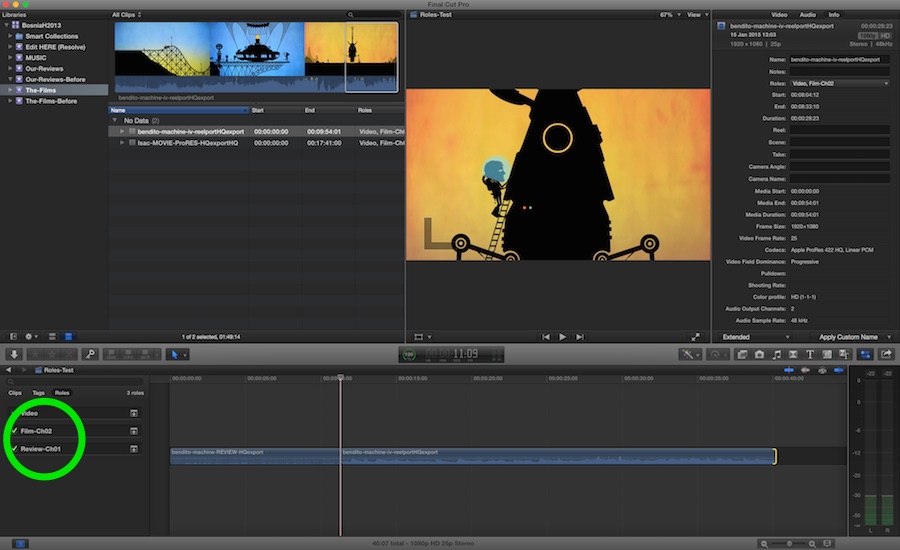
2 Clips in one Event
2 other clips in an other event
Both have one mono channel and I was able to batch apply different roles for different events!
As noted in the documentation:
Channels are presented in reverse order in the Role setting dialogs.
But that is hardly a deal breaker.
Will test some MXF files I have with multiple channels of audio next!!!
Please Log in to join the conversation.
- finalbug.net
-
Topic Author
- Offline
- Platinum Member
-
- Absence of Quality is the essence of squareness.
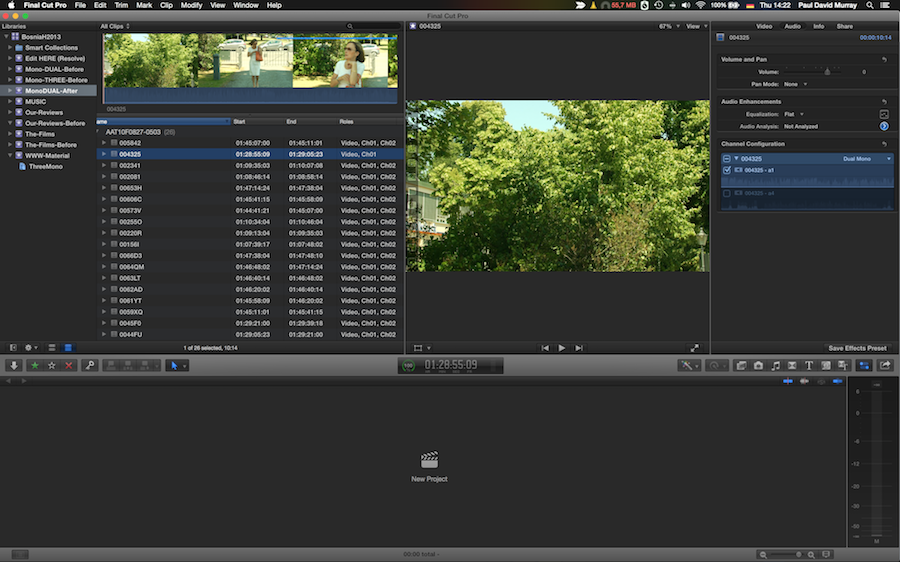
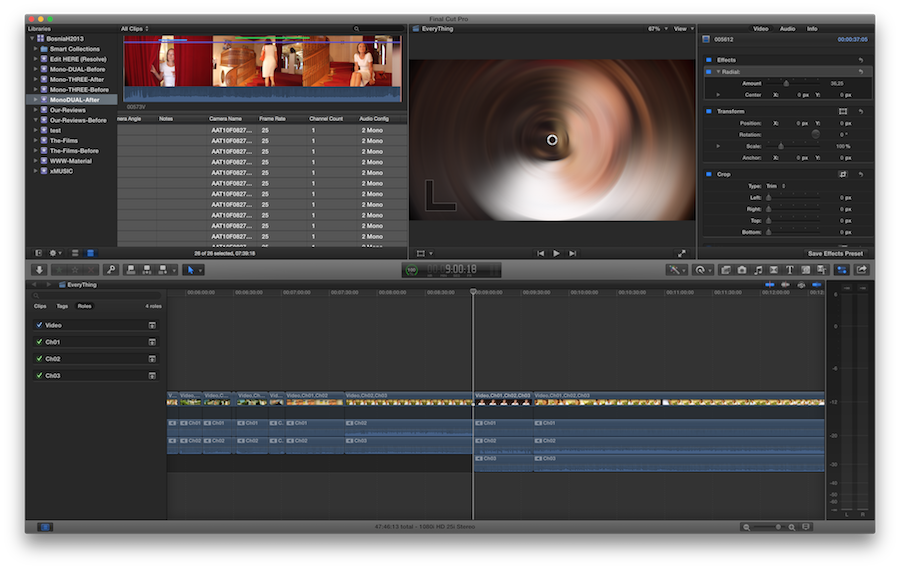
To make things a little bit more fun I had a mix of mxf files.
Some were DualMono & some were ThreeMono
I was able to use the browser column Audio Config to sort.
Created 2 events called DualMono & ThreeMono respectively
Next I selected and dragged the 26 Dual Mono files off into the DualMono Event
Then I selected and dragged the 38 ThreeMono files off into the ThreeMono Event
Maybe this was overkill but I set all of my roles to default. Video & Dialogue.
This is the project that I mentioned earlier for which Sync & Link would have been overkill.
i.e. I had already applied roles on a one in one basis on some clips!
And did the export and reimport.
Sure the track order is a little weird but seriously this program is free I am hardly going to complain.
Back in FCPX I noticed that some of the channels looked as if they were missing/had not been assigned.
On further investigation I found that they were there.
They had just been muted.
I was able to unmute them et voilà
My 26-38 Test worked 100%
Amazing work.
This for me closes the circle for Final Cut Pro X. Great stuff
Please Log in to join the conversation.
- Disproportionate Pictures
-

- Offline
- Platinum Member
-
- Posts: 1433
- Thank you received: 64
Here's some thoughts I had on this last year.
disproportionatepictures.blogspot.ca/201...les-redux-part1.html
Please Log in to join the conversation.
- finalbug.net
-
Topic Author
- Offline
- Platinum Member
-
- Absence of Quality is the essence of squareness.
That is a great article.
Also a very good eg.
i.e. different characters on different channels.
Lots of options for track switching in there!
Enter batch assign roles :blink:
greetings from Berlin
Paul
Please Log in to join the conversation.
- JPM Editor
-
- Offline
- Premium Member
-
Disproportionate Pictures wrote: Here's some thoughts I had on this last year.
disproportionatepictures.blogspot.ca/201...les-redux-part1.html
Yeah, I remember reading your excellent article back in the day, Marcus! I love the mockups you did showing how to batch assign subroles to audio components, specially the one with the contextual menu in the Audio Channel Configuration area. Wouldn't it be nice to have that functionality built into FCPX? Until then, at least we can use Role-O-Matic!
By the way, I'd love to read a "ROLES REDUX: PART 2" article. Maybe you can figure out how to visually organice the magnetic timeline into Role regions before Apple does! :lol:
I think we all love that idea, but it really must be hard to implement:
- With Video roles, arranging clips based on their role might mess with the stacking order and change the final composite and even the whole cut!
- With Audio Roles, I guess it would work with general roles (applied to the clip as a whole), but how would this work with audio components (and subroles) at all? This whole concept defies how the magnetic timeline works right now...
Oh, well. I guess we'll have to wait until the developers figure out a better way for all of us. In the meantime, it's always fun to speculate.
All the best,
Jesús
@jesus_edits
Jesús Pérez-Miranda
Cut People CEO & Founder
www.cutpeople.es
Please Log in to join the conversation.

I have an TV-serie tomorrow full of M&E´s, splits etc to output. I will definetly give this prog a test.
thanks Jesus!
Please Log in to join the conversation.
