


- Posts: 33
- Thank you received: 1
3 Post Moderation Rule for New Boarders (25 Jan 2021)
New boarders will have their posts moderated - Don't worry if you cannot see your post immediately.
Transitions question
- surferrgirl
-
 Topic Author
- Offline
- Junior Member
-

Less
More
12 Jul 2015 22:25 #66412
by surferrgirl
Transitions question was created by surferrgirl
Hi Final cut army!,
I'm back with another question lol, I asked this one sometime ago and have tried to find a few workable solutions, created plugins, or even looked into purchasing third party ones.
So my question is how do I get better, slower, more controllable fade to black such as the one in this vid?
Can I make this fade in motion 5, is it achievable via fcpx? I have been trying to figure this out for over a year ! if anyone can help out with detailed steps that'd be great.
I'm back with another question lol, I asked this one sometime ago and have tried to find a few workable solutions, created plugins, or even looked into purchasing third party ones.
So my question is how do I get better, slower, more controllable fade to black such as the one in this vid?
Can I make this fade in motion 5, is it achievable via fcpx? I have been trying to figure this out for over a year ! if anyone can help out with detailed steps that'd be great.
Please Log in to join the conversation.
- Squamish ed
-
- Offline
- Elite Member
-

Less
More
- Posts: 238
- Thank you received: 20
12 Jul 2015 23:48 #66417
by Squamish ed
Ed
Replied by Squamish ed on topic Transitions question
If you're not getting the result you want with Fade to Color in FCPX have you tried using video animation? With it you can fade to black over as long as you want in the clip.
Ed
Please Log in to join the conversation.
- surferrgirl
-
Topic Author
- Offline
- Junior Member
-
Less
More
- Posts: 33
- Thank you received: 1
12 Jul 2015 23:52 #66418
by surferrgirl
Replied by surferrgirl on topic Transitions question
No I can't say that I have is that an editing program
Please Log in to join the conversation.
- Squamish ed
-
- Offline
- Elite Member
-
Less
More
- Posts: 238
- Thank you received: 20
13 Jul 2015 00:27 #66419
by Squamish ed
Ed
Replied by Squamish ed on topic Transitions question
Hi Surfergirl,
No, it's another control in FCPX that lets you fade (and other things) a clip without affecting any following clips.
Control V opens the window above your selected clip. At the bottom of the list is Compositing: opacity. You may have to double click to open it. There you can grab a fade handle at the end of the clip and drag it across to get as long a fade as your clip duration will allow. I don't know if this will get you exactly what you're looking for but hope it's a helpful tool to know about anyway.
No, it's another control in FCPX that lets you fade (and other things) a clip without affecting any following clips.
Control V opens the window above your selected clip. At the bottom of the list is Compositing: opacity. You may have to double click to open it. There you can grab a fade handle at the end of the clip and drag it across to get as long a fade as your clip duration will allow. I don't know if this will get you exactly what you're looking for but hope it's a helpful tool to know about anyway.
Ed
Please Log in to join the conversation.
- surferrgirl
-
Topic Author
- Offline
- Junior Member
-
Less
More
- Posts: 33
- Thank you received: 1
13 Jul 2015 01:35 - 13 Jul 2015 01:36 #66420
by surferrgirl
Replied by surferrgirl on topic Transitions question
I've tried nearly every option there has got to be a workaround LOL! or plugin, I'm so upset with FCPX over this, this video was created in Sony Vegas which seems to have more control over coloring, and fades and a lot of things overall its just I'm so used to fcpx it would suck to transition into another program and go through the motions of learning it all over again. Plus I've heard that Vegas is very laggy, crashes often, and has very long rendering times depending on your machine.
But yes I have tried video animation, fading clips that I layered over it, gap clips, and nothing seems to provide that level of detailed control.
But yes I have tried video animation, fading clips that I layered over it, gap clips, and nothing seems to provide that level of detailed control.
Last edit: 13 Jul 2015 01:36 by surferrgirl.
Please Log in to join the conversation.

13 Jul 2015 08:16 #66426
by lichinho
Replied by lichinho on topic Transitions question
There is no problem in doing things like this in FCP X, it is very simple, not even scratching the surface of what you can do in it.
Did you actually use the Control-V command like Squamish said?
When I saw the poster frame of the video you posted, with a portrait inside a frame I thought it would be some effect like manipulating the portrait only... and even that is so easy now with the mask tools avaliable in FCP X 10.2...
Of course this could be my misunderstanding of what the problem is, but it certainly looks to me like this more your unfamiliarity with FCP X than any limitation of the software. Maybe you should take the time to follow some good tutorials like Izzy Video's or RippleTraining's. FCP X is very different from other NLE but just as powerful.
Did you actually use the Control-V command like Squamish said?
When I saw the poster frame of the video you posted, with a portrait inside a frame I thought it would be some effect like manipulating the portrait only... and even that is so easy now with the mask tools avaliable in FCP X 10.2...
Of course this could be my misunderstanding of what the problem is, but it certainly looks to me like this more your unfamiliarity with FCP X than any limitation of the software. Maybe you should take the time to follow some good tutorials like Izzy Video's or RippleTraining's. FCP X is very different from other NLE but just as powerful.
Please Log in to join the conversation.
13 Jul 2015 15:52 #66439
by VidGreg
Replied by VidGreg on topic Transitions question
Hi Surfergirl,
I only saw 2 standards transitions in the linked video, "Fade to color(black) and cross dissolves". Both are easy in FCPX.
Select either a clip (whole clip highlighted) which will add transition to both side of clip or select just one end of a clip and transition will be applied to that point in timeline.
Press Cmmd + T for a cross dissolve (default) or drag a cross dissolve or fade transition to the transition point.
Select the transition, it will have a yellow border.
To change the duration, either drag out one end, or press Control + D and type in the amount of time you want the transition to last.
You can set a default time in FCPX Preferences>Editing>Duration. Makes it faster if doing lots of transitions with the same duration. Sounds like you want a long transition.
You can change the mid point of the transition using the "bow tie" in the middle of the transition clip, drag left or right.
Once you have the transition how you like it, you can copy and paste or hold down the Option key and drag and drop the transition to another transition point in the timeline.
This is all covered in the FCPX user guide starting around pg 206.
Fade to color (black) works the same way. Applies fade to just one side of the clip, other side jumps in/out.
Finally, lots of parameters can be adjusted in the info pane for the transition.
Here is a link for a YouTube vid, it is just ok as he fails to use any keyboard shortcuts, but good beginner lesson…
Lots more vids there.
Isn't hard unless I'm missing your issue.
Happy Editing
Hope this helps, Greg
I only saw 2 standards transitions in the linked video, "Fade to color(black) and cross dissolves". Both are easy in FCPX.
Select either a clip (whole clip highlighted) which will add transition to both side of clip or select just one end of a clip and transition will be applied to that point in timeline.
Press Cmmd + T for a cross dissolve (default) or drag a cross dissolve or fade transition to the transition point.
Select the transition, it will have a yellow border.
To change the duration, either drag out one end, or press Control + D and type in the amount of time you want the transition to last.
You can set a default time in FCPX Preferences>Editing>Duration. Makes it faster if doing lots of transitions with the same duration. Sounds like you want a long transition.
You can change the mid point of the transition using the "bow tie" in the middle of the transition clip, drag left or right.
Once you have the transition how you like it, you can copy and paste or hold down the Option key and drag and drop the transition to another transition point in the timeline.
This is all covered in the FCPX user guide starting around pg 206.
Fade to color (black) works the same way. Applies fade to just one side of the clip, other side jumps in/out.
Finally, lots of parameters can be adjusted in the info pane for the transition.
Here is a link for a YouTube vid, it is just ok as he fails to use any keyboard shortcuts, but good beginner lesson…
Lots more vids there.
Isn't hard unless I'm missing your issue.
Happy Editing
Hope this helps, Greg
Please Log in to join the conversation.
14 Jul 2015 08:17 #66461
by plysat
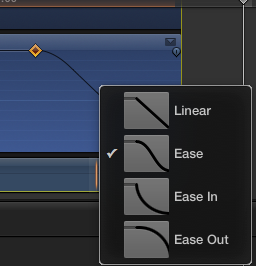
Keyframe the opacity. Control click on the path and choose the type fade you want. you can also add multiple keyframes and do your own curve, Easy.
Can't sleep? Try this: fcpxpert.net ;-)
Replied by plysat on topic Transitions question
surferrgirl wrote: Hi Final cut army!,
... my question is how do I get better, slower, more controllable fade to black such as the one in this vid?
Keyframe the opacity. Control click on the path and choose the type fade you want. you can also add multiple keyframes and do your own curve, Easy.
Can't sleep? Try this: fcpxpert.net ;-)
Please Log in to join the conversation.
