


- Posts: 197
- Thank you received: 27
3 Post Moderation Rule for New Boarders (25 Jan 2021)
New boarders will have their posts moderated - Don't worry if you cannot see your post immediately.
No Recent Libraries
09 Jul 2015 14:16 #66297
by smg669
No Recent Libraries was created by smg669
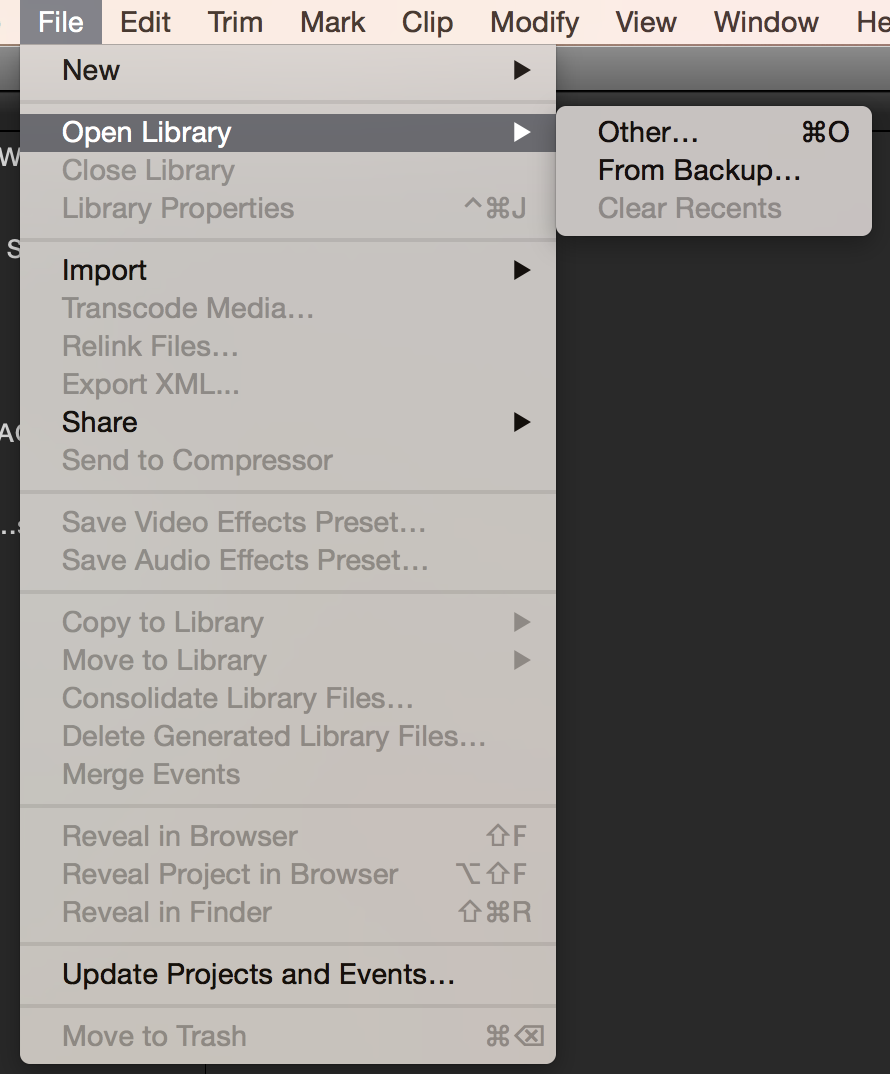
The File->Open Library submenu in my FCPX is not populating itself with recent Libraries. If I choose the "Other" option, I can see the list of recent Libraries in the Open Library dialogue box. Anyone have this happen before and know a way to fix it?
Please Log in to join the conversation.

09 Jul 2015 15:12 #66305
by BenB
Replied by BenB on topic No Recent Libraries
Not broken, works like any other Recently Opened lists. Entries are only remembered for so long before being dismissed. Deleting pref files erases it. Some upgrades can erase it. It is not perpetual, isn't meant to be, that'd be too comber some and bulky.
What you need to do is create an OS X Smart Folder in your Finder sidebar. That makes finding all libraries for any app much faster and easier. I have one for FCPX, Motion, and LPX.
What you need to do is create an OS X Smart Folder in your Finder sidebar. That makes finding all libraries for any app much faster and easier. I have one for FCPX, Motion, and LPX.
Please Log in to join the conversation.
09 Jul 2015 15:32 #66311
by smg669
I understand how a Recent Files menu list works. My point is that mine stays empty regardless of which libraries I open or close... or how recently I've done so. It's not working. So I was asking if anyone had this happen before and how they fixed it before I did the typical stuff (e.g. deleting preferences).
Replied by smg669 on topic No Recent Libraries
BenB wrote: Not broken, works like any other Recently Opened lists. Entries are only remembered for so long before being dismissed. Deleting pref files erases it. Some upgrades can erase it. It is not perpetual, isn't meant to be, that'd be too comber some and bulky.
What you need to do is create an OS X Smart Folder in your Finder sidebar. That makes finding all libraries for any app much faster and easier. I have one for FCPX, Motion, and LPX.
I understand how a Recent Files menu list works. My point is that mine stays empty regardless of which libraries I open or close... or how recently I've done so. It's not working. So I was asking if anyone had this happen before and how they fixed it before I did the typical stuff (e.g. deleting preferences).
Please Log in to join the conversation.
09 Jul 2015 19:48 #66330
by BenB
Replied by BenB on topic No Recent Libraries
Now the menu having nothing in it ever at all, I've never seen before.
Please Log in to join the conversation.
- Jonathan Levin
-

- Offline
- Platinum Member
-

Less
More
- Posts: 786
- Thank you received: 21
11 Jul 2015 03:09 #66386
by Jonathan Levin
Replied by Jonathan Levin on topic No Recent Libraries
Smg669.
Fyi, I too have never seen my recents populated with previously opened libraries. Even after fcp x is open, and I go to open recent, that menu is empty.
Jl
Fyi, I too have never seen my recents populated with previously opened libraries. Even after fcp x is open, and I go to open recent, that menu is empty.
Jl
Please Log in to join the conversation.
- Russ Haskell
-

- Offline
- Elite Member
-

Less
More
- Posts: 176
- Thank you received: 24
11 Jul 2015 15:07 #66393
by Russ Haskell
Replied by Russ Haskell on topic No Recent Libraries
See if Window>Revert to Original Layout does anything for it.
Russ
Russ
Please Log in to join the conversation.
11 Jul 2015 18:23 - 11 Jul 2015 18:29 #66395
by BenB
Replied by BenB on topic No Recent Libraries
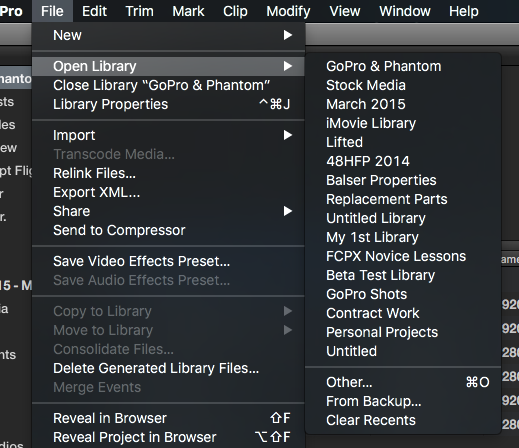
Works fine on both my MP FCPX 10.2.1, OS X 10.11 beta and on my public release OS X 10.10 MBP. So it isn't a universal bug. What is different about the systems that have this issue, as opposed to the ones that don't have the issue?
Last edit: 11 Jul 2015 18:29 by BenB.
Please Log in to join the conversation.
- Jonathan Levin
-
- Offline
- Platinum Member
-
Less
More
- Posts: 786
- Thank you received: 21
11 Jul 2015 19:04 #66396
by Jonathan Levin
Replied by Jonathan Levin on topic No Recent Libraries
I can't really believe I'm writing this, but I think I have solved your problem:
Go to System Preferences> Recent Items and change that from "None" (which is where I had mine set too) and change it to something like 15.
Relaunch FCP, open a bunch of libraries and (at least in my case) you should see what BenB sees.
Hope this helps.
Jonathan
Go to System Preferences> Recent Items and change that from "None" (which is where I had mine set too) and change it to something like 15.
Relaunch FCP, open a bunch of libraries and (at least in my case) you should see what BenB sees.
Hope this helps.
Jonathan
Please Log in to join the conversation.
12 Jul 2015 05:07 - 12 Jul 2015 05:07 #66398
by BenB
Replied by BenB on topic No Recent Libraries
Nope, only effects the Recent Items menu, in the Apple menu, doesn't effect individual apps, and not FCPX. Just tested on 3 Macs.
And it is in the General section of System Preferences.
And it is in the General section of System Preferences.
Last edit: 12 Jul 2015 05:07 by BenB.
Please Log in to join the conversation.
- Jonathan Levin
-
- Offline
- Platinum Member
-
Less
More
- Posts: 786
- Thank you received: 21
12 Jul 2015 05:36 - 12 Jul 2015 05:37 #66399
by Jonathan Levin
Replied by Jonathan Levin on topic No Recent Libraries
Hi BenB.
Well that's really odd. And Yes it is in the General Sys. Prefs, thanks.
You know, when i set the Recents to 15, I did in fact have FCP X open at the time. Not sure if that makes a difference or not. But it sure works for me now, and never did before.
If anyone else can report back that would be great. Smg669???
JL
Well that's really odd. And Yes it is in the General Sys. Prefs, thanks.
You know, when i set the Recents to 15, I did in fact have FCP X open at the time. Not sure if that makes a difference or not. But it sure works for me now, and never did before.
If anyone else can report back that would be great. Smg669???
JL
Last edit: 12 Jul 2015 05:37 by Jonathan Levin.
Please Log in to join the conversation.
12 Jul 2015 15:39 - 12 Jul 2015 15:40 #66405
by BenB
Replied by BenB on topic No Recent Libraries
Just to verify, I have 3 machines: MP, MBP, iMac. Deleted pref files in FCPX, and cleared the recent libraries list, on all three so we had something clean to start with.
Open 10 Libraries in FCPX, they show in the recents list. Quit FCPX, set Recent Items to None. Launch FCPX, all recents still show. Reboot, launch FCPX, all recents still show. Quite FCPX. Set Recent Items to 5, launch FCPX, no change I still have 10 Libraries listed. There's no technical connection between "Recent Items" which is specific to that function in the Apple menu, and individual applications. Not sure if a developer can even access that control from an app, either. I'd say something else happened along the way. I can't make any of three Macs change FCPX's list when changing the Recent Items setting in SysPrefs. An Apple engineer buddy says there shouldn't be any connection, either, but you never know.
Will be interesting to see what results anyone else gets.
Again, would also be interesting to discover what is the difference between Macs with the FCPX list issue, and Macs without it.
Open 10 Libraries in FCPX, they show in the recents list. Quit FCPX, set Recent Items to None. Launch FCPX, all recents still show. Reboot, launch FCPX, all recents still show. Quite FCPX. Set Recent Items to 5, launch FCPX, no change I still have 10 Libraries listed. There's no technical connection between "Recent Items" which is specific to that function in the Apple menu, and individual applications. Not sure if a developer can even access that control from an app, either. I'd say something else happened along the way. I can't make any of three Macs change FCPX's list when changing the Recent Items setting in SysPrefs. An Apple engineer buddy says there shouldn't be any connection, either, but you never know.
Will be interesting to see what results anyone else gets.
Again, would also be interesting to discover what is the difference between Macs with the FCPX list issue, and Macs without it.
Last edit: 12 Jul 2015 15:40 by BenB.
Please Log in to join the conversation.
