


- Posts: 263
- Thank you received: 2
3 Post Moderation Rule for New Boarders (25 Jan 2021)
New boarders will have their posts moderated - Don't worry if you cannot see your post immediately.
Dissecting audio in FCPX 10.2
07 Jul 2015 11:55 #66243
by gaddster
MBP retina 15" 2014
imac 27 i7 2013
G-tech
Panasonic GH4, AC90, Gopro
Dissecting audio in FCPX 10.2 was created by gaddster
Guys, not been on here a while but i have a problem..
I have been given a 20 min audio file of audio one and 2 liners .. I have brought the audio into a timeline, used the blade tool and renamed the clips BUT how do i get them visible individually so i can add them to a promo?
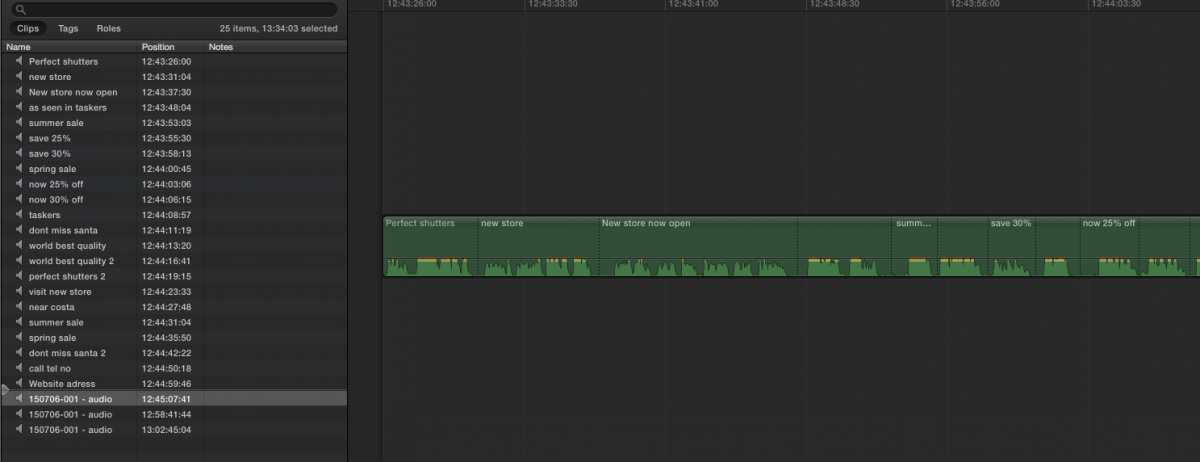
I have been given a 20 min audio file of audio one and 2 liners .. I have brought the audio into a timeline, used the blade tool and renamed the clips BUT how do i get them visible individually so i can add them to a promo?
MBP retina 15" 2014
imac 27 i7 2013
G-tech
Panasonic GH4, AC90, Gopro
Please Log in to join the conversation.
- ronny courtens
-

- Offline
- Moderator
-

Less
More
- Posts: 4455
- Thank you received: 962
07 Jul 2015 14:04 #66247
by ronny courtens
Replied by ronny courtens on topic Dissecting audio in FCPX 10.2
Hey Phil, good to hear from you again.
I'm afraid this is not the best way. This is how I would do this:
Select the 20' audio file in the browser and drag a range around the first topic ("Perfect shutters"). Then press CMD+K to put the range in a keyword collection.
Then go to the next topic ("new store") drag a range around that line, press CMD+K, and so on...
In the end you will have a keyword for every line (or 2 lines) in your browser, making it very easy to select which lines you want to use in your edit. To make things even more organized, you can put all the keyword collections for the voice-over in a "VO" folder.
- Ronny
I'm afraid this is not the best way. This is how I would do this:
Select the 20' audio file in the browser and drag a range around the first topic ("Perfect shutters"). Then press CMD+K to put the range in a keyword collection.
Then go to the next topic ("new store") drag a range around that line, press CMD+K, and so on...
In the end you will have a keyword for every line (or 2 lines) in your browser, making it very easy to select which lines you want to use in your edit. To make things even more organized, you can put all the keyword collections for the voice-over in a "VO" folder.
- Ronny
Please Log in to join the conversation.

07 Jul 2015 14:14 #66249
by BenB
Replied by BenB on topic Dissecting audio in FCPX 10.2
I was just about to say that... so yeah, what Ronnie said. Organize in the Browser first, not the timeline.
Please Log in to join the conversation.
07 Jul 2015 15:29 #66253
by gaddster
MBP retina 15" 2014
imac 27 i7 2013
G-tech
Panasonic GH4, AC90, Gopro
Replied by gaddster on topic Dissecting audio in FCPX 10.2
Thanks Ronnie,
I knew i was barking up the wrong tree with this
I knew i was barking up the wrong tree with this
MBP retina 15" 2014
imac 27 i7 2013
G-tech
Panasonic GH4, AC90, Gopro
Please Log in to join the conversation.
