


- Posts: 103
- Thank you received: 2
3 Post Moderation Rule for New Boarders (25 Jan 2021)
New boarders will have their posts moderated - Don't worry if you cannot see your post immediately.
split edit question
01 Jul 2015 07:11 #66074
by Brinky
split edit question was created by Brinky
Hi,
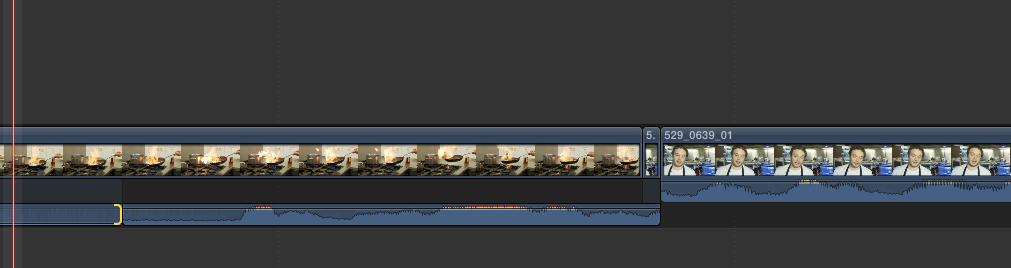
A split edit question. When I want to perform a split edit and want to get rid of the whole video from the incoming clip it always leaves one frame. Like in the attached screenshot. Is there a way to avoid this without detach the audio?
tia
A split edit question. When I want to perform a split edit and want to get rid of the whole video from the incoming clip it always leaves one frame. Like in the attached screenshot. Is there a way to avoid this without detach the audio?
tia
Please Log in to join the conversation.
- Tom Wolsky
-

- Offline
- Moderator
-

01 Jul 2015 07:29 #66075
by Tom Wolsky
Replied by Tom Wolsky on topic split edit question
If you want to get rid of the picture, why don't you want to detach the audio?
Please Log in to join the conversation.
01 Jul 2015 07:32 #66076
by Brinky
Replied by Brinky on topic split edit question
Hi Tom,
Cause it's an extra step. And when I change my mind I have to find the video again. But it sounds logic to leave only the audio.
Cause it's an extra step. And when I change my mind I have to find the video again. But it sounds logic to leave only the audio.
Please Log in to join the conversation.
- Tom Wolsky
-
- Offline
- Moderator
-
01 Jul 2015 07:39 #66077
by Tom Wolsky
Replied by Tom Wolsky on topic split edit question
You could use the position tool and drag the remaining bit of video out of the primary and then roll out the remaining gap with the adjacent shot. Though I'm not sure if it isn't easier to Shift-F to the original clip should you need to retrieve the video at some stage.
Please Log in to join the conversation.
