


3 Post Moderation Rule for New Boarders (25 Jan 2021)
New boarders will have their posts moderated - Don't worry if you cannot see your post immediately.
Relink Externally Managed Proxy Media?


28 Jun 2015 23:58 #65964
by timfo
Relink Externally Managed Proxy Media? was created by timfo
Had to get a new RAID for a rapidly growing project. Media and proxy media are managed external to FCPX. I just copied the entire file structure of original RAID over to the new one.
Opened up FCPX and relinked files to new RAID and everything is great, except that my externally managed Proxy Media isn't recognized. Would definitely love to find a way to reconnect to the 500GB of Proxy rather than re-generate it.
Is there a way to do this?
Opened up FCPX and relinked files to new RAID and everything is great, except that my externally managed Proxy Media isn't recognized. Would definitely love to find a way to reconnect to the 500GB of Proxy rather than re-generate it.
Is there a way to do this?
Please Log in to join the conversation.
- Tom Wolsky
-

- Offline
- Moderator
-

29 Jun 2015 00:09 #65966
by Tom Wolsky
Replied by Tom Wolsky on topic Relink Externally Managed Proxy Media?
If the proxies are in the correct location and folder assigned for the library and you tell the application to make proxies, it will see the existing files and connect them immediately.
Please Log in to join the conversation.
29 Jun 2015 00:20 #65968
by timfo
Replied by timfo on topic Relink Externally Managed Proxy Media?
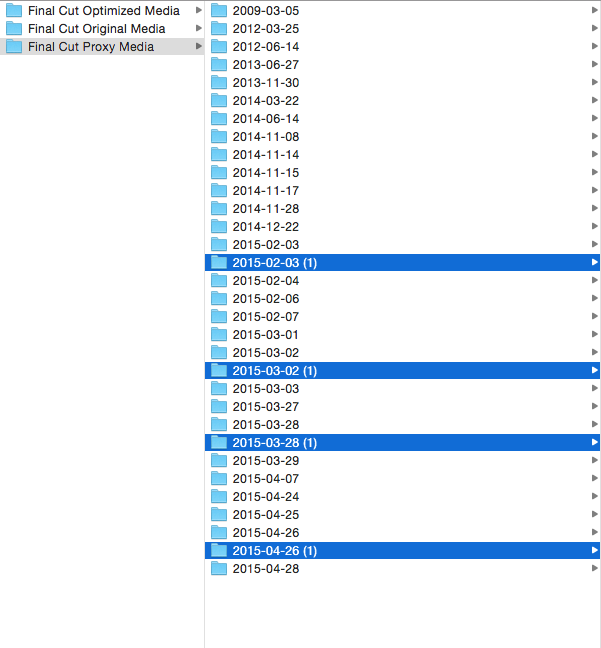
Thanks for responding, Tom. That's what I was hoping but it started generating new copies. I stopped it pretty quickly. See image attached with duplicate folders highlighted.
Please Log in to join the conversation.
- Tom Wolsky
-
- Offline
- Moderator
-
29 Jun 2015 00:54 #65969
by Tom Wolsky
Replied by Tom Wolsky on topic Relink Externally Managed Proxy Media?
What's your media? Where the files modified in some way, or maybe has different user permissions? I've not seen that happen. There is no way to relink. The only thing you can do is dump the original proxies and rebuild them.
Please Log in to join the conversation.
29 Jun 2015 19:12 #65998
by timfo
Replied by timfo on topic Relink Externally Managed Proxy Media?
Yeah, literally nothing was changed. All permissions were the same. Pulled my hair out for another hour or so last night and finally just decided to regenerate proxies and trash the first set. Didn't lose too much work time this morning.
Please Log in to join the conversation.

Less
More
- Posts: 971
- Thank you received: 46
30 Jun 2015 07:02 #66020
by MsJustine
Replied by MsJustine on topic Relink Externally Managed Proxy Media?
Ok, what you need to do is delete generated media, proxy and optimized media, both are disposable media, and is designed to be recreated as and when needed.
Go to the Inspector, to the Library hosting the event, check the storage location info box, change this to the new location, then go to the media and re-create proxy or optimized media.
As changes to the storage location affect only after making the change, deleting generated media, such as proxy/optimized, the new proxy/optimized will now be created in the new location.
Copying of proxy is a really bad idea, just delete then change the storage location, and recreate, so much less headache!!!!
Go to the Inspector, to the Library hosting the event, check the storage location info box, change this to the new location, then go to the media and re-create proxy or optimized media.
As changes to the storage location affect only after making the change, deleting generated media, such as proxy/optimized, the new proxy/optimized will now be created in the new location.
Copying of proxy is a really bad idea, just delete then change the storage location, and recreate, so much less headache!!!!
Please Log in to join the conversation.
