


- Posts: 136
- Thank you received: 0
3 Post Moderation Rule for New Boarders (25 Jan 2021)
New boarders will have their posts moderated - Don't worry if you cannot see your post immediately.
FCP-Libraries > Final Cut External (Optimized and Original) Media and Cache
- youngeddie
-
 Topic Author
- Offline
- Premium Member
-

Less
More
23 Jun 2015 00:29 #65779
by youngeddie
FCP-Libraries > Final Cut External (Optimized and Original) Media and Cache was created by youngeddie
Hello!
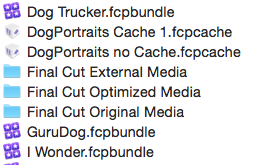
I'm trying to archive my projects, but I am getting really big folders full of media from all of my projects in my "FCP-Libraries" folder. Also "Cache.fcpcasche" files.
Is there a way to get all of this media back into the ".fcpbundle" folders?
Thanks very much for your help with this!!
Eddie
I'm trying to archive my projects, but I am getting really big folders full of media from all of my projects in my "FCP-Libraries" folder. Also "Cache.fcpcasche" files.
Is there a way to get all of this media back into the ".fcpbundle" folders?
Thanks very much for your help with this!!
Eddie
Please Log in to join the conversation.
- Tom Wolsky
-

- Offline
- Moderator
-

23 Jun 2015 01:08 #65780
by Tom Wolsky
Replied by Tom Wolsky on topic FCP-Libraries > Final Cut External (Optimized and Original) Media and Cache
In FCP library properties set the media to be inside the library. Then run the consolidate function to copy everything into the library. FCP will use hard links for everything on the same drive so the media isn't duplicated. You only need the original media, not optimized or proxies. You can recreate those if you need them later. Just make sure the driver be isn't too full. The cache bundle can be dumped at any time. FCP will rebuild them.
Please Log in to join the conversation.
- youngeddie
-
Topic Author
- Offline
- Premium Member
-
Less
More
- Posts: 136
- Thank you received: 0
23 Jun 2015 02:19 #65784
by youngeddie
Replied by youngeddie on topic FCP-Libraries > Final Cut External (Optimized and Original) Media and Cache
Thanks Tom!! This is very useful information.
So, just to be clear...
1. Question: For each project do I go to the "Modify Settings" and choose "FCP-Libraries" or do I choose "Library" (these Media folders already are in the "Library" folder) or "Choose" and find the specific Library for the project that I'm archiving? Sorry, not clear on that.
2. I will toss the "Optimized Media" folders. Can you please tell me why these folders are there? Shouldn't they be in their respective Library folders? How do I avoid this happening in the future?
3. I will toss the Cache folders. I have Final Cut Library Manager... I thought it would get rid of all the extra stuff. Is that still a valid program with all the improvements in FCP?
Thanks again for all your help with this, and other issues that you have so kindly helped me with in the past!!
So, just to be clear...
1. Question: For each project do I go to the "Modify Settings" and choose "FCP-Libraries" or do I choose "Library" (these Media folders already are in the "Library" folder) or "Choose" and find the specific Library for the project that I'm archiving? Sorry, not clear on that.
2. I will toss the "Optimized Media" folders. Can you please tell me why these folders are there? Shouldn't they be in their respective Library folders? How do I avoid this happening in the future?
3. I will toss the Cache folders. I have Final Cut Library Manager... I thought it would get rid of all the extra stuff. Is that still a valid program with all the improvements in FCP?
Thanks again for all your help with this, and other issues that you have so kindly helped me with in the past!!
Please Log in to join the conversation.
- Tom Wolsky
-
- Offline
- Moderator
-
23 Jun 2015 02:31 #65785
by Tom Wolsky
Replied by Tom Wolsky on topic FCP-Libraries > Final Cut External (Optimized and Original) Media and Cache
The problem jets are part of an event and are included in the library. In library properties you use modify settings for the whole library.
You end up with a folder structure like you have when you select a drive as the storage location for your media. FCP creates those folders for original, optimized, and proxy. Those folders are normally inside the library of you used managed media, or in a designated folder for the media, rather than the root level of the drive.
You end up with a folder structure like you have when you select a drive as the storage location for your media. FCP creates those folders for original, optimized, and proxy. Those folders are normally inside the library of you used managed media, or in a designated folder for the media, rather than the root level of the drive.
Please Log in to join the conversation.
- youngeddie
-
Topic Author
- Offline
- Premium Member
-
Less
More
- Posts: 136
- Thank you received: 0
23 Jun 2015 02:44 #65787
by youngeddie
Replied by youngeddie on topic FCP-Libraries > Final Cut External (Optimized and Original) Media and Cache
Okay, Thanks!!
I'm a little confused by your first sentence. ("jets"?) I think there's a typo there... but basically I think I get it.
I'll do some archiving tonight and see if I can get things to go in the right places.
Thanks so much,
Eddie
I'm a little confused by your first sentence. ("jets"?) I think there's a typo there... but basically I think I get it.
I'll do some archiving tonight and see if I can get things to go in the right places.
Thanks so much,
Eddie
Please Log in to join the conversation.
- Tom Wolsky
-
- Offline
- Moderator
-
23 Jun 2015 03:00 #65790
by Tom Wolsky
Replied by Tom Wolsky on topic FCP-Libraries > Final Cut External (Optimized and Original) Media and Cache
The problems jets should simply read The projects.
Please Log in to join the conversation.
- youngeddie
-
Topic Author
- Offline
- Premium Member
-
Less
More
- Posts: 136
- Thank you received: 0
23 Jun 2015 03:03 #65792
by youngeddie
Replied by youngeddie on topic FCP-Libraries > Final Cut External (Optimized and Original) Media and Cache
Go it!
Thanks!!
Thanks!!
Please Log in to join the conversation.
