


- Posts: 16
- Thank you received: 1
3 Post Moderation Rule for New Boarders (25 Jan 2021)
New boarders will have their posts moderated - Don't worry if you cannot see your post immediately.
Meaning of Orange Line in Timeline
22 Jun 2015 02:29 #65758
by hightone
Meaning of Orange Line in Timeline was created by hightone
Hi,
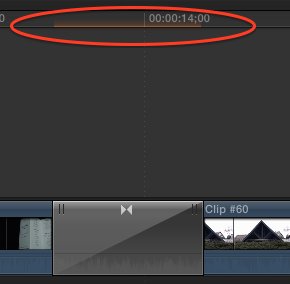
Would someone please tell me the meaning of the orange coloured line highlighted within the read circle? They appear just below the timeline labels.
Thanks.
Would someone please tell me the meaning of the orange coloured line highlighted within the read circle? They appear just below the timeline labels.
Thanks.
Please Log in to join the conversation.
- Tom Wolsky
-

- Offline
- Moderator
-

22 Jun 2015 02:39 #65759
by Tom Wolsky
Replied by Tom Wolsky on topic Meaning of Orange Line in Timeline
It means that portion of the timeline needs to be rendered. No actual video exists that makes up the media of that transition. Doesn't mean you're computer can't play it back in realtime, just that you will not get a optimal display during playback until that piece is rendered and an actual video file created for it.
Please Log in to join the conversation.


22 Jun 2015 02:41 #65760
by FernKraft
Replied by FernKraft on topic Meaning of Orange Line in Timeline
Orange means that section has yet to be "rendered", normally you can just wait 5 seconds, or so, and FCPX will render it for you. Depending on your system, you may notice no difference in performance if a section is not rendered.
Check your settings to see if background rendering is on or off.
(There are times where a scene may not be able to be rendered, this is almost always a glitch or bug in the program)
all the best,
Check your settings to see if background rendering is on or off.
(There are times where a scene may not be able to be rendered, this is almost always a glitch or bug in the program)
all the best,
Please Log in to join the conversation.
22 Jun 2015 02:52 #65761
by hightone
Replied by hightone on topic Meaning of Orange Line in Timeline
Thanks so much for the quick responses Tom and FernKraft.
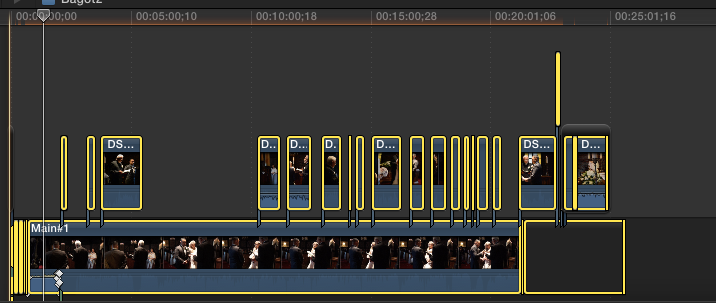
The reason I'm asking is that I've been trying for a few weeks to figure what is preventing this project from being shared. No matter which method I choose it will not export.
I do have background rendering disabled, but even when I try to do a manual render nothing happens. I don't suppose there's any way to figure out what is preventing it from rendering?
It's actually the good part of the whole timeline.
The reason I'm asking is that I've been trying for a few weeks to figure what is preventing this project from being shared. No matter which method I choose it will not export.
I do have background rendering disabled, but even when I try to do a manual render nothing happens. I don't suppose there's any way to figure out what is preventing it from rendering?
It's actually the good part of the whole timeline.
Please Log in to join the conversation.
- Tom Wolsky
-
- Offline
- Moderator
-
22 Jun 2015 03:02 #65763
by Tom Wolsky
Replied by Tom Wolsky on topic Meaning of Orange Line in Timeline
Whether something is rendered or not does not effect exporting. You can export a wholly unrendered timeline.
What are you doing to export and what happens when you do it?
What are you doing to export and what happens when you do it?
Please Log in to join the conversation.
22 Jun 2015 03:09 #65764
by hightone
Replied by hightone on topic Meaning of Orange Line in Timeline
I've got another thread on that issue here:
www.fcp.co/forum/4-final-cut-pro-x-fcpx/...ble-to-share-project
Basically when I choose the share button and then select any of the options (or from the file menu) the dialogue box that is supposed to appear doesn't. Nothing happens. No error is displayed either.
I am able to share other projects though. I've also relinked the clips and started a new project of the one that I'm having trouble sharing, but that means redoing all of the editing.
www.fcp.co/forum/4-final-cut-pro-x-fcpx/...ble-to-share-project
Basically when I choose the share button and then select any of the options (or from the file menu) the dialogue box that is supposed to appear doesn't. Nothing happens. No error is displayed either.
I am able to share other projects though. I've also relinked the clips and started a new project of the one that I'm having trouble sharing, but that means redoing all of the editing.
Please Log in to join the conversation.
