


- Posts: 21
- Thank you received: 0
3 Post Moderation Rule for New Boarders (25 Jan 2021)
New boarders will have their posts moderated - Don't worry if you cannot see your post immediately.
Need help with a "layer" in FCPX
21 Jun 2015 18:42 #65752
by Cromonius
Need help with a "layer" in FCPX was created by Cromonius
Hello all. If anyone could help me with this, that would be awesome. I am using fcpx and have the CoreMelt motion tracker and slicex plugin, and wanted to put a sign behind the actor. The sign wont move, it'll simply be placed behind him. Can I use the tracker or mark to create the actor as a "layer" as in Photoshop?
Please Log in to join the conversation.
- funwithstuff
-

- Offline
- Senior Member
-

Less
More
- Posts: 64
- Thank you received: 19
22 Jun 2015 01:40 #65757
by funwithstuff
Replied by funwithstuff on topic Need help with a "layer" in FCPX
Here are a couple of demos where items have been placed behind the actors. In each case you'll need to use the Keyer to isolate your actor onto the top layer, then place other items behind them, with TrackX for tracking. You can use multiple copies of clips if needed.
Adding a Tracked Background to a Green-Screen Clip using TrackX and SliceX
vimeo.com/96885238
Inserting Blood Hits, Muzzle Flash and Wound Effects into a fight scene in FCP X using TrackX
vimeo.com/120653365
While it would be *possible* to isolate an actor with SliceX, it would be very slow and time consuming, as you'd probably have to move many keyframes every frame.
Adding a Tracked Background to a Green-Screen Clip using TrackX and SliceX
vimeo.com/96885238
Inserting Blood Hits, Muzzle Flash and Wound Effects into a fight scene in FCP X using TrackX
vimeo.com/120653365
While it would be *possible* to isolate an actor with SliceX, it would be very slow and time consuming, as you'd probably have to move many keyframes every frame.
Please Log in to join the conversation.
- Karsten Schlüter
-

- Offline
- Moderator
-

Less
More
- Posts: 3790
- Thank you received: 718
22 Jun 2015 15:57 - 22 Jun 2015 16:05 #65773
by Karsten Schlüter
yupp, a bit like that, have a look, done quick'n dirty …
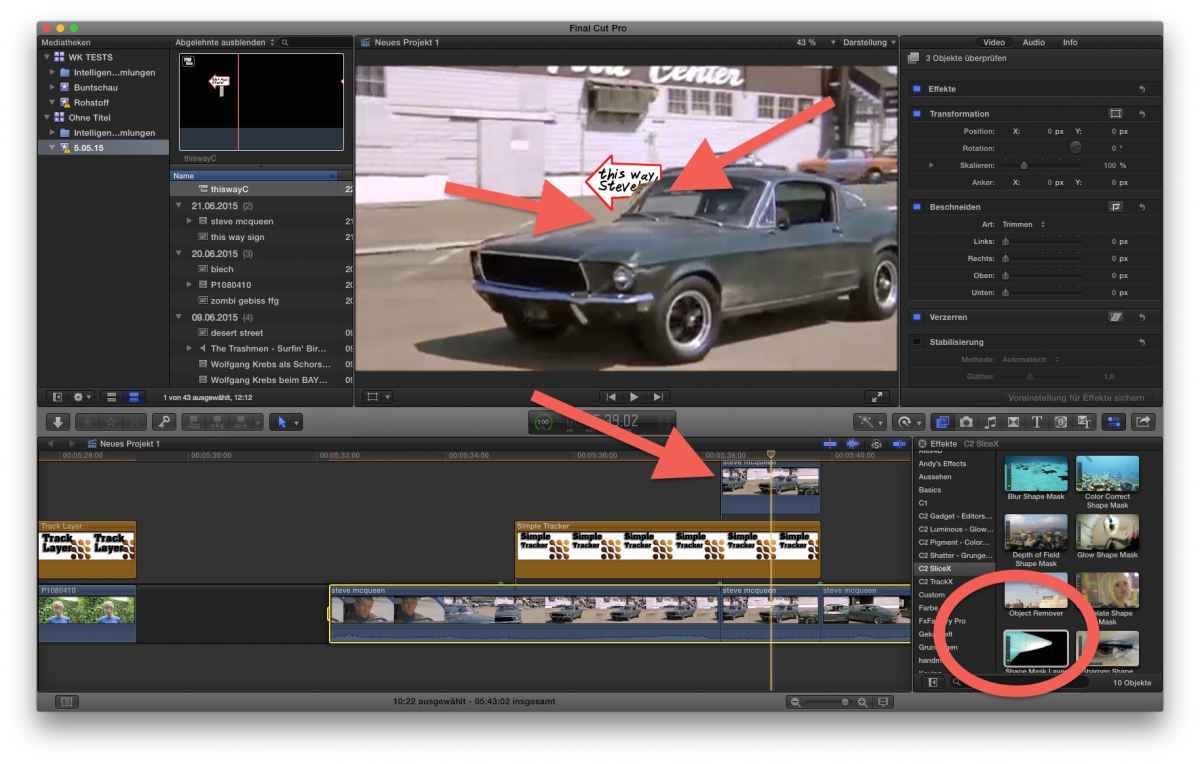
(guess, this time I've overdone it with the Red Arrows…)
You see: To make the sign part of the scene, I used the Simple Tracker from TrackX,
Now, when the car passes the sign, I made a copy of that track (alt-click'n push mouse), and I applied a mask with SliceX....
My example was done in minutes - the tracking for the sign didn't come out as wanted ... the sign 'hops' in some frames.
But to explain the principle: track and place items; then double video and apply masks ....
side note: Steve McQueen, OMG! , the definition of 'cool'..... <sigh>
And:
With TrackX and SliceX done in minutes... ok, some minutes...
These tools are uncompared!
Replied by Karsten Schlüter on topic Need help with a "layer" in FCPX
Cromonius wrote: … CoreMelt motion tracker and slicex plugin, and wanted to put a sign behind the actor. The sign wont move, it'll simply be placed behind him. Can I use the tracker or mark to create the actor as a "layer" as in Photoshop?
yupp, a bit like that, have a look, done quick'n dirty …
(guess, this time I've overdone it with the Red Arrows…)
You see: To make the sign part of the scene, I used the Simple Tracker from TrackX,
Now, when the car passes the sign, I made a copy of that track (alt-click'n push mouse), and I applied a mask with SliceX....
My example was done in minutes - the tracking for the sign didn't come out as wanted ... the sign 'hops' in some frames.
But to explain the principle: track and place items; then double video and apply masks ....
side note: Steve McQueen, OMG! , the definition of 'cool'..... <sigh>
And:
With TrackX and SliceX done in minutes... ok, some minutes...
These tools are uncompared!
Last edit: 22 Jun 2015 16:05 by Karsten Schlüter.
Please Log in to join the conversation.
23 Jun 2015 03:41 #65794
by Cromonius
Replied by Cromonius on topic Need help with a "layer" in FCPX
Wow! Great tutorials. I should have delved deeper into the CoreMelt Vimeo vids before I posted here. Would you know where I could get all those clips that the trainer had? The powder, muzzle flash, etc.
Also, thanks a lot for replying with the links. Very informative and much appreciated.
Also, thanks a lot for replying with the links. Very informative and much appreciated.
Please Log in to join the conversation.
23 Jun 2015 03:44 #65795
by Cromonius
Replied by Cromonius on topic Need help with a "layer" in FCPX
Karsten, thanks for the info and video! I actually laughed out loud when I hit play. Believe it or not, I actually used your exact method in tinkering and waiting (praying) for a response to my initial question. As always, thank you for your help! Very much appreciated.
Please Log in to join the conversation.
- Karsten Schlüter
-
- Offline
- Moderator
-
Less
More
- Posts: 3790
- Thank you received: 718
23 Jun 2015 04:03 - 23 Jun 2015 04:05 #65797
by Karsten Schlüter
"There are no coincidences" ... :lol:
=> in our film workshop at school, we actually had that as an exercise; that's why I had that 'Bullit' scene so fast 'at hand'... Bullit is an excellent source for teaching editing, to mention that ....
TrackX and SliceX are just awesome... a bit more tricky than in the tutorials, but plain awesome.
reg. your other question:
muzzle flashes are more or less just one or two frames 'long'; you get a wide variety by simply performing a pictures/google search (search for png as format) and add them to your scene 'by hand', use the distortion tool to 'fit perspectives'; and you find them at youtube, muzzle flash + green screen ... but you can not be sure, as with any of those YTuploads, if they are legit or not... for 'household' usage I would say "anyhow!", for a more professional usage (publication) I would be careful ...
finally, to make muzzle flashes 'part of the scenery', you should adjust the 'lighting' the of scene either, Brandon tells you how:
Replied by Karsten Schlüter on topic Need help with a "layer" in FCPX
Cromonius wrote: … Believe it or not, I actually used your exact method in tinkering and waiting (praying) for a response to my initial question. ….
"There are no coincidences" ... :lol:
=> in our film workshop at school, we actually had that as an exercise; that's why I had that 'Bullit' scene so fast 'at hand'... Bullit is an excellent source for teaching editing, to mention that ....
TrackX and SliceX are just awesome... a bit more tricky than in the tutorials, but plain awesome.
reg. your other question:
muzzle flashes are more or less just one or two frames 'long'; you get a wide variety by simply performing a pictures/google search (search for png as format) and add them to your scene 'by hand', use the distortion tool to 'fit perspectives'; and you find them at youtube, muzzle flash + green screen ... but you can not be sure, as with any of those YTuploads, if they are legit or not... for 'household' usage I would say "anyhow!", for a more professional usage (publication) I would be careful ...
finally, to make muzzle flashes 'part of the scenery', you should adjust the 'lighting' the of scene either, Brandon tells you how:
Last edit: 23 Jun 2015 04:05 by Karsten Schlüter.
Please Log in to join the conversation.
- funwithstuff
-
- Offline
- Senior Member
-
Less
More
- Posts: 64
- Thank you received: 19
23 Jun 2015 04:15 #65798
by funwithstuff
Replied by funwithstuff on topic Need help with a "layer" in FCPX
Thanks — I'm the trainer who makes most of the Coremelt tutorials. There are some free elements linked below that tutorial:
www.fxelements.com/free-zone
For the exact ones used in the tutorial, they were from Video Copilot's Action Essentials. Additional stills elements were original photos cut out in Photoshop.
For the exact ones used in the tutorial, they were from Video Copilot's Action Essentials. Additional stills elements were original photos cut out in Photoshop.
Please Log in to join the conversation.
23 Jun 2015 04:59 #65799
by Cromonius
Replied by Cromonius on topic Need help with a "layer" in FCPX
Karsten, thanks for the info and I watched, liked and subscribed to Brandon's channel. Also, I just looked up film schools in my area (Jersey) sand will sign up for an editing class come September. Even though I think I am a couple steps down the ever-growing road of editing, I'm sure there are things to learn and relationships to forge. 
funwithstuff, the CoreMelt vids are really great and wholly necessary once purchasing the plugins (which I did after playing around with the free trial). Thanks for the links! Are the Video Copilot's Action Essentials compatible with fcpx? It looks like it is mainly used in After Effects.
funwithstuff, the CoreMelt vids are really great and wholly necessary once purchasing the plugins (which I did after playing around with the free trial). Thanks for the links! Are the Video Copilot's Action Essentials compatible with fcpx? It looks like it is mainly used in After Effects.
Please Log in to join the conversation.
- funwithstuff
-
- Offline
- Senior Member
-
Less
More
- Posts: 64
- Thank you received: 19
23 Jun 2015 05:02 #65800
by funwithstuff
Yes, the Action Essentials (like most of these packs) are just QuickTime movies with alpha channels, so you can use them in any NLE or compositing app.
Replied by funwithstuff on topic Need help with a "layer" in FCPX
Cromonius wrote: Thanks for the links! Are the Video Copilot's Action Essentials compatible with fcpx? It looks like it is mainly used in After Effects.
Yes, the Action Essentials (like most of these packs) are just QuickTime movies with alpha channels, so you can use them in any NLE or compositing app.
Please Log in to join the conversation.
- Karsten Schlüter
-
- Offline
- Moderator
-
Less
More
- Posts: 3790
- Thank you received: 718
23 Jun 2015 05:47 #65801
by Karsten Schlüter
just a millimeter off-topc, using the chance for a direct response:
I'm no native English speaker, so my scale is probably a bit different ...
Excellent!
No bla-bla, straight on the point, very 'hands on', covering all aspects of your tools - Thank you!
(and that your tutorial shows in 2min, what I do in 10 ... that's in the nature of things :lol: )
Replied by Karsten Schlüter on topic Need help with a "layer" in FCPX
funwithstuff wrote: Thanks — I'm the trainer who makes most of the Coremelt tutorials. ….
just a millimeter off-topc, using the chance for a direct response:
I'm no native English speaker, so my scale is probably a bit different ...
Excellent!
No bla-bla, straight on the point, very 'hands on', covering all aspects of your tools - Thank you!
(and that your tutorial shows in 2min, what I do in 10 ... that's in the nature of things :lol: )
Please Log in to join the conversation.
