


- Posts: 3
- Thank you received: 0
3 Post Moderation Rule for New Boarders (25 Jan 2021)
New boarders will have their posts moderated - Don't worry if you cannot see your post immediately.
FCPX saying No importable files, can't import
- EllenintheCity
-
 Topic Author
- Offline
- New Member
-

Less
More
18 Jun 2015 15:17 #65634
by EllenintheCity
FCPX saying No importable files, can't import was created by EllenintheCity
Am new to this forum, please be patient with me  I am self-taught on FCP, and not that well-versed in all the technical language that you may toss out here.
I am working with FCPX 10.2.1 on a 27-inch iMac purchased in October 2014. I have Yosemite 10.10.3.
PROBLEM:
I can't import footage that was shot on a Sony PMW-F55 camera, which I believe is 4k capable but that this is just HD footage. This version of FCPX is supposed to be able to import these files (I think you used to need a plugin?), and in fact I think I've imported footage shot by the same production company, on the same camera, before with no issue. So I'm stumped as to why I can't do it NOW all of a sudden.
BACK STORY:
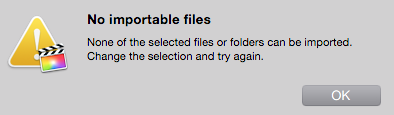
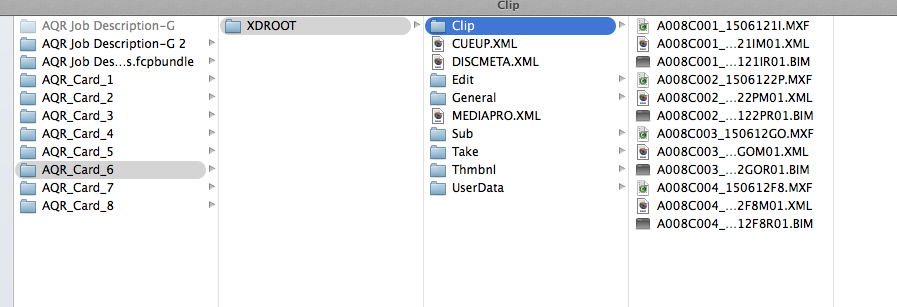
I got an external hard drive from a production company we work with all the time, with HD files (not 4k) shot on the Sony PWW-F55 camera. They had copied all the files from the camera cards, and I could see them when I clicked on the hard drive itself, it looked like all the usual files and folders were present. I'm attaching a screen grab that shows one of the folders opened. But FCPX would not allow import. I could see it trying to read the files, but they were greyed out, and files names would scroll by in the window, disappearing one by one very quickly until FCPX finally said, "No Importable files. None of the selected files or folders can be imported. Change the selection and try again." As though FCPX looked at each file but rejected it. As I said, files were there – you could click on the drive itself and see everything, but in the FCPX import window, if you clicked the triangle down to show contents, they appeared empty.
• NOTE: A colleagues's computer with a slighlty newer version of FCPX was able to see them and import them. I'm trying to import on her computer and transfer over to mine, upgrade and work that way, but it's very inconvenient and slow. Still waiting for first test file to complete to see if this work-around will work. In the meantime...
On 6/17/15 I called Apple, and we tried everything but to no avail - with the tech on the line we did the following:
• Even though I think I had already downloaded the correct Pro Video Formats, we did so again, and downloaded Pro Video formats 2.0.1 – this did not help
• I downloaded a Sony plugin at a collegaue's suggestion, www.sonycreativesoftware.com/pdzk-lt2 - this did not help
• I downloaded another plugin at production company's suggestion, Camera Import Plug-in for Apple Final Cut Pro X (FCPX) found here: pro.sony.com/bbsc/ssr/micro-xdcam/resour...ftwareDownload.shtml - this did not help (It was called PD2K-LT2)
• We took a folder from another project “card” that had files shot on the same camera, in the same format (HD, not 4k), and copied contents of that card onto the external drive that held all the new footage I was having issues with, and then tried to import that and FCPX DID IN FACT RECOGNIZE those files – so it’s not that the external drive itself is bad
After hanging up with Apple, my colleague and I tried the following:
• We uninstalled FCPX and reinstalled – this did not work
• I then reinstalled the 3 plugins mentioned above because maybe by uninstalling FCPX and reinstalling, those plugins weren’t embedded in FCPX anymore – so just to be sure, reinstalled them - this did not work.
Any insights would be greatly appreciated.
I am self-taught on FCP, and not that well-versed in all the technical language that you may toss out here.I am working with FCPX 10.2.1 on a 27-inch iMac purchased in October 2014. I have Yosemite 10.10.3.
PROBLEM:
I can't import footage that was shot on a Sony PMW-F55 camera, which I believe is 4k capable but that this is just HD footage. This version of FCPX is supposed to be able to import these files (I think you used to need a plugin?), and in fact I think I've imported footage shot by the same production company, on the same camera, before with no issue. So I'm stumped as to why I can't do it NOW all of a sudden.
BACK STORY:
I got an external hard drive from a production company we work with all the time, with HD files (not 4k) shot on the Sony PWW-F55 camera. They had copied all the files from the camera cards, and I could see them when I clicked on the hard drive itself, it looked like all the usual files and folders were present. I'm attaching a screen grab that shows one of the folders opened. But FCPX would not allow import. I could see it trying to read the files, but they were greyed out, and files names would scroll by in the window, disappearing one by one very quickly until FCPX finally said, "No Importable files. None of the selected files or folders can be imported. Change the selection and try again." As though FCPX looked at each file but rejected it. As I said, files were there – you could click on the drive itself and see everything, but in the FCPX import window, if you clicked the triangle down to show contents, they appeared empty.
• NOTE: A colleagues's computer with a slighlty newer version of FCPX was able to see them and import them. I'm trying to import on her computer and transfer over to mine, upgrade and work that way, but it's very inconvenient and slow. Still waiting for first test file to complete to see if this work-around will work. In the meantime...
On 6/17/15 I called Apple, and we tried everything but to no avail - with the tech on the line we did the following:
• Even though I think I had already downloaded the correct Pro Video Formats, we did so again, and downloaded Pro Video formats 2.0.1 – this did not help
• I downloaded a Sony plugin at a collegaue's suggestion, www.sonycreativesoftware.com/pdzk-lt2 - this did not help
• I downloaded another plugin at production company's suggestion, Camera Import Plug-in for Apple Final Cut Pro X (FCPX) found here: pro.sony.com/bbsc/ssr/micro-xdcam/resour...ftwareDownload.shtml - this did not help (It was called PD2K-LT2)
• We took a folder from another project “card” that had files shot on the same camera, in the same format (HD, not 4k), and copied contents of that card onto the external drive that held all the new footage I was having issues with, and then tried to import that and FCPX DID IN FACT RECOGNIZE those files – so it’s not that the external drive itself is bad
After hanging up with Apple, my colleague and I tried the following:
• We uninstalled FCPX and reinstalled – this did not work
• I then reinstalled the 3 plugins mentioned above because maybe by uninstalling FCPX and reinstalling, those plugins weren’t embedded in FCPX anymore – so just to be sure, reinstalled them - this did not work.
Any insights would be greatly appreciated.
Please Log in to join the conversation.

18 Jun 2015 16:29 #65636
by BenB
Replied by BenB on topic FCPX saying No importable files, can't import
Give us a screen shot of the folder holding the card contents.
1- Make a folder on the hard drive, name it anything.
2- Copy everything from the camera card to that folder, and I do mean EVERYTHING!
If one copy of FCPX does it, both should. I'm interested to see the solution from other F55 users.
1- Make a folder on the hard drive, name it anything.
2- Copy everything from the camera card to that folder, and I do mean EVERYTHING!
If one copy of FCPX does it, both should. I'm interested to see the solution from other F55 users.
Please Log in to join the conversation.
- EllenintheCity
-
Topic Author
- Offline
- New Member
-
Less
More
- Posts: 3
- Thank you received: 0
18 Jun 2015 16:37 #65637
by EllenintheCity
Replied by EllenintheCity on topic FCPX saying No importable files, can't import
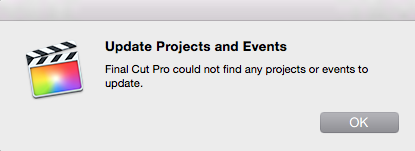
Sorry, tried to attach that screen grab before, it wasn't the correct format. Let me try this again. In the meantime, let me just say that by importing onto my colleagues computer, then copying the FCP Project and FCP Events folders both onto a drive, then trying to bring into my versions with "Update Projects and Veets" > "Locate" then choosing those files it said "Final Cut could not find and Projects or Events to update"
I will attach those screen grabs now, then go back and try what you suggested in your post. Wanted to send images first.
I will attach those screen grabs now, then go back and try what you suggested in your post. Wanted to send images first.
Please Log in to join the conversation.

19 Jun 2015 07:19 #65663
by whitemax
Replied by whitemax on topic FCPX saying No importable files, can't import
I remember FCPX does support F55 XAVC, is it?
Please Log in to join the conversation.
19 Jun 2015 13:29 #65681
by BenB
Replied by BenB on topic FCPX saying No importable files, can't import
What version of FCPX are you running?
What version of FCPX is your friend running?
I'm not sure why you have to update a Library manually.
What version of FCPX is your friend running?
I'm not sure why you have to update a Library manually.
Please Log in to join the conversation.
- EllenintheCity
-
Topic Author
- Offline
- New Member
-
Less
More
- Posts: 3
- Thank you received: 0
22 Jun 2015 17:42 #65774
by EllenintheCity
Replied by EllenintheCity on topic FCPX saying No importable files, can't import
Thanks to all weighing in on this...
I am running FCPX 10.2.1. My colleague running 10.0.9 - I'M SORRY THAT I ORIGINALLY SAID SHE WAS RUNNING SLIGHTLY NEWER VERSION - oops, meant she was running slightly older. That's why when her computer was able to view footage and import it, I thought we could import on her computer and transfer to mine.
So THAT is why I had to update the files when I tried importing them on my computer. Her version is pre-library structure, required updating.
When we did this, all I got were audio files!
I am running FCPX 10.2.1. My colleague running 10.0.9 - I'M SORRY THAT I ORIGINALLY SAID SHE WAS RUNNING SLIGHTLY NEWER VERSION - oops, meant she was running slightly older. That's why when her computer was able to view footage and import it, I thought we could import on her computer and transfer to mine.
So THAT is why I had to update the files when I tried importing them on my computer. Her version is pre-library structure, required updating.
When we did this, all I got were audio files!
Please Log in to join the conversation.
