


- Posts: 21
- Thank you received: 0
3 Post Moderation Rule for New Boarders (25 Jan 2021)
New boarders will have their posts moderated - Don't worry if you cannot see your post immediately.
Separating video tracks
15 Jun 2015 23:18 #65539
by chuckvid
Separating video tracks was created by chuckvid
Hello Guys:
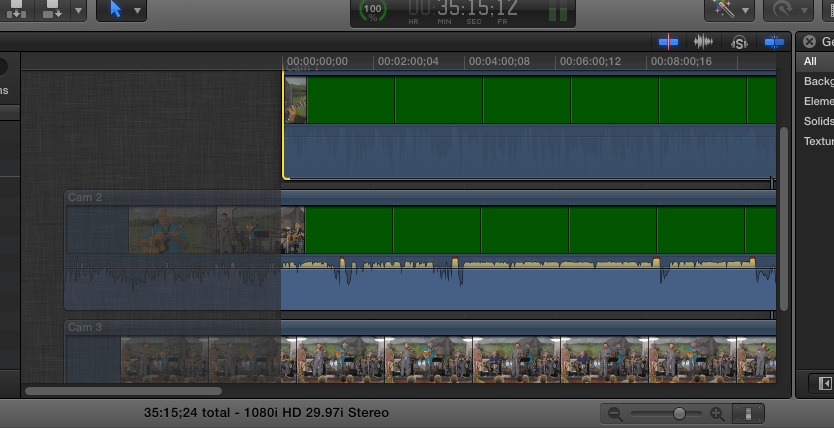
I have shot and successfully edited many 2 cameras shoots on FCPX 10.0.6 without any problems. I have just shot a concert and for the first time I've used three cameras. I've imported all the footage and moved all three to the timeline and they're synced up and ready to go. I wanted to open on camera 3 but when I try to roll (or ripple) cameras 2 or 1 they move in the timeline the same as camera 3 and they are "greyed out" up to that point and I haven't been able to solve the problem. Like I said this is the first time I've shot with three cameras and tried to edit the footage from them. Hopefully you guys can offer some suggestions. I've attached a screen shot, hope it helps.
Thanks
Chuck
I have shot and successfully edited many 2 cameras shoots on FCPX 10.0.6 without any problems. I have just shot a concert and for the first time I've used three cameras. I've imported all the footage and moved all three to the timeline and they're synced up and ready to go. I wanted to open on camera 3 but when I try to roll (or ripple) cameras 2 or 1 they move in the timeline the same as camera 3 and they are "greyed out" up to that point and I haven't been able to solve the problem. Like I said this is the first time I've shot with three cameras and tried to edit the footage from them. Hopefully you guys can offer some suggestions. I've attached a screen shot, hope it helps.
Thanks
Chuck
Please Log in to join the conversation.
