


3 Post Moderation Rule for New Boarders (25 Jan 2021)
New boarders will have their posts moderated - Don't worry if you cannot see your post immediately.
Move connected clip to playhead position?
- Betancourt
-
 Topic Author
- Offline
- Premium Member
-

Less
More
13 Jun 2015 15:26 #65487
by Betancourt
Pablo Betancourt
Move connected clip to playhead position? was created by Betancourt
Hi friends,
Is there any command or shortcut to move a connected clip to playhead position? Many times I need to close a gap between connected clips and doing it manually is not very responsive in my machine (macbook pro late 2013 Retina) so it slows me down.
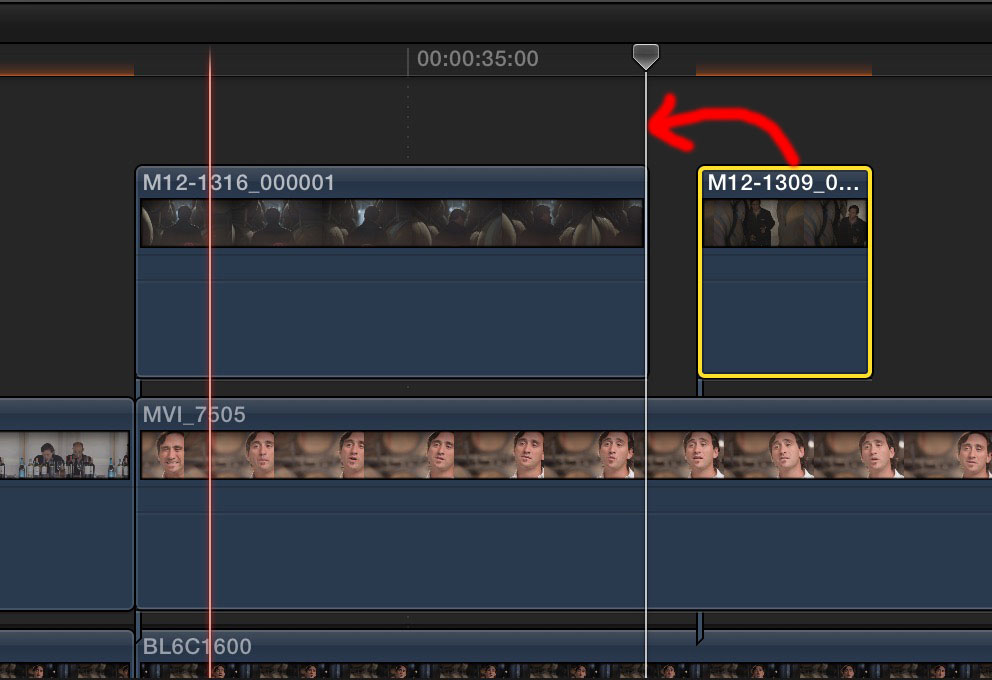
Is there any command or shortcut to move a connected clip to playhead position? Many times I need to close a gap between connected clips and doing it manually is not very responsive in my machine (macbook pro late 2013 Retina) so it slows me down.
Pablo Betancourt
Please Log in to join the conversation.
- Squamish ed
-

- Offline
- Elite Member
-

Less
More
- Posts: 238
- Thank you received: 20
13 Jun 2015 17:41 #65491
by Squamish ed
Ed
Replied by Squamish ed on topic Move connected clip to playhead position?
Not aware of any that will snap it over to the nearest connected clip. You probably already know that if you're close the , and . keys will move the selected clip 1 frame at a time and using them with the 'shift' key will move 10 frames at a time. For longer moves dragging with snapping on (N) seems to work well for me. YMMV.
Of course neither way will do anything about your machine responsiveness. Hope you find a simpler faster method - I'm sure you're not the only one who would benefit. Maybe a feature request to Apple?
Of course neither way will do anything about your machine responsiveness. Hope you find a simpler faster method - I'm sure you're not the only one who would benefit. Maybe a feature request to Apple?
Ed
Please Log in to join the conversation.

14 Jun 2015 15:09 #65512
by BenB
Replied by BenB on topic Move connected clip to playhead position?
If you're zoomed out too much your mouse won't have the accuracy or speed you're looking for. Zoom in enough and it works great. But no, there is no keyboard shortcut, but the function would be handy at times. Feedback form time.
Please Log in to join the conversation.
- ronny courtens
-

- Offline
- Moderator
-

Less
More
- Posts: 4455
- Thank you received: 962
15 Jun 2015 06:37 - 15 Jun 2015 06:40 #65524
by ronny courtens
Replied by ronny courtens on topic Move connected clip to playhead position?
Group-select the two connected clips, press CMD+G, delete the gap clip.
EDIT: I see this is a double post. Tom has already suggested the same solution in the other post.
- Ronny
EDIT: I see this is a double post. Tom has already suggested the same solution in the other post.
- Ronny
Last edit: 15 Jun 2015 06:40 by ronny courtens.
Please Log in to join the conversation.

15 Jun 2015 07:23 #65526
by Francois
Replied by Francois on topic Move connected clip to playhead position?
I am not sure this other way would be more efficient or « passe-partout » but you could (once clip to move is selected as illustrated) put skimmer on selected clip, « shift F » to match frame, « back space » to delete selected clip, then Q to connect at « play head ».
This is not to delete GAP but to connect at play head …
This is not to delete GAP but to connect at play head …
Please Log in to join the conversation.
- realworldmedia
-

- Offline
- Junior Member
-

Less
More
- Posts: 36
- Thank you received: 0
31 Aug 2022 15:24 #122064
by realworldmedia
Replied by realworldmedia on topic Move connected clip to playhead position?
Bringing this years-old thread back to life because I was just trying to figure out a way to something similar, and I found this thread while searching for an answer.
While I don't have a direct solution, I do have a straightforward indirect solution.
In your example, the clip you want to reposition is selected, and you want that clip at the playhead.
Solution: Cut. Paste.
Done.
While I don't have a direct solution, I do have a straightforward indirect solution.
In your example, the clip you want to reposition is selected, and you want that clip at the playhead.
Solution: Cut. Paste.
Done.
Please Log in to join the conversation.

31 Aug 2022 20:43 - 01 Sep 2022 04:43 #122072
by dmetz
Replied by dmetz on topic Move connected clip to playhead position?
** Command+X (cut), Option+V (paste connected, not to primary)
Last edit: 01 Sep 2022 04:43 by dmetz. Reason: Fixed key. Ugh. XD. Thanks Terry!
Please Log in to join the conversation.
