


- Posts: 1
- Thank you received: 0
3 Post Moderation Rule for New Boarders (25 Jan 2021)
New boarders will have their posts moderated - Don't worry if you cannot see your post immediately.
Adjusting Audio
06 Jun 2015 12:02 #65290
by bighop
Adjusting Audio was created by bighop
I used a shot gut mic and my iPad to record some interviews. One interview I had the mic gain turned up too much, I didn't catch it. the audio has some real loud peaks. I'm thinking of adjusting using the equalizer, but not an expert. Any have a simple guide or set of rules to follow for adjusting audio?
I'm on final cut 10.
I'm on final cut 10.
Please Log in to join the conversation.

07 Jun 2015 05:01 #65301
by BenB
Replied by BenB on topic Adjusting Audio
First, put a limiter on it to help tame the peaks. Then you could try using the background sound removal in the Inspector. After those two I'd apply an EQ.
Please Log in to join the conversation.


07 Jun 2015 12:38 #65308
by joema
If it's just a few too-loud peaks, the steps Ben mentioned will help.
OTOH, IF the audio is actually clipped that is a difficult case. Examine the waveform to determine that, if necessary magnifying the waveform size in FCP X. Clipped or flat-topped audio is essentially lost information. The sharply truncated waveform causes significant distortion which is visible in a spectrogram and also audible. It can't be truly fixed by adjusting levels or EQ.
There are various digital audio workstation tools which can de-clip and attempt to repair such cases. One example is SoundSoap 4: www.soundness-llc.com/products/soundsoap4/ The one I use is Izotope RX4, it's pretty good but relatively expensive: www.izotope.com/en/products/audio-repair/rx/
Replied by joema on topic Adjusting Audio
bighop wrote: ....One interview I had the mic gain turned up too much, I didn't catch it. the audio has some real loud peaks...
If it's just a few too-loud peaks, the steps Ben mentioned will help.
OTOH, IF the audio is actually clipped that is a difficult case. Examine the waveform to determine that, if necessary magnifying the waveform size in FCP X. Clipped or flat-topped audio is essentially lost information. The sharply truncated waveform causes significant distortion which is visible in a spectrogram and also audible. It can't be truly fixed by adjusting levels or EQ.
There are various digital audio workstation tools which can de-clip and attempt to repair such cases. One example is SoundSoap 4: www.soundness-llc.com/products/soundsoap4/ The one I use is Izotope RX4, it's pretty good but relatively expensive: www.izotope.com/en/products/audio-repair/rx/
Please Log in to join the conversation.
- simon.a.billington
-

- Offline
- Elite Member
-

Less
More
- Posts: 179
- Thank you received: 10
09 Jun 2015 04:01 #65372
by simon.a.billington
Replied by simon.a.billington on topic Adjusting Audio
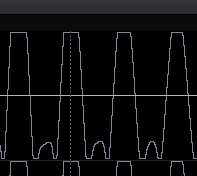
You can tell if audio is clipped by zooming into the loudest, or tallest, part of the waveform, and if it is flat across the top as in this example, then it would be clipped.
This would mean that your audio exceeded the loudest possible level that the system, or cam was capable of recording and so that information was lost for good.
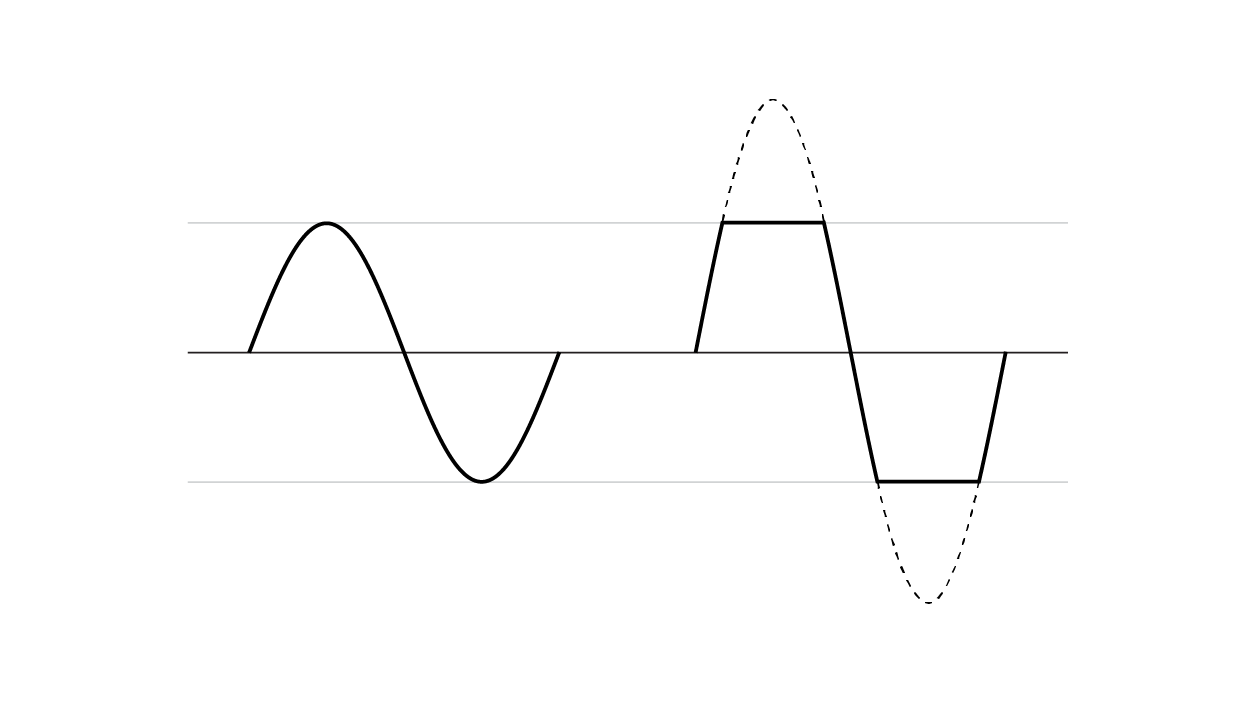
If its a really small number of clipped peaks and the they are relatively short in duration then you could get away with that. If there are too many, or they are too long in duration then it will be more noticeable. It should sound distorted if this the case, even when you lower the level.
If the clipped peaks are in between you could try a Declick plugin, but I doubt you will have much success with it because it is designed to work differently. Otherwise the only Declipper I know of is in the iZotope RX suite that Joema spoke of. You shouldn't need Advanced, which is just as well because it is super expensive, over $1200 normally.
In an ideal world, it would really be better to re-record, if you have a large number of peaks, but most likely this is not possible. As often is the case when working with video.
If you have a decent waveform editor you could try using the Pencil Tool to draw in the missing information. You will need to reduce the overall clip gain a few dB first to make room for your corrections. It takes patience and practice, some times a lot. All you need to do is round the tops, this can have mixed results however.
A limiter may have some desirable effect. If its extremely clipped it could make it worse. For a more transparent, variation of the limiter you could try the Vocal Rider , which can do an almost similar job, but works quite differently and more transparently.
But then...
Your problem could be just case of the levels being louder than the others. You can always make up for this by lowering your overall clip volume.
Having said that, dialogue does sound better if its had some processing done anyway. A bit or eq and limiting is good for that, the Vocal Rider I was speaking of earlier calloused also prove useful. MV2 is another great option, its a step up from a limiter. Not only does it allow you to regulate your peaks, but you can also bring up your quieter levels as well. Just be careful not to bring up your background noise in the process. Either way, applying a little denoising might not go astray.
This would mean that your audio exceeded the loudest possible level that the system, or cam was capable of recording and so that information was lost for good.
If its a really small number of clipped peaks and the they are relatively short in duration then you could get away with that. If there are too many, or they are too long in duration then it will be more noticeable. It should sound distorted if this the case, even when you lower the level.
If the clipped peaks are in between you could try a Declick plugin, but I doubt you will have much success with it because it is designed to work differently. Otherwise the only Declipper I know of is in the iZotope RX suite that Joema spoke of. You shouldn't need Advanced, which is just as well because it is super expensive, over $1200 normally.
In an ideal world, it would really be better to re-record, if you have a large number of peaks, but most likely this is not possible. As often is the case when working with video.
If you have a decent waveform editor you could try using the Pencil Tool to draw in the missing information. You will need to reduce the overall clip gain a few dB first to make room for your corrections. It takes patience and practice, some times a lot. All you need to do is round the tops, this can have mixed results however.
A limiter may have some desirable effect. If its extremely clipped it could make it worse. For a more transparent, variation of the limiter you could try the Vocal Rider , which can do an almost similar job, but works quite differently and more transparently.
But then...
Your problem could be just case of the levels being louder than the others. You can always make up for this by lowering your overall clip volume.
Having said that, dialogue does sound better if its had some processing done anyway. A bit or eq and limiting is good for that, the Vocal Rider I was speaking of earlier calloused also prove useful. MV2 is another great option, its a step up from a limiter. Not only does it allow you to regulate your peaks, but you can also bring up your quieter levels as well. Just be careful not to bring up your background noise in the process. Either way, applying a little denoising might not go astray.
Please Log in to join the conversation.
