


- Posts: 5
- Thank you received: 0
3 Post Moderation Rule for New Boarders (25 Jan 2021)
New boarders will have their posts moderated - Don't worry if you cannot see your post immediately.
Quater vertical snap lines in video frame
05 Jun 2015 08:01 - 05 Jun 2015 18:31 #65248
by iUseFCP
Quater vertical snap lines in video frame was created by iUseFCP
Hello!
You can easily find the vertical center position of a video frame like in the attached picture. But how do you get a snap line in the center of the center (in quarters) vertically?
You can easily find the vertical center position of a video frame like in the attached picture. But how do you get a snap line in the center of the center (in quarters) vertically?
Last edit: 05 Jun 2015 18:31 by iUseFCP.
Please Log in to join the conversation.

05 Jun 2015 13:15 #65262
by BenB
Replied by BenB on topic Quater vertical snap lines in video frame
The image won't open for me.
Please Log in to join the conversation.


05 Jun 2015 15:12 #65265
by dgwvideo
Creating history....one edit at a time !
Replied by dgwvideo on topic Quater vertical snap lines in video frame
I can't open your image either, but you can create a grid overlay or use one of the many free grid plugins available. Place your content precisely using the grid as an aid and then delete the grid when you are done.
Creating history....one edit at a time !
Please Log in to join the conversation.
05 Jun 2015 18:33 #65276
by iUseFCP
Replied by iUseFCP on topic Quater vertical snap lines in video frame
Thanks for the reply! How do I create a grid overlay?
Please Log in to join the conversation.
05 Jun 2015 19:04 #65278
by iUseFCP
Replied by iUseFCP on topic Quater vertical snap lines in video frame
I can't edit my post since it need to be confirmed by admin. Anyway, I managed to get a grid using the plugin from Digital Heaven. However, I ideally want to be able to snap things to the grid. Is that possible?
Please Log in to join the conversation.
- Karsten Schlüter
-

- Offline
- Moderator
-

Less
More
- Posts: 3790
- Thank you received: 718
06 Jun 2015 10:05 - 06 Jun 2015 10:07 #65288
by Karsten Schlüter
Replied by Karsten Schlüter on topic Quater vertical snap lines in video frame
I haven't seen 'snappy/magnetic' help-lines … yet.
Pure speculation:
When you regulary need clips at a specific position, in specfic sizr, build your own Motion Effect
Put a Dropzone at wanted position, re-size/publish Size parameter … done n a minute, see attachment
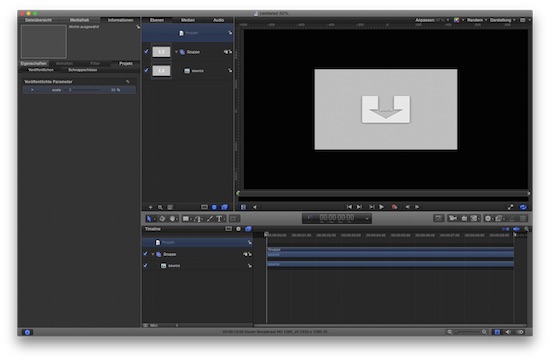
The effect in Motion5...
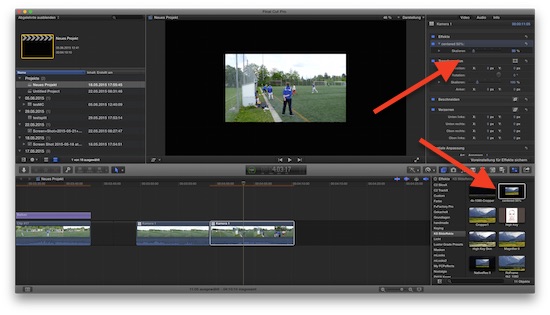
… and installed in FCPX: drag it from the Effects list onto the clip,
In the Inspector is a slider "size"...
like that?
Pure speculation:
- that is a feature, priviledged to Apple programmers only
- that is feature, not documented/applied to the SDK
When you regulary need clips at a specific position, in specfic sizr, build your own Motion Effect
Put a Dropzone at wanted position, re-size/publish Size parameter … done n a minute, see attachment
The effect in Motion5...
… and installed in FCPX: drag it from the Effects list onto the clip,
In the Inspector is a slider "size"...
like that?
Last edit: 06 Jun 2015 10:07 by Karsten Schlüter.
Please Log in to join the conversation.
07 Jun 2015 05:05 - 07 Jun 2015 05:06 #65302
by BenB
Replied by BenB on topic Quater vertical snap lines in video frame
You mean like the ones in Motion. Yes, FCPX does in fact have them. Yo have to turn on the Position tools in the Viewer. Bottom left of the Viewer.
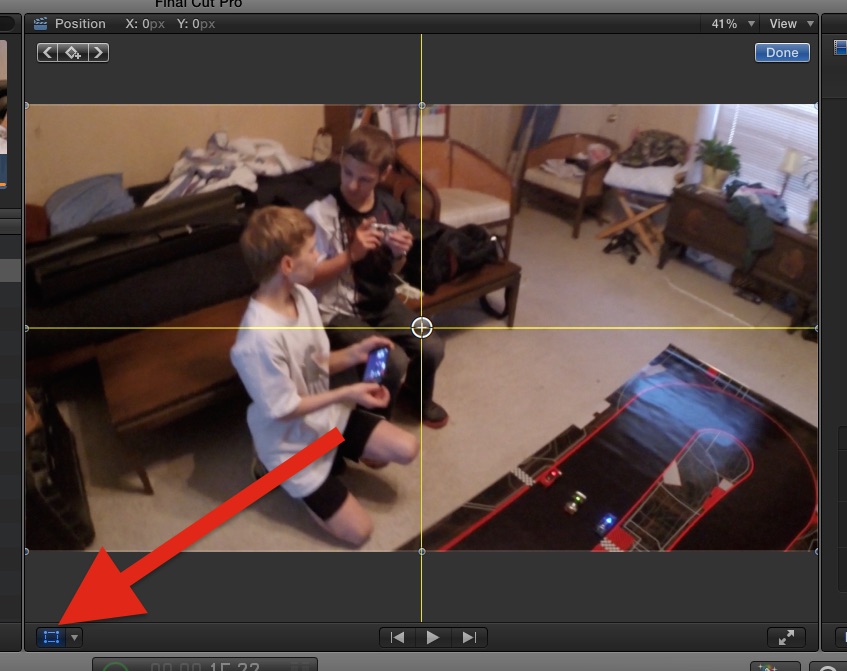
Last edit: 07 Jun 2015 05:06 by BenB.
Please Log in to join the conversation.
07 Jun 2015 07:46 - 07 Jun 2015 07:50 #65304
by iUseFCP
Replied by iUseFCP on topic Quater vertical snap lines in video frame
I got this when applying the center50% plugin, but I think the grid plugin will do. Thanks for all the help guys! 

Last edit: 07 Jun 2015 07:50 by iUseFCP.
Please Log in to join the conversation.
- Karsten Schlüter
-
- Offline
- Moderator
-
Less
More
- Posts: 3790
- Thank you received: 718
07 Jun 2015 10:55 #65306
by Karsten Schlüter
oops how come?
This was done quick'n dirty, but 'missing clip' indicates, I should explain better:
you have to drag the effect onto an existing clip in the Projects timeline....
Replied by Karsten Schlüter on topic Quater vertical snap lines in video frame
iUseFCP wrote: I got this when applying the center50% plugin, ...
oops how come?
This was done quick'n dirty, but 'missing clip' indicates, I should explain better:
you have to drag the effect onto an existing clip in the Projects timeline....
Please Log in to join the conversation.
07 Jun 2015 13:45 #65310
by iUseFCP
Replied by iUseFCP on topic Quater vertical snap lines in video frame
That's what I did, I think you explanation was good. Don't worry about it. 
Please Log in to join the conversation.
- Karsten Schlüter
-
- Offline
- Moderator
-
Less
More
- Posts: 3790
- Thank you received: 718
07 Jun 2015 14:09 #65311
by Karsten Schlüter
Replied by Karsten Schlüter on topic Quater vertical snap lines in video frame
strrrrange.... The plugin is just a resized dropzone, done. The Mother of all efffects, the bare minimum. That red frame tells us, clip/content missing, but when you drag tt on any clip, there IS content! ... I'm no engineer... another proof :whistle:
....anyhow, you found your resolution .... :lol:
....anyhow, you found your resolution .... :lol:
Please Log in to join the conversation.
