


- Posts: 786
- Thank you received: 21
3 Post Moderation Rule for New Boarders (25 Jan 2021)
New boarders will have their posts moderated - Don't worry if you cannot see your post immediately.
FCP X not backing up?
- Jonathan Levin
-
 Topic Author
- Offline
- Platinum Member
-

Less
More
02 Jun 2015 21:06 #65159
by Jonathan Levin
FCP X not backing up? was created by Jonathan Levin
Hi everyone.
I've got a couple of libraries that have projects I've been working on. All but one is backing up, and I can't figure out why. Anyone know why a library might not back up? I've checked my settings.
Isn't FCP X supposed to "auto" back up every 15 minutes or upon quiting?
Even quitting doesn't make a back up. Very strange.
Let me know if you have ???s
Jonathan
I've got a couple of libraries that have projects I've been working on. All but one is backing up, and I can't figure out why. Anyone know why a library might not back up? I've checked my settings.
Isn't FCP X supposed to "auto" back up every 15 minutes or upon quiting?
Even quitting doesn't make a back up. Very strange.
Let me know if you have ???s
Jonathan
Please Log in to join the conversation.

03 Jun 2015 00:14 #65160
by BenB
Replied by BenB on topic FCP X not backing up?
Every 15 minutes while it is being worked on. The modification date/time is read regularly. If it has changed in the past 15 minutes, it gets backed up. If it hasn't changed, it doesn't get backed up. So a Library only gets backed up if something inside of it has been changed, not if it is open and sitting idle.
Please Log in to join the conversation.
- Jonathan Levin
-
Topic Author
- Offline
- Platinum Member
-
Less
More
- Posts: 786
- Thank you received: 21
03 Jun 2015 02:07 #65161
by Jonathan Levin
Replied by Jonathan Levin on topic FCP X not backing up?
BenB thanks.
Does rendering count as a change? Lets say I render a project and then quit the FC a few moments after it has finished. I don't see that getting backed up, although when I re open the project, it seems to still be rendered except for maybe a few clips.
Another thing I found today is if I change the location of my backup by creating a new folder within my main backup folder and choose to save it to the new folder I imediately get a backup of the library. weird.
Does rendering count as a change? Lets say I render a project and then quit the FC a few moments after it has finished. I don't see that getting backed up, although when I re open the project, it seems to still be rendered except for maybe a few clips.
Another thing I found today is if I change the location of my backup by creating a new folder within my main backup folder and choose to save it to the new folder I imediately get a backup of the library. weird.
Please Log in to join the conversation.
03 Jun 2015 03:17 #65162
by BenB
Replied by BenB on topic FCP X not backing up?
Rendering would trigger a backup, in 15 more minutes. If you quit before, then you quit before. I've never quit while rendering. Now, do you mean render a timeline for playback, or render as in exporting a file?
Please Log in to join the conversation.
- Jonathan Levin
-
Topic Author
- Offline
- Platinum Member
-
Less
More
- Posts: 786
- Thank you received: 21
03 Jun 2015 20:22 #65188
by Jonathan Levin
Replied by Jonathan Levin on topic FCP X not backing up?
Rendering a timeline. And yes I let it finish rendering and then quit a minute or two later. Still no back up. It will back up to the new folder that I made in my back up folder. Odd.
Please Log in to join the conversation.
03 Jun 2015 21:08 #65189
by BenB
Replied by BenB on topic FCP X not backing up?
When I'm back in my studio I'll run some tests.
Please Log in to join the conversation.
- Jonathan Levin
-
Topic Author
- Offline
- Platinum Member
-
Less
More
- Posts: 786
- Thank you received: 21
04 Jun 2015 12:39 - 04 Jun 2015 12:40 #65202
by Jonathan Levin
Replied by Jonathan Levin on topic FCP X not backing up?
Thanks BenB.
I'm not sure what is supposed to trigger a back up. But I would hope that it happens upon quiting/closing a library. Especially if you make a bunch of changes to a project before the "scheduled" 15 minute back up time.
Two thing I really miss is to manually do a save and the ability to revert, instead of undo, undo, undo, etc. I know I can do a snapshot but.....just not crazy about software deciding for me when to save.
I'm not sure what is supposed to trigger a back up. But I would hope that it happens upon quiting/closing a library. Especially if you make a bunch of changes to a project before the "scheduled" 15 minute back up time.
Two thing I really miss is to manually do a save and the ability to revert, instead of undo, undo, undo, etc. I know I can do a snapshot but.....just not crazy about software deciding for me when to save.
Last edit: 04 Jun 2015 12:40 by Jonathan Levin.
Please Log in to join the conversation.
04 Jun 2015 13:06 #65205
by BenB
Replied by BenB on topic FCP X not backing up?
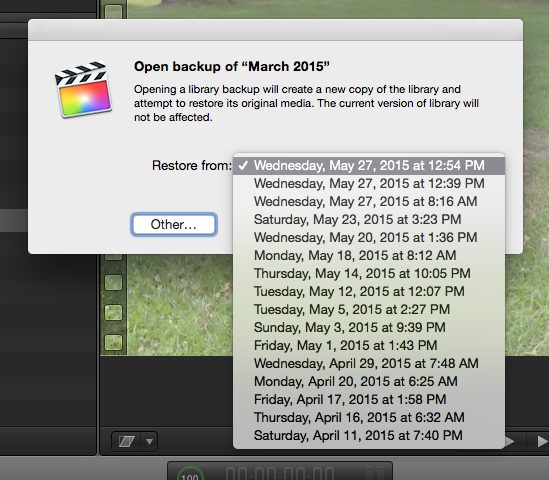
If you didn't have auto-save, you'd wish you did, trust me. I've seen too many students and clients think they lost work, only to be relieved there was an auto-backup. And, you can go back to any of those auto-backup versions at anytime. File > Open Library > From Backup > select the backup to go to. The great thing about FCPX is it doesn't "revert", so you never lose anything. It creates a new Project/Event/etc from that backup. So you have the best of both worlds. Don't want one of them at some point? Delete it, simple.
I just got in to my studio and am about to do some tests on the auto-backup. Will post what I find.
I just got in to my studio and am about to do some tests on the auto-backup. Will post what I find.
Please Log in to join the conversation.
04 Jun 2015 14:03 - 04 Jun 2015 14:04 #65211
by BenB
Replied by BenB on topic FCP X not backing up?
OK, ran some tests, here's what I found (and reported to
Apple via Feedback page
, please fill it out).
Test run on June 4, 2015
8:12 made changes (add two clips to Project timeline)
8:27 there was no backup made
8:30 quit FCPX, no backup made
8:33 Launch FCPX, made changes (imported a new clip, add two more clips to Project timeline, delete 4 existing clips from same timeline)
8:48 there was no backup made
8:50 quit FCPX, no backup made
Changed location of FCPX auto-backups for this test Library, re-launched FCPX, repeated tests, same results, no auto-backups at all.
No backups for anything made since May 27, at 12:54pm for this Library.
Conclusion; FCPX 10.2 auto-backup system is basically non-functional.
Test run on June 4, 2015
8:12 made changes (add two clips to Project timeline)
8:27 there was no backup made
8:30 quit FCPX, no backup made
8:33 Launch FCPX, made changes (imported a new clip, add two more clips to Project timeline, delete 4 existing clips from same timeline)
8:48 there was no backup made
8:50 quit FCPX, no backup made
Changed location of FCPX auto-backups for this test Library, re-launched FCPX, repeated tests, same results, no auto-backups at all.
No backups for anything made since May 27, at 12:54pm for this Library.
Conclusion; FCPX 10.2 auto-backup system is basically non-functional.
Last edit: 04 Jun 2015 14:04 by BenB.
Please Log in to join the conversation.
- Jonathan Levin
-
Topic Author
- Offline
- Platinum Member
-
Less
More
- Posts: 786
- Thank you received: 21
04 Jun 2015 14:47 #65216
by Jonathan Levin
Replied by Jonathan Levin on topic FCP X not backing up?
Thanks for testing that. Before you sent that, I was thinking of re-replying to you to say not to bother testing because I figured it was something I was doing wrong.
One thing that I found "triggered" a back up is when I import files, place them in a project, play around with them for a little bit. I then check the back up folder and there does seem to be a back up made.
So add this issue to the other big issue- Photoshop layered files not updating with changes to original file.
Jonathan
One thing that I found "triggered" a back up is when I import files, place them in a project, play around with them for a little bit. I then check the back up folder and there does seem to be a back up made.
So add this issue to the other big issue- Photoshop layered files not updating with changes to original file.
Jonathan
Please Log in to join the conversation.
- Jonathan Levin
-
Topic Author
- Offline
- Platinum Member
-
Less
More
- Posts: 786
- Thank you received: 21
04 Jun 2015 14:56 #65218
by Jonathan Levin
Replied by Jonathan Levin on topic FCP X not backing up?
Also, while this is being sorted out, it would probably be wise to manually back up a library somewhere.
Please Log in to join the conversation.
- Squamish ed
-

- Offline
- Elite Member
-

Less
More
- Posts: 238
- Thank you received: 20
04 Jun 2015 17:26 - 04 Jun 2015 17:27 #65223
by Squamish ed
Ed
Replied by Squamish ed on topic FCP X not backing up?
Jonathan & Ben
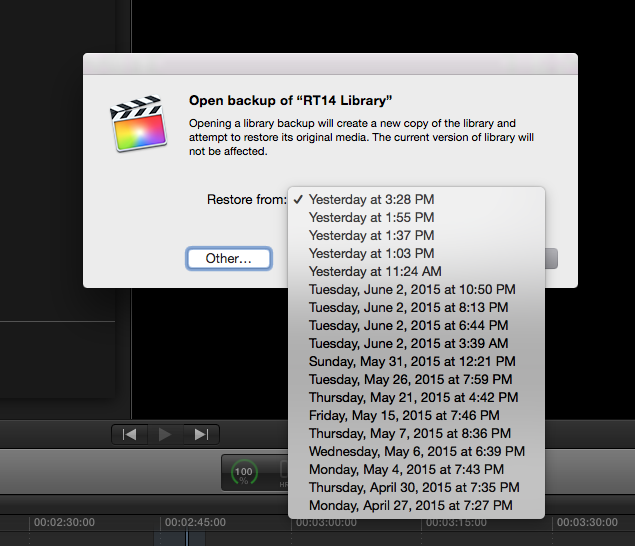
Your discussion got my immediate attention so I checked my backup status. It seems to be working. This suggests to me that this bug is not consistent. OS X 10.10.3, FCPX 10.2.1
Your discussion got my immediate attention so I checked my backup status. It seems to be working. This suggests to me that this bug is not consistent. OS X 10.10.3, FCPX 10.2.1
Ed
Last edit: 04 Jun 2015 17:27 by Squamish ed. Reason: forgot attachment
Please Log in to join the conversation.
