


- Posts: 929
- Thank you received: 131
3 Post Moderation Rule for New Boarders (25 Jan 2021)
New boarders will have their posts moderated - Don't worry if you cannot see your post immediately.
FCPX 10.2.1 crashes
24 Jun 2015 21:35 - 24 Jun 2015 21:48 #65854
by tpayton
BTW I only use my MX02 driving my CRT. All other times I use HDMI out to drive my 2 client LCD monitors, which is significantly better that a third party box. Very low latency, it is fantastic. Much better than the Matrox. BTW. FCPX can switch between the to a/v outs seemingly, even during playback.
Replied by tpayton on topic FCPX 10.2.1 crashes
Jonathan Levin wrote: Have you tried to completely disconnect the Matrox? FWIW, I just sold my MXO2 Mini on Ebay, and I think that was one of the happiest days of my life!...
Final Cut X has a pretty nice "Show viewers on second display" command which made the price of FCP X worth the price right there....
Jonathan
BTW I only use my MX02 driving my CRT. All other times I use HDMI out to drive my 2 client LCD monitors, which is significantly better that a third party box. Very low latency, it is fantastic. Much better than the Matrox. BTW. FCPX can switch between the to a/v outs seemingly, even during playback.
Last edit: 24 Jun 2015 21:48 by tpayton.
Please Log in to join the conversation.
- Pepper Rafferty
-

- Offline
- New Member
-

Less
More
- Posts: 17
- Thank you received: 0
24 Jun 2015 23:07 #65855
by Pepper Rafferty
Replied by Pepper Rafferty on topic FCPX 10.2.1 crashes
Well the reason I don't think its a cable or hardware issue is the system was working very well before I upgraded to 10.2.1. The only thing that's changed is the upgrade. I Also thought it could be a bus problem so i have made sure the Cinema Display and Pegasus are separated as was the DVI. I have now unplugged every thing apart from the Cinema display and the Pegasus. If I can work crash free for and hour i will start plugging up the gear one at a time until it breaks!
Please Log in to join the conversation.
24 Jun 2015 23:17 #65856
by tpayton
Replied by tpayton on topic FCPX 10.2.1 crashes
Well the thing about hardware is that it can fail at any time. So it could of course just be coincidental with the 10.2.1 update. So let me know how that goes.
The other issue is that I have't heard anyone report anything about crashing during trimming or normal editing. If you want to the header and first few lines of your crash logs (You'll find them in the Console a[[. Then under Diagnostic and Usage Information, user Diagnostic Reports. You'll see the Final Cut crash reports there by date. The human readable stuff starts at "Crash Thread" and then goes to a few lines down until "Thread X Crash". You can see if there is a specific plugin, etc. Like for example here is a FCPX crash that was caused by the adobe creative cloud! I'm doubt it was really that that caused it but it could be!
Crashed Thread: 0 CrBrowserMain Dispatch queue: com.apple.main-thread
Exception Type: EXC_BAD_ACCESS (SIGSEGV)
Exception Codes: KERN_INVALID_ADDRESS at 0x0000000000000019
VM Regions Near 0x19:
-->
__TEXT 00000000000ac000-0000000000127000 [ 492K] r-x/rwx SM=COW /Applications/Utilities/Adobe Creative Cloud/*/Creative Cloud.app/Contents/MacOS/Creative Cloud
Thread 0 Crashed:: CrBrowserMain Dispatch queue: com.apple.main-thread
BTW. Did you see my post about my use of the MX02? Why kind of display are you driving with it? I've switched to using a HDMI display for my client monitor about 90% of the time and it works great.
The other issue is that I have't heard anyone report anything about crashing during trimming or normal editing. If you want to the header and first few lines of your crash logs (You'll find them in the Console a[[. Then under Diagnostic and Usage Information, user Diagnostic Reports. You'll see the Final Cut crash reports there by date. The human readable stuff starts at "Crash Thread" and then goes to a few lines down until "Thread X Crash". You can see if there is a specific plugin, etc. Like for example here is a FCPX crash that was caused by the adobe creative cloud! I'm doubt it was really that that caused it but it could be!
Crashed Thread: 0 CrBrowserMain Dispatch queue: com.apple.main-thread
Exception Type: EXC_BAD_ACCESS (SIGSEGV)
Exception Codes: KERN_INVALID_ADDRESS at 0x0000000000000019
VM Regions Near 0x19:
-->
__TEXT 00000000000ac000-0000000000127000 [ 492K] r-x/rwx SM=COW /Applications/Utilities/Adobe Creative Cloud/*/Creative Cloud.app/Contents/MacOS/Creative Cloud
Thread 0 Crashed:: CrBrowserMain Dispatch queue: com.apple.main-thread
BTW. Did you see my post about my use of the MX02? Why kind of display are you driving with it? I've switched to using a HDMI display for my client monitor about 90% of the time and it works great.
Please Log in to join the conversation.
- Pepper Rafferty
-
- Offline
- New Member
-
Less
More
- Posts: 17
- Thank you received: 0
24 Jun 2015 23:31 #65857
by Pepper Rafferty
Replied by Pepper Rafferty on topic FCPX 10.2.1 crashes
so this looks like a display issue Crashed Thread: 0 Dispatch queue: com.apple.main-thread
Exception Type: EXC_BAD_ACCESS (SIGSEGV)
Exception Codes: KERN_INVALID_ADDRESS at 0x00003e880f84bec0
VM Regions Near 0x3e880f84bec0:
__LINKEDIT 00001234804a6000-00001234804b9000 [ 76K] r--/rwx SM=COW /System/Library/Extensions/AMDRadeonX4000GLDriver.bundle/Contents/MacOS/AMDRadeonX4000GLDriver
Exception Type: EXC_BAD_ACCESS (SIGSEGV)
Exception Codes: KERN_INVALID_ADDRESS at 0x00003e880f84bec0
VM Regions Near 0x3e880f84bec0:
__LINKEDIT 00001234804a6000-00001234804b9000 [ 76K] r--/rwx SM=COW /System/Library/Extensions/AMDRadeonX4000GLDriver.bundle/Contents/MacOS/AMDRadeonX4000GLDriver
Please Log in to join the conversation.
24 Jun 2015 23:41 #65858
by tpayton
Replied by tpayton on topic FCPX 10.2.1 crashes
You need a little bit before and proceeding that crash report. I was just joking about the VM Regions near causing the problem. The thread info and Application specific info is what you are looking for.
Please Log in to join the conversation.
- Pepper Rafferty
-
- Offline
- New Member
-
Less
More
- Posts: 17
- Thank you received: 0
25 Jun 2015 10:33 #65870
by Pepper Rafferty
Replied by Pepper Rafferty on topic FCPX 10.2.1 crashes
So with Just The Mac Pro Pegasus USB keyboard and the wireless mouse I've had a crash
hers's the first part of the log
Process: Final Cut Pro [524]
Path: /Applications/Final Cut Pro.app/Contents/MacOS/Final Cut Pro
Identifier: com.apple.FinalCut
Version: 10.2.1 (264102)
Build Info: ProEditor-26410002056000000~1
App Item ID: 424389933
App External ID: 812379208
Code Type: X86-64 (Native)
Parent Process: ??? [1]
Responsible: Final Cut Pro [524]
User ID: 501
Date/Time: 2015-06-25 11:26:01.319 +0100
OS Version: Mac OS X 10.10.3 (14D136)
Report Version: 11
Anonymous UUID: 3EA6F925-E3D4-345B-4450-A74A5C4A9527
Time Awake Since Boot: 5800 seconds
Crashed Thread: 0 Dispatch queue: com.apple.main-thread
Exception Type: EXC_BAD_ACCESS (SIGSEGV)
Exception Codes: KERN_INVALID_ADDRESS at 0x0000412df61abec0
VM Regions Near 0x412df61abec0:
JS JIT generated code 000038945ee01000-000038945ee02000 [ 4K] ---/rwx SM=NUL
-->
MALLOC_NANO 0000600000000000-0000600000a00000 [ 10.0M] rw-/rwx SM=COW
Application Specific Information:
objc_msgSend() selector name: observeValueForKeyPath:ofObject:change:context:
Thread 0 Crashed:: Dispatch queue: com.apple.main-thread
0 libobjc.A.dylib 0x00007fff8e95b0dd objc_msgSend + 29
1 com.apple.Foundation 0x00007fff8f6700f3 NSKeyValueNotifyObserver + 382
2 com.apple.Foundation 0x00007fff8f67cd68 NSKeyValueDidChange + 463
3 com.apple.Foundation 0x00007fff8f63597d -[NSObject(NSKeyValueObserverNotification) didChangeValueForKey:] + 118
4 com.apple.Flexo 0x000000010d2d68fa -[FFAnchoredSequence beginEditing] + 90
5 com.apple.Flexo 0x000000010d2d6eea -[FFAnchoredSequence _actionBeginEditing] + 474
6 com.apple.Flexo 0x000000010d04e9f5 -[FFBinObject(FFBinObjectController) actionBegin:animationHint:deferUpdates:] + 53
7 com.apple.Flexo 0x000000010d37ac07 -[FFAnchoredSequence(FFAnchoredSequenceActions) actionResolveLaneGapsInContainer:error:] + 39
8 com.apple.Flexo 0x000000010d5bb219 -[FFAnchoredTimelineModule(FFTLKDataSource) _handlerDidStopTracking:] + 681
9 com.apple.TLKEventDispatcher 0x0000000110a1c638 -[TLKEventHandler notifyDelegateDidPerformSelector:withDelegate:] + 129
10 com.apple.TLKEventDispatcher 0x0000000110a195c7 -[TLKEventDispatcher _startTrackingLoop] + 1160
11 com.apple.TLKEventDispatcher 0x0000000110a1a586 -[TLKEventDispatcher _evaluateEventDescription:withEventContext:] + 520
12 com.apple.TLKEventDispatcher 0x0000000110a19f53 -[TLKEventDispatcher dispatchEvent:] + 360
13 com.apple.TLKEventDispatcher 0x0000000110a17918 -[TLKEventDispatcher mouseDown:] + 266
14 com.apple.AppKit 0x00007fff933c3dfb forwardMethod + 126
15 com.apple.AppKit 0x00007fff93a3c2fc -[NSWindow _reallySendEvent:isDelayedEvent:] + 14125
16 com.apple.AppKit 0x00007fff933cbd76 -[NSWindow sendEvent:] + 470
17 com.apple.prokit 0x000000010cb4a665 -[NSProWindow sendEvent:] + 236
18 com.apple.AppKit 0x00007fff933c8312 -[NSApplication sendEvent:] + 2504
19 com.apple.prokit 0x000000010cb28b81 -[NSProApplication sendEvent:] + 131
20 com.apple.Flexo 0x000000010d0d8c3f -[FFApplication sendEvent:] + 591
21 com.apple.AppKit 0x00007fff932f1c68 -[NSApplication run] + 711
22 com.apple.prokit 0x000000010cb2942f NSProApplicationMain + 329
23 com.apple.FinalCut 0x000000010c6d4e50 main + 1344
24 libdyld.dylib 0x00007fff89be65c9 start + 1
Thread 1:: Dispatch queue: com.apple.libdispatch-manager
0 libsystem_kernel.dylib 0x00007fff8aa57232 kevent64 + 10
1 libdispatch.dylib 0x00007fff96db4a6a _dispatch_mgr_thread + 52
hers's the first part of the log
Process: Final Cut Pro [524]
Path: /Applications/Final Cut Pro.app/Contents/MacOS/Final Cut Pro
Identifier: com.apple.FinalCut
Version: 10.2.1 (264102)
Build Info: ProEditor-26410002056000000~1
App Item ID: 424389933
App External ID: 812379208
Code Type: X86-64 (Native)
Parent Process: ??? [1]
Responsible: Final Cut Pro [524]
User ID: 501
Date/Time: 2015-06-25 11:26:01.319 +0100
OS Version: Mac OS X 10.10.3 (14D136)
Report Version: 11
Anonymous UUID: 3EA6F925-E3D4-345B-4450-A74A5C4A9527
Time Awake Since Boot: 5800 seconds
Crashed Thread: 0 Dispatch queue: com.apple.main-thread
Exception Type: EXC_BAD_ACCESS (SIGSEGV)
Exception Codes: KERN_INVALID_ADDRESS at 0x0000412df61abec0
VM Regions Near 0x412df61abec0:
JS JIT generated code 000038945ee01000-000038945ee02000 [ 4K] ---/rwx SM=NUL
-->
MALLOC_NANO 0000600000000000-0000600000a00000 [ 10.0M] rw-/rwx SM=COW
Application Specific Information:
objc_msgSend() selector name: observeValueForKeyPath:ofObject:change:context:
Thread 0 Crashed:: Dispatch queue: com.apple.main-thread
0 libobjc.A.dylib 0x00007fff8e95b0dd objc_msgSend + 29
1 com.apple.Foundation 0x00007fff8f6700f3 NSKeyValueNotifyObserver + 382
2 com.apple.Foundation 0x00007fff8f67cd68 NSKeyValueDidChange + 463
3 com.apple.Foundation 0x00007fff8f63597d -[NSObject(NSKeyValueObserverNotification) didChangeValueForKey:] + 118
4 com.apple.Flexo 0x000000010d2d68fa -[FFAnchoredSequence beginEditing] + 90
5 com.apple.Flexo 0x000000010d2d6eea -[FFAnchoredSequence _actionBeginEditing] + 474
6 com.apple.Flexo 0x000000010d04e9f5 -[FFBinObject(FFBinObjectController) actionBegin:animationHint:deferUpdates:] + 53
7 com.apple.Flexo 0x000000010d37ac07 -[FFAnchoredSequence(FFAnchoredSequenceActions) actionResolveLaneGapsInContainer:error:] + 39
8 com.apple.Flexo 0x000000010d5bb219 -[FFAnchoredTimelineModule(FFTLKDataSource) _handlerDidStopTracking:] + 681
9 com.apple.TLKEventDispatcher 0x0000000110a1c638 -[TLKEventHandler notifyDelegateDidPerformSelector:withDelegate:] + 129
10 com.apple.TLKEventDispatcher 0x0000000110a195c7 -[TLKEventDispatcher _startTrackingLoop] + 1160
11 com.apple.TLKEventDispatcher 0x0000000110a1a586 -[TLKEventDispatcher _evaluateEventDescription:withEventContext:] + 520
12 com.apple.TLKEventDispatcher 0x0000000110a19f53 -[TLKEventDispatcher dispatchEvent:] + 360
13 com.apple.TLKEventDispatcher 0x0000000110a17918 -[TLKEventDispatcher mouseDown:] + 266
14 com.apple.AppKit 0x00007fff933c3dfb forwardMethod + 126
15 com.apple.AppKit 0x00007fff93a3c2fc -[NSWindow _reallySendEvent:isDelayedEvent:] + 14125
16 com.apple.AppKit 0x00007fff933cbd76 -[NSWindow sendEvent:] + 470
17 com.apple.prokit 0x000000010cb4a665 -[NSProWindow sendEvent:] + 236
18 com.apple.AppKit 0x00007fff933c8312 -[NSApplication sendEvent:] + 2504
19 com.apple.prokit 0x000000010cb28b81 -[NSProApplication sendEvent:] + 131
20 com.apple.Flexo 0x000000010d0d8c3f -[FFApplication sendEvent:] + 591
21 com.apple.AppKit 0x00007fff932f1c68 -[NSApplication run] + 711
22 com.apple.prokit 0x000000010cb2942f NSProApplicationMain + 329
23 com.apple.FinalCut 0x000000010c6d4e50 main + 1344
24 libdyld.dylib 0x00007fff89be65c9 start + 1
Thread 1:: Dispatch queue: com.apple.libdispatch-manager
0 libsystem_kernel.dylib 0x00007fff8aa57232 kevent64 + 10
1 libdispatch.dylib 0x00007fff96db4a6a _dispatch_mgr_thread + 52
Please Log in to join the conversation.
- Pepper Rafferty
-
- Offline
- New Member
-
Less
More
- Posts: 17
- Thank you received: 0
25 Jun 2015 13:29 #65876
by Pepper Rafferty
Replied by Pepper Rafferty on topic FCPX 10.2.1 crashes
So 5th crash this morning, all cables changed twice, its just me my monitor and hard drive. My personal opinion is that this is to do with the code that draws audio wave forms faster.
Please Log in to join the conversation.
25 Jun 2015 14:46 #65881
by tpayton
Replied by tpayton on topic FCPX 10.2.1 crashes
Very puzzling. It has to be frustrating.
It does point to a Sw issue, however I'm not seeing or hearing anyone else with crashing during trimming.
Have you tried other basic troubleshooting?
- reset fcpx preferences
- copy event(s) to a fresh library
- delete generated render files
- create a fresh user account and see if problem persists
- repaire permissions on startup drive, repair startup drive. Disk warrior on Pegasus.
It does point to a Sw issue, however I'm not seeing or hearing anyone else with crashing during trimming.
Have you tried other basic troubleshooting?
- reset fcpx preferences
- copy event(s) to a fresh library
- delete generated render files
- create a fresh user account and see if problem persists
- repaire permissions on startup drive, repair startup drive. Disk warrior on Pegasus.
Please Log in to join the conversation.

- Pepper Rafferty
-
- Offline
- New Member
-
Less
More
- Posts: 17
- Thank you received: 0
25 Jun 2015 16:29 #65886
by Pepper Rafferty
Replied by Pepper Rafferty on topic FCPX 10.2.1 crashes
Thanks for all the suggestions pro maintenance is suggestion
User Interface Crash
This crash was caused when trying to draw or interact with a user interface element. A common cause for this crash is a corrupt or outdated version of the ProKit or BrowserKit frameworks, but it can also be caused by pushing Final Cut Pro X beyond the capabilities of your hardware.
Users sometimes get this error if they upgrade their OS without reinstalling Final Cut Pro X or if their HIToolbox preferences are corrupt.
Suggested Actions
Use Housekeeper to run a Comprehensive clean.
Make sure you have the latest versions of Final Cut Pro X and related frameworks, particularly ProKit.
Trash preferences.
Report the bug to Apple.
As a last resort, consider reinstalling Final Cut Pro X.
Relevant Line
14 com.apple.AppKit 0x00007fff8bb5edfb forwardMethod + 126
User Interface Crash
This crash was caused when trying to draw or interact with a user interface element. A common cause for this crash is a corrupt or outdated version of the ProKit or BrowserKit frameworks, but it can also be caused by pushing Final Cut Pro X beyond the capabilities of your hardware.
Users sometimes get this error if they upgrade their OS without reinstalling Final Cut Pro X or if their HIToolbox preferences are corrupt.
Suggested Actions
Use Housekeeper to run a Comprehensive clean.
Make sure you have the latest versions of Final Cut Pro X and related frameworks, particularly ProKit.
Trash preferences.
Report the bug to Apple.
As a last resort, consider reinstalling Final Cut Pro X.
Relevant Line
14 com.apple.AppKit 0x00007fff8bb5edfb forwardMethod + 126
Please Log in to join the conversation.
25 Jun 2015 17:02 #65887
by tpayton
Replied by tpayton on topic FCPX 10.2.1 crashes
Those are some good suggestions from Pro Maintenance.
This is a frustrating thing. Let me try to help you further, could you shoot me an email, my fcp.co username at my company onecreative and then dot net.
This is a frustrating thing. Let me try to help you further, could you shoot me an email, my fcp.co username at my company onecreative and then dot net.
Please Log in to join the conversation.
- Pepper Rafferty
-
- Offline
- New Member
-
Less
More
- Posts: 17
- Thank you received: 0
26 Jun 2015 13:08 #65913
by Pepper Rafferty
Replied by Pepper Rafferty on topic FCPX 10.2.1 crashes
Well almost every crash is being reported as a user interface problem. I don't think it's a hardware spec issue. I've trashed prefs. Is the next step a reinstall?
JG
JG
Please Log in to join the conversation.
26 Jun 2015 14:43 #65915
by BenB
Replied by BenB on topic FCPX 10.2.1 crashes
Get the free app "FCS Remove" and use that to uninstall FCPX. Moving the app to the Trash doesn't get all the system files that could also be corrupt. Then reinstall via App Store > Purchases.
Please Log in to join the conversation.
26 Jun 2015 15:34 #65917
by tpayton
Did you try creating a fresh user account and see if the problem is eliminated? In my experience corrupted user accounts are much more likely than a corrupted App.
What is really odd is that the issue apparently previously resolved my disconnecting your MX02 Mini, but as you reported it is still happening even with it disconnected.
BTW. Shoot me an email, or I tried to contact you via messaging on Facebook.
- T.
Replied by tpayton on topic FCPX 10.2.1 crashes
Pepper Rafferty wrote: Well almost every crash is being reported as a user interface problem. I don't think it's a hardware spec issue. I've trashed prefs. Is the next step a reinstall?
JG
Did you try creating a fresh user account and see if the problem is eliminated? In my experience corrupted user accounts are much more likely than a corrupted App.
What is really odd is that the issue apparently previously resolved my disconnecting your MX02 Mini, but as you reported it is still happening even with it disconnected.
BTW. Shoot me an email, or I tried to contact you via messaging on Facebook.
- T.
Please Log in to join the conversation.
31 Jul 2015 15:20 #67046
by Sergey777
Replied by Sergey777 on topic FCPX 10.2.1 crashes
Good afternoon. I'm a newbie on this forum)). And I want to ask for your help. FСPX 10.2.1 falls when I clipped video or audio instrument third. I reinstalled OS X 10.10.4 and editor, but the problem remained. Computer Mac Pro end of 2013.
Thank you.
Thank you.
Please Log in to join the conversation.
07 Aug 2015 15:39 #67198
by tpayton
Sorry for the delay in replying to this. However, I'm afraid I don't understand why you mean by "clipped video or audio instrument third". Can you try to explain another way? Perhaps include a screen shot.
- T.
Replied by tpayton on topic FCPX 10.2.1 crashes
Sergey777 wrote: Good afternoon. I'm a newbie on this forum)). And I want to ask for your help. FСPX 10.2.1 falls when I clipped video or audio instrument third. I reinstalled OS X 10.10.4 and editor, but the problem remained. Computer Mac Pro end of 2013.
Thank you.
Sorry for the delay in replying to this. However, I'm afraid I don't understand why you mean by "clipped video or audio instrument third". Can you try to explain another way? Perhaps include a screen shot.
- T.
Please Log in to join the conversation.
18 Aug 2015 17:40 #67564
by Sergey777
Replied by Sergey777 on topic FCPX 10.2.1 crashes
Good afternoon, thank you for the answer. I use a tool "trim", and when I start to crop by moving the cursor, the editor closes and displays a message. Advise what to do))) Thank you.
Please Log in to join the conversation.
18 Aug 2015 17:47 #67567
by Sergey777
Replied by Sergey777 on topic FCPX 10.2.1 crashes
This is an error message.
Please Log in to join the conversation.
20 Aug 2015 17:01 #67604
by tpayton
Replied by tpayton on topic FCPX 10.2.1 crashes
Are you scopes open by chance? See if it makes a difference if they are open or closed.
Please Log in to join the conversation.
- Robby Richmond
-
- Offline
- New Member
-
Less
More
- Posts: 1
- Thank you received: 0
20 Aug 2015 20:29 #67615
by Robby Richmond
Replied by Robby Richmond on topic FCPX 10.2.1 crashes
Hi everyone,
Apologies if this is not the correct place to post an enquiry but I'm in a rather desperate state with a project due for my Masters degree.
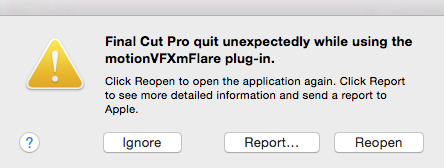
Attached is a photo of a message I keep getting as my project is constantly crashing on start up. I was trying to add lens flare to a shot using a plugin i'd purchased & now I've no clue what to do.
Do I uninstall the plugin?
Do I have to amend the library settings?
I'm really rather desperate for some help, time is on the short side. :blink:
Many thanks
Apologies if this is not the correct place to post an enquiry but I'm in a rather desperate state with a project due for my Masters degree.
Attached is a photo of a message I keep getting as my project is constantly crashing on start up. I was trying to add lens flare to a shot using a plugin i'd purchased & now I've no clue what to do.
Do I uninstall the plugin?
Do I have to amend the library settings?
I'm really rather desperate for some help, time is on the short side. :blink:
Many thanks
Please Log in to join the conversation.
