


- Posts: 21
- Thank you received: 0
3 Post Moderation Rule for New Boarders (25 Jan 2021)
New boarders will have their posts moderated - Don't worry if you cannot see your post immediately.
Pre ingestion workflow for large amount of footage?
29 May 2015 10:52 #65067
by RRKPL
Pre ingestion workflow for large amount of footage? was created by RRKPL
I'm starting a project that involves a huge amount of video clips (terabytes), is there an app that will allow you to browse, pre log, tag and reject footage before ingesting to FCP X?
Please Log in to join the conversation.

29 May 2015 11:06 #65068
by FvH
Replied by FvH on topic Pre ingestion workflow for large amount of footage?
Well, I think the app you are looking for is FCPX. It was made for this kind of stuff. If you choose to leave the media where they are, as external media on an external drive, then FCPX won't copy any of your terabytes. It imports the information and you can browse, tag, reject, keyword, and mark favorites to your liking. And then, everything is set up for your edit. So why bother with another app? It's all there. 
Please Log in to join the conversation.

29 May 2015 11:59 #65069
by BenB
Replied by BenB on topic Pre ingestion workflow for large amount of footage?
Yes, FCPX's organization tools are head and shoulders above any other NLE. Oh wait, there's that Adobe app they made, that does the same thing, but it is a separate app from PPro...
Please Log in to join the conversation.
29 May 2015 12:27 #65073
by RRKPL
Replied by RRKPL on topic Pre ingestion workflow for large amount of footage?
Thanks! I've been using FCP since v1 and FCP X since it was released but I apparently haven't warped my head around the full workflow of FCP X. This is the first really large project in FCP X I haven't produced and was just given a HD with about a months worth of footage from an under sea exploration project.
Really looking forward to diving right into the project in FCP rather than having to do a bunch of pre ingestion sorting.
Really looking forward to diving right into the project in FCP rather than having to do a bunch of pre ingestion sorting.
Please Log in to join the conversation.


29 May 2015 14:07 #65076
by joema
Replied by joema on topic Pre ingestion workflow for large amount of footage?
On recent versions of OS X you can tag clips at the file level, and FCP X will import those as keywords:
www.fcp.co/final-cut-pro/tutorials/1456-...into-final-cut-pro-x
larryjordan.com/articles/use-finder-tags-in-final-cut-pro-x/
This is in line with the old approach of pre-selecting and pre-filtering before import. That required scrubbing through lots of material at the file level, somehow making notes or tagging it, then importing the selects, then doing it all over within the editor for those selects.
Since content management is one of FCP X's strongest points, a newer approach is just import everything (typically without optimization) and do the initial selects from that.
See the various tutorial and training sources for optimizing FCP X metadata management. Examples:
Warp speed keywording:
Fast Editing with the keyboard:
Basic rating workflow:
Used Media Range Improvements:
Power of the Timeline Index:
Smarter Smart Collections:
Organize at High Speed: thefcpxeditor.tumblr.com/post/9959552556...ganize-at-high-speed
Here is a complete narrated step-by-step walk through of an actual production edit on FCP X, with emphasis on pre-edit organization. Note he was using FCP X 10.0.8, which is before the new library scheme. However most of what he says applies to the current version:
fcpxposure.com/video-editing-with-fcpx-at-the-aipp-2013/
www.fcp.co/final-cut-pro/tutorials/1456-...into-final-cut-pro-x
larryjordan.com/articles/use-finder-tags-in-final-cut-pro-x/
This is in line with the old approach of pre-selecting and pre-filtering before import. That required scrubbing through lots of material at the file level, somehow making notes or tagging it, then importing the selects, then doing it all over within the editor for those selects.
Since content management is one of FCP X's strongest points, a newer approach is just import everything (typically without optimization) and do the initial selects from that.
See the various tutorial and training sources for optimizing FCP X metadata management. Examples:
Warp speed keywording:
Fast Editing with the keyboard:
Basic rating workflow:
Used Media Range Improvements:
Power of the Timeline Index:
Smarter Smart Collections:
Organize at High Speed: thefcpxeditor.tumblr.com/post/9959552556...ganize-at-high-speed
Here is a complete narrated step-by-step walk through of an actual production edit on FCP X, with emphasis on pre-edit organization. Note he was using FCP X 10.0.8, which is before the new library scheme. However most of what he says applies to the current version:
fcpxposure.com/video-editing-with-fcpx-at-the-aipp-2013/
Please Log in to join the conversation.
30 May 2015 02:46 #65084
by BenB
Replied by BenB on topic Pre ingestion workflow for large amount of footage?
The pre-editing organization process is where 75 percent of your editing is actually done. Once done, you know what you have, what you want, and are much more prepared to dive in. There are no short-cuts.
You can be fast and low quality, or slow and high quality, but never fast and high quality.
You can be fast and low quality, or slow and high quality, but never fast and high quality.
Please Log in to join the conversation.

30 May 2015 12:06 - 30 May 2015 12:07 #65087
by ddixon
Replied by ddixon on topic Pre ingestion workflow for large amount of footage?
About a year ago I had a discussion online with a person considering the move from FCP to FCPX. He was finding the fact that he could not add keywords in the import window a real deal breaker. His point was that he had to view all the footage twice - once to choose portions to import, then once to add keywords.
I was never able to convince him that with skimming, multiple keywords, etc., the new workflow was infinitely better and faster. But the big point was - he hated that he had to do all this before he could start editing. I couldn't get through to him that the keywording/organizational stage WAS editing.
I now even keyword casual family videos of my nieces/nephews playing sports
I was never able to convince him that with skimming, multiple keywords, etc., the new workflow was infinitely better and faster. But the big point was - he hated that he had to do all this before he could start editing. I couldn't get through to him that the keywording/organizational stage WAS editing.
I now even keyword casual family videos of my nieces/nephews playing sports
Last edit: 30 May 2015 12:07 by ddixon.
Please Log in to join the conversation.
- Karsten Schlüter
-

- Offline
- Moderator
-

Less
More
- Posts: 3790
- Thank you received: 718
31 May 2015 07:29 #65100
by Karsten Schlüter
Excellent wording! … and thinking.....
I will steal this phrase in future discussions..... sorry, dixon!
hmmm... must admit, that idea is tempting, not?
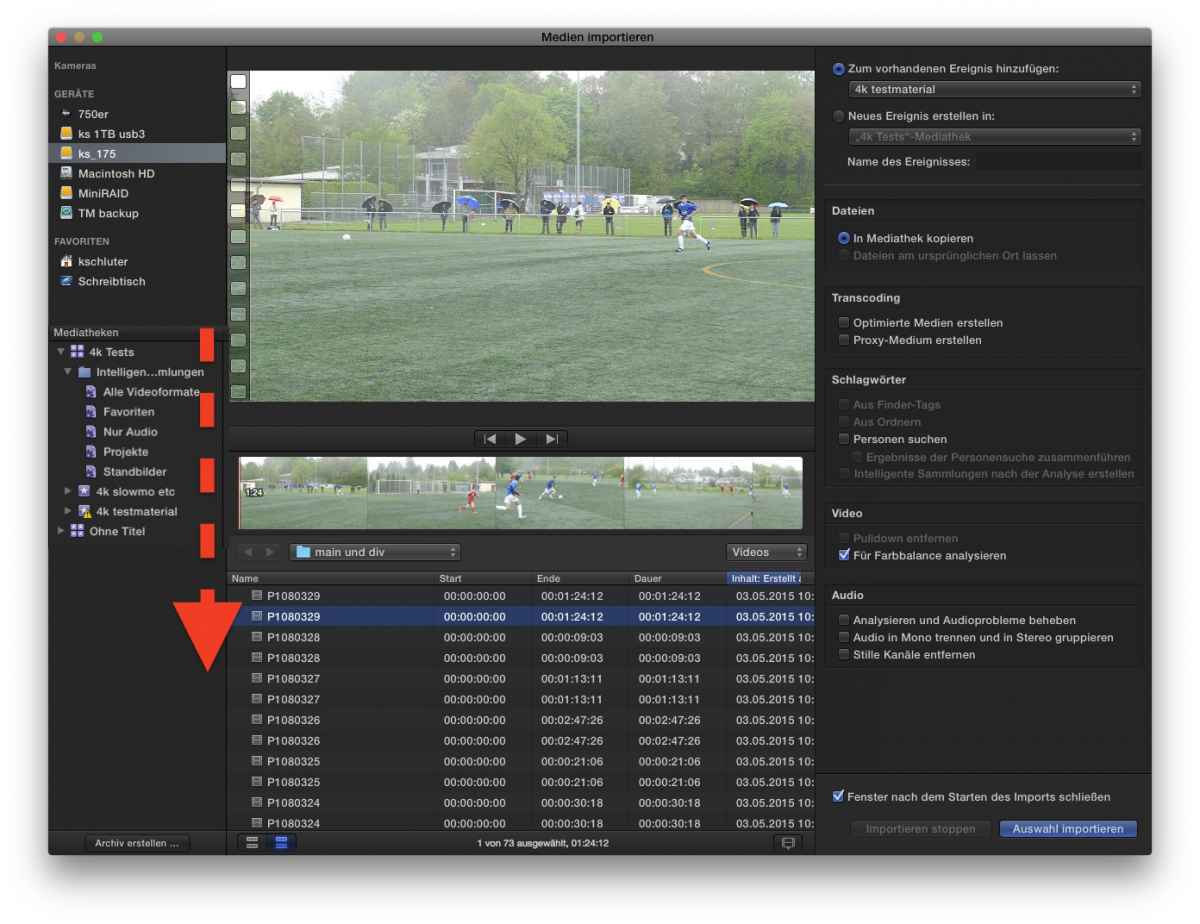
there would be room enough in the new import dialogue....
On the opposite: too much 'stuff' for one window....
Replied by Karsten Schlüter on topic Pre ingestion workflow for large amount of footage?
ddixon wrote: …. I couldn't get through to him that the keywording/organizational stage WAS editing.
Excellent wording! … and thinking.....
I will steal this phrase in future discussions..... sorry, dixon!
... he could not add keywords in the import window ...
hmmm... must admit, that idea is tempting, not?
there would be room enough in the new import dialogue....
On the opposite: too much 'stuff' for one window....
Please Log in to join the conversation.
01 Jun 2015 13:18 #65122
by BenB
Replied by BenB on topic Pre ingestion workflow for large amount of footage?
" He was finding the fact that he could not add keywords in the import window a real deal breaker.
Did you show him he can keyword in the Import window?
1- Make keyword collection.
2- Select it in the Browser.
3- Cmd-i
4- Everything you import now is automatically assigned to that keyword collection that was highlighted before opening the Import window.
Did you show him he can keyword in the Import window?
1- Make keyword collection.
2- Select it in the Browser.
3- Cmd-i
4- Everything you import now is automatically assigned to that keyword collection that was highlighted before opening the Import window.
Please Log in to join the conversation.
01 Jun 2015 15:32 #65129
by ddixon
Replied by ddixon on topic Pre ingestion workflow for large amount of footage?
No, I didn't, because that would not have addressed his true complaint. His beef was that he had to review all his footage twice - once to select what to import, and again to keyword it. I suggested that with the falling prices of storage he could just import everything then make one keywording/rejecting pass through it, but he found that wasteful and a heavy handed workaround. (I disagree, but then I have rarely done a truly long project)
I'd be OK with what he wanted though - in the import window you select clips and/or ranges to import, but before importing you could use all the keywording controls to apply and create keywords - the floating window, the keyboard commands, etc. I'm sure it's not possible though given some kind of internal structural thing.
My frustration is that due to a new camera I'm now importing ProRes for the first time, and am surprised to find I cannot import ranges but only entire clips - I hope I'm just missing something.
I'd be OK with what he wanted though - in the import window you select clips and/or ranges to import, but before importing you could use all the keywording controls to apply and create keywords - the floating window, the keyboard commands, etc. I'm sure it's not possible though given some kind of internal structural thing.
My frustration is that due to a new camera I'm now importing ProRes for the first time, and am surprised to find I cannot import ranges but only entire clips - I hope I'm just missing something.
Please Log in to join the conversation.
