


- Posts: 1077
- Thank you received: 189
3 Post Moderation Rule for New Boarders (25 Jan 2021)
New boarders will have their posts moderated - Don't worry if you cannot see your post immediately.
Some help from the gurus needed ...
- Andreas Kiel
-
 Topic Author
- Offline
- Platinum Member
-

Less
More
26 May 2015 06:03 #64932
by Andreas Kiel
Some help from the gurus needed ... was created by Andreas Kiel
… about Digital Cinema screen size or better a question about the aspect ratios.
DCI per definition is 2048x1080 (2k) or 4096x2160 (4k), Aspect ratio for both is the same: 1.90:1 (256:135).
2k and 4k projection are forward and backward compatible, a 4k content can be played on a 2k projector and 2k can be played on 4k projectors by using up- or down-scale.
Other formats will get a "pillow" or "letterbox" or may be cropped (like classic "open gate" 4096 × 3112 format).
In my old days of film I only had to do with cinemascope, open gate and sometimes with 2:1 aspect ratios.
There are more possible aspect ratios for theatrical release - but which ones.
The reason I ask: For a DCP project I want (need) to figure out the title safe areas for each format.
Any help is highly appreciated.
- Andreas
DCI per definition is 2048x1080 (2k) or 4096x2160 (4k), Aspect ratio for both is the same: 1.90:1 (256:135).
2k and 4k projection are forward and backward compatible, a 4k content can be played on a 2k projector and 2k can be played on 4k projectors by using up- or down-scale.
Other formats will get a "pillow" or "letterbox" or may be cropped (like classic "open gate" 4096 × 3112 format).
In my old days of film I only had to do with cinemascope, open gate and sometimes with 2:1 aspect ratios.
There are more possible aspect ratios for theatrical release - but which ones.
The reason I ask: For a DCP project I want (need) to figure out the title safe areas for each format.
Any help is highly appreciated.
- Andreas
Please Log in to join the conversation.

26 May 2015 11:45 #64938
by Wildgiles
Replied by Wildgiles on topic Some help from the gurus needed ...
The title safe area viewer built into FCPX works for every format.
Please Log in to join the conversation.
- Andreas Kiel
-
Topic Author
- Offline
- Platinum Member
-
Less
More
- Posts: 1077
- Thank you received: 189
26 May 2015 13:59 #64953
by Andreas Kiel
Replied by Andreas Kiel on topic Some help from the gurus needed ...
Thanks Wildgiles,
FCP only works if the timeline is already cropped or set to "final format" not if, but not if final format (DCI) is needs to be letterboxed.
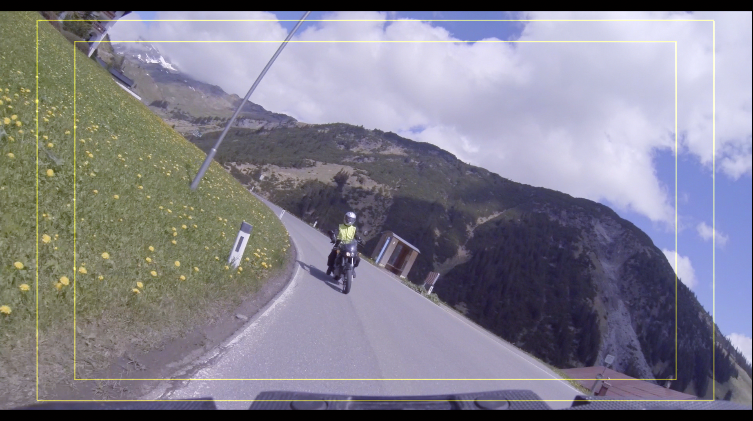
- Andreas
FCP only works if the timeline is already cropped or set to "final format" not if, but not if final format (DCI) is needs to be letterboxed.
- Andreas
Please Log in to join the conversation.


26 May 2015 14:29 #64956
by Francois
Replied by Francois on topic Some help from the gurus needed ...
As you may know "action and tittle safe" are a percentage of used raster , I would believe that the DCI standard would have a « bit » on-off inform the auto-projectionist so they move the black curtains to mask the unused section of the screen; but that is all speculative assertions in case it would put you a track to resolve this problem…
all the best
FRANCOIS
all the best
FRANCOIS
Please Log in to join the conversation.

26 May 2015 14:36 #64957
by FernKraft
Replied by FernKraft on topic Some help from the gurus needed ...
I may be wrong, I often am, but I don't think there is a "title safe zone" for anything that is DCI compliant. anything DCI compliant will not be over or under scanned during projection/viewing. however, delivering for broadcast is different, because of the many different "standards" of television manufacturers.
for example, I wouldn't send my DCP version of a film to a broadcaster, or an iphone for that matter...
I too am interested to hear what others have to say!! interesting topic!
for example, I wouldn't send my DCP version of a film to a broadcaster, or an iphone for that matter...
I too am interested to hear what others have to say!! interesting topic!
Please Log in to join the conversation.
26 May 2015 14:59 - 26 May 2015 15:00 #64958
by Francois
Replied by Francois on topic Some help from the gurus needed ...
I was googling this topic and found this pertinent link from « Larry Jordan « web site , I can not check this on the SMPTE web site since I stopped paying my membership fees a few years ago …
larryjordan.com/articles/display-action-title-safe-zones/
It is funny how old standards are exploited now a days, I have a brand new « full HD » LCD TV from the best selling brand and they do implement a 5% action safe crop (maybe to make money). Anyway I understand that a « DCI Christie projector » would not do that. The problem is how to correctly position of subtitles for « wide screen », « full academy » or normal DCI format within the DCI raster. This should be done while prepping the DCP and is it simply at that step that one would do a selection to affect the subtitles position and scale ?
larryjordan.com/articles/display-action-title-safe-zones/
It is funny how old standards are exploited now a days, I have a brand new « full HD » LCD TV from the best selling brand and they do implement a 5% action safe crop (maybe to make money). Anyway I understand that a « DCI Christie projector » would not do that. The problem is how to correctly position of subtitles for « wide screen », « full academy » or normal DCI format within the DCI raster. This should be done while prepping the DCP and is it simply at that step that one would do a selection to affect the subtitles position and scale ?
Last edit: 26 May 2015 15:00 by Francois.
Please Log in to join the conversation.
26 May 2015 16:15 #64961
by FernKraft
Replied by FernKraft on topic Some help from the gurus needed ...
I couldn't find anything official about Subtitles or title/action safe in the current DCI materials... here is the site I was looking at.
www.dcimovies.com/
and here is the PDF...
dcimovies.com/specification/DCI_DCSS_v12...errata_2012-1010.pdf
Hope that helps...
www.dcimovies.com/
and here is the PDF...
dcimovies.com/specification/DCI_DCSS_v12...errata_2012-1010.pdf
Hope that helps...
Please Log in to join the conversation.
- Andreas Kiel
-
Topic Author
- Offline
- Platinum Member
-
Less
More
- Posts: 1077
- Thank you received: 189
26 May 2015 16:16 #64964
by Andreas Kiel
Replied by Andreas Kiel on topic Some help from the gurus needed ...
Thanks for all of your replies up to now.
I probably asked my question in a wrong way.
Francois analyzed the question very good.
DCI format has it' own size with an aspect of 256:135 (around 1.89:1). Regardless of chip size the vertical position will be calculated as DPI on a virtual 11 inch height chip.
This doesn't picture. Picture will either be "letter-boxed" or "pillowed".
The DPI stuff also makes things difficult for font sizes. In most NLEs or other apps font size is measured in pixels from descent to ascent, DCi uses baseline to ascent in DPI.
Bringing together picture and subtitles opens to the question I asked.
With CinemaScope and above ratios (> 2.35) the vertical placement of subtitles could flip from letter-boxed title save area to full screen title/action safe area (using a non standard but popular 40 font size instead of the default 42 font size - the font size has nothing to do with the font size you entered in FCPX).
While underscan or overscan in theory have nothing to do with digital video many theaters have to handle it caused by the projector placement, screen etc adjustment have to fit multiple usages.
.. Sorry my keyboard gave up and it's a nightmare to write something. I hopefully will followup my own reply tomorrow.
- Andreas
I probably asked my question in a wrong way.
Francois analyzed the question very good.
DCI format has it' own size with an aspect of 256:135 (around 1.89:1). Regardless of chip size the vertical position will be calculated as DPI on a virtual 11 inch height chip.
This doesn't picture. Picture will either be "letter-boxed" or "pillowed".
The DPI stuff also makes things difficult for font sizes. In most NLEs or other apps font size is measured in pixels from descent to ascent, DCi uses baseline to ascent in DPI.
Bringing together picture and subtitles opens to the question I asked.
With CinemaScope and above ratios (> 2.35) the vertical placement of subtitles could flip from letter-boxed title save area to full screen title/action safe area (using a non standard but popular 40 font size instead of the default 42 font size - the font size has nothing to do with the font size you entered in FCPX).
While underscan or overscan in theory have nothing to do with digital video many theaters have to handle it caused by the projector placement, screen etc adjustment have to fit multiple usages.
.. Sorry my keyboard gave up and it's a nightmare to write something. I hopefully will followup my own reply tomorrow.
- Andreas
Please Log in to join the conversation.
- Andreas Kiel
-
Topic Author
- Offline
- Platinum Member
-
Less
More
- Posts: 1077
- Thank you received: 189
26 May 2015 18:01 #64968
by Andreas Kiel
Replied by Andreas Kiel on topic Some help from the gurus needed ...
thanks marcel for your resaerch.
i think i have read most of the relevant documents abailable.
none of them except te original texas intruments specs do give a more less reliable info about subtitle postion.
while horz align looks simple in reality right aligned subs don't work.
and as said title safe areas have to be created by the nle or or appnwhich creates the dcp xml
- andreas
i think i have read most of the relevant documents abailable.
none of them except te original texas intruments specs do give a more less reliable info about subtitle postion.
while horz align looks simple in reality right aligned subs don't work.
and as said title safe areas have to be created by the nle or or appnwhich creates the dcp xml
- andreas
Please Log in to join the conversation.
27 May 2015 06:20 - 27 May 2015 06:23 #64986
by Francois
Replied by Francois on topic Some help from the gurus needed ...
From DIGITAL CINEMA NAMING CONVENTION
"Appendix #7
Projector Aspect Ratio
The Projector Aspect Ratio ("F", "S" or "C") indicates the pixel array size at which the projector should be set. It does not necessarily indicate the aspect ratio of the image -- or theatre masking instructions -- since often times content such as trailers may be letterboxed or pillarboxed.
The choices are:
F = Flat (1.85:1) Pixel array size: 1998 x 1080 out of a 2k or 3996 x 2160 out of 4k
S = Scope (2.39:1) Pixel array size: 2048 x 858 out of a 2k or 4096 x 1716 out of 4k
C = Full Container (1.90:1) Pixel array size: 2048 x 1080 = 2k or 4096 x 2160 = 4k
Digital Cinema projectors are designed to project Flat, Scope or Full Container images. Occasionally product is packaged with Aspect Ratios other than 1.85 (Flat) or 2.39 (Scope). For example, an older 1.33 Aspect Ratio film "
I believe this can be useful since these are the normal formats in US , you would have to do the math for the flat format in Europe which usually has a 1.66 ratio like "super 16". 1793 x 1080 out 2K or 3586 x 2160 out of 4K
S35mm/35mm
1.33:1 Full aperture (S35mm). Not theatrical prints but common as DI master
1.37:1 Academy Aperture SMPTE 195 Style C
1.66:1 Widescreen Aperture SMPTE 195 Style B Used mostly in Europe
- 1:75:1 Widescreen Aperture SMPTE 195 Style B (Little used) -
1.85:1 Widescreen Aperture SMPTE 195 Style B USA Hollywood format
2.39:1 Scope Aperture SMPTE 195 Style A USA et al, Cinemascope
I found a sample file on the web that shows differents offsets are possible and you can also include a font in the DCP
<?xml version="1.0" encoding="UTF-8" standalone="yes" ?> <!-- *** XML Subtitle File *** -->
<!-- *** Monday, March 24, 2003 *** --> -
<DCSubtitle Version="1.0">
<SubtitleID>39c1e4a3-bd49-4445-9d38-93c13732020a</SubtitleID> <MovieTitle>Treasure Island</MovieTitle> <ReelNumber>1AB</ReelNumber> <Language>Japanese</Language>
<LoadFont Id="theFont" URI="/Font/msgoth_small.ttf" /> -
<Font Id="theFont" Color="FFFFFFFF" Effect="shadow" EffectColor="FF000000" Size="42">-
<Subtitle SpotNumber="1" TimeIn="00:00:35:229" TimeOut="00:00:41:167“ FadeUpTime="20" FadeDownTime="20">
<Text HAlign="center" HPosition="0.0" VAlign="bottom" VPosition="10.00">”満天の星が輝く</Text> <Text HAlign="center" HPosition="0.0" VAlign="bottom" VPosition="5.00">静かで平和な宇宙の夜”</Text> </Subtitle>
<Subtitle SpotNumber="2" TimeIn="00:00:51:083" TimeOut="00:00:56:000" FadeUpTime="20" FadeDownTime="20">
<Text HAlign="center" HPosition="0.0" VAlign="bottom" VPosition="10.00">”ソーラー・クリスタルを</Text> <Text HAlign="center" HPosition="0.0" VAlign="bottom" VPosition="5.00">積んだ船が――”</Text> </Subtitle>-
</Font>
</DCSubtitle>
In this sample most of the "timed text" subtitle possibilities are expressed relative to full container. This is probably extracted from the Texas instrument document , you mentioned since I found that in a slide show authored by Bill Werner Product Development Manager DLP CinemaTM Products Texas Instruments, Inc.
"Appendix #7
Projector Aspect Ratio
The Projector Aspect Ratio ("F", "S" or "C") indicates the pixel array size at which the projector should be set. It does not necessarily indicate the aspect ratio of the image -- or theatre masking instructions -- since often times content such as trailers may be letterboxed or pillarboxed.
The choices are:
F = Flat (1.85:1) Pixel array size: 1998 x 1080 out of a 2k or 3996 x 2160 out of 4k
S = Scope (2.39:1) Pixel array size: 2048 x 858 out of a 2k or 4096 x 1716 out of 4k
C = Full Container (1.90:1) Pixel array size: 2048 x 1080 = 2k or 4096 x 2160 = 4k
Digital Cinema projectors are designed to project Flat, Scope or Full Container images. Occasionally product is packaged with Aspect Ratios other than 1.85 (Flat) or 2.39 (Scope). For example, an older 1.33 Aspect Ratio film "
I believe this can be useful since these are the normal formats in US , you would have to do the math for the flat format in Europe which usually has a 1.66 ratio like "super 16". 1793 x 1080 out 2K or 3586 x 2160 out of 4K
S35mm/35mm
1.33:1 Full aperture (S35mm). Not theatrical prints but common as DI master
1.37:1 Academy Aperture SMPTE 195 Style C
1.66:1 Widescreen Aperture SMPTE 195 Style B Used mostly in Europe
- 1:75:1 Widescreen Aperture SMPTE 195 Style B (Little used) -
1.85:1 Widescreen Aperture SMPTE 195 Style B USA Hollywood format
2.39:1 Scope Aperture SMPTE 195 Style A USA et al, Cinemascope
I found a sample file on the web that shows differents offsets are possible and you can also include a font in the DCP
<?xml version="1.0" encoding="UTF-8" standalone="yes" ?> <!-- *** XML Subtitle File *** -->
<!-- *** Monday, March 24, 2003 *** --> -
<DCSubtitle Version="1.0">
<SubtitleID>39c1e4a3-bd49-4445-9d38-93c13732020a</SubtitleID> <MovieTitle>Treasure Island</MovieTitle> <ReelNumber>1AB</ReelNumber> <Language>Japanese</Language>
<LoadFont Id="theFont" URI="/Font/msgoth_small.ttf" /> -
<Font Id="theFont" Color="FFFFFFFF" Effect="shadow" EffectColor="FF000000" Size="42">-
<Subtitle SpotNumber="1" TimeIn="00:00:35:229" TimeOut="00:00:41:167“ FadeUpTime="20" FadeDownTime="20">
<Text HAlign="center" HPosition="0.0" VAlign="bottom" VPosition="10.00">”満天の星が輝く</Text> <Text HAlign="center" HPosition="0.0" VAlign="bottom" VPosition="5.00">静かで平和な宇宙の夜”</Text> </Subtitle>
<Subtitle SpotNumber="2" TimeIn="00:00:51:083" TimeOut="00:00:56:000" FadeUpTime="20" FadeDownTime="20">
<Text HAlign="center" HPosition="0.0" VAlign="bottom" VPosition="10.00">”ソーラー・クリスタルを</Text> <Text HAlign="center" HPosition="0.0" VAlign="bottom" VPosition="5.00">積んだ船が――”</Text> </Subtitle>-
</Font>
</DCSubtitle>
In this sample most of the "timed text" subtitle possibilities are expressed relative to full container. This is probably extracted from the Texas instrument document , you mentioned since I found that in a slide show authored by Bill Werner Product Development Manager DLP CinemaTM Products Texas Instruments, Inc.
Last edit: 27 May 2015 06:23 by Francois.
Please Log in to join the conversation.
- Scrubelicious
-

- Offline
- Platinum Member
-
Less
More
- Posts: 1228
- Thank you received: 114
27 May 2015 07:51 #64989
by Scrubelicious
Replied by Scrubelicious on topic Some help from the gurus needed ...
Andreas, you are looking for Title Safe for Final Cut Pro X.
I have something that we put together but it isn't 100% done. If you like you can try it out with some feedback?
I have something that we put together but it isn't 100% done. If you like you can try it out with some feedback?
Please Log in to join the conversation.
- Andreas Kiel
-
Topic Author
- Offline
- Platinum Member
-
Less
More
- Posts: 1077
- Thank you received: 189
27 May 2015 09:24 - 27 May 2015 09:29 #64991
by Andreas Kiel
Replied by Andreas Kiel on topic Some help from the gurus needed ...
Thanks again for the replies.
@ Francois
The list of aspect ratios is a real big help!!!
It's a perfect start to go from (U)HD which is most widely used to DCI.
The DCP/DCL XML is DCP Interop the standard defined by TI.
My XMLs look pretty much the same except I use a slightly different vertical position. It is based on the given font size.
If you are interested in details let me know.
@ Scrubelicious
Thanks, would really like to see it. Send it to me (kiel at spherico dot com). I definitively send you some feedback.
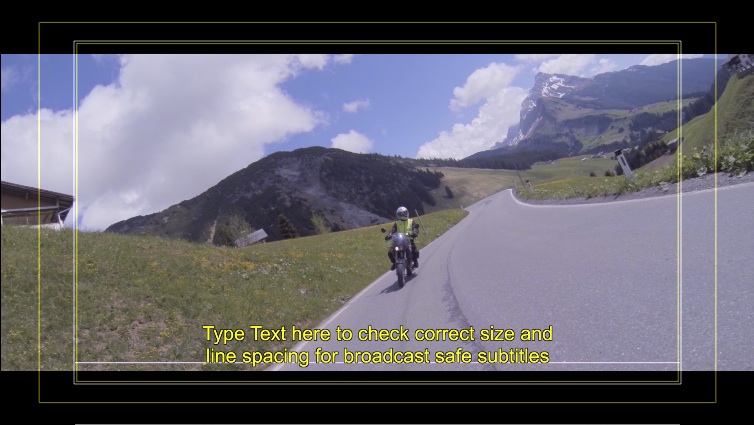
A screen shot to make (maybe) things clearer. It' a 2k/4k DCI screen with a 2.39 letter box. It shows that the minimum title safe vertical area is way different from the FCPX title safe.
- Andreas
@ Francois
The list of aspect ratios is a real big help!!!
It's a perfect start to go from (U)HD which is most widely used to DCI.
The DCP/DCL XML is DCP Interop the standard defined by TI.
My XMLs look pretty much the same except I use a slightly different vertical position. It is based on the given font size.
If you are interested in details let me know.
@ Scrubelicious
Thanks, would really like to see it. Send it to me (kiel at spherico dot com). I definitively send you some feedback.
A screen shot to make (maybe) things clearer. It' a 2k/4k DCI screen with a 2.39 letter box. It shows that the minimum title safe vertical area is way different from the FCPX title safe.
- Andreas
Last edit: 27 May 2015 09:29 by Andreas Kiel.
Please Log in to join the conversation.
- sperezrleon
-
- Offline
- Junior Member
-

- No hay mucho que decir... ni siquiera tengo cita favorita :)
Less
More
- Posts: 35
- Thank you received: 1
27 May 2015 18:07 #65018
by sperezrleon
Replied by sperezrleon on topic Some help from the gurus needed ...
Don't know if this helps, but every time I create a DCP o go to a Lab for them to create it they preview the subtitles and adjust a little bit the base line, so I don't usually use the FCPX for more of a "preview". But I get what you are trying to do, so when you export you subtitles you know already how they are going to look... thats grate!
Please Log in to join the conversation.
- Scrubelicious
-
- Offline
- Platinum Member
-
Less
More
- Posts: 1228
- Thank you received: 114
27 May 2015 18:09 #65019
by Scrubelicious
Replied by Scrubelicious on topic Some help from the gurus needed ...
@Andreas Kiel
sorry I just realised you are looking for something for 4K project? The Generator is in its HD stage.
Didn't have time to finish the 4K version still need calculating 4K resolution.
If you like I will send you the generator and if you have specific resolution you need I can add them?
sorry I just realised you are looking for something for 4K project? The Generator is in its HD stage.
Didn't have time to finish the 4K version still need calculating 4K resolution.
If you like I will send you the generator and if you have specific resolution you need I can add them?
Please Log in to join the conversation.
- Andreas Kiel
-
Topic Author
- Offline
- Platinum Member
-
Less
More
- Posts: 1077
- Thank you received: 189
28 May 2015 05:26 #65034
by Andreas Kiel
Replied by Andreas Kiel on topic Some help from the gurus needed ...
Scrubelicious,
Many thanks for sending- don't worry about 2k or 4k. They don't matter in this case.
- Andreas
Many thanks for sending- don't worry about 2k or 4k. They don't matter in this case.
- Andreas
Please Log in to join the conversation.
- Andreas Kiel
-
Topic Author
- Offline
- Platinum Member
-
Less
More
- Posts: 1077
- Thank you received: 189
28 May 2015 06:28 - 28 May 2015 06:29 #65036
by Andreas Kiel
Replied by Andreas Kiel on topic Some help from the gurus needed ...
To all others,
Again many thanks for all the incredible replies and input.
The quotation from Francois about the SMPTE specs made me think different and start over again.
I remembered my (very) old days when working with film only. Was mainly kind of stop motion.
Only thing I had to care was 3-perf or 4-perf and/or anamorphic lenses - very seldom Cinemascope.
So the the "open gate" thing I mentioned in the beginning made some kind of more sense to me.
Those thoughts and the SMPTE 195 specs Francois mentioned changed my "broadcast spoiled brain" and I modified my Google search.
I found an article written by Peter R Swinson (November 2005) about the issues of DCI versus standard film ( www.edcf.net/edcf_docs/DCI%20and%20OTHER%20Film%20Formats.pdf ).
This one confirmed my thoughts and the dumb feeling that my thoughts when starting this post were wrong.
The result of the new thoughts are pretty "radical" for "broadcast spoiled brains"
So my "open gate" 4096 × 3112 was not a bad idea - 4096 x 3072 (4:3) is better. This is the resolution all letterbox stuff is calculated upon.
So many of the "letterbox effects" are somehow wrong, though they give a good feeling.
The logical result (for me) will be to take the aspect ratios Francois posted over to DCI res and aspect.
Just some more thoughts
Andreas
Again many thanks for all the incredible replies and input.
The quotation from Francois about the SMPTE specs made me think different and start over again.
I remembered my (very) old days when working with film only. Was mainly kind of stop motion.
Only thing I had to care was 3-perf or 4-perf and/or anamorphic lenses - very seldom Cinemascope.
So the the "open gate" thing I mentioned in the beginning made some kind of more sense to me.
Those thoughts and the SMPTE 195 specs Francois mentioned changed my "broadcast spoiled brain" and I modified my Google search.
I found an article written by Peter R Swinson (November 2005) about the issues of DCI versus standard film ( www.edcf.net/edcf_docs/DCI%20and%20OTHER%20Film%20Formats.pdf ).
This one confirmed my thoughts and the dumb feeling that my thoughts when starting this post were wrong.
The result of the new thoughts are pretty "radical" for "broadcast spoiled brains"
So my "open gate" 4096 × 3112 was not a bad idea - 4096 x 3072 (4:3) is better. This is the resolution all letterbox stuff is calculated upon.
So many of the "letterbox effects" are somehow wrong, though they give a good feeling.
The logical result (for me) will be to take the aspect ratios Francois posted over to DCI res and aspect.
Just some more thoughts
Andreas
Last edit: 28 May 2015 06:29 by Andreas Kiel.
Please Log in to join the conversation.
- Andreas Kiel
-
Topic Author
- Offline
- Platinum Member
-
Less
More
- Posts: 1077
- Thank you received: 189
30 May 2015 09:38 - 30 May 2015 10:21 #65086
by Andreas Kiel
Replied by Andreas Kiel on topic Some help from the gurus needed ...
Hi all,
I'm a bit handicapped at the moment, so a bit slow.
The above mentioned PDF and the implied graphics (© Peter Swinson Associates Ltd 2005) were a big help to start over.
As the mentioned PDF and the comments (I didn't buy the 59 USD PDF) about the SMPTE rules say all is based on the 4:3 4k scan which is mostly defined by Kodak based upon a fine grain (low ISO) film material.
So based on that readings I started a new calculation for DCI. It gives a very different result from the letterbox plugins available now.
Here a screenshot from a simple Numbers chart. The columns order and names are not really helpful.
- Andreas
dl.dropboxusercontent.com/u/63959366/Asp...ratio%20thoughts.png
I'm a bit handicapped at the moment, so a bit slow.
The above mentioned PDF and the implied graphics (© Peter Swinson Associates Ltd 2005) were a big help to start over.
As the mentioned PDF and the comments (I didn't buy the 59 USD PDF) about the SMPTE rules say all is based on the 4:3 4k scan which is mostly defined by Kodak based upon a fine grain (low ISO) film material.
So based on that readings I started a new calculation for DCI. It gives a very different result from the letterbox plugins available now.
Here a screenshot from a simple Numbers chart. The columns order and names are not really helpful.
- Andreas
dl.dropboxusercontent.com/u/63959366/Asp...ratio%20thoughts.png
Last edit: 30 May 2015 10:21 by Andreas Kiel.
Please Log in to join the conversation.
- Andreas Kiel
-
Topic Author
- Offline
- Platinum Member
-
Less
More
- Posts: 1077
- Thank you received: 189
31 May 2015 08:40 #65102
by Andreas Kiel
Replied by Andreas Kiel on topic Some help from the gurus needed ...
Hi all,
I created a basic 2k Motion Title with SMPTE letterbox handling.
dl.dropboxusercontent.com/u/63959366/DCI%20Boxes.zip
Unzip and put into the Title folder of you Motion Templates folder.
The matching title safe areas will come soon.
- Andreas
I created a basic 2k Motion Title with SMPTE letterbox handling.
dl.dropboxusercontent.com/u/63959366/DCI%20Boxes.zip
Unzip and put into the Title folder of you Motion Templates folder.
The matching title safe areas will come soon.
- Andreas
Please Log in to join the conversation.
- Andreas Kiel
-
Topic Author
- Offline
- Platinum Member
-
Less
More
- Posts: 1077
- Thank you received: 189
31 May 2015 12:43 #65105
by Andreas Kiel
Replied by Andreas Kiel on topic Some help from the gurus needed ...
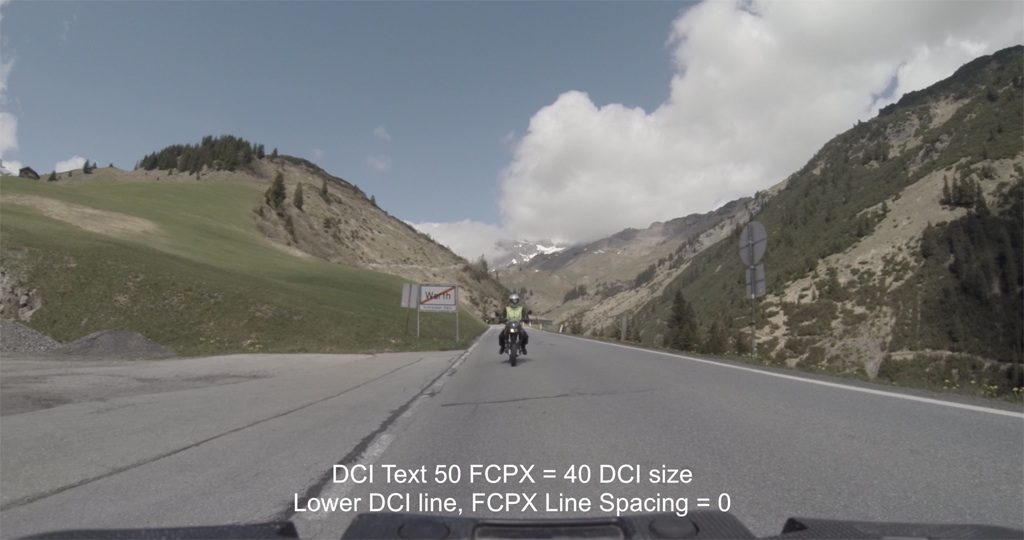
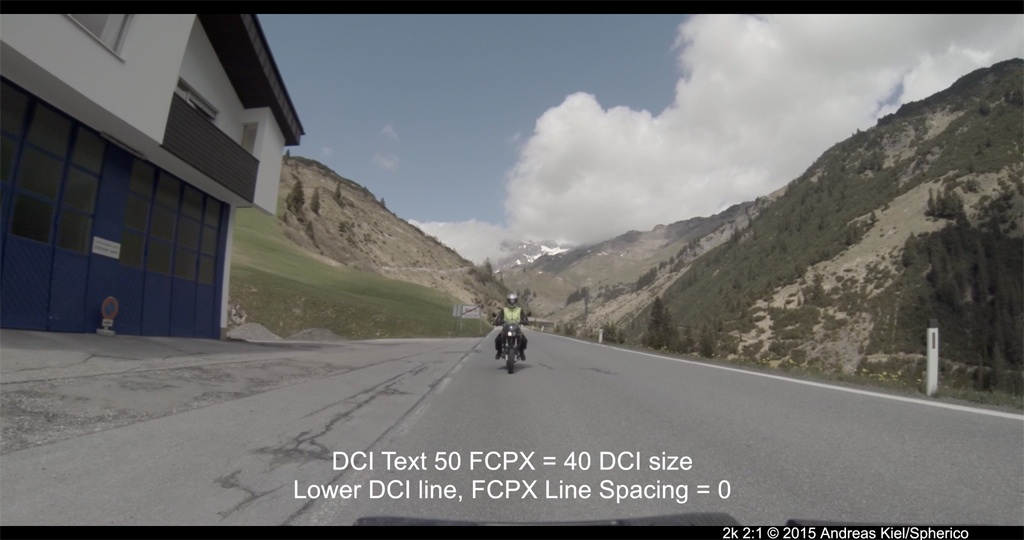
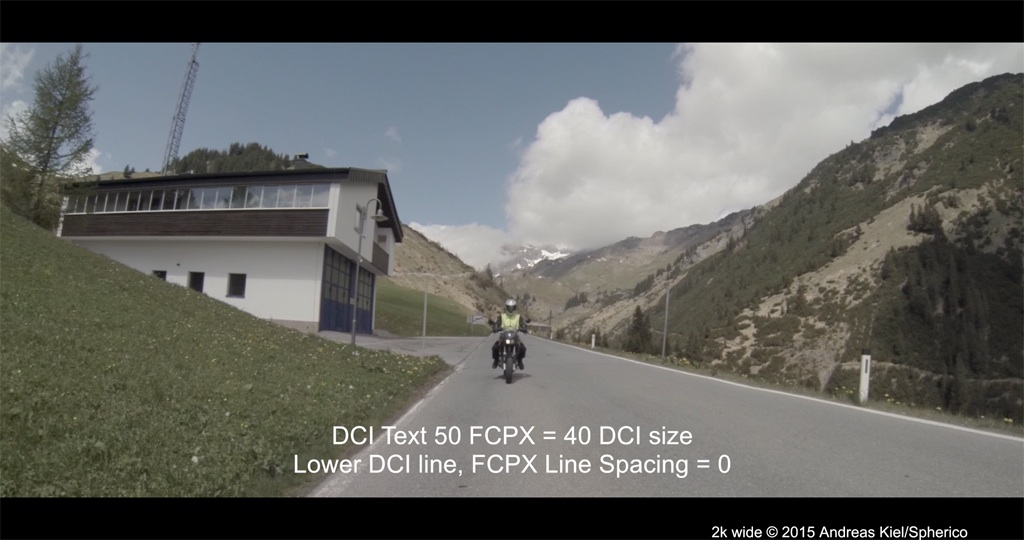
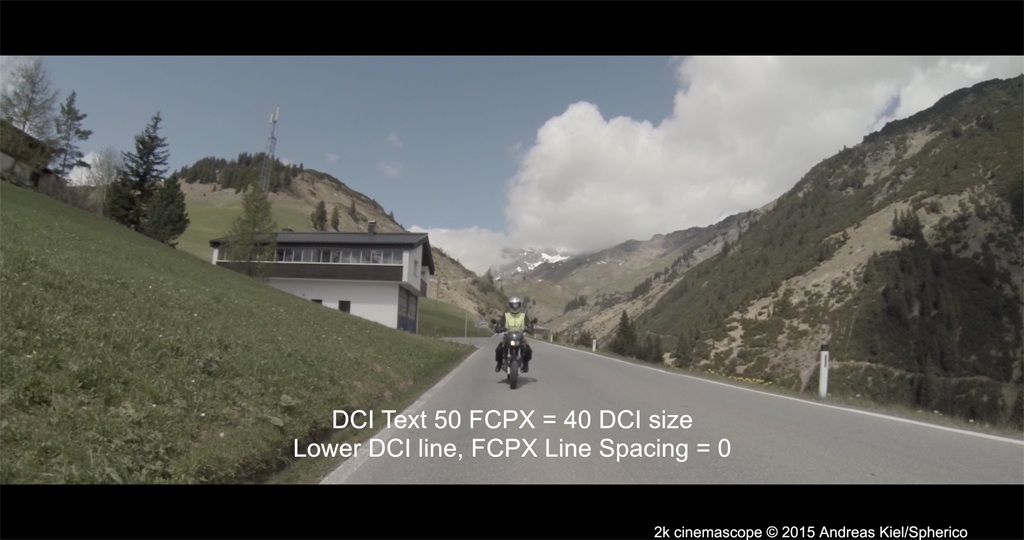
Some examples with letterbox including scaled DCI title safe.
Please Log in to join the conversation.
