


- Posts: 9
- Thank you received: 0
3 Post Moderation Rule for New Boarders (25 Jan 2021)
New boarders will have their posts moderated - Don't worry if you cannot see your post immediately.
Change from Cassette to SD card
18 May 2015 21:28 #64673
by Harry298
Change from Cassette to SD card was created by Harry298
Hi,
I have resently changer from a Canon XHG1 that records to a mini cassette that i only use once and so have all my original footage. Which is as i like it.
I have now started to use a canon HF G30 thats uses sd cards. I can record a few house on one card but would loke to save the original to keep. Using the method that i used with the cassettes is great but will be expensive with the sd cards.
I have tried to copy them direct to DVD but it can't be done direct from the HF G30 to FCPX. The only way i can do it, is putting the card in the computer to upload in to FCPX.
I have also tried to copy the fottage to iTunes so i could burn it to disc. That also failed.
To night i will leave to computer on doing it the only way i have found so far to do it. Thats loading all the footage into a prodject use FPCX to make a DVD of it all. I hope it works to night.
Have anyone got a faster suggestion that i could use.
Its only for videos of my travel and i'm off to India in june hence the lighter camera.
Thanks in advance.
Harry
I have resently changer from a Canon XHG1 that records to a mini cassette that i only use once and so have all my original footage. Which is as i like it.
I have now started to use a canon HF G30 thats uses sd cards. I can record a few house on one card but would loke to save the original to keep. Using the method that i used with the cassettes is great but will be expensive with the sd cards.
I have tried to copy them direct to DVD but it can't be done direct from the HF G30 to FCPX. The only way i can do it, is putting the card in the computer to upload in to FCPX.
I have also tried to copy the fottage to iTunes so i could burn it to disc. That also failed.
To night i will leave to computer on doing it the only way i have found so far to do it. Thats loading all the footage into a prodject use FPCX to make a DVD of it all. I hope it works to night.
Have anyone got a faster suggestion that i could use.
Its only for videos of my travel and i'm off to India in june hence the lighter camera.
Thanks in advance.
Harry
Please Log in to join the conversation.

20 May 2015 03:53 #64711
by cseeman
Replied by cseeman on topic Change from Cassette to SD card
DVDs hold about 4.7GB. I doubt your video will fit without massive compression (quality loss) assuming you're using typical SD cards which are much larger. Additionally if you were to compress it to a DVD Video Disk you'd not only massively compress it you'd end up with only Standard Definition.
You can use FCPX Archive function to copy to a hard disk drive. Some would copy to two different drives given the potential of drive failure.
You can use FCPX Archive function to copy to a hard disk drive. Some would copy to two different drives given the potential of drive failure.
Please Log in to join the conversation.
- Karsten Schlüter
-

- Offline
- Moderator
-

Less
More
- Posts: 3790
- Thank you received: 718
20 May 2015 08:17 #64719
by Karsten Schlüter
Replied by Karsten Schlüter on topic Change from Cassette to SD card
I think, we should unravel a few things first:
keeping the tapes as 'original, unaltered Ras' is no bad idea - alone, you have to keep aside the tapes a device for playback... fingers crossed, your Canon works in the near future ...
SDcards ... not meant for longterm storage. And then you jump to DVDs ... hu?
videoDVD (which work in any DVDplayer) are SDef (480i) resolution. You camera works with HDef (1080), which is close to 6x times the resolution. You throw 75% of your pictures!! Plus, videoDVD is nd-of-the-road, in case you want to edit in the future, you first have to convert into an 'editable' format.
or did you meant dataDVD? Which is 4.7GB per disk ... less than an hour from your cam.
What I would do:
connect an external hard drive to your Mac, create a New Folder (India1) for each crad, and in Finder, drag all folders from your SDcard into that folder => creates a 'clone' of your card, and for future project you import from that 'camera'=drive,
Such a drive can easiely backupped every day, week, 3 months onto a 2nd drive.
... but forget that disk-thingie ...
keeping the tapes as 'original, unaltered Ras' is no bad idea - alone, you have to keep aside the tapes a device for playback... fingers crossed, your Canon works in the near future ...
SDcards ... not meant for longterm storage. And then you jump to DVDs ... hu?
videoDVD (which work in any DVDplayer) are SDef (480i) resolution. You camera works with HDef (1080), which is close to 6x times the resolution. You throw 75% of your pictures!! Plus, videoDVD is nd-of-the-road, in case you want to edit in the future, you first have to convert into an 'editable' format.
or did you meant dataDVD? Which is 4.7GB per disk ... less than an hour from your cam.
What I would do:
connect an external hard drive to your Mac, create a New Folder (India1) for each crad, and in Finder, drag all folders from your SDcard into that folder => creates a 'clone' of your card, and for future project you import from that 'camera'=drive,
Such a drive can easiely backupped every day, week, 3 months onto a 2nd drive.
... but forget that disk-thingie ...
Please Log in to join the conversation.
- Andreas Kiel
-

- Offline
- Platinum Member
-

Less
More
- Posts: 1077
- Thank you received: 189
21 May 2015 03:52 - 21 May 2015 03:54 #64763
by Andreas Kiel
Replied by Andreas Kiel on topic Change from Cassette to SD card
I would do it the same way Karsten suggested.
Except: I would never use Finder to copy the cards. Use Disk Utility or my CopyCards for secure card copies.
- Andreas
www.spherico.com/filmtools/copyCards/copyCards.dmg
Except: I would never use Finder to copy the cards. Use Disk Utility or my CopyCards for secure card copies.
- Andreas
www.spherico.com/filmtools/copyCards/copyCards.dmg
Last edit: 21 May 2015 03:54 by Andreas Kiel.
Please Log in to join the conversation.
- Karsten Schlüter
-
- Offline
- Moderator
-
Less
More
- Posts: 3790
- Thank you received: 718
21 May 2015 04:06 #64764
by Karsten Schlüter
Now you have my attention! :huh:
'Copying files' is one of the most basic feature an OS has to offer - … what's wrong by selecting all content on a SDcard and dragging/copying it to some other location? Or, vice versa; what advances offers a 3rd party product for that? ....
Replied by Karsten Schlüter on topic Change from Cassette to SD card
Andreas Kiel wrote: …Except: I would never use Finder to copy the cards. …
Now you have my attention! :huh:
'Copying files' is one of the most basic feature an OS has to offer - … what's wrong by selecting all content on a SDcard and dragging/copying it to some other location? Or, vice versa; what advances offers a 3rd party product for that? ....
Please Log in to join the conversation.

21 May 2015 04:21 #64765
by dgwvideo
Creating history....one edit at a time !
Replied by dgwvideo on topic Change from Cassette to SD card
I have copied many cards thru finder without problems, but I do know that this is not the most secure and accurate way to do so. Most card copying utilities (such as Panasonic's P2CMS for P2 media, Sony's Catalyst, etc.) provide a more secure method for protecting the data during the transfer. They offer checksum verification, compare functions and preserve metadata. Some card structures can be adversely affected by additional files being written by the OS, such as versioning information and more. While the finder generally causes no issues for most drag and drop functions, certain cards may present a problem. It is more of a safety precaution to use a dedicated copying application.
Creating history....one edit at a time !
Please Log in to join the conversation.
- Andreas Kiel
-
- Offline
- Platinum Member
-
Less
More
- Posts: 1077
- Thank you received: 189
21 May 2015 04:29 #64767
by Andreas Kiel
Replied by Andreas Kiel on topic Change from Cassette to SD card
Thanks Dn for the explaination and the details - this is all correct.
Finder copies convert the card's system to Mac OS. That can lead to some confusion later.
Those Finder card copies are not checksum verified.
It's a bit like saying: I have a RAID 0 - it runs for years without problems.
- Andreas
Finder copies convert the card's system to Mac OS. That can lead to some confusion later.
Those Finder card copies are not checksum verified.
It's a bit like saying: I have a RAID 0 - it runs for years without problems.
- Andreas
Please Log in to join the conversation.
- Karsten Schlüter
-
- Offline
- Moderator
-
Less
More
- Posts: 3790
- Thank you received: 718
21 May 2015 04:31 - 21 May 2015 04:34 #64768
by Karsten Schlüter
okayyy, that's new to me, never heard nor read of this issue.....
... and those tools you recommend don't ? Thought, that has to do with drives format .... hmmm?
.. learning new every day....... Thanks for sharing!
(never had problems with drag'n drop my vdeos.... )
Replied by Karsten Schlüter on topic Change from Cassette to SD card
dgwvideo wrote: ...Some card structures can be adversely affected by additional files being written by the OS, such as versioning information and more. ….
okayyy, that's new to me, never heard nor read of this issue.....
Finder copies convert the card's system to Mac OS.
... and those tools you recommend don't ? Thought, that has to do with drives format .... hmmm?
.. learning new every day....... Thanks for sharing!
(never had problems with drag'n drop my vdeos.... )
Last edit: 21 May 2015 04:34 by Karsten Schlüter.
Please Log in to join the conversation.
- Andreas Kiel
-
- Offline
- Platinum Member
-
Less
More
- Posts: 1077
- Thank you received: 189
21 May 2015 04:46 #64771
by Andreas Kiel
Replied by Andreas Kiel on topic Change from Cassette to SD card
Karsten,
It's also a difference how the copies are used.
Making a ISO copy of the card allows to use them in the original cam (or a cam which uses the same structure). This often helps if there is is an error. Many cams allow a "repair" function.
ISO copies also work on any available OS.
- Andreas
It's also a difference how the copies are used.
Making a ISO copy of the card allows to use them in the original cam (or a cam which uses the same structure). This often helps if there is is an error. Many cams allow a "repair" function.
ISO copies also work on any available OS.
- Andreas
Please Log in to join the conversation.
- Karsten Schlüter
-
- Offline
- Moderator
-
Less
More
- Posts: 3790
- Thank you received: 718
21 May 2015 05:00 #64773
by Karsten Schlüter
There you have it:
An amateur like me never thought of that scenario; .. or have the need of it ("other OS")...
Thanks again.... !
Will reflect on my habitual workflow ...
Replied by Karsten Schlüter on topic Change from Cassette to SD card
Andreas Kiel wrote: … /fullquote/ …
There you have it:
An amateur like me never thought of that scenario; .. or have the need of it ("other OS")...
Thanks again.... !
Will reflect on my habitual workflow ...
Please Log in to join the conversation.

Less
More
- Posts: 971
- Thank you received: 46
21 May 2015 05:54 #64775
by MsJustine
Replied by MsJustine on topic Change from Cassette to SD card
Harry has FCP X, so why not use the make camera archive option, that "clones" the SD card file structure. I would suggest buying a few 1 or 2 TB USB 2 or 3 drives,then go to the inspector--modify settings, media-choose location--this would be the external USB drive.
Or so I thought... I tried that method...and something is not right with FCP X 10.2.1, I figured out that the problem is that there is a BUG in FAVORITES, when you create a Camera Archive, then check the Add Camera to Favorites, it does the fill in the circle action.
The new Camera Archive shows in the left of the screen

When I go to Show Package Content..the footage is there... This is before pressing import selection.
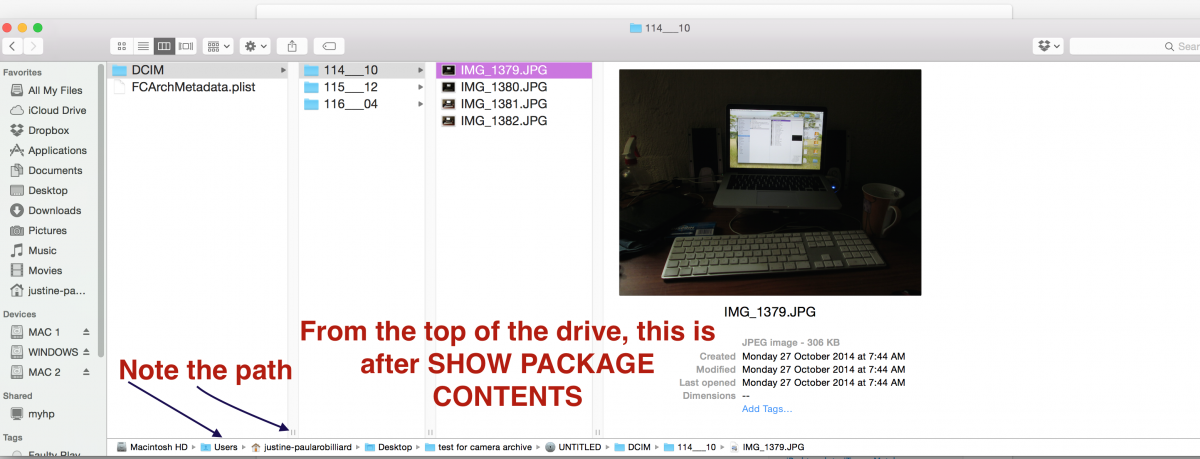
Or so I thought... I tried that method...and something is not right with FCP X 10.2.1, I figured out that the problem is that there is a BUG in FAVORITES, when you create a Camera Archive, then check the Add Camera to Favorites, it does the fill in the circle action.
The new Camera Archive shows in the left of the screen
When I go to Show Package Content..the footage is there... This is before pressing import selection.
Please Log in to join the conversation.
Less
More
- Posts: 971
- Thank you received: 46
21 May 2015 06:30 #64777
by MsJustine
Replied by MsJustine on topic Change from Cassette to SD card
I dont understand this...In FCP X 10.2.1, when I insert a 4GB SD card, it shows up as it should, then I click create camera archive, as you should, on the right you cannot change the option from copy file, there is only one option..as it should.
Yet when the camera archive has finished doing it thing, there is only thumbnail images for the video, NOT the stills, which are jpeg...
Just a small blue connected clip icon! Where is the thumbnail??
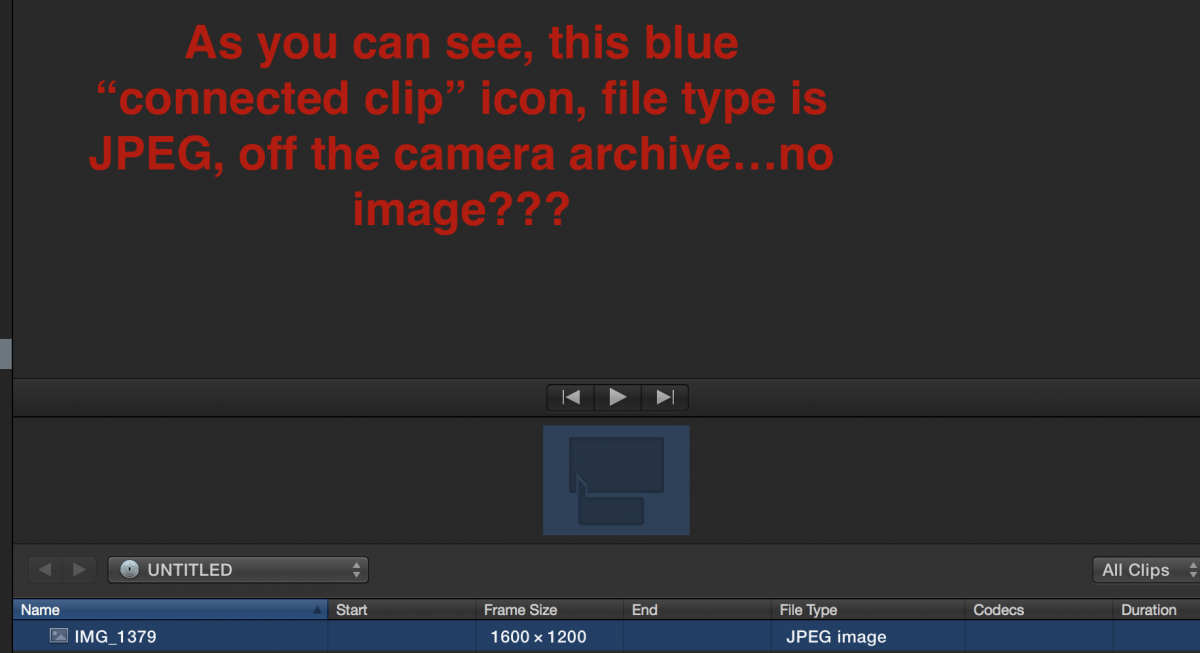
I have sent a bug report to Apple... When I come to import all/selection, the footage, the video and still images are all imported, seems FCP X has an issue with jpeg...Is this the bug..JPEG??
Yet when the camera archive has finished doing it thing, there is only thumbnail images for the video, NOT the stills, which are jpeg...
Just a small blue connected clip icon! Where is the thumbnail??
I have sent a bug report to Apple... When I come to import all/selection, the footage, the video and still images are all imported, seems FCP X has an issue with jpeg...Is this the bug..JPEG??
Please Log in to join the conversation.
- Andreas Kiel
-
- Offline
- Platinum Member
-
Less
More
- Posts: 1077
- Thank you received: 189
21 May 2015 06:50 #64778
by Andreas Kiel
Replied by Andreas Kiel on topic Change from Cassette to SD card
In my very personal opinion "camera archives" is one of of the most useless things Apple ever introduced.
If you have a SD card or similar from a camera you already have an "archive" which can be copied/saved in one of the ways described above.
FCPX "camera archives" can only be read by FCPX nothing else. Corrupted "camera archives" can't be repaired by any tool available yet. Lot's of metadata are lost or can be lost for several formats.
Over the time the Apple "camera archives" existed I got a lot questions how to fix them - several from people with popular reputation. Even from 1 who found out shortly before publishing his FCPX that the "camera archives" are not working.
I helped out explaining how to copy the assets to a "blank" camera card fake (created with my VCC) and then re-create a Apple "camera archive".
Totally useless steps - if he would have kept the original copies of the cards.
- Andreas
If you have a SD card or similar from a camera you already have an "archive" which can be copied/saved in one of the ways described above.
FCPX "camera archives" can only be read by FCPX nothing else. Corrupted "camera archives" can't be repaired by any tool available yet. Lot's of metadata are lost or can be lost for several formats.
Over the time the Apple "camera archives" existed I got a lot questions how to fix them - several from people with popular reputation. Even from 1 who found out shortly before publishing his FCPX that the "camera archives" are not working.
I helped out explaining how to copy the assets to a "blank" camera card fake (created with my VCC) and then re-create a Apple "camera archive".
Totally useless steps - if he would have kept the original copies of the cards.
- Andreas
Please Log in to join the conversation.
Less
More
- Posts: 971
- Thank you received: 46
21 May 2015 07:06 #64779
by MsJustine
Replied by MsJustine on topic Change from Cassette to SD card
I would agree 100%, as far as I can understand, it has very little function, and if I am to be honest, should be scrapped in FCP X 10.2.2...
It has created a mess that really need have been created, I can see the reason behind the concept of camera archive, sloppy if no effort at all was put into fixing the very obvious flaws in this aspect of FCP X.
This is just one more of the should have been fixed many updates ago, as Redifer says, Apple keep adding new features without fixing old faults, that is such a true statement, it seems with each update the faults get worse...And they multiply...
It was a lesson for me, I was trying to suggest a viable working method, so I tested my own advice and gosh what I thought I understood, and the reality, so far apart..great lesson...
It has created a mess that really need have been created, I can see the reason behind the concept of camera archive, sloppy if no effort at all was put into fixing the very obvious flaws in this aspect of FCP X.
This is just one more of the should have been fixed many updates ago, as Redifer says, Apple keep adding new features without fixing old faults, that is such a true statement, it seems with each update the faults get worse...And they multiply...
It was a lesson for me, I was trying to suggest a viable working method, so I tested my own advice and gosh what I thought I understood, and the reality, so far apart..great lesson...
Please Log in to join the conversation.
- Andreas Kiel
-
- Offline
- Platinum Member
-
Less
More
- Posts: 1077
- Thank you received: 189
21 May 2015 07:26 - 21 May 2015 07:28 #64780
by Andreas Kiel
Recently I got some unexpected donations from some people who tried to use similar apps from well known brand name companies. They all had problems with real secure copies on the field.
They turned back to my my no name brand and no problems anymore. They made the donations cause the were anxious that I would stop support for this app.
:woohoo:
- Andreas
P.S.
CopyCards doesn't do any real magic. It's own magic is to use the underlying framework Disk Utility uses and bring it into a more user user friendly order for this specified usage and using some options which are not shown in Disk Utility.
Replied by Andreas Kiel on topic Change from Cassette to SD card
Karsten Schlüter wrote: ... and those tools you recommend don't ? Thought, that has to do with drives format .... hmmm?
Recently I got some unexpected donations from some people who tried to use similar apps from well known brand name companies. They all had problems with real secure copies on the field.
They turned back to my my no name brand and no problems anymore. They made the donations cause the were anxious that I would stop support for this app.
:woohoo:
- Andreas
P.S.
CopyCards doesn't do any real magic. It's own magic is to use the underlying framework Disk Utility uses and bring it into a more user user friendly order for this specified usage and using some options which are not shown in Disk Utility.
Last edit: 21 May 2015 07:28 by Andreas Kiel.
Please Log in to join the conversation.
21 May 2015 12:40 #64785
by Harry298
Replied by Harry298 on topic Change from Cassette to SD card
Thanks for all the replies. I never thought it would get so much attention. I have read all the replies and will seriously take some on board.
I clad that its a hobby for me and dont have to worry about getting right for a client.
I use FCP x for my own uses and did not realise all the protentual with in the software. Most of it i will never use.
Thanks all
Harry a Happy OAP.
I clad that its a hobby for me and dont have to worry about getting right for a client.
I use FCP x for my own uses and did not realise all the protentual with in the software. Most of it i will never use.
Thanks all
Harry a Happy OAP.
Please Log in to join the conversation.
