


- Posts: 61
- Thank you received: 0
3 Post Moderation Rule for New Boarders (25 Jan 2021)
New boarders will have their posts moderated - Don't worry if you cannot see your post immediately.
I dunno why the frame of my upload is so small.
17 May 2015 22:58 #64638
by iKitty2
I dunno why the frame of my upload is so small. was created by iKitty2
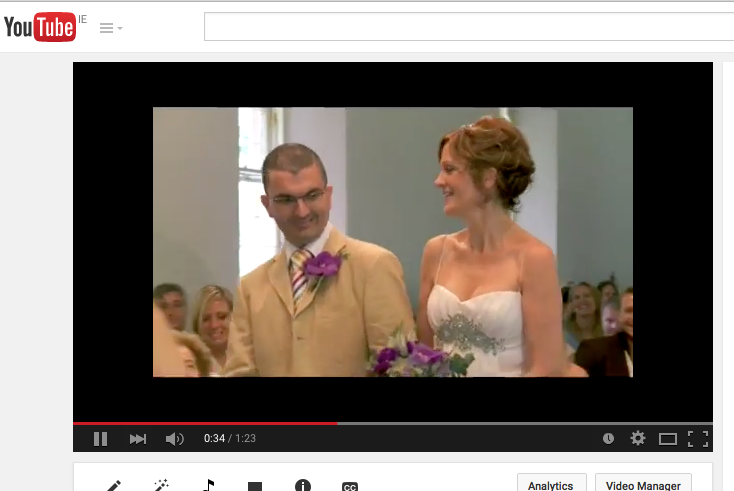
I have just uploaded a clip onto youtube for a color test when I saw that the size frame is smaller than usual - I dunno how to fix it.
The format I received was unfamiliar (.dvi) but I continued anyway and have also noticed the poor picture quality.
Please can you help
Attached are 2 screen grabs: off inspector and the youtube clip.
Thanks
Kitty
The format I received was unfamiliar (.dvi) but I continued anyway and have also noticed the poor picture quality.
Please can you help
Attached are 2 screen grabs: off inspector and the youtube clip.
Thanks
Kitty
Please Log in to join the conversation.
- Tom Wolsky
-

- Offline
- Moderator
-

17 May 2015 23:06 #64639
by Tom Wolsky
Replied by Tom Wolsky on topic I dunno why the frame of my upload is so small.
I'm only seeing one attachment.
Please Log in to join the conversation.

18 May 2015 00:39 #64641
by BenB
Replied by BenB on topic I dunno why the frame of my upload is so small.
Just a basic test to start at the beginning. In FCPX, click the Viewer, do a Shift-Z (fit to window) and verify your video is in fact the same size, and fitting inside the Timeline frame property.
Please Log in to join the conversation.
18 May 2015 08:42 #64648
by iKitty2
Replied by iKitty2 on topic I dunno why the frame of my upload is so small.
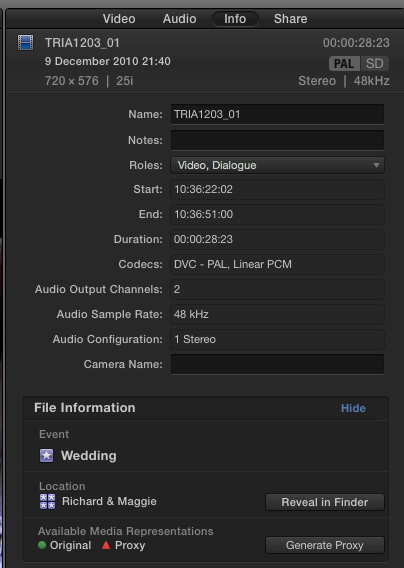
Here is the screenshot of inspector...
Please Log in to join the conversation.
- Tom Wolsky
-
- Offline
- Moderator
-
18 May 2015 09:00 #64649
by Tom Wolsky
Replied by Tom Wolsky on topic I dunno why the frame of my upload is so small.
That's standard definition video and it looks like it's set in an HD frame.
Please Log in to join the conversation.
18 May 2015 14:43 #64659
by iKitty2
Replied by iKitty2 on topic I dunno why the frame of my upload is so small.
Okay I can see now it's standard def, but I still don't understand how to change it - I so hope I do not have to re-import and re-edit all my work... Gulp!
Please Log in to join the conversation.
- Tom Wolsky
-
- Offline
- Moderator
-
18 May 2015 14:51 #64660
by Tom Wolsky
Replied by Tom Wolsky on topic I dunno why the frame of my upload is so small.
What are your project properties? I assume it doesn't look like that in FCP. This may be something YT is doing over which you have no control. It looks like it's displaying your SD material in an HD frame.
Please Log in to join the conversation.
18 May 2015 17:01 - 18 May 2015 17:06 #64664
by iKitty2
Replied by iKitty2 on topic I dunno why the frame of my upload is so small.
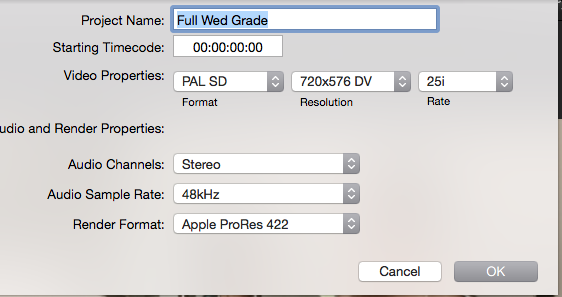
Video Properties - attached below. Not sure what YT is? How do I change my view from Hd to SD?
Last edit: 18 May 2015 17:06 by iKitty2. Reason: Added info
Please Log in to join the conversation.
- Tom Wolsky
-
- Offline
- Moderator
-
18 May 2015 17:35 #64665
by Tom Wolsky
Replied by Tom Wolsky on topic I dunno why the frame of my upload is so small.
Your project is SD. YT is YouTube. This is something being by them to load SD media in their regular HD framework. I don't think there is a solution for you if you use YoTube.
Please Log in to join the conversation.
18 May 2015 18:17 #64666
by iKitty2
Replied by iKitty2 on topic I dunno why the frame of my upload is so small.
That is a relief to hear - I thought I was been a complete idiot...lol
Thanks K
Thanks K
Please Log in to join the conversation.

18 May 2015 21:19 #64671
by Overturf
Replied by Overturf on topic I dunno why the frame of my upload is so small.
One question: are you sure all your footage was shot in SD? Or maybe your project setting just got messed up?
If it is SD, you could still try to export it in HD (720p will do) and then upload it to YT. This might fix your problem and at least work better if viewed in a small window.
If it is SD, you could still try to export it in HD (720p will do) and then upload it to YT. This might fix your problem and at least work better if viewed in a small window.
Please Log in to join the conversation.
19 May 2015 09:55 - 19 May 2015 11:02 #64688
by FvH
Replied by FvH on topic I dunno why the frame of my upload is so small.
One brief question: Your footage appears to be SD at 720x576 px, which is an aspect ratio of roughly 4:3 (exactly 4:3.2). However, in your first YouTube screenshot, the visible frame of your footage is 640x360 px, that is 16:9. What did you do to your footage to arrive at this aspect ratio in the first place?
Last edit: 19 May 2015 11:02 by FvH. Reason: removed typo
Please Log in to join the conversation.
- Tom Wolsky
-
- Offline
- Moderator
-
19 May 2015 11:29 #64692
by Tom Wolsky
Replied by Tom Wolsky on topic I dunno why the frame of my upload is so small.
It's PAL 720x576. It was probably anamorphic widescreen.
Please Log in to join the conversation.
19 May 2015 19:09 #64702
by iKitty2
Replied by iKitty2 on topic I dunno why the frame of my upload is so small.
It is PAL anamorphic but I do not know how it got like this as I was given footage to edit - I just imported it as is... with normal settings, Optimised and Pro Res 422
Please Log in to join the conversation.
