


- Posts: 299
- Thank you received: 10
3 Post Moderation Rule for New Boarders (25 Jan 2021)
New boarders will have their posts moderated - Don't worry if you cannot see your post immediately.
Small text box
14 May 2015 09:20 #64473
by robertdee
Small text box was created by robertdee
Hi,
Has anyone else had an issue with a shrinking text box since the update? Mine seems limited to 2 lines and I'm not seeing any drag options to resize it. Here's a pic:
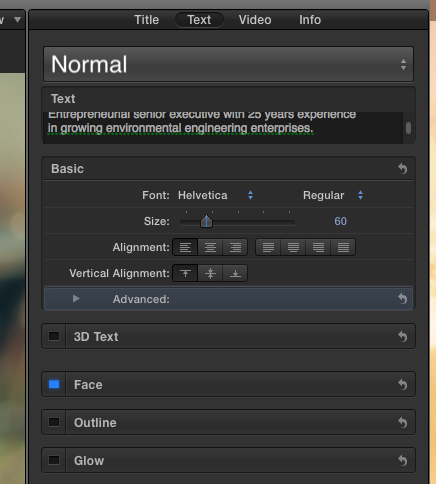
Has anyone else had an issue with a shrinking text box since the update? Mine seems limited to 2 lines and I'm not seeing any drag options to resize it. Here's a pic:
Please Log in to join the conversation.
- ronny courtens
-

- Offline
- Moderator
-

Less
More
- Posts: 4455
- Thank you received: 962
14 May 2015 09:40 #64475
by ronny courtens
Replied by ronny courtens on topic Small text box
Hey Robertdee,
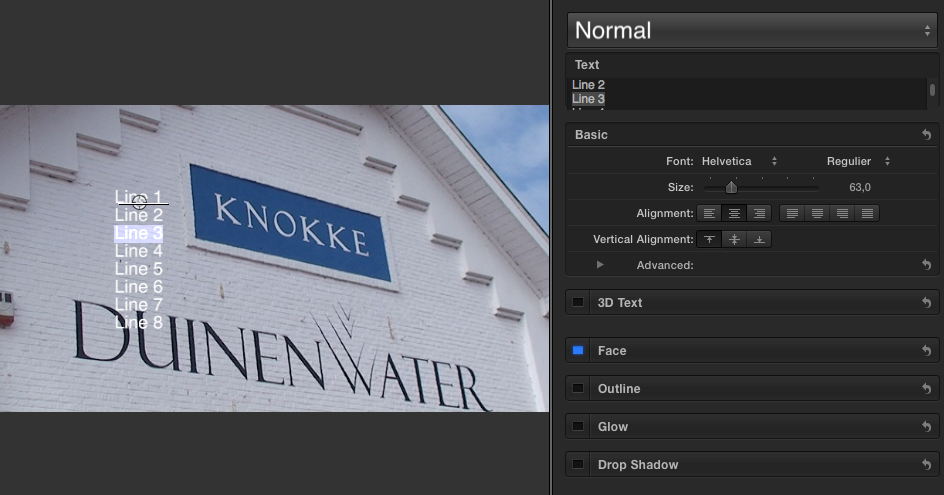
The text box has a fixed size. You can either use the scroll handle to scroll through the text in the text bx, or you can type and modify the text in the Viewer where you see all your lines at once.
- Ronny
The text box has a fixed size. You can either use the scroll handle to scroll through the text in the text bx, or you can type and modify the text in the Viewer where you see all your lines at once.
- Ronny
Please Log in to join the conversation.
14 May 2015 09:42 - 14 May 2015 09:43 #64476
by robertdee
Replied by robertdee on topic Small text box
Hi Ronny,
Thanks for replying quickly. I understand that I can amend the text in the viewer but in my experience it's a bit clunky and quite easy to move the text accidentally. I work with a pen and tablet which might explain this to a degree. Seems odd the text box would be so small.
Thanks for replying quickly. I understand that I can amend the text in the viewer but in my experience it's a bit clunky and quite easy to move the text accidentally. I work with a pen and tablet which might explain this to a degree. Seems odd the text box would be so small.
Last edit: 14 May 2015 09:43 by robertdee.
Please Log in to join the conversation.
- ronny courtens
-
- Offline
- Moderator
-
Less
More
- Posts: 4455
- Thank you received: 962
14 May 2015 09:49 #64477
by ronny courtens
Replied by ronny courtens on topic Small text box
I agree it could be somewhat bigger. But I guess they have to create the box height so that it fits on any screen, from 13" MBPs to 5K iMacs. Now that the 3D text option has been added to the Inspector they needed to make some place. I think they could make it resizable but I'm not sure this is a priority for the majority of FCP X users. You always can submit a feature request via the feedback page. Every feedback helps.
- Ronny
- Ronny
Please Log in to join the conversation.
14 May 2015 09:59 - 14 May 2015 10:00 #64478
by robertdee
Replied by robertdee on topic Small text box
Hi Ronny,
I'm really not impressed with the 3D text decision of the FCPX team. I can only hope it's part of a transition to something less gimmicky like full 3D space. Aside from it being a niche concern - over things like motion roundtripping and/or a built in audio mixer - it just looks like dated 3D to me. Just my opinion, of course. I love FCPX and some of the other inclusions in the new version were great - mask changes were a BIG plus for me as were smart collections (a timesaver) and multiple scopes.
In my wilder fantasies I imagine FCX, Resolve and Fusion are heading towards a convergence when Apple gets round to buying Blackmagic...
Feedback on the textbox faithfully submitted...
I'm really not impressed with the 3D text decision of the FCPX team. I can only hope it's part of a transition to something less gimmicky like full 3D space. Aside from it being a niche concern - over things like motion roundtripping and/or a built in audio mixer - it just looks like dated 3D to me. Just my opinion, of course. I love FCPX and some of the other inclusions in the new version were great - mask changes were a BIG plus for me as were smart collections (a timesaver) and multiple scopes.
In my wilder fantasies I imagine FCX, Resolve and Fusion are heading towards a convergence when Apple gets round to buying Blackmagic...
Feedback on the textbox faithfully submitted...
Last edit: 14 May 2015 10:00 by robertdee.
Please Log in to join the conversation.
- ronny courtens
-
- Offline
- Moderator
-
Less
More
- Posts: 4455
- Thank you received: 962
14 May 2015 10:17 #64479
by ronny courtens
Replied by ronny courtens on topic dd
3D text is not really a new feature for FCP X. It's a long requested feature by many that has been added to Motion and that also has being ported over into X. Of course this won't be important for you if you don't use it. But from what I can see there are quite some people who are very happy with it. I see 3D titles used in many tv programs these days, only today they are really subtle and not the overwhelming fly-in 3D titles anymore.
Features are a very delicate matter. There are many very different opinions on what should be a feature or not. While Motion roundtripping and an audio mixer may seem important for you, they also may be irrelevant for others. With over 1.5 million users it is normal that we will have many different wish-lists. So yes, the feedback page is the only efficient way to ask for what you specifically want, hoping many others will ask the same. Discussions about features on forums are a waste of time, simply because they don't change anything.
- Ronny
Features are a very delicate matter. There are many very different opinions on what should be a feature or not. While Motion roundtripping and an audio mixer may seem important for you, they also may be irrelevant for others. With over 1.5 million users it is normal that we will have many different wish-lists. So yes, the feedback page is the only efficient way to ask for what you specifically want, hoping many others will ask the same. Discussions about features on forums are a waste of time, simply because they don't change anything.
- Ronny
Please Log in to join the conversation.
14 May 2015 10:23 #64480
by robertdee
Replied by robertdee on topic Small text box
I understand this, Ronny - I hope I managed to convey that I was talking about my opinion only and that I understand others have different needs 
Overall, I'm very happy with FCPX and wouldn't use anything else - I'm a self employed pro user and it's the tool of my trade so I'm 'all in' with it.
Always appreciate your balanced comments.
Overall, I'm very happy with FCPX and wouldn't use anything else - I'm a self employed pro user and it's the tool of my trade so I'm 'all in' with it.
Always appreciate your balanced comments.
Please Log in to join the conversation.


14 May 2015 12:28 #64482
by anickt
Replied by anickt on topic Small text box
I do a lot with text. I think the new version is more responsive to editing text in the viewer so the change in the size of the text entry box is not as much of an issue for me as I thought it would be. If I am doing small text (like a disclaimer) I just work on it in TextEdit and then copy and paste into FCP.
Please Log in to join the conversation.

14 May 2015 21:08 #64498
by John G
Replied by John G on topic Small text box
Hi All
Yup, the text box got smaller with the 10.2 release. We used to use it all the time as we do a lot of graphics. It's a much better way to orgazise your text than clicking and typing in the viewer IMHO! Also IMHO, the text box wasn't really big enough originally. Now it' so small it's pretty much unusable and I find we're typing in the viewer instead. Not so good.
If the text box could be drag-resisable that would be excellent. Couldn't be hard to do Apple, surely?
John G
Yup, the text box got smaller with the 10.2 release. We used to use it all the time as we do a lot of graphics. It's a much better way to orgazise your text than clicking and typing in the viewer IMHO! Also IMHO, the text box wasn't really big enough originally. Now it' so small it's pretty much unusable and I find we're typing in the viewer instead. Not so good.
If the text box could be drag-resisable that would be excellent. Couldn't be hard to do Apple, surely?
John G
Please Log in to join the conversation.
- ronny courtens
-
- Offline
- Moderator
-
Less
More
- Posts: 4455
- Thank you received: 962
15 May 2015 08:09 - 15 May 2015 08:12 #64519
by ronny courtens
Replied by ronny courtens on topic Small text box
Hi John,
If you would prefer the text window to be resizable, submit a feature enhancement request. It's not really a matter of wether this is difficult to do or not, it's a matter of choices.
I don't think suggesting a text window that can be resized by dragging will have much success because it goes against the current UI design. Motion 5 does not have a resizable text window either. But you could suggest having an extra "Shrink"/"Expand" option top right of the text window (just like the blue "Hide"/"Show" options on the other text parameters).
When you only need to enter a title or a lower third you won't need to expand. When working on a long text you could choose "Expand" and the window would get larger, pushing the other parameters down. Just like when you select "Show" in the other parameters. If you suggest it this way, I think that's a suggestion the programmers will understand.
- Ronny
If you would prefer the text window to be resizable, submit a feature enhancement request. It's not really a matter of wether this is difficult to do or not, it's a matter of choices.
I don't think suggesting a text window that can be resized by dragging will have much success because it goes against the current UI design. Motion 5 does not have a resizable text window either. But you could suggest having an extra "Shrink"/"Expand" option top right of the text window (just like the blue "Hide"/"Show" options on the other text parameters).
When you only need to enter a title or a lower third you won't need to expand. When working on a long text you could choose "Expand" and the window would get larger, pushing the other parameters down. Just like when you select "Show" in the other parameters. If you suggest it this way, I think that's a suggestion the programmers will understand.
- Ronny
Last edit: 15 May 2015 08:12 by ronny courtens.
Please Log in to join the conversation.
- Karsten Schlüter
-

- Offline
- Moderator
-
Less
More
- Posts: 3790
- Thank you received: 718
15 May 2015 08:29 #64520
by Karsten Schlüter
Mentioning Motion ... the free flowing HUD comes to mind ... plus, in the Inspector, at the very bottom, the text-field in M5 is much bigger than in FCPX.
'layout arrangement', resizeable, dragable, customizable AND save/recall prsets... Top in my wishlist... For diff. tasks I have/need/use diff. layouts ...
Replied by Karsten Schlüter on topic Small text box
ronny courtens wrote: ....
I don't think suggesting a text window that can be resized by dragging will have much success because it goes against the current UI design. Motion 5 does not have a resizable text window either. ...
Mentioning Motion ... the free flowing HUD comes to mind ... plus, in the Inspector, at the very bottom, the text-field in M5 is much bigger than in FCPX.
'layout arrangement', resizeable, dragable, customizable AND save/recall prsets... Top in my wishlist... For diff. tasks I have/need/use diff. layouts ...
Please Log in to join the conversation.
- ronny courtens
-
- Offline
- Moderator
-
Less
More
- Posts: 4455
- Thank you received: 962
15 May 2015 08:36 #64521
by ronny courtens
Replied by ronny courtens on topic Small text box
Hi Karsten,
The text window in Motion is fixed and non-resizable. It's bigger (5 lines) because there is more room in the UI.
I don't think resizing sub-windows by dragging will happen again because non-standard window layouts can screw up user preferences more easily. But feel free to post a feature request.
- Ronny
The text window in Motion is fixed and non-resizable. It's bigger (5 lines) because there is more room in the UI.
I don't think resizing sub-windows by dragging will happen again because non-standard window layouts can screw up user preferences more easily. But feel free to post a feature request.
- Ronny
Please Log in to join the conversation.
- Karsten Schlüter
-
- Offline
- Moderator
-
Less
More
- Posts: 3790
- Thank you received: 718
15 May 2015 08:53 #64525
by Karsten Schlüter
The HUD I mentioned always gets in the way, I never know where to put it best indeed :lol:
But FCPX ... the layout when importing/tagging clips, and editing clips, and CC clips ... at last my needs ask for different arrangements ...
I wrote a request ... I see your/Apples point too ... maybe, I just need a bigger screen! :lol:
Replied by Karsten Schlüter on topic Small text box
ronny courtens wrote: ... because non-standard window layouts can screw up user preferences more easily...
The HUD I mentioned always gets in the way, I never know where to put it best indeed :lol:
But FCPX ... the layout when importing/tagging clips, and editing clips, and CC clips ... at last my needs ask for different arrangements ...
I wrote a request ... I see your/Apples point too ... maybe, I just need a bigger screen! :lol:
Please Log in to join the conversation.
- ronny courtens
-
- Offline
- Moderator
-
Less
More
- Posts: 4455
- Thank you received: 962
15 May 2015 08:57 - 15 May 2015 08:58 #64527
by ronny courtens
Replied by ronny courtens on topic Small text box
I think suggesting different standard layouts for different tasks is a very valid point. But resizing sub-parts of windows by dragging probably isn't.
- Ronny
- Ronny
Last edit: 15 May 2015 08:58 by ronny courtens.
Please Log in to join the conversation.
