


- Posts: 2
- Thank you received: 0
3 Post Moderation Rule for New Boarders (25 Jan 2021)
New boarders will have their posts moderated - Don't worry if you cannot see your post immediately.
exporting annotations/markers?
13 May 2015 19:23 #64446
by lucylu
exporting annotations/markers? was created by lucylu
Hi,
Im using fcp X, and wondering if I can export markers or -so i understood- annotations.
I am not just looking for markers to improve my workflow. The final idea is to export it, and provide viewers with an opportunity to skip to certain parts of the video (it's an faq video).
It will not be posted on youtube, yet all I can find are tutorials that describe the 'how to' on youtube.
Preferably I only want the marker/annotation tot pop-up when a viewer moves over the timeline.
Is this even possible in fcp, or am I too demanding?
Thank you so much in advance!
Im using fcp X, and wondering if I can export markers or -so i understood- annotations.
I am not just looking for markers to improve my workflow. The final idea is to export it, and provide viewers with an opportunity to skip to certain parts of the video (it's an faq video).
It will not be posted on youtube, yet all I can find are tutorials that describe the 'how to' on youtube.
Preferably I only want the marker/annotation tot pop-up when a viewer moves over the timeline.
Is this even possible in fcp, or am I too demanding?
Thank you so much in advance!
Please Log in to join the conversation.
- ronny courtens
-

- Offline
- Moderator
-

Less
More
- Posts: 4455
- Thank you received: 962
14 May 2015 08:21 #64471
by ronny courtens
Replied by ronny courtens on topic exporting annotations/markers?
Hoi Loesje, welcome to the forum.
Actually this is quite easy.
1. Put a chapter marker on your timeline for every new question. To add a chapter marker, press M twice. This will add a marker and open the marker dialogue:
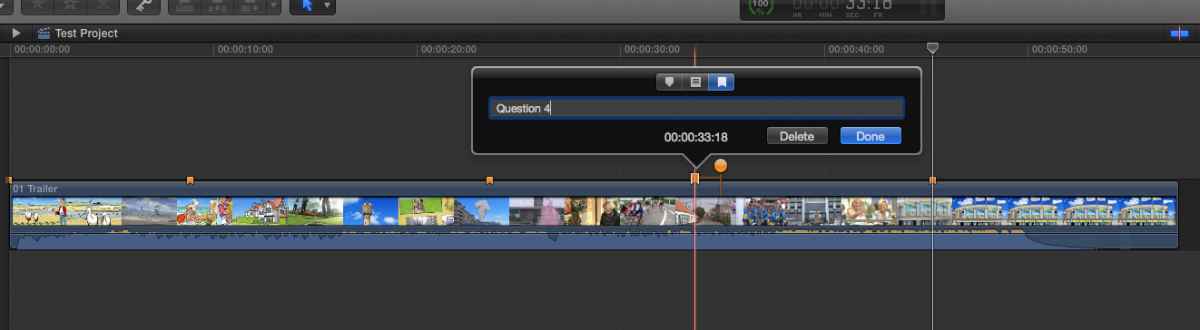
In the marker dialogue select the chapter marker button (third option), the marker will turn orange. Then enter an annotation for the chapter marker (here: Question 4). You can drag the orange circle to any frame on your timeline to create a poster frame for that marker. This is a visual reference for the annotation that will be shown in modern video players.
2. Export the timeline with "Include chapter markers" checked in the Settings tab:
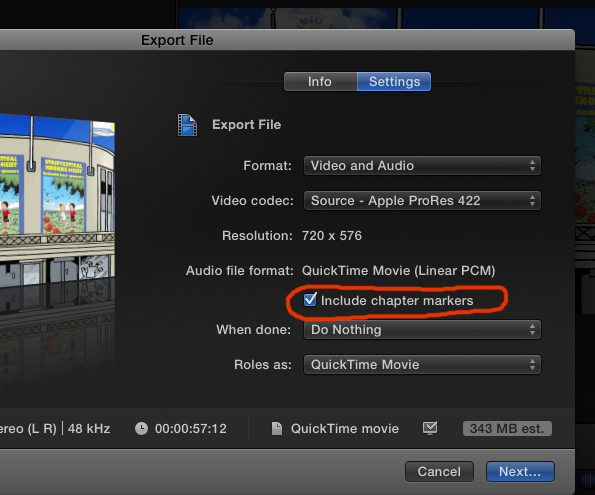
Here I have exported the timeline as a ProRes 422 master file. If your video is intended for iTunes, iPhone or iPad you should export for Apple Devices. But always have the "Include chapter markers" box checked.
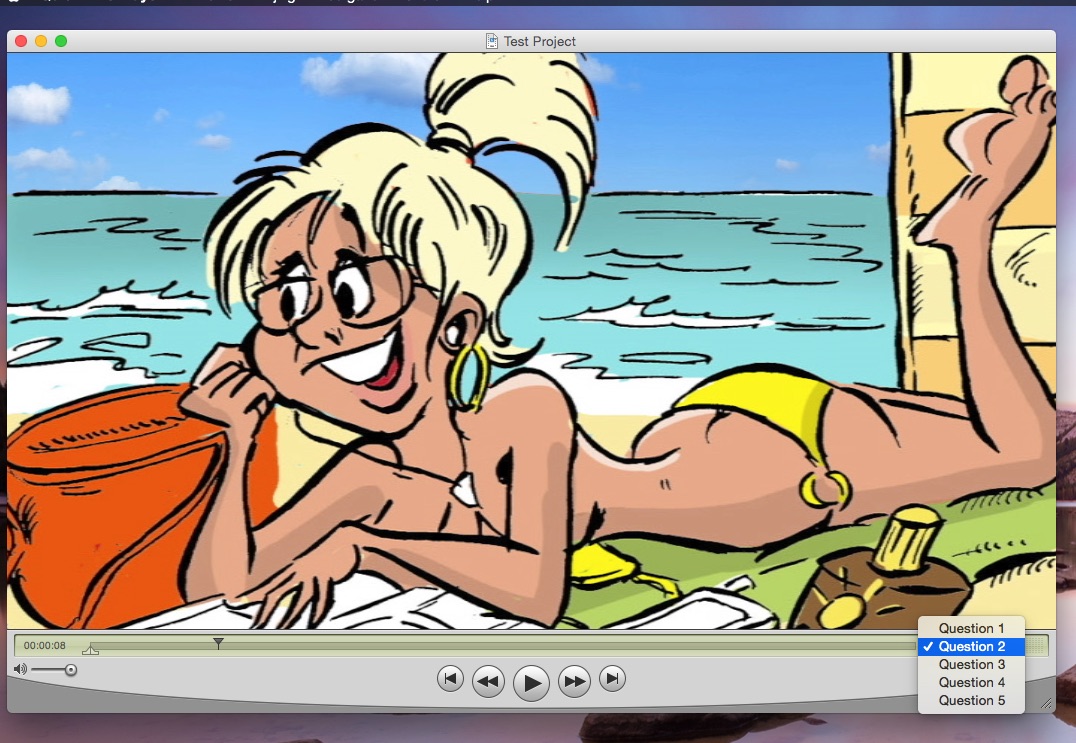
Here you see the file played in good-old QT7. When the viewer clicks the chapters button he can quickly navigate to any question in the list:
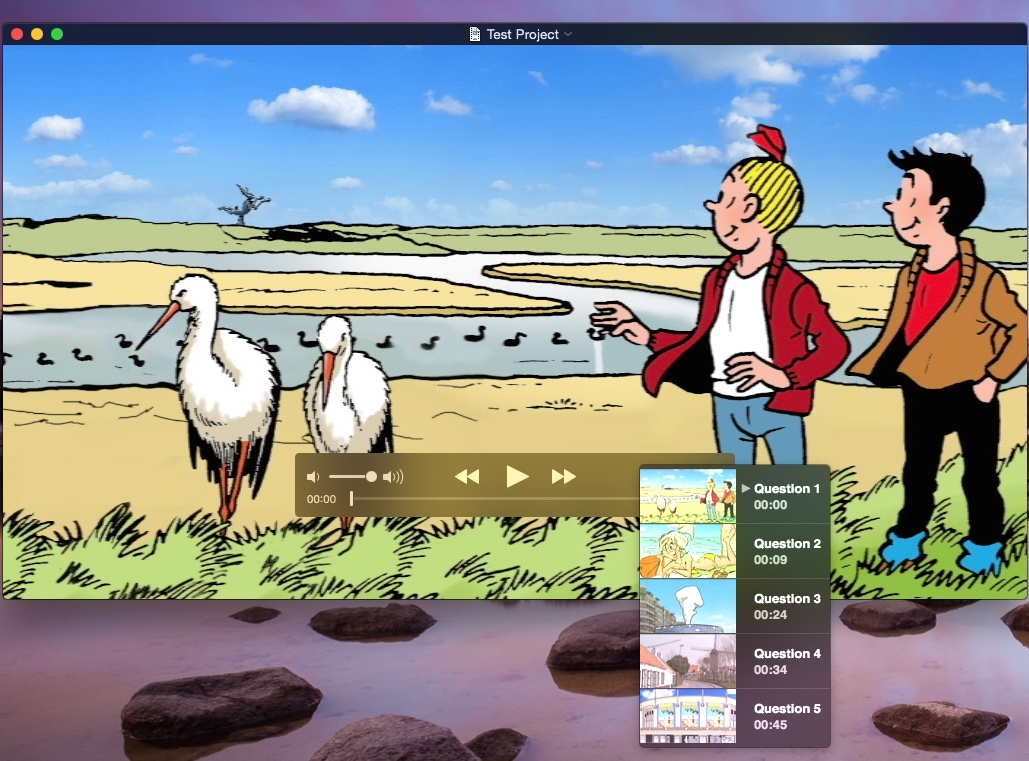
This is the same video played in QT X. The viewer can navigate through the questions and see the poster frames you have set as visual support:
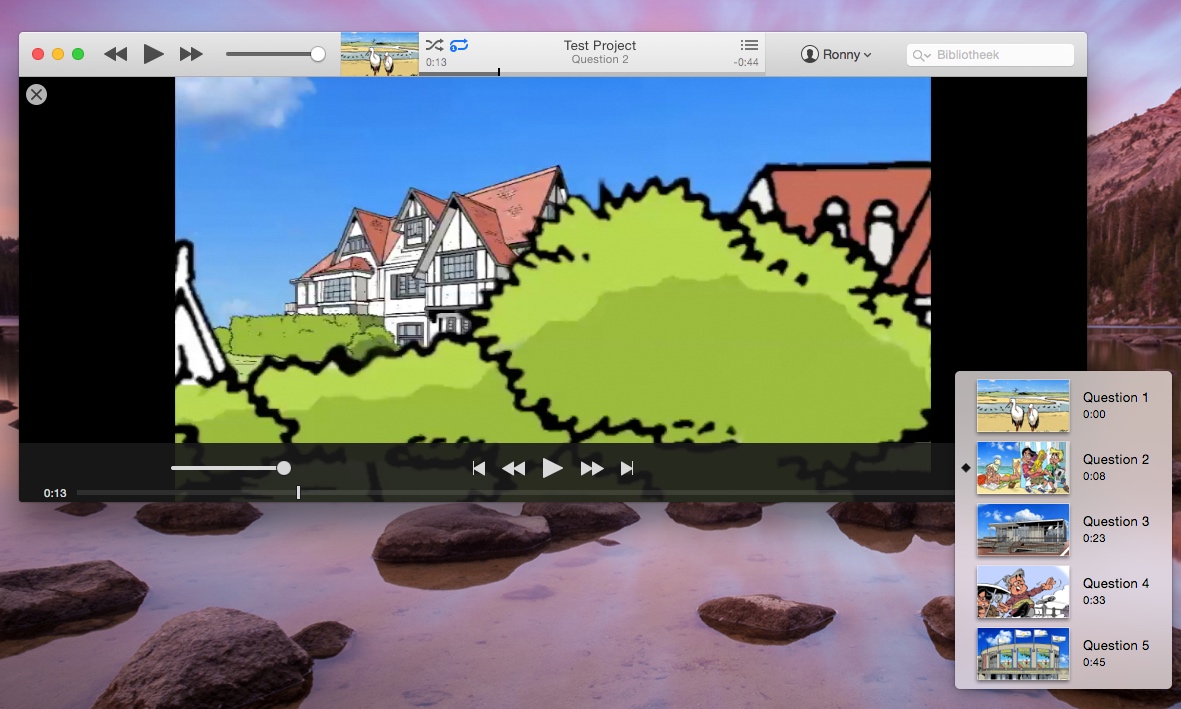
This is a version created for Apple Devices and played in iTunes. Again the viewer can jump to any question and he can see the poster frames you have set:
Just a quick note on poster frames. It is better not to set poster frames right before or after a cut, especially if the final video is going to be encoded into H.264, MPEG or any other long-GOP format. These codecs don't have all i-frames, so the poster frame may differ some frames from the exact spot you have selected on the timeline. Create a poster frame on a clip with sufficient headroom.
Groeten uit België
- Ronny
Actually this is quite easy.
1. Put a chapter marker on your timeline for every new question. To add a chapter marker, press M twice. This will add a marker and open the marker dialogue:
In the marker dialogue select the chapter marker button (third option), the marker will turn orange. Then enter an annotation for the chapter marker (here: Question 4). You can drag the orange circle to any frame on your timeline to create a poster frame for that marker. This is a visual reference for the annotation that will be shown in modern video players.
2. Export the timeline with "Include chapter markers" checked in the Settings tab:
Here I have exported the timeline as a ProRes 422 master file. If your video is intended for iTunes, iPhone or iPad you should export for Apple Devices. But always have the "Include chapter markers" box checked.
Here you see the file played in good-old QT7. When the viewer clicks the chapters button he can quickly navigate to any question in the list:
This is the same video played in QT X. The viewer can navigate through the questions and see the poster frames you have set as visual support:
This is a version created for Apple Devices and played in iTunes. Again the viewer can jump to any question and he can see the poster frames you have set:
Just a quick note on poster frames. It is better not to set poster frames right before or after a cut, especially if the final video is going to be encoded into H.264, MPEG or any other long-GOP format. These codecs don't have all i-frames, so the poster frame may differ some frames from the exact spot you have selected on the timeline. Create a poster frame on a clip with sufficient headroom.
Groeten uit België
- Ronny
Please Log in to join the conversation.
17 May 2015 17:36 #64629
by lucylu
Replied by lucylu on topic exporting annotations/markers?
Hi Ronny,
Is it too much to say I love you? haha! Of course Im kidding.. sort of...
No seriously, this helped me out so much, thank you. I am not quite sure what player is being used by the webeditor; I will talk to this persoon about it. But to be able to at least deliver my end product with these markers is great!
Thanks again Ronny, for taking the time to do this!
Groeten uit Nederland
Is it too much to say I love you? haha! Of course Im kidding.. sort of...
No seriously, this helped me out so much, thank you. I am not quite sure what player is being used by the webeditor; I will talk to this persoon about it. But to be able to at least deliver my end product with these markers is great!
Thanks again Ronny, for taking the time to do this!
Groeten uit Nederland
Please Log in to join the conversation.
- ronny courtens
-
- Offline
- Moderator
-
Less
More
- Posts: 4455
- Thank you received: 962
18 May 2015 09:37 #64651
by ronny courtens
Replied by ronny courtens on topic exporting annotations/markers?
Hey Loesje,
My pleasure. And thank you for the kind words, I am truly flattered
Most web players will be able to embed your markers as annotations. If you have any more questions, feel free to drop me an e-mail: ronnycourtens@mac.com
- Ronny
My pleasure. And thank you for the kind words, I am truly flattered
Most web players will be able to embed your markers as annotations. If you have any more questions, feel free to drop me an e-mail: ronnycourtens@mac.com
- Ronny
Please Log in to join the conversation.
