


- Posts: 2
- Thank you received: 0
3 Post Moderation Rule for New Boarders (25 Jan 2021)
New boarders will have their posts moderated - Don't worry if you cannot see your post immediately.
Mulclip editing in FCPX 10.2
06 May 2015 19:32 #64142
by TheGuigo
Mulclip editing in FCPX 10.2 was created by TheGuigo
I'm trying to edit a 8 cam tv show with multiclip on fcpx. My problem is when I switch cam it made an edit slice on video AND audio. I don't mean that audio is switched to, I know how to only switch video and keep the master audio playing all the way. But it still made an edit slice on the audio track so when I'm ready to send my editing to the audio mix it made to much cuts for noting. I would like to be able to switch cam on my video and let the audio intact unless I want to cut a part of the timing on the video. If I detach audio when I want to cut time everyting go off sync!
I wish I'm clear with my demand... !!
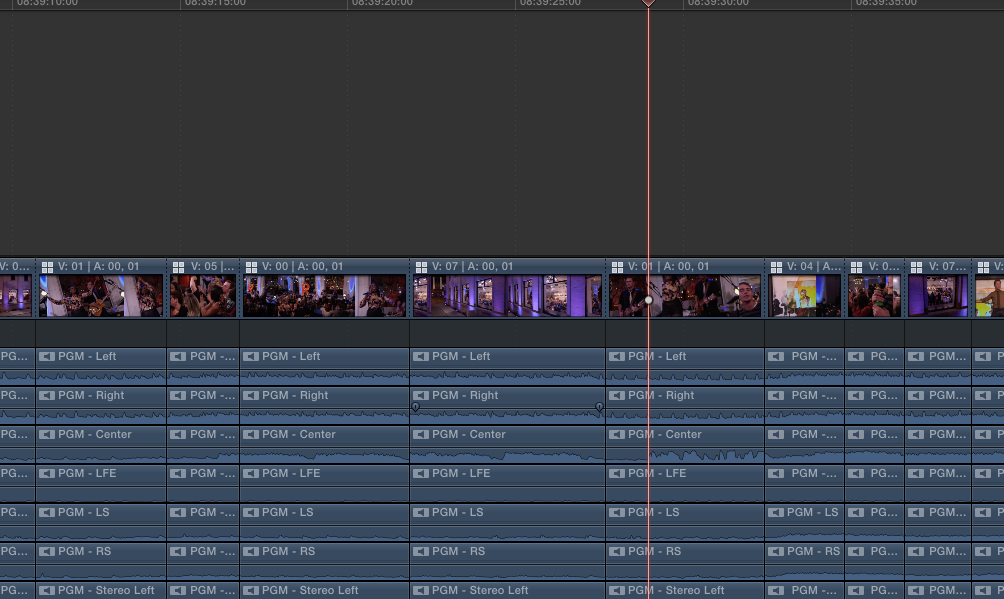
I wish I'm clear with my demand... !!
Please Log in to join the conversation.
- Tom Wolsky
-

- Offline
- Moderator
-

07 May 2015 10:52 #64156
by Tom Wolsky
Replied by Tom Wolsky on topic Mulclip editing in FCPX 10.2
Use feedback to make a request to have this changed.
Detach the audio. When you have to make a cut for time use Shift-Cmd-B to blade through all the layers. Delete all the layer content together to maintain sync.
Detach the audio. When you have to make a cut for time use Shift-Cmd-B to blade through all the layers. Delete all the layer content together to maintain sync.
Please Log in to join the conversation.

07 May 2015 12:52 #64160
by dkag7
Replied by dkag7 on topic Mulclip editing in FCPX 10.2
I am on a multicam project as well but I dont see this issue (5 cams)
just to double check, in the multicam preview window, only the 'video icon' is selected correct?
I do my multicam a bit different however...
All the audio clips seen in your screenshot, for me are never there.
In my multicam projects, all those audio clips would be withing the multicam itself.
So for my multicam clips timeline (not the project timeline you show in the snapshot), I would have audio only angles as well as video angles.
You can do this by selecting these audio files before making the multicam clip,
or you can open the multicam clip, add new angles, then place these audio clips within these new angles.
The end result would be a multicam clip with many more angles and a project timeline that just shows the multicam clip, and not all the extra audio tracks below it.
hope that helps..
Kurt
just to double check, in the multicam preview window, only the 'video icon' is selected correct?
I do my multicam a bit different however...
All the audio clips seen in your screenshot, for me are never there.
In my multicam projects, all those audio clips would be withing the multicam itself.
So for my multicam clips timeline (not the project timeline you show in the snapshot), I would have audio only angles as well as video angles.
You can do this by selecting these audio files before making the multicam clip,
or you can open the multicam clip, add new angles, then place these audio clips within these new angles.
The end result would be a multicam clip with many more angles and a project timeline that just shows the multicam clip, and not all the extra audio tracks below it.
hope that helps..
Kurt
Please Log in to join the conversation.
07 May 2015 13:17 - 10 May 2015 23:10 #64162
by dkag7
Replied by dkag7 on topic Mulclip editing in FCPX 10.2
Here is an example screenshot.
In this project I want to use both the audio tracks so I have them always selected in the multicam viewer (cmmand click them to select)
The other screenshot is of the multicam timeline.
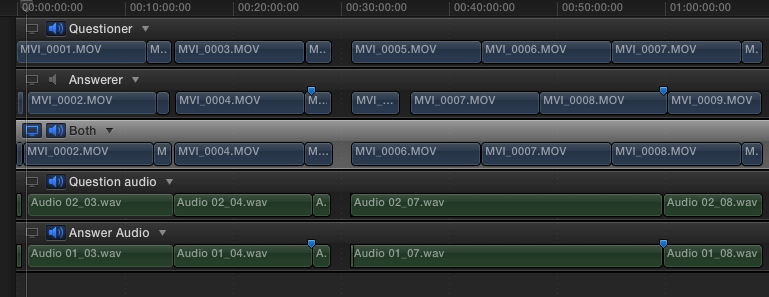
In this project I want to use both the audio tracks so I have them always selected in the multicam viewer (cmmand click them to select)
The other screenshot is of the multicam timeline.
Last edit: 10 May 2015 23:10 by dkag7.
Please Log in to join the conversation.
07 May 2015 13:25 - 10 May 2015 23:10 #64164
by dkag7
Replied by dkag7 on topic Mulclip editing in FCPX 10.2
I did a test and added a separate audio angle to the timeline below the multicam clip.
When switching angles in the angle viewer, the separate audio track did not blade..
When switching angles in the angle viewer, the separate audio track did not blade..
Last edit: 10 May 2015 23:10 by dkag7.
Please Log in to join the conversation.
08 May 2015 14:58 #64200
by TheGuigo
Replied by TheGuigo on topic Mulclip editing in FCPX 10.2
Thank you all .. but that don't help me much!
I work with 8 cameras and 24 audio tracks with 3hrs medias that I need to turn down to 45 minutes for my broadcast show. So I need to use multi cams to keep my audio and video sync but every time I switch angle it make a splice on the audio tracks that turns it impossible to make primary audio mix.
I work with 8 cameras and 24 audio tracks with 3hrs medias that I need to turn down to 45 minutes for my broadcast show. So I need to use multi cams to keep my audio and video sync but every time I switch angle it make a splice on the audio tracks that turns it impossible to make primary audio mix.
Please Log in to join the conversation.
