


- Posts: 164
- Thank you received: 0
3 Post Moderation Rule for New Boarders (25 Jan 2021)
New boarders will have their posts moderated - Don't worry if you cannot see your post immediately.
I've somehow changd the dimensions of my film ?
05 May 2015 13:43 #64078
by Neil P
I've somehow changd the dimensions of my film ? was created by Neil P
Hi
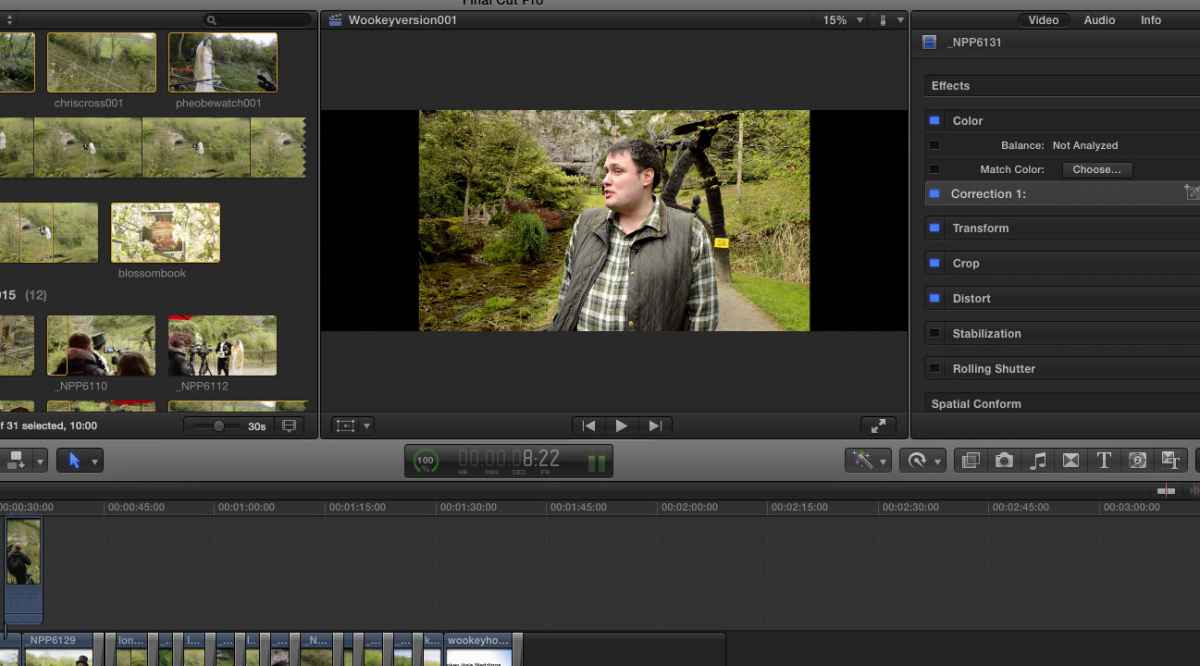
I've somehow managed to change the dimensions of my film, viewing box (not sure if I've hit wide view or something similar. Can anybody advise me on how to get it back to normal view ?
See pic of my screen
thanks
Neil
I've somehow managed to change the dimensions of my film, viewing box (not sure if I've hit wide view or something similar. Can anybody advise me on how to get it back to normal view ?
See pic of my screen
thanks
Neil
Please Log in to join the conversation.

05 May 2015 13:57 #64079
by lichinho
Replied by lichinho on topic I've somehow changd the dimensions of my film ?
Your screenshot is missing.
I am not sure what the problem is. If it is a matter of the size you see in the viewer, click the little triangle at the top right and choose "Fit".
I am not sure what the problem is. If it is a matter of the size you see in the viewer, click the little triangle at the top right and choose "Fit".
Please Log in to join the conversation.
05 May 2015 14:10 #64080
by Neil P
Replied by Neil P on topic I've somehow changd the dimensions of my film ?
test,
arrrgggHHH my attachments also don't seem to be loading
arrrgggHHH my attachments also don't seem to be loading
Please Log in to join the conversation.
05 May 2015 14:11 #64081
by Neil P
Replied by Neil P on topic I've somehow changd the dimensions of my film ?
here it is, my screen is now long and thin (as above) , have I changed the screen resolution ?
Please Log in to join the conversation.
05 May 2015 14:37 #64083
by lichinho
Replied by lichinho on topic I've somehow changd the dimensions of my film ?
It is also pretty big, seeing that it says "15%" at the top of the viewer...
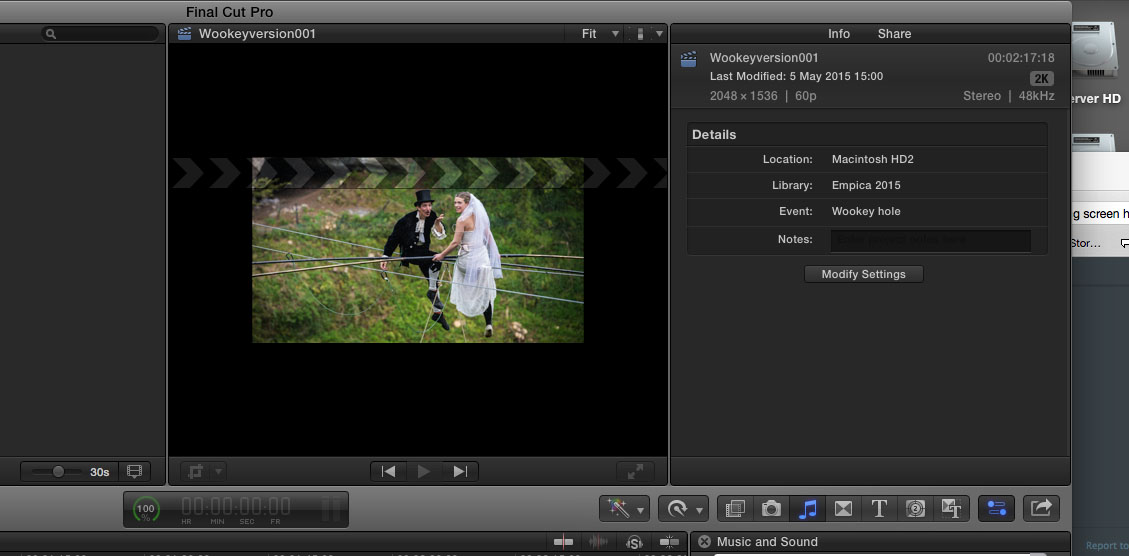
Select the project in the browser and show us what you see in the Inspector, under "Info".
It should show the project frame size. It is also there that you can make changes by clicking the "Modify Settings" button.
Select the project in the browser and show us what you see in the Inspector, under "Info".
It should show the project frame size. It is also there that you can make changes by clicking the "Modify Settings" button.
Please Log in to join the conversation.
05 May 2015 14:49 #64084
by Neil P
Replied by Neil P on topic I've somehow changd the dimensions of my film ?
Here you go, should it be a 1080 setting, 25 fps ?
Neil
Neil
Please Log in to join the conversation.
05 May 2015 15:06 #64085
by lichinho
Replied by lichinho on topic I've somehow changd the dimensions of my film ?
That is for you to say. It depends on your content and where and how you are going to deploy it. If you are using 1080p footage and stills, it is probably a good choice.
The current dimensions in your project are not standard for video. They are in 4:3 proportion, which makes me think that they probably match the size of some still image - maybe the one that appears in the screenshot.
The current dimensions in your project are not standard for video. They are in 4:3 proportion, which makes me think that they probably match the size of some still image - maybe the one that appears in the screenshot.
Please Log in to join the conversation.
05 May 2015 15:27 #64087
by Neil P
Replied by Neil P on topic I've somehow changd the dimensions of my film ?
ok,
I've change it back to 1920 x1080 now via the info box and everything now looks as it should be.
I think that I accidently changed the setting while trying to create a intro plate for the film.
Thanks
Neil
I've change it back to 1920 x1080 now via the info box and everything now looks as it should be.
I think that I accidently changed the setting while trying to create a intro plate for the film.
Thanks
Neil
Please Log in to join the conversation.
