


- Posts: 136
- Thank you received: 0
3 Post Moderation Rule for New Boarders (25 Jan 2021)
New boarders will have their posts moderated - Don't worry if you cannot see your post immediately.
MultiCam isn't syncing...
- youngeddie
-
 Topic Author
- Offline
- Premium Member
-

Less
More
04 May 2015 20:10 #64031
by youngeddie
MultiCam isn't syncing... was created by youngeddie
Hello!
I'm creating MultiCam clips that are not syncing up. I'm trying to sync two 18 second clips and I get a 45 minute MultiCam clip with the two 18 second clips on either end.
What am I doing wrong?????
I have the latest version of Yosemite and FCPX
Thanks!
I'm creating MultiCam clips that are not syncing up. I'm trying to sync two 18 second clips and I get a 45 minute MultiCam clip with the two 18 second clips on either end.
What am I doing wrong?????
I have the latest version of Yosemite and FCPX
Thanks!
Please Log in to join the conversation.
- youngeddie
-
Topic Author
- Offline
- Premium Member
-
Less
More
- Posts: 136
- Thank you received: 0
04 May 2015 20:15 #64033
by youngeddie
Replied by youngeddie on topic FCPX 10.2 Importing Clips give me Black Boxes
I'm using the latest version of FCPX (10.2) and I'm having issues importing clips.
The clips from my Sony camera are working fine, but my associate has a Panasonic camera, and when I import his clips I get audio, but no video.
I've seen some mention of this on line, but the article talks about changing settings on the camera, but what about the footage that's already been shot. Is there any hope of importing that footage?
Thanks for your help with this!!
The clips from my Sony camera are working fine, but my associate has a Panasonic camera, and when I import his clips I get audio, but no video.
I've seen some mention of this on line, but the article talks about changing settings on the camera, but what about the footage that's already been shot. Is there any hope of importing that footage?
Thanks for your help with this!!
Please Log in to join the conversation.


04 May 2015 20:18 #64034
by BenB
Replied by BenB on topic MultiCam isn't syncing...
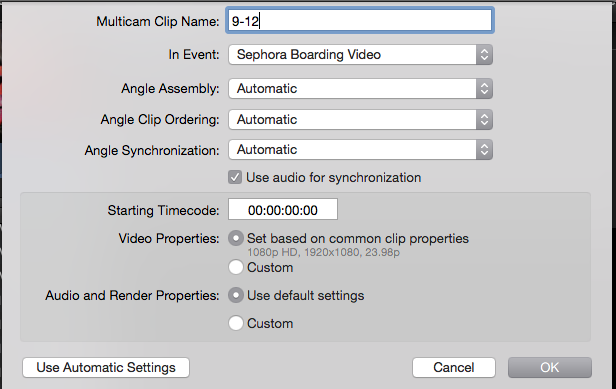
How are you configuring the Multicam Setup window? Screen shot please?
Please Log in to join the conversation.
- Tom Wolsky
-

- Offline
- Moderator
-

04 May 2015 20:23 #64038
by Tom Wolsky
Replied by Tom Wolsky on topic MultiCam isn't syncing...
Assign camera angle numbers in the Info inspector before you create the multicam clip.
Please Log in to join the conversation.
- Tom Wolsky
-
- Offline
- Moderator
-
04 May 2015 20:23 #64040
by Tom Wolsky
Replied by Tom Wolsky on topic FCPX 10.2 Importing Clips give me Black Boxes
Please Log in to join the conversation.
- youngeddie
-
Topic Author
- Offline
- Premium Member
-
Less
More
- Posts: 136
- Thank you received: 0
04 May 2015 20:24 #64041
by youngeddie
Replied by youngeddie on topic MultiCam isn't syncing...
Hi Tom,
I'm just using the basic sync with audio setting. (at least that's my intension)
I'm just using the basic sync with audio setting. (at least that's my intension)
Please Log in to join the conversation.
04 May 2015 20:26 #64042
by BenB
Replied by BenB on topic MultiCam isn't syncing...
OK, clip timecode could effect this, camera name could effect this, like Tom said, asking your metadata manually before hand to be sure. See the link he posted.
Please Log in to join the conversation.
- youngeddie
-
Topic Author
- Offline
- Premium Member
-
Less
More
- Posts: 136
- Thank you received: 0
04 May 2015 20:28 #64044
by youngeddie
Replied by youngeddie on topic MultiCam isn't syncing...
Will do thanks!
Please Log in to join the conversation.
