


- Posts: 52
- Thank you received: 0
3 Post Moderation Rule for New Boarders (25 Jan 2021)
New boarders will have their posts moderated - Don't worry if you cannot see your post immediately.
Individually moving audio channels
- Brad Parsons
-
 Topic Author
- Offline
- Senior Member
-

Less
More
02 May 2015 21:07 #63959
by Brad Parsons
Individually moving audio channels was created by Brad Parsons
I recently shot an event with a feed from the board and other from shotgun for ambience. I usually move the ambience channel forward to minimize the latency issues between the two audio sources. I can't seem to find a way to reposition the shotgun mic channel to match the timing of the line feed.
Please Log in to join the conversation.
- Tom Wolsky
-

- Offline
- Moderator
-

02 May 2015 21:26 #63960
by Tom Wolsky
Replied by Tom Wolsky on topic Individually moving audio channels
Right-click on the clip and select open in Timeline. Make sure the audio is set to dual mono and use break apart components.
Please Log in to join the conversation.
- Brad Parsons
-
Topic Author
- Offline
- Senior Member
-
Less
More
- Posts: 52
- Thank you received: 0
02 May 2015 23:09 #63961
by Brad Parsons
Replied by Brad Parsons on topic Individually moving audio channels
Thanks Tom
I guess the problem I am having is that this feature won't work on a multicam clip. I take it into Angle Editor and then Open in Timeline and the Break Apart Clip Items is not available. I guess I will have to figure a way to do this before bringing the clip into multicam edit.
I guess the problem I am having is that this feature won't work on a multicam clip. I take it into Angle Editor and then Open in Timeline and the Break Apart Clip Items is not available. I guess I will have to figure a way to do this before bringing the clip into multicam edit.
Please Log in to join the conversation.
- Tom Wolsky
-
- Offline
- Moderator
-
02 May 2015 23:23 #63963
by Tom Wolsky
Replied by Tom Wolsky on topic Individually moving audio channels
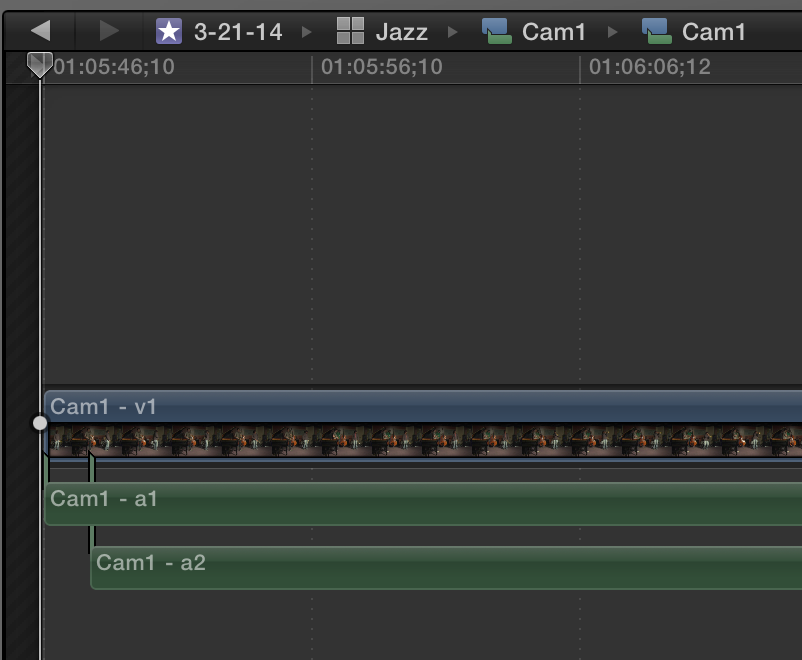
Did you set up the channel configuration before you made the multicam. I get this when I open in Timeline
Please Log in to join the conversation.
- Brad Parsons
-
Topic Author
- Offline
- Senior Member
-
Less
More
- Posts: 52
- Thank you received: 0
02 May 2015 23:30 - 02 May 2015 23:32 #63964
by Brad Parsons
Replied by Brad Parsons on topic Individually moving audio channels
No, that is the where I steered wrong. Thanks Tom. Do you just save it as a new compound clip then and bring it back to sync up with other camera?
Last edit: 02 May 2015 23:32 by Brad Parsons.
Please Log in to join the conversation.
