


- Posts: 6
- Thank you received: 1
3 Post Moderation Rule for New Boarders (25 Jan 2021)
New boarders will have their posts moderated - Don't worry if you cannot see your post immediately.
Text Color in Titles
- Villagenut
-
 Topic Author
- Offline
- New Member
-

Less
More
01 May 2015 19:47 #63909
by Villagenut
Text Color in Titles was created by Villagenut
I have a two line title. Name/Description. I set the face color and other attributes of the first line but can't seem to find an easy way to match the second line. The copy and paste attributes doesn't seem to be available at this level. thanks....
Please Log in to join the conversation.
- Tom Wolsky
-

- Offline
- Moderator
-

02 May 2015 13:04 #63938
by Tom Wolsky
Replied by Tom Wolsky on topic Text Color in Titles
Select the description text. Click in Face on the color search for the Apple system color picker. There is an eyedrpper that lets you select any color from the screen.
Please Log in to join the conversation.
- Andreas Kiel
-
- Offline
- Platinum Member
-

Less
More
- Posts: 1077
- Thank you received: 189
03 May 2015 06:12 - 03 May 2015 06:15 #63967
by Andreas Kiel
Replied by Andreas Kiel on topic Text Color in Titles
Here my way to do it.
When selecting to color for the first entry the color panel will open,
Go to the Color Wheel or RGB sliders and select a color.
Then switch to Palettes. A palette lib is already selected.
Right to the popup you see an "action wheel".
Click and select "New". This creates an "Unnamed" palette with the selected color inside.
Click the "action wheel" again and select rename. Enter a name which makes sense and is easy to remember.
Now click the color which is also "Unnamed" at this time.
Double click and enter a name for it.
Now for the other text entries it's easy to select the exact same color.
Up from from now you have your own special color which can be used in any app.
You can add or remove colors to that palette at any time. As an example you have a color in Pixelmator or PhotoShop you want to use in FCPX just add the color from the actual app to your palette. Then it's directly available in FCPX.
- Andreas
When selecting to color for the first entry the color panel will open,
Go to the Color Wheel or RGB sliders and select a color.
Then switch to Palettes. A palette lib is already selected.
Right to the popup you see an "action wheel".
Click and select "New". This creates an "Unnamed" palette with the selected color inside.
Click the "action wheel" again and select rename. Enter a name which makes sense and is easy to remember.
Now click the color which is also "Unnamed" at this time.
Double click and enter a name for it.
Now for the other text entries it's easy to select the exact same color.
Up from from now you have your own special color which can be used in any app.
You can add or remove colors to that palette at any time. As an example you have a color in Pixelmator or PhotoShop you want to use in FCPX just add the color from the actual app to your palette. Then it's directly available in FCPX.
- Andreas
Last edit: 03 May 2015 06:15 by Andreas Kiel.
Please Log in to join the conversation.

03 May 2015 13:09 #63973
by BenB
Replied by BenB on topic Text Color in Titles
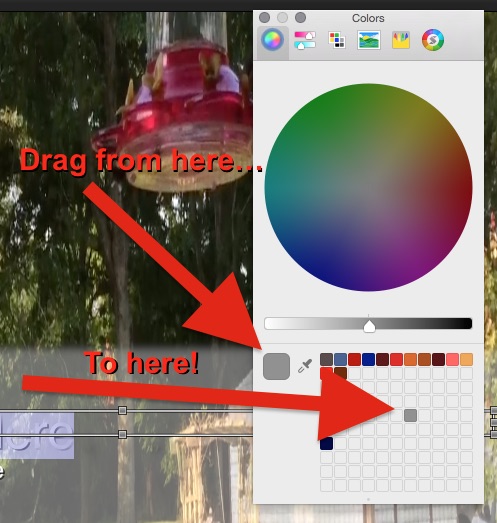
Use the eye dropper, as Tom said, to select the color.
To save it, simply drag it to the preset wells at the bottom of the Color Picker.
You can grab the dot at the bottom of the preset well section to expand it for lots and lots of presets.
To save it, simply drag it to the preset wells at the bottom of the Color Picker.
You can grab the dot at the bottom of the preset well section to expand it for lots and lots of presets.
Please Log in to join the conversation.
- Andreas Kiel
-
- Offline
- Platinum Member
-
Less
More
- Posts: 1077
- Thank you received: 189
04 May 2015 08:56 #64005
by Andreas Kiel
Replied by Andreas Kiel on topic Text Color in Titles
Ben's suggestion is good if you handle a few colors and have a good memory.
To handle colors more effective I personally still would prefer my method.
It has some advantages.
• You can install the palette on different machines and update them once needed - means you have consistent colors thru several machines.
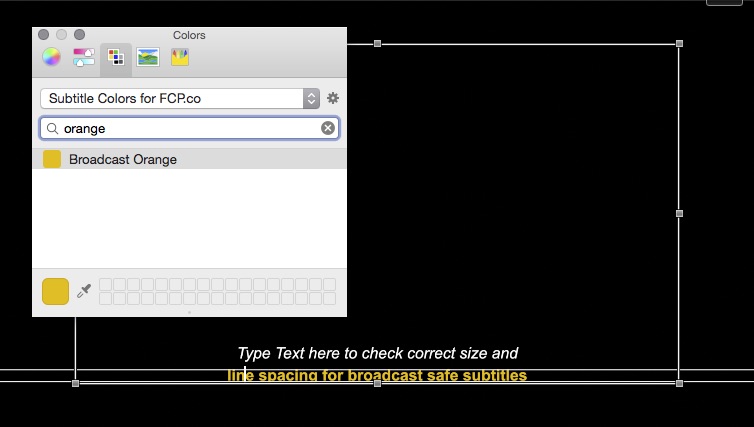
• Colors are searchable by name inside a palette.
• Selecting a color via eye dropper will automatically find the color in the palette if it already exists.
But as the posts above show – there are many ways to handle
To handle colors more effective I personally still would prefer my method.
It has some advantages.
• You can install the palette on different machines and update them once needed - means you have consistent colors thru several machines.
• Colors are searchable by name inside a palette.
• Selecting a color via eye dropper will automatically find the color in the palette if it already exists.
But as the posts above show – there are many ways to handle
Please Log in to join the conversation.
