


- Posts: 67
- Thank you received: 5
3 Post Moderation Rule for New Boarders (25 Jan 2021)
New boarders will have their posts moderated - Don't worry if you cannot see your post immediately.
Sony XDCAM EX in FCPX 10.2 problem importing
01 May 2015 12:39 #63870
by John G
Sony XDCAM EX in FCPX 10.2 problem importing was created by John G
Hi All
I have been trying to import some XDCAM EX footage (from a Sony EX1R) into FCPX 10.2. When I try to import the .MP4 file from the camera I just get a green screen in the import window. I am getting the same problem on two different machines.
I have installed the latest Pro Video update 2.0.1. In fact I have tried to instal this update twice, once through the App Store and also via the manual download from the Apple support pages. It's as if the Pro Video Install hasn't worked properly.
Am I just missing something or doing something stupid?
Could anybody help with this problem? I really don't want to go back to using the Sony transfer software!
Thanks
John G
I have been trying to import some XDCAM EX footage (from a Sony EX1R) into FCPX 10.2. When I try to import the .MP4 file from the camera I just get a green screen in the import window. I am getting the same problem on two different machines.
I have installed the latest Pro Video update 2.0.1. In fact I have tried to instal this update twice, once through the App Store and also via the manual download from the Apple support pages. It's as if the Pro Video Install hasn't worked properly.
Am I just missing something or doing something stupid?
Could anybody help with this problem? I really don't want to go back to using the Sony transfer software!
Thanks
John G
Please Log in to join the conversation.
- ronny courtens
-

- Offline
- Moderator
-

Less
More
- Posts: 4455
- Thank you received: 962
02 May 2015 15:50 #63950
by ronny courtens
Replied by ronny courtens on topic Sony XDCAM EX in FCPX 10.2 problem importing
Hi John, welcome to the forum.
Do you have the PDZK import plugin from Sony installed on your system?
If so, remove this plugin and try importing again.
- Ronny
Do you have the PDZK import plugin from Sony installed on your system?
If so, remove this plugin and try importing again.
- Ronny
Please Log in to join the conversation.
02 May 2015 16:23 #63953
by John G
Replied by John G on topic Sony XDCAM EX in FCPX 10.2 problem importing
Hi Ronny
Thanks for this. To my knowledge I have never installed anything from Sony on these systems (unless the plugin you mention sneaked in as part of a previous Pro Aps install). Do you know how I can check?
However, something odd which I didn't mention before.. I've noticed that the Pro Apps 2.0.1 download keeps appearing in my App Store 'updates' window (at the top) although I have already installed it and it shows as intalled. I've never seen this happen in the App Store before. Anyone else seeing this? I'm thinking there might be a connection.
Thanks
John G
Thanks for this. To my knowledge I have never installed anything from Sony on these systems (unless the plugin you mention sneaked in as part of a previous Pro Aps install). Do you know how I can check?
However, something odd which I didn't mention before.. I've noticed that the Pro Apps 2.0.1 download keeps appearing in my App Store 'updates' window (at the top) although I have already installed it and it shows as intalled. I've never seen this happen in the App Store before. Anyone else seeing this? I'm thinking there might be a connection.
Thanks
John G
Please Log in to join the conversation.
- ronny courtens
-
- Offline
- Moderator
-
Less
More
- Posts: 4455
- Thank you received: 962
03 May 2015 10:07 #63969
by ronny courtens
Replied by ronny courtens on topic Sony XDCAM EX in FCPX 10.2 problem importing
Hey John,
The repeated Pro Apps update is a known issue with the App Store. And yes, this could be related to your problem because for some people the update does not install at all. Try this:
Download the Pro Video Formats 2.0.1 disk image directly from the Apple support page:
support.apple.com/kb/DL1396?locale=en_US
Install the disk image, then go to Macintosh HD > Library > Quicktime and check if the following components are inside that folder:
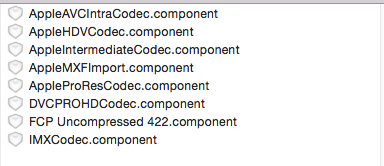
If these components are inside the Quicktime folder you have the latest Pro Apps update.
Try importing the MP4 files again. If that does not work, import from the card structure instead of selecting the individual files.
- Ronny
The repeated Pro Apps update is a known issue with the App Store. And yes, this could be related to your problem because for some people the update does not install at all. Try this:
Download the Pro Video Formats 2.0.1 disk image directly from the Apple support page:
support.apple.com/kb/DL1396?locale=en_US
Install the disk image, then go to Macintosh HD > Library > Quicktime and check if the following components are inside that folder:
If these components are inside the Quicktime folder you have the latest Pro Apps update.
Try importing the MP4 files again. If that does not work, import from the card structure instead of selecting the individual files.
- Ronny
Please Log in to join the conversation.
04 May 2015 12:19 #64011
by John G
Replied by John G on topic Sony XDCAM EX in FCPX 10.2 problem importing
Hi Ronnie
Success! Thank you!
I checked and I did have the Pro Apps installed. But yes I was trying to import a single file (as I was just testing).
I went back to the camera folder structure and everything works fine.
Thanks again.
John G
Success! Thank you!
I checked and I did have the Pro Apps installed. But yes I was trying to import a single file (as I was just testing).
I went back to the camera folder structure and everything works fine.
Thanks again.
John G
Please Log in to join the conversation.
