


- Posts: 2609
- Thank you received: 696
3 Post Moderation Rule for New Boarders (25 Jan 2021)
New boarders will have their posts moderated - Don't worry if you cannot see your post immediately.
Extreme Lag with program
02 May 2015 13:42 - 02 May 2015 13:43 #63946
by joema
Does this happen only when editing/scrubbing camera native media or has it been seen on 100% optimized media? If only camera native media, is it specific to any codec?
As you said, noting any commonality or dissimilarity between those with and without the problem may be informative.
However if anyone can reproduce the problem (even if only 1 out of 4 tries), try to take that scenario and progressively simplify it until the problem goes away, then back up one step.
FCP X is also affected by other open libraries, even if not in use. It may be necessary to close all other libraries except a test version to achieve a portable replication scenario.
Replied by joema on topic Extreme Lag with program
While that's logical we don't know how FCP internally handles filters and plugins. Some could be loaded whether or not the user invokes them, which in turn could alter execution paths and set up a memory/resource leak. E.g, double-click FCP X in Activity Monitor, select "Open Files and Ports". You may see a surprising number of items -- even before you invoke any filter or 3rd party plugin.dkag7 wrote: ...I really dont see how it is a 3rd party problem because the filter is never actually used, you just preview it while scrubbing over it...
Does this happen only when editing/scrubbing camera native media or has it been seen on 100% optimized media? If only camera native media, is it specific to any codec?
As you said, noting any commonality or dissimilarity between those with and without the problem may be informative.
However if anyone can reproduce the problem (even if only 1 out of 4 tries), try to take that scenario and progressively simplify it until the problem goes away, then back up one step.
FCP X is also affected by other open libraries, even if not in use. It may be necessary to close all other libraries except a test version to achieve a portable replication scenario.
Last edit: 02 May 2015 13:43 by joema.
Please Log in to join the conversation.

02 May 2015 13:52 #63947
by dkag7
Replied by dkag7 on topic Extreme Lag with program
Good points:
For me I usually have just the current library open.
Sometimes I will have another open so I can copy effect settings/clips etc.. over.
(though now the effect settings dont matter becuase you can save them)
Usually once any clips and effects are copied into the new library, I will close the old library, close and reopen fcp.
I use both optimized and native codecs. I have not seen any difference in memory usage here.
For the 3rd party issue, I agree. However one of my tests was on a clean new installed OS (on a formatted SSD), and new FCPX install (no 3rd party plugins ever installed on the OS). It is just that 3rd party filters (including ones you may make for yourself in motion) sometimes contain media. Where there is media (a large video clip) scrubbing on an effect like this, the memory usage is more pronounced - easier to see..
For me I usually have just the current library open.
Sometimes I will have another open so I can copy effect settings/clips etc.. over.
(though now the effect settings dont matter becuase you can save them)
Usually once any clips and effects are copied into the new library, I will close the old library, close and reopen fcp.
I use both optimized and native codecs. I have not seen any difference in memory usage here.
For the 3rd party issue, I agree. However one of my tests was on a clean new installed OS (on a formatted SSD), and new FCPX install (no 3rd party plugins ever installed on the OS). It is just that 3rd party filters (including ones you may make for yourself in motion) sometimes contain media. Where there is media (a large video clip) scrubbing on an effect like this, the memory usage is more pronounced - easier to see..
Please Log in to join the conversation.

02 May 2015 19:14 - 02 May 2015 19:17 #63956
by Redifer
It definitely feels like a memory issue to me. But when I check Activity Monitor FCPX is barely using any memory. I have 64GB of RAM in my system and it doesn't work any better than when I had 16GB of RAM. FCPX still takes up less than 4GB of RAM on most occasions. Does it think it's a 32-bit program or something?
Lots of people suggest closing the Inspector and this or that. I use the Inspector A LOT and closing it just means I have to keep opening it and closing it again and again over and over and that's extremely annoying. I shouldn't have to do that. Usually the problems come up when I make a compound clip or two. Again I shouldn't have to worry about that, not with my machine. Maybe if I was using a Performa G3 to edit, but I'm not. My compound clips are not multiple video streams, usually just graphics layers. And it's not the playback that's the issue, it's the responsiveness of the timeline. Have any of you ever dragged and tried to drop a clip on the timeline, only to accidentally put it in on top of the previous clip slightly? It then takes 2 or 3 seconds for the "Replace from Start" dialog to pop up.
Replied by Redifer on topic Extreme Lag with program
dkag7 wrote: In my case, I want to stress that 100% of the time, not 99%, 100% of the time sluggishness is related to high memory usage.
This is why restarting FCP fixes the problem for a short amount of time... until the memory pumps back up again.
It definitely feels like a memory issue to me. But when I check Activity Monitor FCPX is barely using any memory. I have 64GB of RAM in my system and it doesn't work any better than when I had 16GB of RAM. FCPX still takes up less than 4GB of RAM on most occasions. Does it think it's a 32-bit program or something?
Lots of people suggest closing the Inspector and this or that. I use the Inspector A LOT and closing it just means I have to keep opening it and closing it again and again over and over and that's extremely annoying. I shouldn't have to do that. Usually the problems come up when I make a compound clip or two. Again I shouldn't have to worry about that, not with my machine. Maybe if I was using a Performa G3 to edit, but I'm not. My compound clips are not multiple video streams, usually just graphics layers. And it's not the playback that's the issue, it's the responsiveness of the timeline. Have any of you ever dragged and tried to drop a clip on the timeline, only to accidentally put it in on top of the previous clip slightly? It then takes 2 or 3 seconds for the "Replace from Start" dialog to pop up.
Last edit: 02 May 2015 19:17 by Redifer.
Please Log in to join the conversation.

02 May 2015 19:22 #63957
by Navigator
Replied by Navigator on topic Extreme Lag with program
Try the program 'Memory Clean'
Please Log in to join the conversation.
02 May 2015 19:27 - 02 May 2015 19:32 #63958
by dkag7
Replied by dkag7 on topic Extreme Lag with program
For me it is always memory related.
from 16GB ram to 32, I didnt not notice any difference in FCP performance.
FCP just uses more.
at about 50% active memory usage, fcp is well into its sluggish cycle.
Only one time, just now as a matter of fact, I was at 1/4 memory used and dragging a title on top of another tile, to replace it and retime to fit, took about 10 seconds to complete, before the title would highlight and the 'retime to fit' option would show up (about 5 seconds)...
let go of the mouse and another 5 seconds for everything to settle down and 'unstick'
Edit: More info on the title issue... twice FCPX crashed when doing this. I havent had time yet to see if it is a 100% reproducible bug, but after a title is replaced, because of all the sticky-ness, I mistakenly double clicked it in the viewer (trying to grab it to reposition it), and FCPX crashed,. So double clicking on a title in the viewer, may be a reproducible crash.
from 16GB ram to 32, I didnt not notice any difference in FCP performance.
FCP just uses more.
at about 50% active memory usage, fcp is well into its sluggish cycle.
Only one time, just now as a matter of fact, I was at 1/4 memory used and dragging a title on top of another tile, to replace it and retime to fit, took about 10 seconds to complete, before the title would highlight and the 'retime to fit' option would show up (about 5 seconds)...
let go of the mouse and another 5 seconds for everything to settle down and 'unstick'
Edit: More info on the title issue... twice FCPX crashed when doing this. I havent had time yet to see if it is a 100% reproducible bug, but after a title is replaced, because of all the sticky-ness, I mistakenly double clicked it in the viewer (trying to grab it to reposition it), and FCPX crashed,. So double clicking on a title in the viewer, may be a reproducible crash.
Last edit: 02 May 2015 19:32 by dkag7.
Please Log in to join the conversation.
02 May 2015 23:15 #63962
by Redifer
Replied by Redifer on topic Extreme Lag with program
YES! It's definitely at its worst with titles.
Please Log in to join the conversation.
03 May 2015 02:45 #63965
by dkag7
Replied by dkag7 on topic Extreme Lag with program
Here are test results on FCP memory that I just ran
Clean OS install of yosemite and fcpx 10.2
open fcpx and load a library project.
Scrub and or play a minute or so of the project.
open activity monitor>memory
My memory for FCP is at 360MB
open the effects browser> generators
Scrub over and preview some of the backgrounds, Elements, Solids and Textures clips
FCPX memory rose to 2.1GB
Close the effects browser
Scrub or play your project again.
Memory remains at 2.1GB
It did not lower at all after previewing Generator clips.
On a side note, on my other OS I tried Memory clean and the terminal purge command.
Neither one of them released any memory that FCPX was using (according to the activity monitor)
Memory clean did release memory (from what I do not know) according to istat menus, but FCP memory usage stayed the same.
Clean OS install of yosemite and fcpx 10.2
open fcpx and load a library project.
Scrub and or play a minute or so of the project.
open activity monitor>memory
My memory for FCP is at 360MB
open the effects browser> generators
Scrub over and preview some of the backgrounds, Elements, Solids and Textures clips
FCPX memory rose to 2.1GB
Close the effects browser
Scrub or play your project again.
Memory remains at 2.1GB
It did not lower at all after previewing Generator clips.
On a side note, on my other OS I tried Memory clean and the terminal purge command.
Neither one of them released any memory that FCPX was using (according to the activity monitor)
Memory clean did release memory (from what I do not know) according to istat menus, but FCP memory usage stayed the same.
Please Log in to join the conversation.


03 May 2015 02:55 #63966
by FernKraft
Replied by FernKraft on topic Extreme Lag with program
I use Memory Monitor. seem to work.
Please Log in to join the conversation.
03 May 2015 13:09 #63974
by dkag7
Replied by dkag7 on topic Extreme Lag with program
I just tried memory monitor with the same results.
Open activity monitor and run memory monitor, the FCPX usage does not change.
I just ran the same scrubbing through the genorators test on my OS that was an update of an update of an update and many 3rd party plugins and many apps..
When opening the same project and previewing generators the memory usage before and after was about the same as on the clean OS.
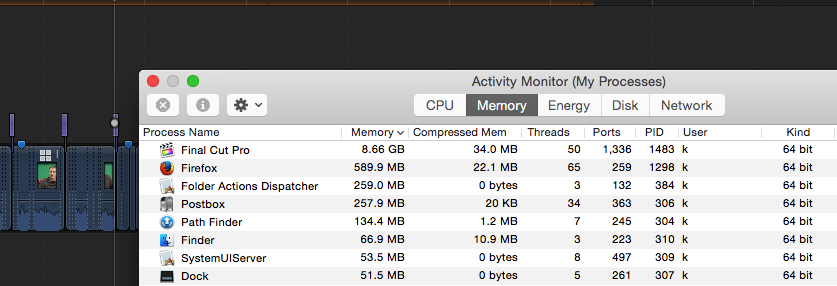
Now however I also opened the effects browser and began previewing some filters, generic and 3rd party including many I made in motion. Within about a minute I was able to get fcp memory in activity monitor to 8.64 GB.
Close effects browser and just as before the memory did not release.
Previously I reported that when FCP gets to about 1/3 memory usage, the slugishness will start.
This 1/3 usage was was according to istat menus (on my bloated OS) 'active memory'
Right now istat active memory is at 50%, but according to activity monitor FCP is using 8.64 or about 1/4 my memory. (32 total in the system). So as Redifer reports that 'fcp is not using that much memory around 4GB in activity monitor', I am seeing the same thing.
When I view istat before opening FCP, there is just a sliver of 'red' or active used memory. Basically nothing at all. But now the pie chart is 50% red (active usage) but the active number it reports is 13GB, FCP usage is 27%. So this is right compared to activity monitor, but the graphical pie chart is wrong, it looks like more memory is being used than actually is. So my initial report that 1/3 of memory used before sluggishness starts, should be lower, about 1/5 th or something or about 2 GB according to activity monitor.
Whatever the actual number or % used by FCP is, there is a point where sluggishness starts.
This sluggishness can almost instantly be seen if you start previewing filters and generators.
So the result of this test shows that FCP is not releasing memory when previewing elements in the effects browser (effects generators etc..)
For me, this is in direct correlation with slugishness.
So people who say they have no sluggishness, please perform the same test.
Scrub through your effects and generators for a couple of minutes.
1. does fcp memory rise and not release in activity monitor?
2. If so, get the usage to about 1/5 to 1/3 of your total memory. This will not take long.
3. Edit the timeline and work on a project as I mentioned earlier in the thread.
4. Are things sticky and sluggish?
Open activity monitor and run memory monitor, the FCPX usage does not change.
I just ran the same scrubbing through the genorators test on my OS that was an update of an update of an update and many 3rd party plugins and many apps..
When opening the same project and previewing generators the memory usage before and after was about the same as on the clean OS.
Now however I also opened the effects browser and began previewing some filters, generic and 3rd party including many I made in motion. Within about a minute I was able to get fcp memory in activity monitor to 8.64 GB.
Close effects browser and just as before the memory did not release.
Previously I reported that when FCP gets to about 1/3 memory usage, the slugishness will start.
This 1/3 usage was was according to istat menus (on my bloated OS) 'active memory'
Right now istat active memory is at 50%, but according to activity monitor FCP is using 8.64 or about 1/4 my memory. (32 total in the system). So as Redifer reports that 'fcp is not using that much memory around 4GB in activity monitor', I am seeing the same thing.
When I view istat before opening FCP, there is just a sliver of 'red' or active used memory. Basically nothing at all. But now the pie chart is 50% red (active usage) but the active number it reports is 13GB, FCP usage is 27%. So this is right compared to activity monitor, but the graphical pie chart is wrong, it looks like more memory is being used than actually is. So my initial report that 1/3 of memory used before sluggishness starts, should be lower, about 1/5 th or something or about 2 GB according to activity monitor.
Whatever the actual number or % used by FCP is, there is a point where sluggishness starts.
This sluggishness can almost instantly be seen if you start previewing filters and generators.
So the result of this test shows that FCP is not releasing memory when previewing elements in the effects browser (effects generators etc..)
For me, this is in direct correlation with slugishness.
So people who say they have no sluggishness, please perform the same test.
Scrub through your effects and generators for a couple of minutes.
1. does fcp memory rise and not release in activity monitor?
2. If so, get the usage to about 1/5 to 1/3 of your total memory. This will not take long.
3. Edit the timeline and work on a project as I mentioned earlier in the thread.
4. Are things sticky and sluggish?
Please Log in to join the conversation.

03 May 2015 13:21 - 03 May 2015 13:24 #63976
by BenB
Replied by BenB on topic Extreme Lag with program
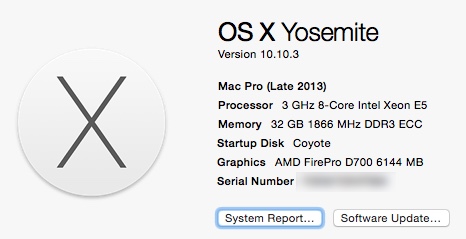
1- Did it this for 3 minutes, memory released immediately, things continued running smoothly.
2- Did it, check.
3- Did it, check.
4- System continued to run smoothly, no issued for me. Using mixtures of ProRes from BMD cameras, H.264 from 7D and GoPros, some RED RAW.
Again, this is a known issue, but it is not universal. Hope those with the issue are documenting it very well and filling out the feedback page.
2- Did it, check.
3- Did it, check.
4- System continued to run smoothly, no issued for me. Using mixtures of ProRes from BMD cameras, H.264 from 7D and GoPros, some RED RAW.
Again, this is a known issue, but it is not universal. Hope those with the issue are documenting it very well and filling out the feedback page.
Last edit: 03 May 2015 13:24 by BenB.
Please Log in to join the conversation.
03 May 2015 13:22 #63977
by joema
Likewise, I have had the slowdown and crash on fairly small H.264 timelines when using only basic titles and generators. I am typically scrubbing a lot in the event browser, marking in/out points, and appending them to the storyline, then putting basic titles and generators between each clip. I then use the color board to tweak exposure and color. It is a very basic assembly edit.
When pushing for a deadline, you get pretty perceptive about the behavior. When it starts slowing down a lot, it is prone to crash -- something inside the FCP process has become deranged. When that happens I proactively restart FCP X to prevent an uncontrolled crash. Next time I encounter this I'll watch various memory parameters.
Replied by joema on topic Extreme Lag with program
Redifer wrote: YES! It's definitely at its worst with titles.
Likewise, I have had the slowdown and crash on fairly small H.264 timelines when using only basic titles and generators. I am typically scrubbing a lot in the event browser, marking in/out points, and appending them to the storyline, then putting basic titles and generators between each clip. I then use the color board to tweak exposure and color. It is a very basic assembly edit.
When pushing for a deadline, you get pretty perceptive about the behavior. When it starts slowing down a lot, it is prone to crash -- something inside the FCP process has become deranged. When that happens I proactively restart FCP X to prevent an uncontrolled crash. Next time I encounter this I'll watch various memory parameters.
Please Log in to join the conversation.
03 May 2015 13:33 #63978
by dkag7
Replied by dkag7 on topic Extreme Lag with program
Thanks for the test BenB.
steps 2,3,4 are not really needed if in step 1 your memory released.
So the question is why did it release for you and not others?
steps 2,3,4 are not really needed if in step 1 your memory released.
So the question is why did it release for you and not others?
Please Log in to join the conversation.
03 May 2015 14:17 #63980
by Makki
Replied by Makki on topic Extreme Lag with program
I ran test 1. For about 5 minutes with lot of effects and layers. FCPX returned the memory instantly. So this real problem does not affect me. I have no idea why . My gears are Mac Pro late 2013 with Thunderbolt 2 SSD 1 TB Raid 0. Is it possible that it has something to with the computer and how it works with FCPX. I do not know.
Please Log in to join the conversation.
03 May 2015 15:07 #63981
by dkag7
Replied by dkag7 on topic Extreme Lag with program
thanks Makki,
for me it does not matter what is on a timeline.
as long as there is 1 clip so you can scrub and scan over any effect/generator and see the preview result. No need to actually add the effect to a clip. Just preview it by scrubbing over it.
You can actually play the effect as well without adding it to the clip.
Once the scrub bar is over an effect icon, press the space bar and it should loop.
I dont see how this is possible that on some systems memory will release and others not.
I think I have ruled out the OS and other software, because on one OS was just the clean installed OS and FCP installed (on a formatted SSD).
What in hardware would cause memory not to release?
Seems impossible to me.. also Redifer has the trashcan, so this pretty much rules out hardware as well.
for me it does not matter what is on a timeline.
as long as there is 1 clip so you can scrub and scan over any effect/generator and see the preview result. No need to actually add the effect to a clip. Just preview it by scrubbing over it.
You can actually play the effect as well without adding it to the clip.
Once the scrub bar is over an effect icon, press the space bar and it should loop.
I dont see how this is possible that on some systems memory will release and others not.
I think I have ruled out the OS and other software, because on one OS was just the clean installed OS and FCP installed (on a formatted SSD).
What in hardware would cause memory not to release?
Seems impossible to me.. also Redifer has the trashcan, so this pretty much rules out hardware as well.
Please Log in to join the conversation.

03 May 2015 19:04 #63984
by anickt
Replied by anickt on topic Extreme Lag with program
I have not had time to wring out my Mac Pro regarding this issue. It is fully updated and I have been using it, but not on anything that stressed it too much.
However, I just updated my Macbook Pro. Latest version of everything with 16 GB RAM and 1 GB VRAM. I exported a 2 minute project to Vimeo. While it was exporting I previewed effects, opened a new project, added a bunch of very intricate titles to the new project (like a full page of 28 pixel text) scrubbed, shifted clips around etc. etc. etc.
No lag except when I was copying and pasting some large text (180 px) in a title and it took less than a second to catch up after several pastes. Went out to Safari a back a couple of times as well and so on.
During the whole time my RAM usage was between 7.5 and 8.5 GB. It barely changed during the entire process.
I'm wondering if some of us have some bad RAM or something to do with the video card. This is pretty weird. I look forward to working my Mac Pro a little harder and see what I get.
PS - I am running my Macbook Pro at the moment off a single Firewire 800 drive. Like I said, pretty weird. :S
However, I just updated my Macbook Pro. Latest version of everything with 16 GB RAM and 1 GB VRAM. I exported a 2 minute project to Vimeo. While it was exporting I previewed effects, opened a new project, added a bunch of very intricate titles to the new project (like a full page of 28 pixel text) scrubbed, shifted clips around etc. etc. etc.
No lag except when I was copying and pasting some large text (180 px) in a title and it took less than a second to catch up after several pastes. Went out to Safari a back a couple of times as well and so on.
During the whole time my RAM usage was between 7.5 and 8.5 GB. It barely changed during the entire process.
I'm wondering if some of us have some bad RAM or something to do with the video card. This is pretty weird. I look forward to working my Mac Pro a little harder and see what I get.
PS - I am running my Macbook Pro at the moment off a single Firewire 800 drive. Like I said, pretty weird. :S
Please Log in to join the conversation.
03 May 2015 19:19 - 03 May 2015 19:21 #63985
by joema
It is unlikely to be a hardware issue, whether due to memory, I/O or GPU. It is most likely an application-layer software problem in FCP X which only manifests under specific conditions. However it conceivably could be induced by a plugin, corrupt video file, etc. By corruption I don't mean totally damaged.
Software often dereferences pointers and makes various decisions based on information in a data input stream. Ideally those should always be validated for correctness (by the application) before using them, but if not it can derange the software and make it unstable. In that case the fault is still generally considered to be with the application since you can never ensure 100% perfect input data.
The most likely cause is a bug in FCP X memory management, although bugs in some application support layer or OS X itself are also possible. These can be very narrow and unpredictable. Just because only a certain people see it doesn't mean there's something wrong with their system.
Replied by joema on topic Extreme Lag with program
dkag7 wrote: ...What in hardware would cause memory not to release?...
It is unlikely to be a hardware issue, whether due to memory, I/O or GPU. It is most likely an application-layer software problem in FCP X which only manifests under specific conditions. However it conceivably could be induced by a plugin, corrupt video file, etc. By corruption I don't mean totally damaged.
Software often dereferences pointers and makes various decisions based on information in a data input stream. Ideally those should always be validated for correctness (by the application) before using them, but if not it can derange the software and make it unstable. In that case the fault is still generally considered to be with the application since you can never ensure 100% perfect input data.
The most likely cause is a bug in FCP X memory management, although bugs in some application support layer or OS X itself are also possible. These can be very narrow and unpredictable. Just because only a certain people see it doesn't mean there's something wrong with their system.
Last edit: 03 May 2015 19:21 by joema.
Please Log in to join the conversation.
04 May 2015 12:33 #64012
by BenB
Replied by BenB on topic Extreme Lag with program
So I'm now tempted to start looking at OS X's GPU drivers. Check out this post.
preta3d.com/os-x-users-unite/
Then everyone with issues, hit this bug report page, AND the FCPX feedback page.
idmsa.apple.com/IDMSWebAuth/login.html?a...sslEnabled=true&rv=3
And email Tim Cook if you feel strongly enough about it.
preta3d.com/os-x-users-unite/
Then everyone with issues, hit this bug report page, AND the FCPX feedback page.
idmsa.apple.com/IDMSWebAuth/login.html?a...sslEnabled=true&rv=3
And email Tim Cook if you feel strongly enough about it.
Please Log in to join the conversation.
04 May 2015 13:23 #64018
by dkag7
Replied by dkag7 on topic Extreme Lag with program
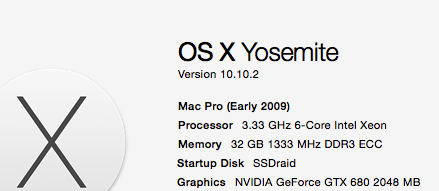
I have the GTX 680.
I have (and am using now) the Nvidia drivers and not the OS drivers. (tried both)
How much the Nvidia drivers differ from the OS drivers (and OpenCL), I dont know.
Operation wise, I really cant notice much of a difference between the two.. but I keep the OS using the Nvidia drivers.. figure they may be better and more up to date..
On a side note I have downloaded the trial version to test that onto my test clean OS, just incase there was some install/download issue. Same problem.
I did notice testing this that if I add anything from the effects browser to the timeline, then scrub the timeline, memory will release (90% to 100%), it will creep up slowly over time.
The 3D title that looks like a space thing with a planet (i forget the name now) is a good one to test with, the memory usage really shoots up.
This same title (or other effects) will not release memory in the effects browser as before, but will release memory once it is added to the timeline.
So timeline memory release seems OK for me (not 100% as it will still creep up)
but effects browser memory will never release.
ON this test OS, I will need to double check, but I think I only installed the video card drivers from Nvidia and not the CUDA side.
I have (and am using now) the Nvidia drivers and not the OS drivers. (tried both)
How much the Nvidia drivers differ from the OS drivers (and OpenCL), I dont know.
Operation wise, I really cant notice much of a difference between the two.. but I keep the OS using the Nvidia drivers.. figure they may be better and more up to date..
On a side note I have downloaded the trial version to test that onto my test clean OS, just incase there was some install/download issue. Same problem.
I did notice testing this that if I add anything from the effects browser to the timeline, then scrub the timeline, memory will release (90% to 100%), it will creep up slowly over time.
The 3D title that looks like a space thing with a planet (i forget the name now) is a good one to test with, the memory usage really shoots up.
This same title (or other effects) will not release memory in the effects browser as before, but will release memory once it is added to the timeline.
So timeline memory release seems OK for me (not 100% as it will still creep up)
but effects browser memory will never release.
ON this test OS, I will need to double check, but I think I only installed the video card drivers from Nvidia and not the CUDA side.
Please Log in to join the conversation.
04 May 2015 13:36 #64019
by dkag7
Replied by dkag7 on topic Extreme Lag with program
Double checking that thread, it appears that Nvidia couldn't update openCL even if they wanted too.
But wouldnt this apply on all systems?
By this I mean all systems should see the same results, where as here we have some people reporting the memory will release after scrubbing the effect I cons, and others not.
That said, that is a pretty pathetic thread to see something as important as Video drivers (or areas of them) are not being updated... good find.
But wouldnt this apply on all systems?
By this I mean all systems should see the same results, where as here we have some people reporting the memory will release after scrubbing the effect I cons, and others not.
That said, that is a pretty pathetic thread to see something as important as Video drivers (or areas of them) are not being updated... good find.
Please Log in to join the conversation.
04 May 2015 19:48 #64028
by Redifer
Replied by Redifer on topic Extreme Lag with program
That bug reporter page doesn't let me log in. It seems to not be available to just anyone. What is Tim Cook's e-mail address? Anyone e-mailing him needs to remember one thing: KEEP IT SHORT! The guy on the web page who e-mailed him was too verbose. He gets a lot of -mails and I'm sure he just glosses over them. He has to. So if it's short, say 3 sentences or less, it'll likely be read in its entirety.
Please Log in to join the conversation.
