


3 Post Moderation Rule for New Boarders (25 Jan 2021)
New boarders will have their posts moderated - Don't worry if you cannot see your post immediately.
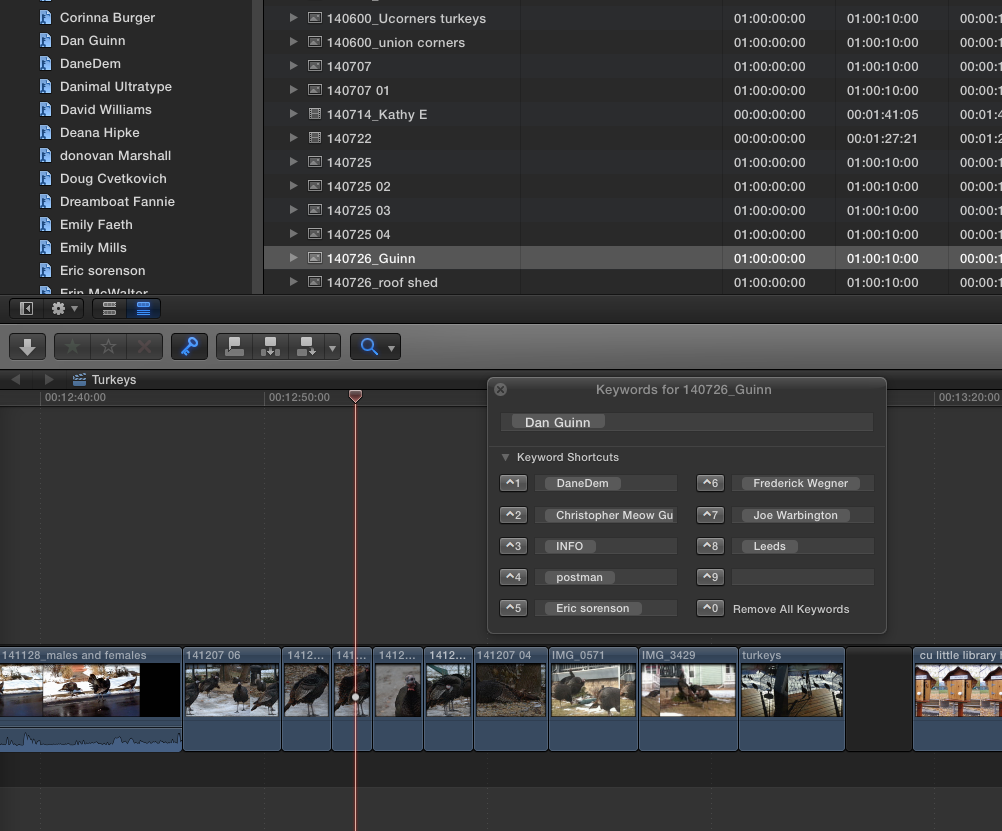
Keywords not showing on timeline clips

28 Apr 2015 14:32 - 28 Apr 2015 15:42 #63752
by Gretta
Keywords not showing on timeline clips was created by Gretta
I am putting together a project which is strictly chronological; basically a collection of pix from a lot of different people, many who shot the same day. I have named all the clips by date they were shot, but collected in folders named for the photog. In FCPX the event is sorted by None/name, and the photog folders are keyword collections. Great. Perfect. But periodically I want to know who shot a particular clip but opening the keyword editor only gives me the clip selected in the Browser. I can't get it to give me the keywords for the Timeline/Project clip. This seems specific to this 10.2 upgrade. Anybody else notice this?
(OS 10.10.3. I believe I did all of the other updates for this v. FCPX)
(OS 10.10.3. I believe I did all of the other updates for this v. FCPX)
Last edit: 28 Apr 2015 15:42 by Gretta.
Please Log in to join the conversation.


28 Apr 2015 18:16 #63762
by BenB
Replied by BenB on topic Keywords not showing on timeline clips
Nope, that's how it has always worked.
But you can make a Smart Collection (or just a momentary filter) that shows specific keywords, and used or unused media.
You can also do this from the Library level, to see photographers across the whole project.
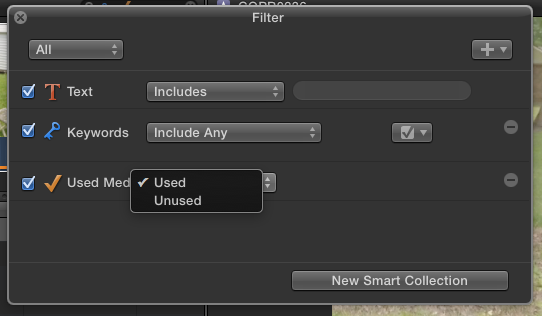
But you can make a Smart Collection (or just a momentary filter) that shows specific keywords, and used or unused media.
You can also do this from the Library level, to see photographers across the whole project.
Please Log in to join the conversation.
28 Apr 2015 22:50 #63774
by Gretta
Replied by Gretta on topic Keywords not showing on timeline clips
Seriously; always? Well if so, it is easier to Shift-F to see who shot it and the rest of that person's pix. I would swear I had had the keyword editor open and it was shifting as I moved thru the timeline. Curiouser and curiouser…
Please Log in to join the conversation.
- Tom Wolsky
-

- Offline
- Moderator
-

28 Apr 2015 23:12 #63775
by Tom Wolsky
Replied by Tom Wolsky on topic Keywords not showing on timeline clips
If you key worded the clips, the keywords will appear in the tags pane of the timeline index, which is a searchable database.
Please Log in to join the conversation.
