


- Posts: 25
- Thank you received: 0
3 Post Moderation Rule for New Boarders (25 Jan 2021)
New boarders will have their posts moderated - Don't worry if you cannot see your post immediately.
Bad quality at export with MXF why?
28 Apr 2015 07:34 - 28 Apr 2015 07:36 #63720
by expander
Bad quality at export with MXF why? was created by expander
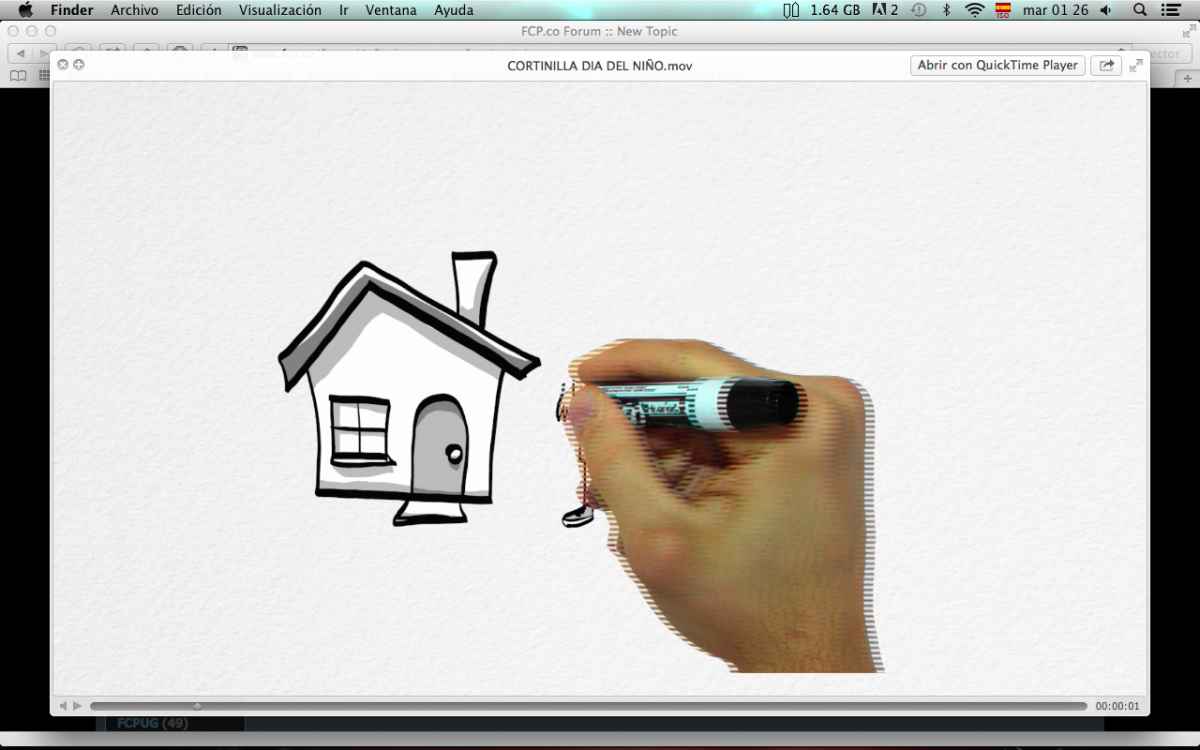
I'm getting this horrible lines when i export a file. The thing is always happen when i add a MXF file to the project i'm working on.
It's from an XDCAM, any thoughts on what cause it?
It's from an XDCAM, any thoughts on what cause it?
Last edit: 28 Apr 2015 07:36 by expander.
Please Log in to join the conversation.

28 Apr 2015 07:37 #63721
by Deano
Replied by Deano on topic Bad quality at export with MXF why?
Maybe upload a screen grab so we can have a look at it...
What is the recorded media file type? Frame Rate? Resolution?
What are your project settings?
Working in Transcoded or Native Media?
Do you have the latest ProApps update?
What version of FCPX/Compressor are you using?
Do you get the same issues whether you export from FCPX or Compressor?
What is the recorded media file type? Frame Rate? Resolution?
What are your project settings?
Working in Transcoded or Native Media?
Do you have the latest ProApps update?
What version of FCPX/Compressor are you using?
Do you get the same issues whether you export from FCPX or Compressor?
Please Log in to join the conversation.
28 Apr 2015 07:39 #63724
by Deano
Replied by Deano on topic Bad quality at export with MXF why?
Ahh, I see it. Thats a Field Order issue to me...
Answering my earlier questions on file formats etc may assist us here...
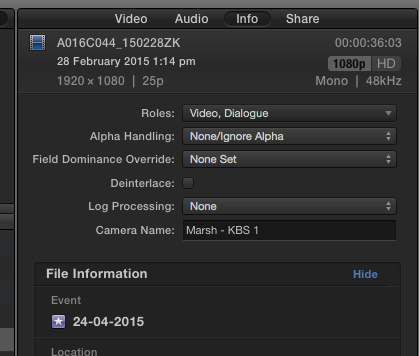
These settings are key in terms of field order when dealing with INTERLACED content.
Answering my earlier questions on file formats etc may assist us here...
These settings are key in terms of field order when dealing with INTERLACED content.
Please Log in to join the conversation.
28 Apr 2015 07:44 #63726
by expander
Replied by expander on topic Bad quality at export with MXF why?
Hey Deano, i have just uploaded a screenshoot. the MXF is from an XDCAM, the specs of the video are 1440x1080 35Mb/s. the project is 1920x1080 29.97. Yes i have the pro apps update. i'm working with native media and i have FCPX 10.2
i was wondering if maybe using the option to make the project with the settings of the first video added to the timeline can fix this?
i was wondering if maybe using the option to make the project with the settings of the first video added to the timeline can fix this?
Please Log in to join the conversation.

28 Apr 2015 07:57 #63728
by BenB
Replied by BenB on topic Bad quality at export with MXF why?
Sort of looks like interlace artifacts.
Please Log in to join the conversation.
- Karsten Schlüter
-

- Offline
- Moderator
-

Less
More
- Posts: 3790
- Thank you received: 718
28 Apr 2015 08:24 #63731
by Karsten Schlüter
Two reasons optional:
wrong field dominance order
or, re-framing interlaced material: when you zoom-in to interlaced material, and it is not deinterlaced, you zoom the 'lines'...
For the first problem, have a look in the Inspector (Deanos post) and try 'override'
For the 2nd problem, de-interlace first then zoom-in
Replied by Karsten Schlüter on topic Bad quality at export with MXF why?
expander wrote: I'm getting this horrible lines ...
Two reasons optional:
wrong field dominance order
or, re-framing interlaced material: when you zoom-in to interlaced material, and it is not deinterlaced, you zoom the 'lines'...
For the first problem, have a look in the Inspector (Deanos post) and try 'override'
For the 2nd problem, de-interlace first then zoom-in
Please Log in to join the conversation.
20 May 2015 04:35 - 20 May 2015 04:39 #64712
by expander
Replied by expander on topic Bad quality at export with MXF why?
Sorry for the late response i'm having so much work these days. The footage i'm getting shows in the Inspector as "Primary First" in the field dominance override. I change it to "None Set" and the problem has gone.
Thanks for your help guys!
Thanks for your help guys!
Last edit: 20 May 2015 04:39 by expander.
Please Log in to join the conversation.
