


- Posts: 10
- Thank you received: 0
3 Post Moderation Rule for New Boarders (25 Jan 2021)
New boarders will have their posts moderated - Don't worry if you cannot see your post immediately.
MultiCam Audio levels different inside MC vs. on Timeline.
- grandxadmiral
-
 Topic Author
- Offline
- New Member
-

Less
More
28 Apr 2015 03:45 - 28 Apr 2015 03:51 #63710
by grandxadmiral
Problem: Audio levels inside a MultiCam are different once you're 'outside' a multicam, working in the Project timeline. In this instance tonight, I now seem to have gained +6dB difference between inside and out. I've experienced this for many FCPX versions, on multiple machines running FCPX.
I'm triple checking all my audio filters, but I just can't account for this audio difference.
Anyone else noticed this?
I usually put a limiter on the audio inside the MC. (For my current project, I've added a limiter, and EQd the Audio to my liking.
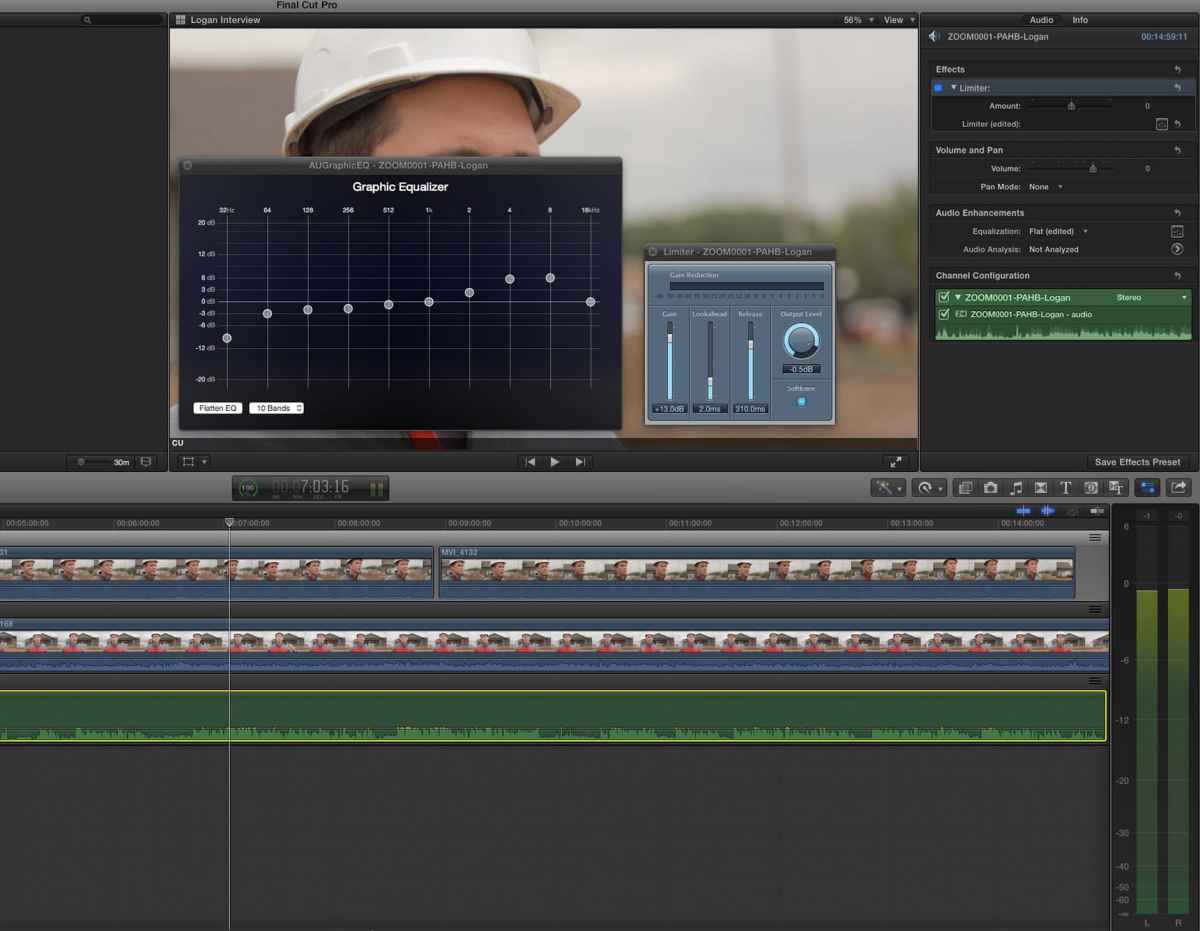
Two screenshots attached - notice the Meters.
1) Inside MultiCam, with EQ and Limiter panels opened.
2) In main timeline, with clip from that multi, EQ open but not touched. Volume at 0. But now its clipping hard.
Am I missing something?


I'm triple checking all my audio filters, but I just can't account for this audio difference.
Anyone else noticed this?
I usually put a limiter on the audio inside the MC. (For my current project, I've added a limiter, and EQd the Audio to my liking.
Two screenshots attached - notice the Meters.
1) Inside MultiCam, with EQ and Limiter panels opened.
2) In main timeline, with clip from that multi, EQ open but not touched. Volume at 0. But now its clipping hard.
Am I missing something?

Last edit: 28 Apr 2015 03:51 by grandxadmiral. Reason: Adding pics
Please Log in to join the conversation.

28 Apr 2015 03:51 #63711
by iskurrie
Replied by iskurrie on topic MultiCam Audio levels different inside MC vs. on Timeline.
Yep, I have noticed the same thing, can't see why?
Ian S
Ian S
Please Log in to join the conversation.
28 Apr 2015 06:19 #63714
by rrongman
Replied by rrongman on topic MultiCam Audio levels different inside MC vs. on Timeline.
Try to set the pan on the multiclip to stereo L-R. From my findings FCPX is utilizing M6 on the "masterbuss". Please correct me here anyone if I'm wrong regarding the pan law for FCPX.
Please Log in to join the conversation.
- grandxadmiral
-
Topic Author
- Offline
- New Member
-
Less
More
- Posts: 10
- Thank you received: 0
28 Apr 2015 06:38 #63716
by grandxadmiral
Replied by grandxadmiral on topic MultiCam Audio levels different inside MC vs. on Timeline.
Playing around with your suggestion, rrongman, and it doesn't seem to be improving or changing anything. Thanks for extra insight tho!
Please Log in to join the conversation.

28 Apr 2015 07:43 #63725
by BenB
Replied by BenB on topic MultiCam Audio levels different inside MC vs. on Timeline.
Are you monitoring only one clip's audio at a time in the angle editor?
Please Log in to join the conversation.
- grandxadmiral
-
Topic Author
- Offline
- New Member
-
Less
More
- Posts: 10
- Thank you received: 0
28 Apr 2015 08:06 #63729
by grandxadmiral
Replied by grandxadmiral on topic MultiCam Audio levels different inside MC vs. on Timeline.
Correct, there's only the one track enabled and monitored.
Please Log in to join the conversation.
28 Apr 2015 12:02 - 28 Apr 2015 12:06 #63739
by BenB
Replied by BenB on topic MultiCam Audio levels different inside MC vs. on Timeline.
If you're only monitoring one audio channel in both the angle editor and the timeline, with no channel configuration changes, then that's odd.
If you're monitoring more than on channel in the timeline, or reconfiguring a single mono channel to dual mono channels, or a stereo channel, then you're seeing the additive effect of audio. Two channels individually at, let's say -3db, when played together increase the overall gain.
Also, inside the angle editor, you are working with that one clip, in an isolated fashion. Once you drop that Multicam clip into a Timeline, you are working with the Multicam container, not the individual clip, and levels can increase, decrease, etc. This is why I don't do audio work like this inside the angle editor, I do it in the Timeline, where the final mix/mastering should take place to the Multicam container as a whole.
But, according to your screen shots, that is odd. Than again, FCPX's audio needs serious work, always has needed it. Fill out the feedback form.
If you're monitoring more than on channel in the timeline, or reconfiguring a single mono channel to dual mono channels, or a stereo channel, then you're seeing the additive effect of audio. Two channels individually at, let's say -3db, when played together increase the overall gain.
Also, inside the angle editor, you are working with that one clip, in an isolated fashion. Once you drop that Multicam clip into a Timeline, you are working with the Multicam container, not the individual clip, and levels can increase, decrease, etc. This is why I don't do audio work like this inside the angle editor, I do it in the Timeline, where the final mix/mastering should take place to the Multicam container as a whole.
But, according to your screen shots, that is odd. Than again, FCPX's audio needs serious work, always has needed it. Fill out the feedback form.
Last edit: 28 Apr 2015 12:06 by BenB.
Please Log in to join the conversation.
- grandxadmiral
-
Topic Author
- Offline
- New Member
-
Less
More
- Posts: 10
- Thank you received: 0
28 Apr 2015 16:09 #63754
by grandxadmiral
Replied by grandxadmiral on topic MultiCam Audio levels different inside MC vs. on Timeline.
Yes my first thought was there was another channel adding in. But nope. And this has happened on a lot of projects before. Yep, I filled out the feedback forum (pointed the Devs to this Forum post too, in case anyone else had more info.) Thanks BenB.
Please Log in to join the conversation.
29 Apr 2015 08:16 #63782
by Jimbo
Replied by Jimbo on topic MultiCam Audio levels different inside MC vs. on Timeline.
Hello,
I just wanted to say I am having a similar issue since updating to version 10.2
However, my audio levels inside the multicam are higher than on the timeline. I am only finding this with audio-only angles. I too have checked that I'm not making some silly mistake, but everything is in order and I've had this trouble on my last two projects, both with an audio-only angle.
These are hour long multicams and I much prefer to do all the main work on the audio within the multicam and then just use the timeline for ducking/switching between tracks. Feels neater.
Fingers crossed for a solution soon
I just wanted to say I am having a similar issue since updating to version 10.2
However, my audio levels inside the multicam are higher than on the timeline. I am only finding this with audio-only angles. I too have checked that I'm not making some silly mistake, but everything is in order and I've had this trouble on my last two projects, both with an audio-only angle.
These are hour long multicams and I much prefer to do all the main work on the audio within the multicam and then just use the timeline for ducking/switching between tracks. Feels neater.
Fingers crossed for a solution soon
Please Log in to join the conversation.

04 May 2015 03:36 #63998
by Julian
Replied by Julian on topic MultiCam Audio levels different inside MC vs. on Timeline.
I'm on 10.2 and working on a multicam with 12 angles right now and there is no difference between the angle editor and the storyline.
Please Log in to join the conversation.
- grandxadmiral
-
Topic Author
- Offline
- New Member
-
Less
More
- Posts: 10
- Thank you received: 0
04 May 2015 03:44 #63999
by grandxadmiral
Julian, do you have any audio-only angles? This happens only with my synced WAV audio from a Zoom Recorder. The Camera audio doesn't appear to change.
Replied by grandxadmiral on topic MultiCam Audio levels different inside MC vs. on Timeline.
Julian wrote: I'm on 10.2 and working on a multicam with 12 angles right now and there is no difference between the angle editor and the storyline.
Julian, do you have any audio-only angles? This happens only with my synced WAV audio from a Zoom Recorder. The Camera audio doesn't appear to change.
Please Log in to join the conversation.
04 May 2015 04:06 #64000
by Julian
Replied by Julian on topic MultiCam Audio levels different inside MC vs. on Timeline.
Yeah, I have an angle that is just an audio track from the recording session of the song used in the performance.
I just came back here to point out that if you have a cross dissolve at the in and out point of a clip and you drag them so that they are touching, the audio then has a peaking issue, but I think this is a different bug altogether.
I just came back here to point out that if you have a cross dissolve at the in and out point of a clip and you drag them so that they are touching, the audio then has a peaking issue, but I think this is a different bug altogether.
Please Log in to join the conversation.

04 May 2015 15:30 #64024
by timfo
Replied by timfo on topic MultiCam Audio levels different inside MC vs. on Timeline.
Yeah, I've noticed too that multicam audio is a little buggy since the last update. I'm working on a multicam clip with 6 channels of audio. I turn off the unused and conflicting channels (mic'd up individuals not in the same room as the camera), but they are still "on" when I play back the clip in the multicam timeline. Annoying.
Please Log in to join the conversation.
24 Jul 2015 06:31 - 24 Jul 2015 19:26 #66796
by m3rob
Replied by m3rob on topic MultiCam Audio levels different inside MC vs. on Timeline.
I have this same problem! So annoying! It is so much more efficient to add audio effects and adjustments inside the Multicam and this latest version totally breaks the functionality. Is there anyone that isn't having this problem? I can't believe this is broken now. Its such a big part of my workflow! I hope they fix it in the next version.
Last edit: 24 Jul 2015 19:26 by m3rob.
Please Log in to join the conversation.
- Tom Wolsky
-

- Offline
- Moderator
-

24 Jul 2015 13:45 #66808
by Tom Wolsky
Replied by Tom Wolsky on topic MultiCam Audio levels different inside MC vs. on Timeline.
You can't add effects and make adjustments in the timeline? This works for me, and doesn't sound like what others are describing.
Please Log in to join the conversation.
24 Jul 2015 19:27 #66818
by m3rob
Replied by m3rob on topic MultiCam Audio levels different inside MC vs. on Timeline.
Hi Tom,
I meant to say "inside the Multicam" instead inside the timeline.
Rob
I meant to say "inside the Multicam" instead inside the timeline.
Rob
Please Log in to join the conversation.
- Tom Wolsky
-
- Offline
- Moderator
-
27 Jul 2015 08:55 #66870
by Tom Wolsky
Replied by Tom Wolsky on topic MultiCam Audio levels different inside MC vs. on Timeline.
You should be able to apply effects and adjust levels inside the angle editor. What exactly isn't working? What are you doing and what happens when you do it?
Please Log in to join the conversation.
14 Sep 2015 15:55 - 14 Sep 2015 15:56 #68473
by moonpost
Replied by moonpost on topic MultiCam Audio levels different inside MC vs. on Timeline.
Yeah, I seem to be having this issue today, too. First multicam project since updating to 10.2x and after setting audio track levels, eq, and limiter and going into the timeline it appears to be partially or wholly ignoring what I did inside the angle editor (using Treble Boost and tweaking it from there might be fully working, but my limiter I applied is definitely NOT).
Last edit: 14 Sep 2015 15:56 by moonpost.
Please Log in to join the conversation.
- Tom Wolsky
-
- Offline
- Moderator
-
14 Sep 2015 16:09 #68476
by Tom Wolsky
Replied by Tom Wolsky on topic MultiCam Audio levels different inside MC vs. on Timeline.
Audio effects applied in the angle editor don't work the same as video effects. The audio effect is applied in the project on a cut by cut basis and the controls are based on the content of the cut clip, which makes the effect vary, sometimes considerably from shot to shot.
Please Log in to join the conversation.
- grandxadmiral
-
Topic Author
- Offline
- New Member
-
Less
More
- Posts: 10
- Thank you received: 0
15 Sep 2015 16:45 - 15 Sep 2015 16:45 #68539
by grandxadmiral
Replied by grandxadmiral on topic MultiCam Audio levels different inside MC vs. on Timeline.
Just a note to say FCPX MCs still behave weirdly with audio levels: Working on a multicam with 4 angles and 2 audio channels, Inside the Multicam I'll EQ and Apply a Limiter to 1 channel, so the audio peaks at 0 dB. When I go up to the Timeline, the edited clips will peak at -6 dB even after making sure that only 1 audio channel is enabled, and not set to dual-mono or something like that.
Sometimes the created MultiCams have no dB change, sometimes there's +6 dB, sometimes there -6 dBs. Can't find rhyme or reason.
Sometimes the created MultiCams have no dB change, sometimes there's +6 dB, sometimes there -6 dBs. Can't find rhyme or reason.
Last edit: 15 Sep 2015 16:45 by grandxadmiral.
Please Log in to join the conversation.
