


- Posts: 377
- Thank you received: 9
3 Post Moderation Rule for New Boarders (25 Jan 2021)
New boarders will have their posts moderated - Don't worry if you cannot see your post immediately.
Disabling clip re-enables
21 Apr 2015 14:54 #63388
by dkag7
Disabling clip re-enables was created by dkag7
on 10.2 on my system if i pres V to disable a clip, then click on another clip, the disabled clip re-enables.
To get around this you need to click somewhere on unused area of the timeline, then click on another clip so that the disabled clip will remain disabled.
To get around this you need to click somewhere on unused area of the timeline, then click on another clip so that the disabled clip will remain disabled.
Please Log in to join the conversation.
- Tom Wolsky
-

- Offline
- Moderator
-

21 Apr 2015 15:13 #63392
by Tom Wolsky
Replied by Tom Wolsky on topic Disabling clip re-enables
Please Log in to join the conversation.
21 Apr 2015 15:39 #63398
by dkag7
Replied by dkag7 on topic Disabling clip re-enables
No.
As soon as I disable a clip, then click on another clip, the disabled clip re-enables.
I dont think it matters, but I was using clips that had various opacity settings (they were swipes with alpha channels)
So one clip was set to 'behind' (the main TL video clip)
Then the 2 swipe clips were set to stencil luma (i think) and the other was set to either Normal or behind (depending on its hierarchy in the timeline)
Sorry but I am on 10.1.4 now because of the black video clip issue so I cant give you exact details, but it happened everytime. Possibly try the same thing on clips not on the same 'track'
as most of mine, if I remember right, were storyboard clips.
BTW, i have both versions 10.1.4 and 10.2 running (not at the same time) and all seems to work fine between the 2 versions. They dont seem to mess each other up..
As soon as I disable a clip, then click on another clip, the disabled clip re-enables.
I dont think it matters, but I was using clips that had various opacity settings (they were swipes with alpha channels)
So one clip was set to 'behind' (the main TL video clip)
Then the 2 swipe clips were set to stencil luma (i think) and the other was set to either Normal or behind (depending on its hierarchy in the timeline)
Sorry but I am on 10.1.4 now because of the black video clip issue so I cant give you exact details, but it happened everytime. Possibly try the same thing on clips not on the same 'track'
as most of mine, if I remember right, were storyboard clips.
BTW, i have both versions 10.1.4 and 10.2 running (not at the same time) and all seems to work fine between the 2 versions. They dont seem to mess each other up..
Please Log in to join the conversation.
21 Apr 2015 15:56 #63402
by dkag7
Replied by dkag7 on topic Disabling clip re-enables
Well of course, today it is not happening..
2 days and various re starts it happend like clockwork.
Sorry..
The only thing I did different between now and then was remove a bunch of fonts.
Its possible that the fonts loading and memory usage was causing things to 'stick'..?
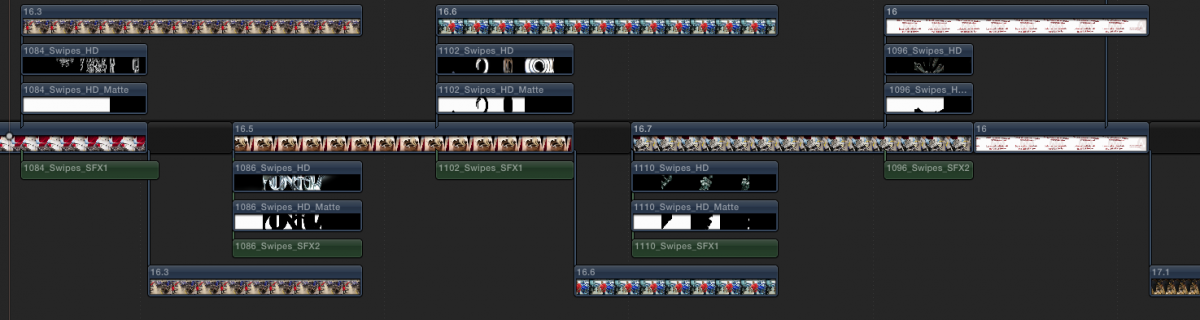
Anyway attached is an example of the matte timeline I was refering too..
2 days and various re starts it happend like clockwork.
Sorry..
The only thing I did different between now and then was remove a bunch of fonts.
Its possible that the fonts loading and memory usage was causing things to 'stick'..?
Anyway attached is an example of the matte timeline I was refering too..
Please Log in to join the conversation.
- Tom Wolsky
-
- Offline
- Moderator
-
21 Apr 2015 16:25 #63403
by Tom Wolsky
Replied by Tom Wolsky on topic Disabling clip re-enables
I think it only happens on Mon Wed Fri afternoons. 
Please Log in to join the conversation.
