


- Posts: 377
- Thank you received: 9
3 Post Moderation Rule for New Boarders (25 Jan 2021)
New boarders will have their posts moderated - Don't worry if you cannot see your post immediately.
No Multicam after library and fcp 10.2 update
20 Apr 2015 14:52 #63300
by dkag7
No Multicam after library and fcp 10.2 update was created by dkag7
I just updated a library and many projects to work in 10.2
After updating I have No preview at all for my multicam clips.
Audio for them is there.
No preview in viewer or in the multicam timeline.
Also all separate audio clips (not MC embedded) have no wave forms or audio at all.
The clips are there but nothing is in them.
Trashed preferences and opened again, no change.
Any Idea what is going on?
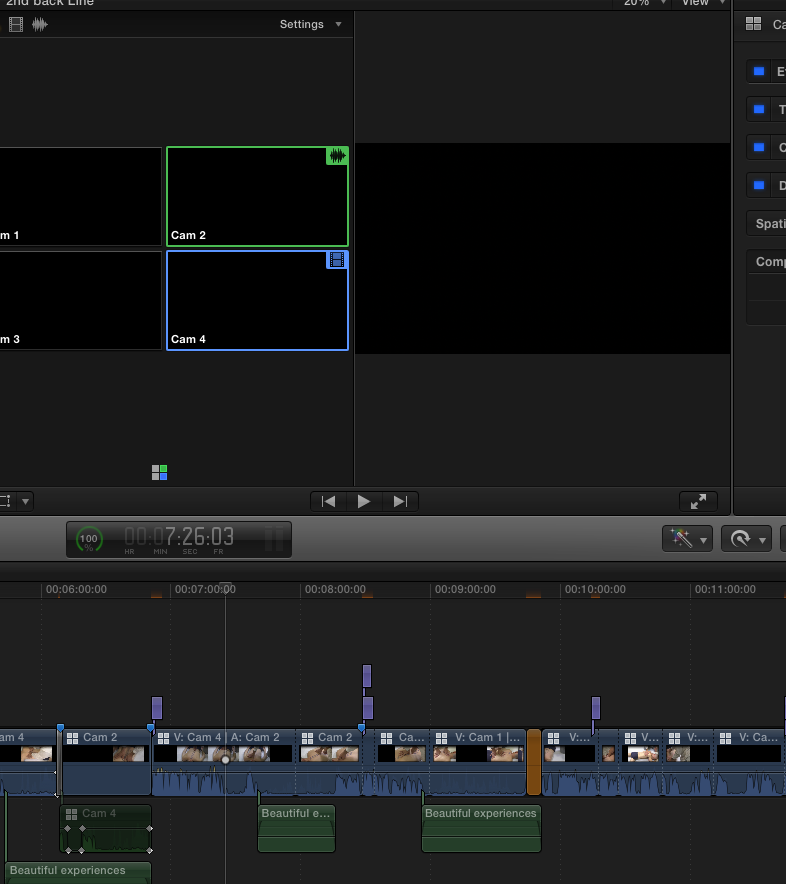
After updating I have No preview at all for my multicam clips.
Audio for them is there.
No preview in viewer or in the multicam timeline.
Also all separate audio clips (not MC embedded) have no wave forms or audio at all.
The clips are there but nothing is in them.
Trashed preferences and opened again, no change.
Any Idea what is going on?
Please Log in to join the conversation.
- Tom Wolsky
-

- Offline
- Moderator
-

20 Apr 2015 15:11 #63302
by Tom Wolsky
Replied by Tom Wolsky on topic No Multicam after library and fcp 10.2 update
Trash prefs and relaunch. Does it come back? If not report to feedback with details.
Please Log in to join the conversation.
20 Apr 2015 15:13 #63303
by dkag7
Replied by dkag7 on topic No Multicam after library and fcp 10.2 update
Trashing preferences did nothing, reboot did nothing.
Also the clips that were used to make the multicam have no video in the either.
In the event viewer, MC viewer or viewer.
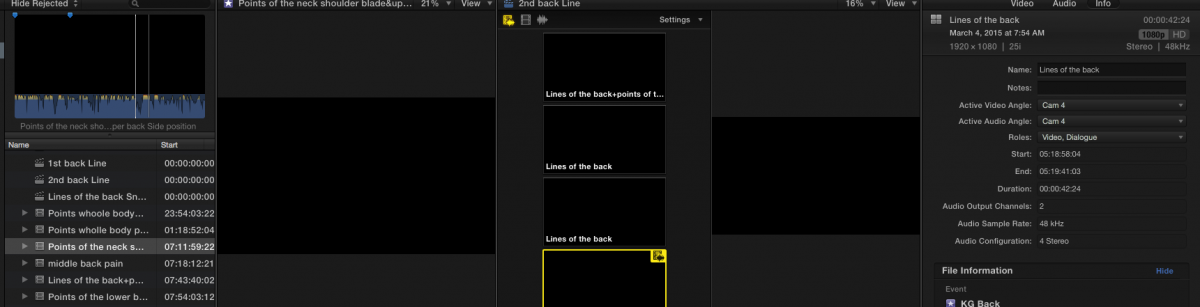
Also the clips that were used to make the multicam have no video in the either.
In the event viewer, MC viewer or viewer.
Please Log in to join the conversation.

20 Apr 2015 15:17 #63304
by BenB
Replied by BenB on topic No Multicam after library and fcp 10.2 update
I'll assume you have no background tasks running.
Do a "Reveal In Finder" command from the Browser, verify you have legitimate clips for FCPX to point to.
If so, what I would do at this point, is use "FCS Remover" to totally remove FCPX from my system (media and Libraries are kept safe), and reinstall from scratch.
Do a "Reveal In Finder" command from the Browser, verify you have legitimate clips for FCPX to point to.
If so, what I would do at this point, is use "FCS Remover" to totally remove FCPX from my system (media and Libraries are kept safe), and reinstall from scratch.
Please Log in to join the conversation.
- Tom Wolsky
-
- Offline
- Moderator
-
20 Apr 2015 15:29 #63307
by Tom Wolsky
Replied by Tom Wolsky on topic No Multicam after library and fcp 10.2 update
Give complete specs of the media and its source. There are some known problems with some formats. Did you optimize the media?
Please Log in to join the conversation.
20 Apr 2015 15:45 #63308
by dkag7
Replied by dkag7 on topic No Multicam after library and fcp 10.2 update
The media is not optimised for this project because I have 3TB of original footage.
The media is h264 pcm.
At this point I am not sure if I should try to optimize one of the clips to see what happens.
Even if it did work, I have no where near enough room to optimize all media in the projects.
dozens of multicam projects.
All clips are the same format except,
I have 2 clips that are Interlaced, and they are showing up OK.
All Progressive clips are not.
But, all the Multicam clips are interlaced, and they are not showing up.
Showing both fields in viewer does nothing.
Clips reveal in finder and play in QT fine.
In FCS remover, there is a selection to also remove 'content'
Do you know what this is?
Is it referring to 3d plugins?
So fat I cant find anything on their web page as to what this is.
Also, if I click on an original clip that a MC clips is made from, in the viewer, FCPX CPU usage shoots up to 125% or so and bounces around this % usage.
If I click on a MC clip in the viewer, there is no CPU raised usage.
There is also no CPU raised usage if I click on anywhere in the timeline.
I have titles in the timeline as well.
These titles will also not preview by scrubbing or playing, and they are above the MC clip in the timeline, that also does not preview (video). But if I skim over the titles they will show up normally in the viewer.
The media is h264 pcm.
At this point I am not sure if I should try to optimize one of the clips to see what happens.
Even if it did work, I have no where near enough room to optimize all media in the projects.
dozens of multicam projects.
All clips are the same format except,
I have 2 clips that are Interlaced, and they are showing up OK.
All Progressive clips are not.
But, all the Multicam clips are interlaced, and they are not showing up.
Showing both fields in viewer does nothing.
Clips reveal in finder and play in QT fine.
In FCS remover, there is a selection to also remove 'content'
Do you know what this is?
Is it referring to 3d plugins?
So fat I cant find anything on their web page as to what this is.
Also, if I click on an original clip that a MC clips is made from, in the viewer, FCPX CPU usage shoots up to 125% or so and bounces around this % usage.
If I click on a MC clip in the viewer, there is no CPU raised usage.
There is also no CPU raised usage if I click on anywhere in the timeline.
I have titles in the timeline as well.
These titles will also not preview by scrubbing or playing, and they are above the MC clip in the timeline, that also does not preview (video). But if I skim over the titles they will show up normally in the viewer.
Please Log in to join the conversation.
20 Apr 2015 17:09 #63313
by dkag7
Replied by dkag7 on topic No Multicam after library and fcp 10.2 update DONT UPDATE MC projects
FCS remover did not help.
I did not select 'contents' during the uninstall because I cant find what contents will be removed.
I did a test and put 10.1.4 back on the system.
Opened up a back up library (same MC library that did not work, but an older version from a few days ago).
Created a new library and copied over one MC clip into the new library.
Opened 10.2 and updated the copied over library.
Same exact problem.
I do not know that if the library had optimized media to begin with, if the same issue would happen, but optimizing media afterwards did nothing.
Not even sure this is the issue because default titles also would not work in this library unless i skimmed them, scrubbing or playback would show a black viewer screen.
Do NOT update any projects that contain multicam clips!!!
Good thing there was backups so I could at least get the back up older libraries loaded in 10.1.4
100+ Multicam projects within 3TB of data editing would have been lost... for good.
All other project I updated seemed to work fine (many crashes however when scrubbing).
But they opened and worked, I didnt think there would be such deadly consequences if a library had multicam in it however..
So again,
Do NOT update any projects that contain multicam clips!!!
Kurt
I did not select 'contents' during the uninstall because I cant find what contents will be removed.
I did a test and put 10.1.4 back on the system.
Opened up a back up library (same MC library that did not work, but an older version from a few days ago).
Created a new library and copied over one MC clip into the new library.
Opened 10.2 and updated the copied over library.
Same exact problem.
I do not know that if the library had optimized media to begin with, if the same issue would happen, but optimizing media afterwards did nothing.
Not even sure this is the issue because default titles also would not work in this library unless i skimmed them, scrubbing or playback would show a black viewer screen.
Do NOT update any projects that contain multicam clips!!!
Good thing there was backups so I could at least get the back up older libraries loaded in 10.1.4
100+ Multicam projects within 3TB of data editing would have been lost... for good.
All other project I updated seemed to work fine (many crashes however when scrubbing).
But they opened and worked, I didnt think there would be such deadly consequences if a library had multicam in it however..
So again,
Do NOT update any projects that contain multicam clips!!!
Kurt
Please Log in to join the conversation.
- Tom Wolsky
-
- Offline
- Moderator
-
20 Apr 2015 18:49 #63319
by Tom Wolsky
Replied by Tom Wolsky on topic No Multicam after library and fcp 10.2 update
H.264 doesn't say much. Please, there are problems with specific formats. Can you give exact specific information about your media and where it came from? Like what camera shot it. What information is given in the QT inspector?
Please Log in to join the conversation.
20 Apr 2015 18:53 #63321
by dkag7
Replied by dkag7 on topic No Multicam after library and fcp 10.2 update DONT UPDATE MC projects
The problem appears to be media.
10.2 will not accept the same media that 10.1.4 did.
Progressive, AVCHD 1080p25 will not load any video (black screen in import window and if you import it, or its from a updated project.
Interlaced, AVCHD 1080p25 Will work.
More media info on NON working files:
Video
ID : 1
Format : AVC
Format/Info : Advanced Video Codec
Format profile : High@L4.0
Format settings, CABAC : Yes
Format settings, ReFrames : 4 frames
Format settings, GOP : M=3, N=12
Codec ID : avc1
Codec ID/Info : Advanced Video Coding
Duration : 6mn 21s
Bit rate mode : Variable
Bit rate : 19.9 Mbps
Maximum bit rate : 20.9 Mbps
Width : 1 920 pixels
Height : 1 080 pixels
Display aspect ratio : 16:9
Frame rate mode : Constant
Frame rate : 25.000 fps
Color space : YUV
Chroma subsampling : 4:2:0
Bit depth : 8 bits
Scan type : Progressive
Bits/(Pixel*Frame) : 0.384
Stream size : 904 MiB (93%)
Title : Core Media Video
Encoded date : UTC 2014-06-15 09:29:21
Tagged date : UTC 2014-06-15 09:29:42
Color primaries : BT.709
Transfer characteristics : BT.709
Matrix coefficients : BT.709
Working Media:
ID : 1
Format : AVC
Format/Info : Advanced Video Codec
Format profile : High@L4.0
Format settings, CABAC : Yes
Format settings, ReFrames : 4 frames
Format settings, GOP : M=3, N=12
Codec ID : avc1
Codec ID/Info : Advanced Video Coding
Duration : 28mn 46s
Bit rate mode : Variable
Bit rate : 19.9 Mbps
Maximum bit rate : 20.9 Mbps
Width : 1 920 pixels
Height : 1 080 pixels
Display aspect ratio : 16:9
Frame rate mode : Constant
Frame rate : 25.000 fps
Color space : YUV
Chroma subsampling : 4:2:0
Bit depth : 8 bits
Scan type : Interlaced
Scan order : Top Field First
Bits/(Pixel*Frame) : 0.384
Stream size : 4.00 GiB (93%)
Title : Core Media Video
Encoded date : UTC 2014-05-03 18:59:15
Tagged date : UTC 2014-05-03 19:01:36
Color primaries : BT.709
Transfer characteristics : BT.709
Matrix coefficients : BT.709
10.2 will not accept the same media that 10.1.4 did.
Progressive, AVCHD 1080p25 will not load any video (black screen in import window and if you import it, or its from a updated project.
Interlaced, AVCHD 1080p25 Will work.
More media info on NON working files:
Video
ID : 1
Format : AVC
Format/Info : Advanced Video Codec
Format profile : High@L4.0
Format settings, CABAC : Yes
Format settings, ReFrames : 4 frames
Format settings, GOP : M=3, N=12
Codec ID : avc1
Codec ID/Info : Advanced Video Coding
Duration : 6mn 21s
Bit rate mode : Variable
Bit rate : 19.9 Mbps
Maximum bit rate : 20.9 Mbps
Width : 1 920 pixels
Height : 1 080 pixels
Display aspect ratio : 16:9
Frame rate mode : Constant
Frame rate : 25.000 fps
Color space : YUV
Chroma subsampling : 4:2:0
Bit depth : 8 bits
Scan type : Progressive
Bits/(Pixel*Frame) : 0.384
Stream size : 904 MiB (93%)
Title : Core Media Video
Encoded date : UTC 2014-06-15 09:29:21
Tagged date : UTC 2014-06-15 09:29:42
Color primaries : BT.709
Transfer characteristics : BT.709
Matrix coefficients : BT.709
Working Media:
ID : 1
Format : AVC
Format/Info : Advanced Video Codec
Format profile : High@L4.0
Format settings, CABAC : Yes
Format settings, ReFrames : 4 frames
Format settings, GOP : M=3, N=12
Codec ID : avc1
Codec ID/Info : Advanced Video Coding
Duration : 28mn 46s
Bit rate mode : Variable
Bit rate : 19.9 Mbps
Maximum bit rate : 20.9 Mbps
Width : 1 920 pixels
Height : 1 080 pixels
Display aspect ratio : 16:9
Frame rate mode : Constant
Frame rate : 25.000 fps
Color space : YUV
Chroma subsampling : 4:2:0
Bit depth : 8 bits
Scan type : Interlaced
Scan order : Top Field First
Bits/(Pixel*Frame) : 0.384
Stream size : 4.00 GiB (93%)
Title : Core Media Video
Encoded date : UTC 2014-05-03 18:59:15
Tagged date : UTC 2014-05-03 19:01:36
Color primaries : BT.709
Transfer characteristics : BT.709
Matrix coefficients : BT.709
Please Log in to join the conversation.
20 Apr 2015 19:03 #63325
by dkag7
Replied by dkag7 on topic No Multicam after library and fcp 10.2 update DONT UPDATE MC projects
Extended info on the NON working media:
So far the only thing I see different is scan mode.
Video
Count : 251
Count of stream of this kind : 1
Kind of stream : Video
Stream identifier : 0
StreamOrder : 0
ID : 1
Format : AVC
Format/Info : Advanced Video Codec
Format/Url : developers.videolan.org/x264.html
Commercial name : AVC
Format profile : High@L4.0
Format settings : CABAC / 4 Ref Frames
Format settings, CABAC : Yes
Format settings, ReFrames : 4 frames
Format settings, GOP : M=3, N=12
Internet media type : video/H264
Codec ID : avc1
Codec ID/Info : Advanced Video Coding
Codec ID/Url : www.apple.com/quicktime/download/standalone.html
Codec : AVC
Codec/Family : AVC
Codec/Info : Advanced Video Codec
Codec/Url : developers.videolan.org/x264.html
Codec/CC : avc1
Codec profile : High@L4.0
Codec settings : CABAC / 4 Ref Frames
Codec settings, CABAC : Yes
Codec_Settings_RefFrames : 4
Duration : 00:06:21.120
Bit rate mode : Variable
Bit rate : 19.9 Mbps
Maximum bit rate : 20.9 Mbps
Width : 1 920 pixels
Height : 1 080 pixels
Pixel aspect ratio : 1.000
Display aspect ratio : 16:9
Rotation : 0.000
Frame rate mode : Constant
Frame rate : 25.000 fps
Frame count : 9528
Resolution : 8 bits
Colorimetry : 4:2:0
Color space : YUV
Chroma subsampling : 4:2:0
Bit depth : 8 bits
Scan type : Progressive
Interlacement : Progressive
Bits/(Pixel*Frame) : 0.384
Delay : 23:42:24.480
Delay_Settings : DropFrame=No / 24HourMax=Yes / IsVisual=No
Delay, origin : Container
Stream size : 904 MiB (93%)
Proportion of this stream : 0.92617
Title : Core Media Video
Encoded date : UTC 2014-06-15 09:29:21
Tagged date : UTC 2014-06-15 09:29:42
Buffer size : 16720000
Color primaries : BT.709
Transfer characteristics : BT.709
Matrix coefficients : BT.709
================
Working media:
Video
Count : 251
Count of stream of this kind : 1
Kind of stream : Video
Stream identifier : 0
StreamOrder : 0
ID : 1
Format : AVC
Format/Info : Advanced Video Codec
Format/Url : developers.videolan.org/x264.html
Commercial name : AVC
Format profile : High@L4.0
Format settings : CABAC / 4 Ref Frames
Format settings, CABAC : Yes
Format settings, ReFrames : 4 frames
Format settings, GOP : M=3, N=12
Internet media type : video/H264
Codec ID : avc1
Codec ID/Info : Advanced Video Coding
Codec ID/Url : www.apple.com/quicktime/download/standalone.html
Codec : AVC
Codec/Family : AVC
Codec/Info : Advanced Video Codec
Codec/Url : developers.videolan.org/x264.html
Codec/CC : avc1
Codec profile : High@L4.0
Codec settings : CABAC / 4 Ref Frames
Codec settings, CABAC : Yes
Codec_Settings_RefFrames : 4
Duration : 00:28:46.080
Bit rate mode : Variable
Bit rate : 19.9 Mbps
Maximum bit rate : 20.9 Mbps
Width : 1 920 pixels
Height : 1 080 pixels
Pixel aspect ratio : 1.000
Display aspect ratio : 16:9
Rotation : 0.000
Frame rate mode : Constant
Frame rate : 25.000 fps
Frame count : 43152
Resolution : 8 bits
Colorimetry : 4:2:0
Color space : YUV
Chroma subsampling : 4:2:0
Bit depth : 8 bits
Scan type : Interlaced
Scan order : Top Field First
Interlacement : Top Field First
Bits/(Pixel*Frame) : 0.384
Delay : 02:54:17.840
Delay_Settings : DropFrame=No / 24HourMax=Yes / IsVisual=No
Delay, origin : Container
Stream size : 4.00 GiB (93%)
Proportion of this stream : 0.92635
Title : Core Media Video
Encoded date : UTC 2014-05-03 18:59:15
Tagged date : UTC 2014-05-03 19:01:36
Buffer size : 16720000
Color primaries : BT.709
Transfer characteristics : BT.709
Matrix coefficients : BT.709
So far the only thing I see different is scan mode.
Video
Count : 251
Count of stream of this kind : 1
Kind of stream : Video
Stream identifier : 0
StreamOrder : 0
ID : 1
Format : AVC
Format/Info : Advanced Video Codec
Format/Url : developers.videolan.org/x264.html
Commercial name : AVC
Format profile : High@L4.0
Format settings : CABAC / 4 Ref Frames
Format settings, CABAC : Yes
Format settings, ReFrames : 4 frames
Format settings, GOP : M=3, N=12
Internet media type : video/H264
Codec ID : avc1
Codec ID/Info : Advanced Video Coding
Codec ID/Url : www.apple.com/quicktime/download/standalone.html
Codec : AVC
Codec/Family : AVC
Codec/Info : Advanced Video Codec
Codec/Url : developers.videolan.org/x264.html
Codec/CC : avc1
Codec profile : High@L4.0
Codec settings : CABAC / 4 Ref Frames
Codec settings, CABAC : Yes
Codec_Settings_RefFrames : 4
Duration : 00:06:21.120
Bit rate mode : Variable
Bit rate : 19.9 Mbps
Maximum bit rate : 20.9 Mbps
Width : 1 920 pixels
Height : 1 080 pixels
Pixel aspect ratio : 1.000
Display aspect ratio : 16:9
Rotation : 0.000
Frame rate mode : Constant
Frame rate : 25.000 fps
Frame count : 9528
Resolution : 8 bits
Colorimetry : 4:2:0
Color space : YUV
Chroma subsampling : 4:2:0
Bit depth : 8 bits
Scan type : Progressive
Interlacement : Progressive
Bits/(Pixel*Frame) : 0.384
Delay : 23:42:24.480
Delay_Settings : DropFrame=No / 24HourMax=Yes / IsVisual=No
Delay, origin : Container
Stream size : 904 MiB (93%)
Proportion of this stream : 0.92617
Title : Core Media Video
Encoded date : UTC 2014-06-15 09:29:21
Tagged date : UTC 2014-06-15 09:29:42
Buffer size : 16720000
Color primaries : BT.709
Transfer characteristics : BT.709
Matrix coefficients : BT.709
================
Working media:
Video
Count : 251
Count of stream of this kind : 1
Kind of stream : Video
Stream identifier : 0
StreamOrder : 0
ID : 1
Format : AVC
Format/Info : Advanced Video Codec
Format/Url : developers.videolan.org/x264.html
Commercial name : AVC
Format profile : High@L4.0
Format settings : CABAC / 4 Ref Frames
Format settings, CABAC : Yes
Format settings, ReFrames : 4 frames
Format settings, GOP : M=3, N=12
Internet media type : video/H264
Codec ID : avc1
Codec ID/Info : Advanced Video Coding
Codec ID/Url : www.apple.com/quicktime/download/standalone.html
Codec : AVC
Codec/Family : AVC
Codec/Info : Advanced Video Codec
Codec/Url : developers.videolan.org/x264.html
Codec/CC : avc1
Codec profile : High@L4.0
Codec settings : CABAC / 4 Ref Frames
Codec settings, CABAC : Yes
Codec_Settings_RefFrames : 4
Duration : 00:28:46.080
Bit rate mode : Variable
Bit rate : 19.9 Mbps
Maximum bit rate : 20.9 Mbps
Width : 1 920 pixels
Height : 1 080 pixels
Pixel aspect ratio : 1.000
Display aspect ratio : 16:9
Rotation : 0.000
Frame rate mode : Constant
Frame rate : 25.000 fps
Frame count : 43152
Resolution : 8 bits
Colorimetry : 4:2:0
Color space : YUV
Chroma subsampling : 4:2:0
Bit depth : 8 bits
Scan type : Interlaced
Scan order : Top Field First
Interlacement : Top Field First
Bits/(Pixel*Frame) : 0.384
Delay : 02:54:17.840
Delay_Settings : DropFrame=No / 24HourMax=Yes / IsVisual=No
Delay, origin : Container
Stream size : 4.00 GiB (93%)
Proportion of this stream : 0.92635
Title : Core Media Video
Encoded date : UTC 2014-05-03 18:59:15
Tagged date : UTC 2014-05-03 19:01:36
Buffer size : 16720000
Color primaries : BT.709
Transfer characteristics : BT.709
Matrix coefficients : BT.709
Please Log in to join the conversation.
- Tom Wolsky
-
- Offline
- Moderator
-
20 Apr 2015 19:05 - 20 Apr 2015 19:06 #63326
by Tom Wolsky
Replied by Tom Wolsky on topic No Multicam after library and fcp 10.2 update DONT UPDATE MC projects
25p media, specifically from Panasonic cameras, though others may be effected as well, have this problem. It's not specific to multicam.
support.apple.com/en-au/HT204782
support.apple.com/en-au/HT204782
Last edit: 20 Apr 2015 19:06 by Tom Wolsky.
Please Log in to join the conversation.
20 Apr 2015 19:09 #63327
by dkag7
Replied by dkag7 on topic No Multicam after library and fcp 10.2 update DONT UPDATE MC projects
Yes, it is a media issue.
optimizing wont do anything because it cant see it correctly on import.
Not sure what compressor will do...
Either way, in my case I have too much media to try and transcode.
Back to 10.1.4
optimizing wont do anything because it cant see it correctly on import.
Not sure what compressor will do...
Either way, in my case I have too much media to try and transcode.
Back to 10.1.4
Please Log in to join the conversation.
- ronny courtens
-

- Offline
- Moderator
-
Less
More
- Posts: 4455
- Thank you received: 962
20 Apr 2015 19:14 #63328
by ronny courtens
Replied by ronny courtens on topic No Multicam after library and fcp 10.2 update DONT UPDATE MC projects
There is a known issue with AVCHD, and that is causing your problem.
There is no problem with updating multicam projects to 10.2. I just got a mail from friends of mine who do multicam tv shows. They have updated a show from 10.1.4 to 10.2 and have had no issues at all.
- Ronny
There is no problem with updating multicam projects to 10.2. I just got a mail from friends of mine who do multicam tv shows. They have updated a show from 10.1.4 to 10.2 and have had no issues at all.
- Ronny
Please Log in to join the conversation.
- Brad Parsons
-

- Offline
- Senior Member
-

Less
More
- Posts: 52
- Thank you received: 0
21 Apr 2015 03:15 #63346
by Brad Parsons
Replied by Brad Parsons on topic No Multicam after library and fcp 10.2 update
Wow I feel for you. I really wish I could help with this one!
Please Log in to join the conversation.
- Brad Parsons
-
- Offline
- Senior Member
-
Less
More
- Posts: 52
- Thank you received: 0
21 Apr 2015 03:30 #63349
by Brad Parsons
Replied by Brad Parsons on topic No Multicam after library and fcp 10.2 update
Did you read Tom's link? It looks helpful.
Please Log in to join the conversation.
