


3 Post Moderation Rule for New Boarders (25 Jan 2021)
New boarders will have their posts moderated - Don't worry if you cannot see your post immediately.
Library Level Smart Collections


20 Apr 2015 12:43 #63284
by BenB
Library Level Smart Collections was created by BenB
I love Library level Smart Collections, but would love to see an option to specify which Events I'm searching through. I've already got a situation where that would really help. Many Events, but some are non-vital clips, and I'd like to search only the Events that have vital clips. Anyone else wish we had this search option at the Library level?
Please Log in to join the conversation.
- ronny courtens
-

- Offline
- Moderator
-

Less
More
- Posts: 4455
- Thank you received: 962
20 Apr 2015 12:46 #63286
by ronny courtens
Replied by ronny courtens on topic Library Level Smart Collections
I think that would be a good addition to this feature. Feedback time.
- Ronny
- Ronny
Please Log in to join the conversation.
- Jonathan Levin
-

- Offline
- Platinum Member
-

Less
More
- Posts: 786
- Thank you received: 21
20 Apr 2015 16:17 #63310
by Jonathan Levin
Replied by Jonathan Levin on topic Library Level Smart Collections
I'm still trying to understand Library Level Smart Collection compared to just a regular smart collection.
So my way of do this has been to do this as an example:
Create Event called Photos. On my HD I have a folders called "Jim Interview Photos", one called "Alice Interview photos" and so on. In FCPX I'll import that that folder with the Keywords from Folders and from finder tags(?) checked.
The folder imports the way I think it should with the smart collection in the Event called "Jim interview photos", "Alice Interview photos" etc.
So in the Event called Photos I can add a Smart collection based on my organization
What am I missing?
Thanks guys.
JL
So my way of do this has been to do this as an example:
Create Event called Photos. On my HD I have a folders called "Jim Interview Photos", one called "Alice Interview photos" and so on. In FCPX I'll import that that folder with the Keywords from Folders and from finder tags(?) checked.
The folder imports the way I think it should with the smart collection in the Event called "Jim interview photos", "Alice Interview photos" etc.
So in the Event called Photos I can add a Smart collection based on my organization
What am I missing?
Thanks guys.
JL
Please Log in to join the conversation.
20 Apr 2015 16:35 #63311
by lichinho
Replied by lichinho on topic Library Level Smart Collections
Jonathan, you are talking about Keyword Collections, not Smart Collections.
And if there is only one event per library then this addition is not very relevant.
Here is an example: say you have a library containing 10 events, and you want to locate all the still images, or all the multicam clips, or all the clips containing keyword A, but not keyword B, or any combination of such criteria.
Previously, you could do that with Smart Collections, but only inside an event. Now you can do that across the whole library.
And it would/will be better still if, as Ben suggested, we can in addition restrict this search to specific events. Right now is within one event or in the whole library.
And if there is only one event per library then this addition is not very relevant.
Here is an example: say you have a library containing 10 events, and you want to locate all the still images, or all the multicam clips, or all the clips containing keyword A, but not keyword B, or any combination of such criteria.
Previously, you could do that with Smart Collections, but only inside an event. Now you can do that across the whole library.
And it would/will be better still if, as Ben suggested, we can in addition restrict this search to specific events. Right now is within one event or in the whole library.
Please Log in to join the conversation.

20 Apr 2015 18:53 #63322
by Gretta
Replied by Gretta on topic Library Level Smart Collections
Library level smart collections are so helpful for me. E.G., I shoot every month for a local history group, and within and among the presentations, I create videos for various different people/groups. I name each Event for the name of the presentation, but the stills created by the PPTs in each of them can be used for many different Projects. And having all the Projects at Library level keeps me from having to check thru events to find the one I am looking for. And having all mixes and music and VO at library level is also swell. This one thing made my day!
Please Log in to join the conversation.
- Jonathan Levin
-
- Offline
- Platinum Member
-
Less
More
- Posts: 786
- Thank you received: 21
20 Apr 2015 19:27 #63330
by Jonathan Levin
Replied by Jonathan Levin on topic Library Level Smart Collections
lichinho.
You are absolutely correct about the keyword collections! I made a test smart collection in an event, and I got my icons mixed up.
And I know Ronny explained this before, and maybe someone could point me in the right direction about learning about Smart Collections.
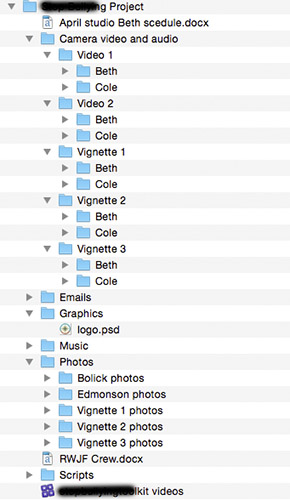
I try and keep my workflow real simple. Basically as you can see by the screen grab, this is how I've been organizing videos on my hard drive.
What I then do in FC is create a whole bunch of events: one called Camera video and audio. And in that I would do a "Keyword" import of the folder video 1. Then in that same event do video 2.
Photos I would make another event and do a seperate Keyword import for those 5 different photos folders. Seems to work for me, but if there is a better way, this old dog is willing to learn new tricks!
Jonathan
You are absolutely correct about the keyword collections! I made a test smart collection in an event, and I got my icons mixed up.
And I know Ronny explained this before, and maybe someone could point me in the right direction about learning about Smart Collections.
I try and keep my workflow real simple. Basically as you can see by the screen grab, this is how I've been organizing videos on my hard drive.
What I then do in FC is create a whole bunch of events: one called Camera video and audio. And in that I would do a "Keyword" import of the folder video 1. Then in that same event do video 2.
Photos I would make another event and do a seperate Keyword import for those 5 different photos folders. Seems to work for me, but if there is a better way, this old dog is willing to learn new tricks!
Jonathan
Please Log in to join the conversation.
20 Apr 2015 20:05 - 20 Apr 2015 20:10 #63333
by BenB
Replied by BenB on topic Library Level Smart Collections
Keyword Collection (arbitrary metadata)- Based on adding metadata to a clip, specifically a word or multiple words, any piece of media can be added to the collection (by adding the keyword metadata). This is a criteria that can be added arbitrarily to any clip. You can arbitrarily give a video clip the keyword of "still".
Smart Collection (fixed metadata) - Based on existing physical characteristics and/or metadata in a clip. Only pieces of media already containing the specified criteria will be filtered to show up in that collection. This is a "filter" that only shows media that meets existing criteria. You can't arbitrarily make a video clip show up as a still image, using "Media Type".
Doing real estate video for undeveloped land, I do this:
Library for a specific real estate company.
Event for each specific property they have me photo/video.
Each Event has Keyword Collections for: Indoor, Outdoor, water, land, aerial, dwelling, barn, utility, etc.
Each Event has Smart Collections for: Stills, video, audio only, projects, etc.
You can make Libraries, Events, Keyword Collections, Smart Collections in any manner that works for you. There's no standard rules. But understanding each very well, and pre-planning an organizational methodology, goes a long way to making productions go faster, smoother, easier.
Smart Collection (fixed metadata) - Based on existing physical characteristics and/or metadata in a clip. Only pieces of media already containing the specified criteria will be filtered to show up in that collection. This is a "filter" that only shows media that meets existing criteria. You can't arbitrarily make a video clip show up as a still image, using "Media Type".
Doing real estate video for undeveloped land, I do this:
Library for a specific real estate company.
Event for each specific property they have me photo/video.
Each Event has Keyword Collections for: Indoor, Outdoor, water, land, aerial, dwelling, barn, utility, etc.
Each Event has Smart Collections for: Stills, video, audio only, projects, etc.
You can make Libraries, Events, Keyword Collections, Smart Collections in any manner that works for you. There's no standard rules. But understanding each very well, and pre-planning an organizational methodology, goes a long way to making productions go faster, smoother, easier.
Last edit: 20 Apr 2015 20:10 by BenB.
Please Log in to join the conversation.
20 Apr 2015 20:19 #63334
by BenB
Replied by BenB on topic Library Level Smart Collections
In your example, you have Video1 as an Event, Video2 as an Event, etc. Then inside each keywords for Beth and Cole. What do you do when you want to see ALL of Beth's videos from ALL of the Events, at one time? Let's say for promotional stills, etc?
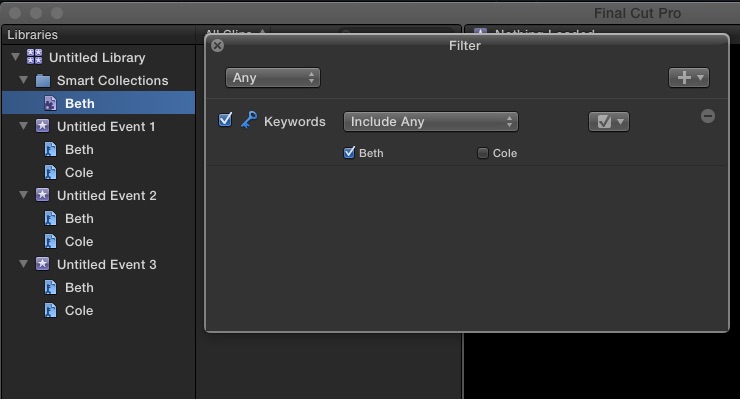
Right-click the Library in FCPX, and select "New Library Smart Collection".
Name it Beth.
Double-click it to open its settings.
Add "Keywords" and only check off "Beth".
Now you can see all of Beth's videos in the entire Library at one time. "Library Smart Collection" vs "Event Smart Collection".
Right-click the Library in FCPX, and select "New Library Smart Collection".
Name it Beth.
Double-click it to open its settings.
Add "Keywords" and only check off "Beth".
Now you can see all of Beth's videos in the entire Library at one time. "Library Smart Collection" vs "Event Smart Collection".
Please Log in to join the conversation.
- Jonathan Levin
-
- Offline
- Platinum Member
-
Less
More
- Posts: 786
- Thank you received: 21
20 Apr 2015 21:30 #63337
by Jonathan Levin
Replied by Jonathan Levin on topic Library Level Smart Collections
Thanks Ben and Gretta.
I got to wrap my mind around this :blink:
I got to wrap my mind around this :blink:
Please Log in to join the conversation.
