


- Posts: 80
- Thank you received: 5
3 Post Moderation Rule for New Boarders (25 Jan 2021)
New boarders will have their posts moderated - Don't worry if you cannot see your post immediately.
Rendering in 10.2 and waveform drawing sluggishnes
- Bluebicycle
-
 Topic Author
- Offline
- Premium Member
-

Less
More
19 Apr 2015 08:42 #63206
by Bluebicycle
Rendering in 10.2 and waveform drawing sluggishnes was created by Bluebicycle
I'm finding rendering in 10.2 a bit haphazard. I have a very simple multicam edit, the project is 1080p. One of the sources is Prores 422 LT but 1080i. Rendering is taking forever. I've gone away and left it, and returned after half an hour. Even overnight and it just seems to stop after a while. App nap is off. Sometimes you see the progress bar go backwards briefly. I have never before returned from a break to find material unrendered. Have reported to Apple
I'm not experiencing the same slow downs as 10.1. which is great, but trying to edit a 16 multichannel synced wav file, is impossible. Constant stalling and re-drawing. If you blade any tracks the waveforms re-draw from scratch, just unworkable.
I'm not experiencing the same slow downs as 10.1. which is great, but trying to edit a 16 multichannel synced wav file, is impossible. Constant stalling and re-drawing. If you blade any tracks the waveforms re-draw from scratch, just unworkable.
Please Log in to join the conversation.
- ronny courtens
-

- Offline
- Moderator
-

Less
More
- Posts: 4455
- Thank you received: 962
19 Apr 2015 11:00 #63209
by ronny courtens
Replied by ronny courtens on topic Rendering in 10.2 and waveform drawing sluggishnes
Hey John,
Good you have sent feedback about this. Just a few questions to see if we can find something to help you.
Is this a multicam project with the 16-channel WAV audio clips?
How long is the multicam clip?
What are your machine specs?
What version of Yosemite?
Have you checked your startup drive to see if it has enough space left?
Are you rendering to the same drive as the drive where your original media are stored?
Do you have any filters applied to clips or angles?
With this info we might be able to figure out what's causing this issue, it's certainly not normal.
- Ronny
Good you have sent feedback about this. Just a few questions to see if we can find something to help you.
Is this a multicam project with the 16-channel WAV audio clips?
How long is the multicam clip?
What are your machine specs?
What version of Yosemite?
Have you checked your startup drive to see if it has enough space left?
Are you rendering to the same drive as the drive where your original media are stored?
Do you have any filters applied to clips or angles?
With this info we might be able to figure out what's causing this issue, it's certainly not normal.
- Ronny
Please Log in to join the conversation.
- Bluebicycle
-
Topic Author
- Offline
- Premium Member
-
Less
More
- Posts: 80
- Thank you received: 5
19 Apr 2015 20:09 - 19 Apr 2015 20:14 #63235
by Bluebicycle
Replied by Bluebicycle on topic Rendering in 10.2 and waveform drawing sluggishnes
HI Ronnie,
Been thrashing away at this job all day , so sorry for delay in getting back. I've ended up adding to the list of gripes I'm afraid.
You wrote:
Is this a multicam project with the 16-channel WAV audio clips? Yes
How long is the multicam clip? 7 hours 24 mins
What are your machine specs? Macbook Pro 2.5 Dual Core i7 16Gb Ram
What version of Yosemite? 10.10.3
Have you checked your startup drive to see if it has enough space left? Yes
Are you rendering to the same drive as the drive where your original media are stored? Yes My Media Drive is a Pegasus R6 12TB
Do you have any filters applied to clips or angles? No
Now I look at the length of the Multicam and my machine spec, I realise I might be pushing it! I had a new MacPro on the last job on loan, so had forgotten my Macbook is getting behind now.
Inspite of that though X, is quite inconsistent in it's performance. It seems to do some things extremely well and others, well it just falls at the first hurdle. Lot's of crashes throughout the day.
There is something odd about the rendering since the update. As turning off background render and manually applying to sections does not remove the red bars, and it's quite happy to re-render etc. Maybe this is just misreporting.
Exporting a H264 1280X720 file directly from the Share menu is much quicker though.
My Timeline for this show is 2 hours 45 mins, again crazy long, so perhaps unreasonable.
If there's one place where we need improvement it is on audio. Quick addition of audio only crossfades, desperately needed. Audio though edits, when cutting vision only, cause clicks. why is that all NLE's always treat audio as a poor relation?
I haven't worked out a way of toggling off and on 16 tracks of audio. OK they are on and if expanded in the timeline, you can disable, range select, fade etc, but the performance, is cripplingly slow. Every time you move, the waveforms are redrawing. Not that Avid is any better, but even if you could say, "do you know what, just don't bother displaying these waveforms", it would be so much better.
That's all for now. Long day, so getting grumpy. Still love X, but sometimes embarrassed to be pushing so hard to others an App that still doesn't cut it in certain specific areas. We will get there!
Been thrashing away at this job all day , so sorry for delay in getting back. I've ended up adding to the list of gripes I'm afraid.
You wrote:
Is this a multicam project with the 16-channel WAV audio clips? Yes
How long is the multicam clip? 7 hours 24 mins
What are your machine specs? Macbook Pro 2.5 Dual Core i7 16Gb Ram
What version of Yosemite? 10.10.3
Have you checked your startup drive to see if it has enough space left? Yes
Are you rendering to the same drive as the drive where your original media are stored? Yes My Media Drive is a Pegasus R6 12TB
Do you have any filters applied to clips or angles? No
Now I look at the length of the Multicam and my machine spec, I realise I might be pushing it! I had a new MacPro on the last job on loan, so had forgotten my Macbook is getting behind now.
Inspite of that though X, is quite inconsistent in it's performance. It seems to do some things extremely well and others, well it just falls at the first hurdle. Lot's of crashes throughout the day.
There is something odd about the rendering since the update. As turning off background render and manually applying to sections does not remove the red bars, and it's quite happy to re-render etc. Maybe this is just misreporting.
Exporting a H264 1280X720 file directly from the Share menu is much quicker though.
My Timeline for this show is 2 hours 45 mins, again crazy long, so perhaps unreasonable.
If there's one place where we need improvement it is on audio. Quick addition of audio only crossfades, desperately needed. Audio though edits, when cutting vision only, cause clicks. why is that all NLE's always treat audio as a poor relation?
I haven't worked out a way of toggling off and on 16 tracks of audio. OK they are on and if expanded in the timeline, you can disable, range select, fade etc, but the performance, is cripplingly slow. Every time you move, the waveforms are redrawing. Not that Avid is any better, but even if you could say, "do you know what, just don't bother displaying these waveforms", it would be so much better.
That's all for now. Long day, so getting grumpy. Still love X, but sometimes embarrassed to be pushing so hard to others an App that still doesn't cut it in certain specific areas. We will get there!
Last edit: 19 Apr 2015 20:14 by Bluebicycle. Reason: mistakes
Please Log in to join the conversation.
- ronny courtens
-
- Offline
- Moderator
-
Less
More
- Posts: 4455
- Thank you received: 962
19 Apr 2015 20:19 - 19 Apr 2015 20:21 #63236
by ronny courtens
Replied by ronny courtens on topic Rendering in 10.2 and waveform drawing sluggishnes
Hey John,
Now that's no way to spend a Sunday (-: Sorry you are having all that trouble.
I absolutely don't know how a 7 hour multicam wit 16 WAV angles really should perform on a MacBook Pro. I would even hesitate to push that through any NLE I know. Yet it's always good to push applications and hardware to the limits, then at least we know where those limits are.
FCPX has problems with waveform redraw on very long clips, just like any NLE does except Avid. But that's only when you import in Avid, which splits video and audio. With AMA Avid has the same trouble as any other NLE.
No matter what machine or NLE you use, I think it is best to split super-long timelines like that in manageable chunks. I think 7 hours is just way too long.
I agree audio has been neglected a bit so far. From what I know, I think that's what they will be concentrating on for the next feature update.
- Ronny
Now that's no way to spend a Sunday (-: Sorry you are having all that trouble.
I absolutely don't know how a 7 hour multicam wit 16 WAV angles really should perform on a MacBook Pro. I would even hesitate to push that through any NLE I know. Yet it's always good to push applications and hardware to the limits, then at least we know where those limits are.
FCPX has problems with waveform redraw on very long clips, just like any NLE does except Avid. But that's only when you import in Avid, which splits video and audio. With AMA Avid has the same trouble as any other NLE.
No matter what machine or NLE you use, I think it is best to split super-long timelines like that in manageable chunks. I think 7 hours is just way too long.
I agree audio has been neglected a bit so far. From what I know, I think that's what they will be concentrating on for the next feature update.
- Ronny
Last edit: 19 Apr 2015 20:21 by ronny courtens.
Please Log in to join the conversation.
- Bluebicycle
-
Topic Author
- Offline
- Premium Member
-
Less
More
- Posts: 80
- Thank you received: 5
20 Apr 2015 08:56 #63270
by Bluebicycle
Replied by Bluebicycle on topic Rendering in 10.2 and waveform drawing sluggishnes
HI Ronnie,
Yes I was expecting too much. There weren't many files, just long recordings and it's so simple to select everything, and make a multi clip.
In an edit you are always the last man standing, and I was just getting media thrown at me with the usual gibberish file names, timecode breaks, labels from previous job......
I used Lumberjack on an IPad as a trial though. Superb bit of software, so perhaps I should be making multi-clips from keyword selections, and breaking things up, if that's possible, rather than the entire length.
I must say I had many crashes yesterday, and beach balling. Each time everything comes back though. On the other hand Avid has crashed 3 times, today already, just making an AAF from the multi-track audios, and each time I've had to start again from scratch!
The rendering bars are still a mystery on X, so that must be a bug. Project played fine and no amount of manual rendering makes them go away. Having one of the sources interlaced was an oversight, but always likely to happen again in TV. Would that clip be better in it's own Compound clip set to progressive and pre-rendered? I say this because I noticed towards the end of the edit that this interlaced mixer-out feed was out of sync (3 frames, probably as a result of the audio- embedding route and vision mixer. I had used the audio to sync). I slipped it inside the angle editor, but that meant the whole show, which was getting on for 3 hours long, then became un-rendered for all instances of that source, not good.
Another couple of questions I can't find answers on:
With multitrack audio, do you happen to know if there's an easy way to turn on or off the tracks, instead of individually ticking the boxes in the Inspector? Once they're on, they appear in the timeline and can be toggled with V.
If I make a simple text effect. Can you then take all the formatting and paste into another? Scenario. you make up say 3 simple cards, A,B&C then you end up tweaking one and want to make the others reflect the same changes. Save effect Preset doesn't work and I can't imagine you have to make a Motion Template, for something so simple.
Many thanks for all your help.
J
Yes I was expecting too much. There weren't many files, just long recordings and it's so simple to select everything, and make a multi clip.
In an edit you are always the last man standing, and I was just getting media thrown at me with the usual gibberish file names, timecode breaks, labels from previous job......
I used Lumberjack on an IPad as a trial though. Superb bit of software, so perhaps I should be making multi-clips from keyword selections, and breaking things up, if that's possible, rather than the entire length.
I must say I had many crashes yesterday, and beach balling. Each time everything comes back though. On the other hand Avid has crashed 3 times, today already, just making an AAF from the multi-track audios, and each time I've had to start again from scratch!
The rendering bars are still a mystery on X, so that must be a bug. Project played fine and no amount of manual rendering makes them go away. Having one of the sources interlaced was an oversight, but always likely to happen again in TV. Would that clip be better in it's own Compound clip set to progressive and pre-rendered? I say this because I noticed towards the end of the edit that this interlaced mixer-out feed was out of sync (3 frames, probably as a result of the audio- embedding route and vision mixer. I had used the audio to sync). I slipped it inside the angle editor, but that meant the whole show, which was getting on for 3 hours long, then became un-rendered for all instances of that source, not good.
Another couple of questions I can't find answers on:
With multitrack audio, do you happen to know if there's an easy way to turn on or off the tracks, instead of individually ticking the boxes in the Inspector? Once they're on, they appear in the timeline and can be toggled with V.
If I make a simple text effect. Can you then take all the formatting and paste into another? Scenario. you make up say 3 simple cards, A,B&C then you end up tweaking one and want to make the others reflect the same changes. Save effect Preset doesn't work and I can't imagine you have to make a Motion Template, for something so simple.
Many thanks for all your help.
J
Please Log in to join the conversation.
- ronny courtens
-
- Offline
- Moderator
-
Less
More
- Posts: 4455
- Thank you received: 962
20 Apr 2015 12:53 #63291
by ronny courtens
Replied by ronny courtens on topic Rendering in 10.2 and waveform drawing sluggishnes
Hi John,
Hope you had a good rest after all of this.
I hear you, we always have to clean up the mess everyone else in production has created. But hey, that's why we always get the big bucks eh :whistle:
Breaking up very long multiclips is something we have been doing since the advent of NLEs, and it's still good practice. If only to prevent having to scroll through hours of timeline.
I have seen such a rendering issue yesterday when working on a retimed clip with Optical Flow. Just on that clip, on none of the others, the render bar would't go away. But I could play the timeline perfectly, so I didn't bother looking for a reason. Maybe just deleting all render files and do a fresh serenader would already solve this.
Interlaced video in a progressive timeline should not be problematic. In fact FCP X seems the only NLE that deals with this without any problems. But if things have been recorded out of sync and you have to re-sunc video, you of course lose the rendering.
I don't know of any way to disable all or multiple audio channels in the Inspector at once (except for V in the timeline). Maybe someone else can chime in on this?
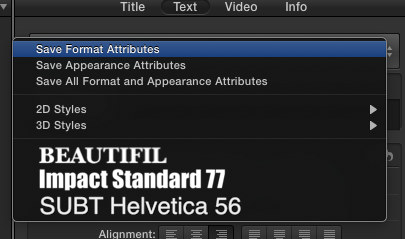
Yes you can save a title with all its attributes. Select the title clip and in the Inspector > Text tab click on the double arrow in the top of the text window.You will get a new window asking if you want to save the Format (Font, size etc...), the Attributes (Color, shadow etc...) or both. Press any of the options, give your preset a name and it will appear in the list. Now you can re-use this preset on any new title you wish.
- Ronny
Hope you had a good rest after all of this.
I hear you, we always have to clean up the mess everyone else in production has created. But hey, that's why we always get the big bucks eh :whistle:
Breaking up very long multiclips is something we have been doing since the advent of NLEs, and it's still good practice. If only to prevent having to scroll through hours of timeline.
I have seen such a rendering issue yesterday when working on a retimed clip with Optical Flow. Just on that clip, on none of the others, the render bar would't go away. But I could play the timeline perfectly, so I didn't bother looking for a reason. Maybe just deleting all render files and do a fresh serenader would already solve this.
Interlaced video in a progressive timeline should not be problematic. In fact FCP X seems the only NLE that deals with this without any problems. But if things have been recorded out of sync and you have to re-sunc video, you of course lose the rendering.
I don't know of any way to disable all or multiple audio channels in the Inspector at once (except for V in the timeline). Maybe someone else can chime in on this?
Yes you can save a title with all its attributes. Select the title clip and in the Inspector > Text tab click on the double arrow in the top of the text window.You will get a new window asking if you want to save the Format (Font, size etc...), the Attributes (Color, shadow etc...) or both. Press any of the options, give your preset a name and it will appear in the list. Now you can re-use this preset on any new title you wish.
- Ronny
Please Log in to join the conversation.
- Bluebicycle
-
Topic Author
- Offline
- Premium Member
-
Less
More
- Posts: 80
- Thank you received: 5
20 Apr 2015 13:15 #63297
by Bluebicycle
Replied by Bluebicycle on topic Rendering in 10.2 and waveform drawing sluggishnes
Thanks for the title tip. I still can't work out how it remembers the position information, as that is not reflected by Transform. You would need this to quickly align a bunch of text boards to the same place. Thought it might be to do with published parameters, on something that starts of a basic title but there doesn't seem any way to Open a saved preset, as a copy in Motion, which is perhaps reasonable, as maybe you wouldn't want to edit something you've saved as a preset. It seems once you save as preset it is disconnected from the ability to work in Motion.
Please Log in to join the conversation.
- Bluebicycle
-
Topic Author
- Offline
- Premium Member
-
Less
More
- Posts: 80
- Thank you received: 5
20 Apr 2015 13:26 #63298
by Bluebicycle
Replied by Bluebicycle on topic Rendering in 10.2 and waveform drawing sluggishnes
Ah these parameters not published by default on basic title, seems an oversight.
Even then doesn't look like there is any way to copy these text position attributes from one to another.
Even then doesn't look like there is any way to copy these text position attributes from one to another.
Please Log in to join the conversation.
- ronny courtens
-
- Offline
- Moderator
-
Less
More
- Posts: 4455
- Thank you received: 962
20 Apr 2015 19:55 #63332
by ronny courtens
Replied by ronny courtens on topic Rendering in 10.2 and waveform drawing sluggishnes
It all depends on the templates you are using. Some have many parameters inside, others not. If the parameters are available in both templates you will be able to copy them over. If not you can add parameters in Motion.
- Ronny
- Ronny
Please Log in to join the conversation.


20 Apr 2015 20:29 #63335
by BenB
Replied by BenB on topic Rendering in 10.2 and waveform drawing sluggishnes
If you use the Transform parameters in the Video tab of the Inspector, you can copy and paste them.
Please Log in to join the conversation.
- Bluebicycle
-
Topic Author
- Offline
- Premium Member
-
Less
More
- Posts: 80
- Thank you received: 5
20 Apr 2015 20:34 #63336
by Bluebicycle
Replied by Bluebicycle on topic Rendering in 10.2 and waveform drawing sluggishnes
Nope I opened a copy in Motion and published the position parameters for a 2 line lower third and resaved. They now appear in FCP Inspector. If you now select both text boxes and save "All format and Appearance Attributes" then apply that saved setting to another segment with the same effect, but text in a different place, nothing happens. Looks like all other formatting is transferred but not position.
Transform etc., isn't' being used so no point in saving an FX preset.
Transform etc., isn't' being used so no point in saving an FX preset.
Please Log in to join the conversation.
20 Apr 2015 22:34 #63338
by BenB
Replied by BenB on topic Rendering in 10.2 and waveform drawing sluggishnes
The All Format And Appearance Attributes doesn't work that way, no.
Format refers to the whole "basic" section.
Appearance refers to the "advance" section.
There is no "Transform" attributes in the Text section at all. Again, you'd have to copy and paste the Position parameters from the Video tab, that's the only way to do it.
Format refers to the whole "basic" section.
Appearance refers to the "advance" section.
There is no "Transform" attributes in the Text section at all. Again, you'd have to copy and paste the Position parameters from the Video tab, that's the only way to do it.
Please Log in to join the conversation.
