


- Posts: 7
- Thank you received: 2
3 Post Moderation Rule for New Boarders (25 Jan 2021)
New boarders will have their posts moderated - Don't worry if you cannot see your post immediately.
FCP Library icon appearing as folders
15 Apr 2015 16:03 #62828
by savaege
FCP Library icon appearing as folders was created by savaege
I have this production which I finished last year. After a period of time when I went to open it, it wouldn't load in FCP when I attached the external hard drive it's on.
While it used to look something like this on the Hard Drives root

It now looks like this
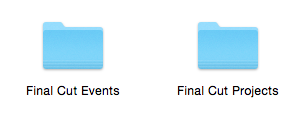
All the correct files and folders are inside the Events and Project folders but I can't open it in FCP
I'm currently using FCPX 10.1.4 and OS X 10.10.2 but no idea what version of FCPX I was using last time it was open.
Any fixes for this?
While it used to look something like this on the Hard Drives root
It now looks like this
All the correct files and folders are inside the Events and Project folders but I can't open it in FCP
I'm currently using FCPX 10.1.4 and OS X 10.10.2 but no idea what version of FCPX I was using last time it was open.
Any fixes for this?
Please Log in to join the conversation.

15 Apr 2015 16:16 #62829
by BenB
Replied by BenB on topic FCP Library icon appearing as folders
Those are two different things. The Library is the Library, and was updated from those two folder. Those two folders can't be re-created to older versions from the Library. When you updated the Library, it did not delete the original folders. You're Library must still be somewhere, unless it is just gone. But you should be able to update those folders again.
Please Log in to join the conversation.
15 Apr 2015 19:32 #62841
by savaege
Replied by savaege on topic FCP Library icon appearing as folders
I've looked and there is no sign of it.
Please Log in to join the conversation.


16 Apr 2015 04:54 #62869
by dgwvideo
Creating history....one edit at a time !
Replied by dgwvideo on topic FCP Library icon appearing as folders
Within FCPX, select File - Update projects and events. Then choose the LOCATE option to point to your project and let FCPX update and create the new library. Since V10.1, FCPX used libraries instead of separate project and event folders, so likely you were on a version prior to that when you last opened the project in question.
Also, within FCPX you can view details of updating your libraries by going to "HELP - Updating to Libraries" from the top menu. This might be helpful before you actually update.
Also, within FCPX you can view details of updating your libraries by going to "HELP - Updating to Libraries" from the top menu. This might be helpful before you actually update.
Creating history....one edit at a time !
Please Log in to join the conversation.
16 Apr 2015 09:50 #62897
by savaege
Replied by savaege on topic FCP Library icon appearing as folders
Thanks, that seems to have done the trick.
Is it save to remove the old events and projects from the hard drive as it's full?
Is it save to remove the old events and projects from the hard drive as it's full?
Please Log in to join the conversation.
16 Apr 2015 11:30 #62921
by BenB
Replied by BenB on topic FCP Library icon appearing as folders
Nothing is removed automatically, only what you tell FCPX to remove. I believe in the Update process there is an option to keep or trash the original legacy folders. But, the new Library will be built first (duplicating clips) before the old folders are trashed. No physical way around that, though.
Please Log in to join the conversation.
16 Apr 2015 12:44 #62927
by savaege
Replied by savaege on topic FCP Library icon appearing as folders
Yeah there was an option to save or trash, I chose save to play it safe. Have removed them now.
Exporting what I wanted now so all seems good.
Exporting what I wanted now so all seems good.
Please Log in to join the conversation.
