




- Posts: 45
- Thank you received: 0
3 Post Moderation Rule for New Boarders (25 Jan 2021)
New boarders will have their posts moderated - Don't worry if you cannot see your post immediately.
FCPX 10.2 No more auto color correct?
13 Apr 2015 20:00 #62622
by truelife2
FCPX 10.2 No more auto color correct? was created by truelife2
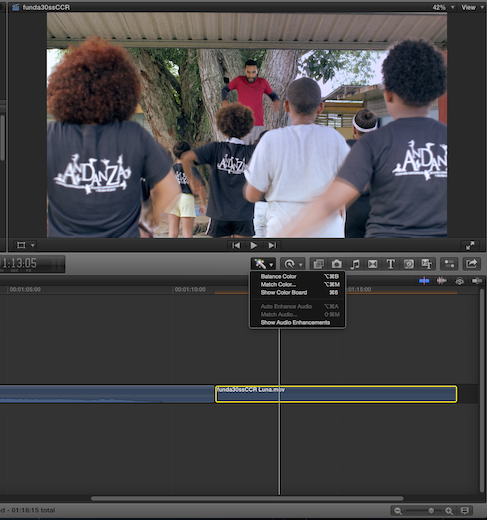
Just started playing with color in the new version and can't find auto color correct. I find this very helpful to give a base idea of what I want. Is this gone?
Please Log in to join the conversation.


13 Apr 2015 20:37 #62629
by FernKraft
Replied by FernKraft on topic 10.1.5 PRE-RELEASE DISCUSSION
Just an FYI, in regards to 10.2
You don't actually have to put a colour correction on to colour correct.
while a clip is selected (either highlighted or by the magic ball) you can just press command+6, then start colour correcting. FCPX will add the effect for you.
better yet, if you go to a clip that doesn't have any colour correction done, you can just keep colour correcting. FCPX makes all the right moves in the back ground.
Its as fast as ever!
Now I just have to find the keyboard command that allows me to toggle colour corrections on and off. It used to be "...toggle colour corrections..." which I made "G". I'm thinking I'll have to change my "G" to "toggle effect".
You don't actually have to put a colour correction on to colour correct.
while a clip is selected (either highlighted or by the magic ball) you can just press command+6, then start colour correcting. FCPX will add the effect for you.
better yet, if you go to a clip that doesn't have any colour correction done, you can just keep colour correcting. FCPX makes all the right moves in the back ground.
Its as fast as ever!
Now I just have to find the keyboard command that allows me to toggle colour corrections on and off. It used to be "...toggle colour corrections..." which I made "G". I'm thinking I'll have to change my "G" to "toggle effect".
Please Log in to join the conversation.
13 Apr 2015 20:47 - 13 Apr 2015 20:48 #62631
by robertdee
Replied by robertdee on topic 10.1.5 PRE-RELEASE DISCUSSION
Thanks FernKraft,
It's posts like these that I am looking forward to where people work out and post all the small things that make the process of editing so much better - a shortcut to add a colour correction removes the concern I had about the extra step involved in dropping an effect on. That's more impressive to me than the Titling which I can only assume is a stepping stone to something else - like full 3D space. Liking what I'm hearing about the performance improvements too. Only had a chance to open a project in it quickly and it did seem to be zippier - I'll know tomorrow when I've had a proper day's edit with it.
It's posts like these that I am looking forward to where people work out and post all the small things that make the process of editing so much better - a shortcut to add a colour correction removes the concern I had about the extra step involved in dropping an effect on. That's more impressive to me than the Titling which I can only assume is a stepping stone to something else - like full 3D space. Liking what I'm hearing about the performance improvements too. Only had a chance to open a project in it quickly and it did seem to be zippier - I'll know tomorrow when I've had a proper day's edit with it.
Last edit: 13 Apr 2015 20:48 by robertdee.
Please Log in to join the conversation.
13 Apr 2015 21:02 #62633
by moonpost
Replied by moonpost on topic 10.1.5 PRE-RELEASE DISCUSSION
Thanks FernKraft. Was looking for the keyboard command now I know I don't even need one! slick.
Please Log in to join the conversation.
13 Apr 2015 21:09 #62635
by FernKraft
Replied by FernKraft on topic FCPX 10.2 No more auto color correct?
for what it's worth, I make "H" my colour balance short cut. H for Hue, G for grade.
Please Log in to join the conversation.

13 Apr 2015 21:13 #62636
by rgpearson
Replied by rgpearson on topic FCPX 10.2 No more auto color correct?
Anyone having trouble with the "Toggle Effects on/off" keyboard shortcut? For me it toggles off the color correction, then doesn't go on again... a bug or just me?
Please Log in to join the conversation.
- Marc Lucas
-

- Offline
- Platinum Member
-

Less
More
- Posts: 379
- Thank you received: 6
13 Apr 2015 21:18 #62639
by Marc Lucas
Replied by Marc Lucas on topic FCPX 10.2 No more auto color correct?
What I've just found is that if you apply a CC to a clip and then press whatever you have as the toggle colour on/off it just disables the colour effect. However if you select the colour effect in the Inspector (which should be disabled and off) then use your key command again and then it works. Well does for me.
Please Log in to join the conversation.
13 Apr 2015 21:23 #62640
by rickytin
Replied by rickytin on topic FCPX 10.2 No more auto color correct?
It's kind of bogy, sometime if I toggle off the CC I cant toggle on but if i select the inspector with "Correction Disabled" I can toggle the correction on again.
Please Log in to join the conversation.
13 Apr 2015 21:30 #62642
by FernKraft
Replied by FernKraft on topic FCPX 10.2 No more auto color correct?
yeah, i'm getting that behaviour as well. you have to "select" what you want to turn back on, it doesn't "hold" the "toggle effect".
Please Log in to join the conversation.
13 Apr 2015 21:33 - 13 Apr 2015 21:34 #62643
by rgpearson
Replied by rgpearson on topic FCPX 10.2 No more auto color correct?
Yeah I guess it works if you click on the effect, but that defeats the purpose of the shortcut because it takes you off the color board. Oh well, some bugs are expected when you completely redesign the color effect architecture.
Last edit: 13 Apr 2015 21:34 by rgpearson. Reason: typo
Please Log in to join the conversation.
13 Apr 2015 23:56 #62647
by FernKraft
Replied by FernKraft on topic FCPX 10.2 No more auto color correct?
I just got to my home computer, and my colour short cut had already been enabled. Cool!
But I guess the FCPX team has to create some kind of keyboard command that can be linked directly to "toggle colour balance" and another for "toggle Color Correction effect"
either way, WE HAVE MULTIPLE SCOPES!! that saves me a dozen shortcuts every minute! Hazah!
But I guess the FCPX team has to create some kind of keyboard command that can be linked directly to "toggle colour balance" and another for "toggle Color Correction effect"
either way, WE HAVE MULTIPLE SCOPES!! that saves me a dozen shortcuts every minute! Hazah!
Please Log in to join the conversation.
14 Apr 2015 17:19 #62714
by Arsecati
Replied by Arsecati on topic FCPX 10.2 No more auto color correct?
Can someone explain the logic to me of moving it down to the Effects in the first place? Pointless and annoying if you ask me - seems like a retrograde step (I've resorted to applying it to the first clip, then copying it and pasting it to every other - just so as I have it back again!).
And multiple scopes isn't helping me either - I wanted to be able to open video scopes along with the angle viewer. Correcting multi-cam clips for an event where the light changes over the course of the event, it's a pain to have to keep alternating between shift-cmd-7 and cmd-7 all the time to alternate.
So many other features requested numerous times (and I know by many, many others too) still not implemented. Very frustrating - again!!!
And multiple scopes isn't helping me either - I wanted to be able to open video scopes along with the angle viewer. Correcting multi-cam clips for an event where the light changes over the course of the event, it's a pain to have to keep alternating between shift-cmd-7 and cmd-7 all the time to alternate.
So many other features requested numerous times (and I know by many, many others too) still not implemented. Very frustrating - again!!!
Please Log in to join the conversation.
14 Apr 2015 19:47 #62725
by FernKraft
Replied by FernKraft on topic FCPX 10.2 No more auto color correct?
the logic is that now we can order our effects. the biggest example is having a broadcast safe come last in our list.
also, you don't have to apply the correction every time. with your CC board open, you can just start making adjustments, and FCPX will add the correction. you can just follow the magic ball down your project. still just as fast and easy. (except when it comes to disabling the CC effect)(( but i'm sure that will get fixed.))
Also, you can make Effects presets now, so that is pretty handy!
As for Multicam scopes and an angle viewer, I guess you'll have to wait...That would be a lot of Scopes!! hahah
That's a lot of screen real-estate!
also, you don't have to apply the correction every time. with your CC board open, you can just start making adjustments, and FCPX will add the correction. you can just follow the magic ball down your project. still just as fast and easy. (except when it comes to disabling the CC effect)(( but i'm sure that will get fixed.))
Also, you can make Effects presets now, so that is pretty handy!
As for Multicam scopes and an angle viewer, I guess you'll have to wait...That would be a lot of Scopes!! hahah
That's a lot of screen real-estate!
Please Log in to join the conversation.
14 Apr 2015 21:13 #62738
by Arsecati
Replied by Arsecati on topic FCPX 10.2 No more auto color correct?
Sorry, but I don't understand what you mean about having to apply the correction every time: every time to what? Since when did you have to apply corrections every time before? The CC board was already there before - I could already 'just start making adjustments and FCPX would add the correction'.
Making 'effects presets' is also a different issue, and though I can think of no need for it myself - if it's handy for you, then that's great, but I still don't see why CC had to be taken away from the Inspector (so I guess I'm now going to have to learn another key command to bring up the colour board, instead of just having it already there!)
But you have got the scopes/angle viewer issue completely wrong: I don't know why you'd think there has to be 'a lot of scopes': there only needs to be one scope - the one that relates to the active angle, exactly as if you hit cmd-7.
If I'm editing a multi-cam shot with 4, 8 or 20 angles, you only view the scope that relates to the live or active angle, meaning you have to alternate constantly between angle view and scope view if I just happen to cut to an angle that needs adjusting for changing light or conditions. If the scope is there, I can just correct straight away without having to alternate the views. You can already have a scope with the browser view side by side with the viewer and it's scope (2 views and 2 scopes), so they've already allocated more than enough 'screen real estate' for this to happen.
This - among many other things listed on plenty of other forum's 'wishlists' that STILL haven't been answered - are issues that I have to deal with every day, things that actively WOULD increase productivity. These very subtle changes to 10.2 (barely justify a 10.1.5!) seem to only help the very few - they certainly don't help me!
Making 'effects presets' is also a different issue, and though I can think of no need for it myself - if it's handy for you, then that's great, but I still don't see why CC had to be taken away from the Inspector (so I guess I'm now going to have to learn another key command to bring up the colour board, instead of just having it already there!)
But you have got the scopes/angle viewer issue completely wrong: I don't know why you'd think there has to be 'a lot of scopes': there only needs to be one scope - the one that relates to the active angle, exactly as if you hit cmd-7.
If I'm editing a multi-cam shot with 4, 8 or 20 angles, you only view the scope that relates to the live or active angle, meaning you have to alternate constantly between angle view and scope view if I just happen to cut to an angle that needs adjusting for changing light or conditions. If the scope is there, I can just correct straight away without having to alternate the views. You can already have a scope with the browser view side by side with the viewer and it's scope (2 views and 2 scopes), so they've already allocated more than enough 'screen real estate' for this to happen.
This - among many other things listed on plenty of other forum's 'wishlists' that STILL haven't been answered - are issues that I have to deal with every day, things that actively WOULD increase productivity. These very subtle changes to 10.2 (barely justify a 10.1.5!) seem to only help the very few - they certainly don't help me!
Please Log in to join the conversation.
- ronny courtens
-

- Offline
- Moderator
-

Less
More
- Posts: 4455
- Thank you received: 962
14 Apr 2015 21:48 - 14 Apr 2015 21:49 #62747
by ronny courtens
Replied by ronny courtens on topic FCPX 10.2 No more auto color correct?
Making color correction an effect is a very clever move which I appreciate. As Fernkrart said this allows us to apply selective broadcast safe filters without needing the Adjustment Layer workaround, which is a big improvement over the old integrated color board. Another advantage is that now the color board does not interfere anymore with third-party grading plugins, which was annoying in previous versions. You can chose whatever color correction option you wish.
You say you will have to learn yet another keyboard shortcut. So I guess you don't know that this shortcut for opening the color board has been there since many versions. Nothing new, has been there all the time. Just a faster way for opening the color board without needing to click in the Inspector.
If you see no use for saving effects presets, great. But I think 99% of the users will disagree. I think it's a huge addition that we will use a lot.
As to multicam: we first cut our multicam until we are satisfied with the edit, then we color correct the clips on the timeline where required. You may be doing this the other way around, but I see no use for having any scopes open while I concentrate on cutting a multicam. Would be quite useless. I only need them when the cutting is done.
- Ronny
You say you will have to learn yet another keyboard shortcut. So I guess you don't know that this shortcut for opening the color board has been there since many versions. Nothing new, has been there all the time. Just a faster way for opening the color board without needing to click in the Inspector.
If you see no use for saving effects presets, great. But I think 99% of the users will disagree. I think it's a huge addition that we will use a lot.
As to multicam: we first cut our multicam until we are satisfied with the edit, then we color correct the clips on the timeline where required. You may be doing this the other way around, but I see no use for having any scopes open while I concentrate on cutting a multicam. Would be quite useless. I only need them when the cutting is done.
- Ronny
Last edit: 14 Apr 2015 21:49 by ronny courtens.
Please Log in to join the conversation.
15 Apr 2015 00:19 - 15 Apr 2015 01:38 #62759
by FernKraft
Replied by FernKraft on topic FCPX 10.2 No more auto color correct?
Just to clarify; by "you don't have to apply the correction every time" I meant that one may think you have to "manually" apply a CC now that CC is an effect, but you don't. the FCPX team probably realized that that would be too many clicks. CC works almost the same as before*. *minus the toggle
Also, for your multicam, I see what you mean now. As a work around; While in the angle editor, you can click between which is the monitoring angle, and which clip is selected, this works fairly well if you have "clip skimming" enabled as you can quickly skim over other clips to compair. You never get a two up, but I find it can work.
Through edits work as well if there are lighting changes to deal with.

All the best,
Also, for your multicam, I see what you mean now. As a work around; While in the angle editor, you can click between which is the monitoring angle, and which clip is selected, this works fairly well if you have "clip skimming" enabled as you can quickly skim over other clips to compair. You never get a two up, but I find it can work.
Through edits work as well if there are lighting changes to deal with.
All the best,
Last edit: 15 Apr 2015 01:38 by FernKraft. Reason: added "while in the angle editor..." to clarify.
Please Log in to join the conversation.
15 Apr 2015 06:09 #62779
by Arsecati
Replied by Arsecati on topic FCPX 10.2 No more auto color correct?
It may be an effect that you find clever, but I don't - not everyone edits the same way, though Apple continues to endeavour and make us try, I continue to try and adapt. Huge fuss was made over the new design of the colour board and it's addition to the Inspector window when FCPX was originally released, so we learned to adapt, and have now actually got used to it - but then they take it away again! I don't know what 3rd party grading plug-ins you use, but I've been using the full Red Giant Suite since inception, and have never had an 'interference' issue. Even with the long awaited addition of Colorista III to get even more control over the colour correction (something I sorely missed from FCP7), bizarrely, I still found myself making the vast majority of my corrections still on the board - and have barely had the need to add the Colorista effect at all.
And no Ronny, I knew the keyboard shortcut was there - I just found no advantage in using it and found myself still quickly hitting it on screen: just because there is a keyboard shortcut for it, doesn't mean it is the best way or you have to use it. Considering that from what I can see, you have to hit the back button anyway to return if you need to, then this is even more counter productive - though I'm sure you have yet another keyboard shortcut for that too.
And I specifically did NOT say I 'see no use for saving effects presets': I DO see how that could be of use to others (though I think your 99% claim is just slightly exaggerated!), I said I can't think of a need for it myself: big, big difference, as I actually appreciate that not everyone edits the same way. I may indeed find use for it now that it is there, but for now, no, I can't think of a need for it myself, but that does not mean I blanket discount it as having no use at all.
Once again Ronny, your attitude to my way of multicam editing is also quite arrogant and condescending. Just because that is your way of doing it, does NOT mean every other way is wrong - I actually find the way you've just described quite counter productive, but if that works for you - so be it. But how can you just go out and make the statement 'Would be quite useless'??? If I'm editing a long multicam sequence like a conference for example, the lighting can change multiple times over the course of that sequence - the sun going in or out for example. As I am going through the sequence, cutting back and forth between angles, I would like the option to make these continual subtle adjustments as I see them or as required: a slight correction, bam - it's done and I don't have to come back to it. To cut an hour long webinar/conference first, then to go back over the entire thing again so as to make the corrections is ridiculous to me - you clearly have a lot more time on your hands. But if that's what works for you - then that's great, but I certainly wouldn't go out and criticise your way of doing it.
And no Ronny, I knew the keyboard shortcut was there - I just found no advantage in using it and found myself still quickly hitting it on screen: just because there is a keyboard shortcut for it, doesn't mean it is the best way or you have to use it. Considering that from what I can see, you have to hit the back button anyway to return if you need to, then this is even more counter productive - though I'm sure you have yet another keyboard shortcut for that too.
And I specifically did NOT say I 'see no use for saving effects presets': I DO see how that could be of use to others (though I think your 99% claim is just slightly exaggerated!), I said I can't think of a need for it myself: big, big difference, as I actually appreciate that not everyone edits the same way. I may indeed find use for it now that it is there, but for now, no, I can't think of a need for it myself, but that does not mean I blanket discount it as having no use at all.
Once again Ronny, your attitude to my way of multicam editing is also quite arrogant and condescending. Just because that is your way of doing it, does NOT mean every other way is wrong - I actually find the way you've just described quite counter productive, but if that works for you - so be it. But how can you just go out and make the statement 'Would be quite useless'??? If I'm editing a long multicam sequence like a conference for example, the lighting can change multiple times over the course of that sequence - the sun going in or out for example. As I am going through the sequence, cutting back and forth between angles, I would like the option to make these continual subtle adjustments as I see them or as required: a slight correction, bam - it's done and I don't have to come back to it. To cut an hour long webinar/conference first, then to go back over the entire thing again so as to make the corrections is ridiculous to me - you clearly have a lot more time on your hands. But if that's what works for you - then that's great, but I certainly wouldn't go out and criticise your way of doing it.
Please Log in to join the conversation.
- ronny courtens
-
- Offline
- Moderator
-
Less
More
- Posts: 4455
- Thank you received: 962
15 Apr 2015 21:23 #62847
by ronny courtens
Replied by ronny courtens on topic FCPX 10.2 No more auto color correct?
Hi Garry,
I certainly had no intention to hurt your feelings or to criticize anything. And if I gave you that feeling, I apologize for that. If you come here frequently I think you know that being condescending is not my style. But I wanted to point out that we all do things differently, so what may be bad for you might be perfect for other users. If you feel he changes are bad for you, feel free to hit the Feedback page. If many more people feel like this I'm sure the dev team will take this seriously. I, for one, don't care. I enjoyed how it worked in the previous version, and I still enjoy how it works now. Maybe that's because I have worked in film and television for over 38 years, so I have learned adapt to changes very often. And lord knows our tools have changed a lot in all that time.
- Ronny
I certainly had no intention to hurt your feelings or to criticize anything. And if I gave you that feeling, I apologize for that. If you come here frequently I think you know that being condescending is not my style. But I wanted to point out that we all do things differently, so what may be bad for you might be perfect for other users. If you feel he changes are bad for you, feel free to hit the Feedback page. If many more people feel like this I'm sure the dev team will take this seriously. I, for one, don't care. I enjoyed how it worked in the previous version, and I still enjoy how it works now. Maybe that's because I have worked in film and television for over 38 years, so I have learned adapt to changes very often. And lord knows our tools have changed a lot in all that time.
- Ronny
Please Log in to join the conversation.
- basementape
-

- Offline
- New Member
-

Less
More
- Posts: 7
- Thank you received: 2
16 Apr 2015 01:32 #62865
by basementape
Replied by basementape on topic FCPX 10.2 No more auto color correct?
Thx for the tip! Has anyone seen the keyframes for the 3d text? I want to animate lights etc...no keyframes???
they are greyed out?
they are greyed out?
Please Log in to join the conversation.
